
- Installs
- —
- Apple does not publish download counts
- Rating
- 3.91
- Ratings
- 1.8K
- 1.8K reviews
- Version
- 26.075.0
- Updated 5 Nov 2026
- Released
- 4 Feb 2015
- Tracked since 10 May 2026
- Size
- 112 MB
- Needs 18.0
Also on Google Play: Acumatica (740 ratings)
Screenshots

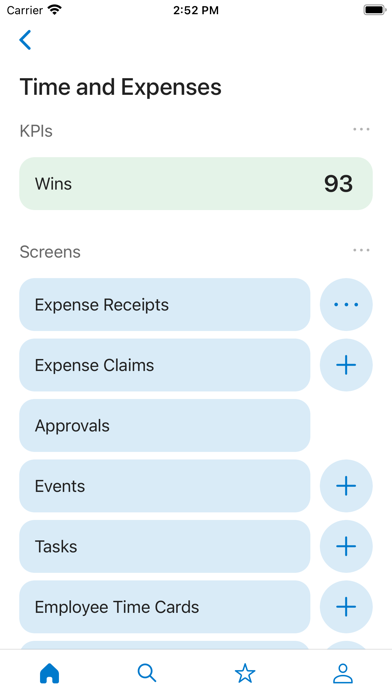


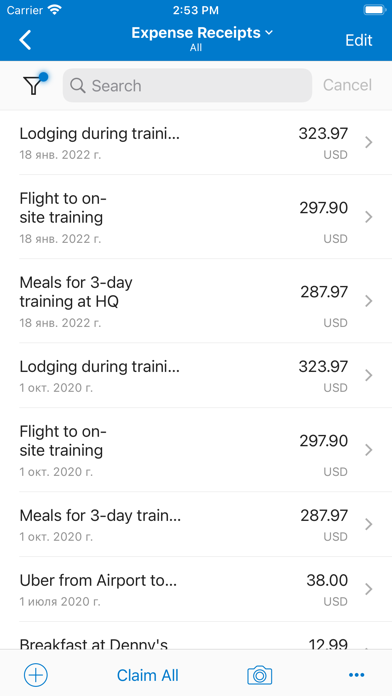


About Acumatica
The description on the store listing
An Acumatica license is required to use this app.
Acumatica Cloud ERP Software enables small and mid-sized businesses to access financials, inventory, sales, purchases, and more from any web browser on any device. This allows your entire workforce to get real-time data and manage business processes using iPhone or iPad.
Key Features:
• Expense receipts and claims: submit new expenses using the camera on your device to photograph receipts. View submitted expense claims to see if they have been approved.
• Reports and dashboards: view real-time reports and dashboards.
• Time cards: enter time sheets and follow up on tasks.
• Approvals: review and complete approvals in just a few clicks. …
Read the full description
An Acumatica license is required to use this app. Acumatica Cloud ERP Software enables small and mid-sized businesses to access financials, inventory, sales, purchases, and more from any web browser on any device. This allows your entire workforce to get real-time data and manage business processes using iPhone or iPad. Key Features: • Expense receipts and claims: submit new expenses using the camera on your device to photograph receipts. View submitted expense claims to see if they have been approved. • Reports and dashboards: view real-time reports and dashboards. • Time cards: enter time sheets and follow up on tasks. • Approvals: review and complete approvals in just a few clicks. Role Specific Features: • Support: create and work on cases including adding pictures with your camera and taking notes using voice to text. • Sales: manage contacts, your opportunity pipeline, create sales orders, and check order status. • Purchasing: manage purchase orders and receipts • Field services: perform daily appointment work including driving directions, taking notes using voice to text, entering inventory, lookup past appointments, recording time, taking pictures from the job site, and more. Extensible: • Developers, partners, and ISVs can create new applets without programming skills so users can access any data or Acumatica screen function. Cost: The Acumatica mobile app is available at no extra cost for Acumatica customers. Download the app, login, and begin accessing features.
Installs, last 30 days
Apple does not publish download counts. Estimates are in testing.
Estimated store revenue Estimated Beta
App Store, worldwide, monthly rate from the last 12 chart days to 19 Nov 2026
Below the top 100 grossing apps in the markets we calibrate. In the United States that usually means under about $6.4M a month. App Store purchases and subscriptions only, before Apple's 15 to 30% fee. Ads and web payments are not included.
Ratings
1,819 ratings, 1,819 reviews
- 5 ★64%
- 4 ★7.9%
- 3 ★5.3%
- 2 ★2.8%
- 1 ★20%
Recent reviews
Latest public reviews from the store
- 14 Jul 2021
Very slow and clunky
I use this app at the beginning and end of jobs. It locks up frequently and I have to power cycle my phone to get the app to respond. It asks me to sign in using my password even though I have signed in earlier in the day. It is very slow to register information and the status timer will just continue to spin and spin until finally the data will be accepted, or I receive a timeout or protocol error. I like the app, but it is frustrating to use on busy days when customers are waiting and I cannot get the app to respond. This occurs even in places where cell service is good, so I cannot blame it on the cellular service provider, it’s the app itself.
- 11 Nov 2020
Amazing Companion to Acumatica ERP
The mobile app not only has extensive functionality built in, but has limitless customization through the Acumatica ERP framework. The WMS system is very fast and responsive. The sign on integrates flawlessly with Azure AD multi factor authentication and also enables builtin accounts to use multi factor authentication. You can easily upload a document from the mobile app. Push notifications can be done on almost any business event to go to a users phone. The Acumatica mobile app is a must for all customers of Acumatica.
- 26 Oct 2020
Brings signatures, easy photo attachments, and barcode scanning to custom screens
Easily extends Acumatica ERP customizations to the mobile app. Capture signatures, such as customer drop-off for repairs and deliveries. Quickly and easily attach photos to stock items, PO receipts, and more. Add barcode scanning to custom solutions extended from Acumatica ERP to improve accuracy and simplify tracking within your own custom solutions. Leverage Device Hub to print reports and labels to local printers from mobile devices.
- 22 Oct 2020
Field Sales User
I’ve been in B2B sales for 10+ years and used a variety of tools. This App is outstanding for managing my tasks and checking contact and account activity. From an org level it’s great that the rest of our team can access the different modules of our ops software. 10/10! Takes a moment to load the first time I load it after a weekend or a few days of not using it. Universal search great!
What reviewers bring up
Topics mentioned in the latest 8 reviews, by how many reviews mention them
Liked in good reviews (5 reviews)
- acumatica 3
- easily 3
- scanning 2
- receipts 2
- checking 2
- getting 2
- mobile 2
- upload 2
Raised in bad reviews (2 reviews)
No topic comes up twice.
Top chart positions
Latest App Store chart ranks by country, last 10 days
Not in any tracked top chart in the last 10 days.
Acumatica history
Release, install milestones, listing and store changes
- First released on the store 4 Feb 2015
Update frequency
How often Acumatica ships a new version, month by month
6 updates in the last 12 months. More often than most similar apps: they shipped a median of 2 updates in the same year.
Recent versions
Current version 26.075.0
- Version 26.075.05 Nov 2026
- When the GPS tracking service was running in the background, users could experience intermittent failures when uploading photos or signatures. - When a user tried to take and attach a photo using an iOS device, the app could unexpectedly close and sign the user out. - The sign-in process could fail if a user tried to sign in to a tenant whose name contained Chinese characters. - Handling of expired user sessions in various scenarios has been improved.
- Version 26.074.020 Aug 2026
- The functionality that improves main menu loading speed has been restored. The main menu now loads faster for all users. - The image border detection functionality has been re-enabled. - Screen titles have been corrected on some screens. - The Save button is now displayed correctly in portrait orientation when the device uses extremely enlarged display settings. - Users can now copy values from disabled fields in the Acumatica mobile app.
- Version 26.073.14 Jun 2026
- Currently running timers for project tasks can now be viewed as Live Activities on the lock screen and in the notification area. - Duration values are now displayed differently from time values to improve clarity. - The app no longer crashes when third-party screen mirroring applications are used. - The main menu now loads faster for all users. - Automatic detection of document borders after taking a picture has been temporarily disabled to prevent the app from crashing on certain iPhone models.
- Version 26.073.02 Jun 2026
- Currently running timers for project tasks can now be viewed as Live Activities on the lock screen and in the notification area. - Duration values are now displayed differently from time values to improve clarity. - The app no longer crashes when third-party screen mirroring applications are used. - The main menu now loads faster for all users. - Automatic detection of document borders after taking a picture has been temporarily disabled to prevent the app from crashing on certain iPhone models.
Listing keywords
Words and phrases Acumatica repeats most in its store listing
Top phrases: notes using voice (2), reports and dashboards (2), voice to text (2), taking notes (2).
Highlighted words also appear in the title. Counts cover the title, short description and description.
Compliance
What the listing and the app package show
- Store status
- Live
- Upkeep
- Updated 5 Nov 2026
- Age rating
- 4+
Apps like Acumatica
 Scanner App: Scan DocumentsUNITEMAN TECHNOLOGY (HK) LIMITED★ 4.59
 Yelp Guest ManagerYelp★ 4.56
 Document Scanner App- PDF ScanHareshbhai Issamaliya★ 4.21
 Resume Star 2: Pro CV DesignerQrayon, LLC★ 4.77
 MAPP by DECSCredence Consultancy Services★ 4.58
 Qualtrics XMQualtrics, LLC★ 4.71
 BatelcoBEYON B.S.C★ 4.26
 Fax It: Faxing AppElena Ustinova★ 4.72
 Voxer Walkie Talkie MessengerVoxer LLC★ 2.98
Acumatica: questions and answers
Who makes Acumatica?
Acumatica is published by Acumatica Inc..
When was Acumatica last updated?
The latest version (26.075.0) was released on 5 Nov 2026.
Is Acumatica free?
Yes. Acumatica is free to download.
Is Acumatica still available?
Yes. Acumatica is live on App Store as of 19 Nov 2026.
Track Acumatica and its competitors
Watch any app for new versions, rating drops, chart moves and removals. Free plan, no card.