
- Installs
- —
- Apple does not publish download counts
- Rating
- 3.55
- Ratings
- 11
- 11 reviews
- Version
- 2.0.2
- Updated 29 Mar 2018
- Released
- 13 Jul 2016
- Tracked since 10 May 2026
- Size
- 59 MB
- Needs 9.0
Screenshots


About Annot8: Annotation & Markup
The description on the store listing
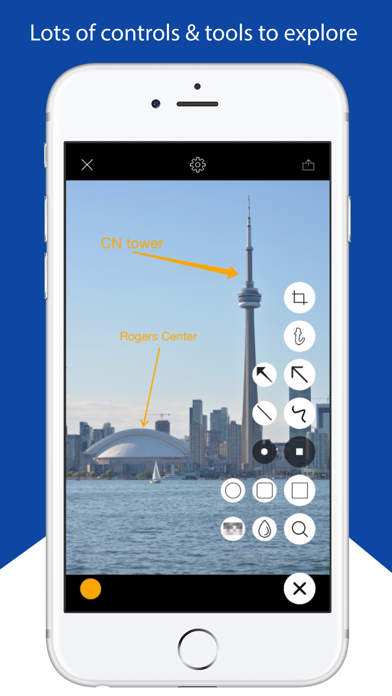
Annot8 is the perfect app for those who want to annotate pictures on-the-go. It is an easy-to-use app to add catchy and customizable annotations to your pictures. Just select your picture, your annotation style and you are good to go.
An app that is a must-have for students, teachers and business people alike; it has brilliant features that can be used by everyone, anywhere.
Key features:
• Extremely user friendly for all annotation and mark-up needs
• Simple graphic user interface that has all the options just a tap away
• Various forms of annotations such as highlighting, magnification, shapes, text, etc.
• Draw on photos or add handwritten annotations
• Add images right from the app …
Read the full description
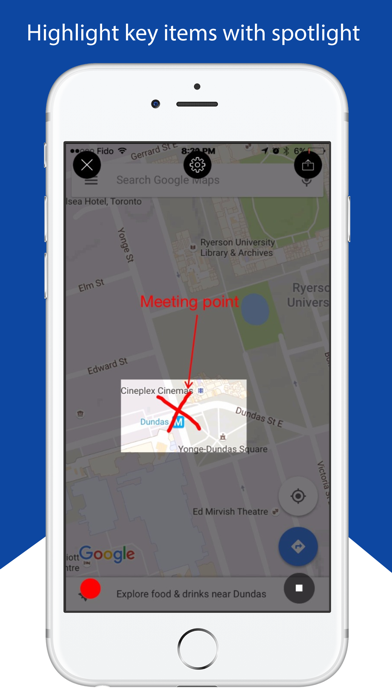
Annot8 is the perfect app for those who want to annotate pictures on-the-go. It is an easy-to-use app to add catchy and customizable annotations to your pictures. Just select your picture, your annotation style and you are good to go. An app that is a must-have for students, teachers and business people alike; it has brilliant features that can be used by everyone, anywhere. Key features: • Extremely user friendly for all annotation and mark-up needs • Simple graphic user interface that has all the options just a tap away • Various forms of annotations such as highlighting, magnification, shapes, text, etc. • Draw on photos or add handwritten annotations • Add images right from the app using your camera or add them from your image gallery • Share annotated images right from the app on multiple platforms such as Facebook, Twitter, Whatsapp, iMessage, Facebook Messenger, and more, with one touch • Extensive photo editing options such cropping, rotating, magnifying etc. Adding annotations is easy - just select a picture from your gallery or take a picture right from the app using your camera and touch add. Next select the type of annotation you want – shapes (such as arrows), spotlight for emphasis, free text, and more, and just drag it where you want to add the annotation. The shapes and text are customizable and you can change the thickness as well as color of both. Using the spotlight and blur features you can focus on a particular area of your picture while blurring out everything else. You can also edit the photos on-the-go and only focus on the parts of the picture you want. Crop, rotate, and straighten your pics right in the app. Share your designs with a touch and post it on various social networks with ease. Easy-to-use and extremely versatile, Annot8 is awesome. The app is suitable for all age groups and is best suited for students, teachers, business professionals, field technicians, and even meme makers. For all the features that it has, the app is quite lightweight and works well with iPad as well as iPhone. If you have enjoyed any feature of the Annot8 app, don’t forget to rate it in the App Store and share Annot8 with your friends.
Installs
Apple does not publish download counts. Estimates are in testing.
We publish iOS estimates only after they pass a back-test against real numbers. Chart history below is measured.
Estimated store revenue Estimated Beta
App Store, worldwide, monthly rate from the last 14 chart days to 21 Nov 2026
Below the top 100 grossing apps in the markets we calibrate. In the United States that usually means under about $6.4M a month. App Store purchases and subscriptions only, before Apple's 15 to 30% fee. Ads and web payments are not included.
Ratings
11 ratings, 11 reviews
No rating breakdown published for this app.
Recent reviews
Latest public reviews from the store
- 13 Jan 2024
Love this
Beyond awesome!
- 24 Jul 2022
Great in a pinch.
Seems to have limitations in the dimensioning department. Either wildly too large or infinitesimally small. Also seems to default to portrait, no option to change when printing. One must save as a JPG or PDF. Otherwise, with some patience, for the price, this app is the best thing going from getting one’s thoughts on paper.
- 24 Mar 2022
Please add brush stroke function to photo library version
I love being able to adjust brush stroke with for arrows. I’m not able to do this when marking photo library photos. Please add this function. I have premium, so even if it’s a premium effect, please do so anyway
- 16 Sep 2019
Almost there
2019-09-15 This is close, so close, but not there. You can’t seem to edit things afterwRds like the text in the cloud which doesn’t fit very well anyway. The blur tool should let you set how strong you want the blur. Text should let you choose size and font. This looks like the first draft of Annotatable by Ling Wang I would get Ling Wangs if it were cheaper. By the way, the pronunciation of Wang is Wong. When you see what the system is based on, it kind of makes sense, but someone screwed the pooch way back then. My wife’s name is Li Fang and it is pronounced Lee Fong. They think ang is like ahng (ahhh)(ng) so they put a “W” in front and think everyone will see Wahng. They didn’t know about the H at that point. When I was in Taiwan, they said I need to go to this address “young Ho” and had no idea why I was rolling on the ground laughing especially when this was supposed to be a school for young girls. The actual pronunciation for it was y-oh-ng Hæ (huh) instead of how it was written - young Ho. Anyway.
What reviewers bring up
Topics mentioned in the latest 41 reviews, by how many reviews mention them
Liked in good reviews (38 reviews)
- photo 12
- annot 7
- useful 6
- pictures 4
- editing 4
- editor 4
- tool 4
- add 4
Raised in bad reviews (2 reviews)
No topic comes up twice.
Top chart positions
Latest App Store chart ranks by country, last 10 days
Not in any tracked top chart in the last 10 days.
Annot8: Annotation & Markup history
Release, install milestones, listing and store changes
- First released on the store 13 Jul 2016
Recent versions
Current version 2.0.2
- Version 2.0.229 Mar 2018
This update from Apple will improve the functionality of this app. No new features are included. Bug fixes
Listing keywords
Words and phrases Annot8: Annotation & Markup repeats most in its store listing
Top phrases: students teachers (2).
Highlighted words also appear in the title. Counts cover the title, short description and description.
Compliance
What the listing and the app package show
- Store status
- Live
- Upkeep
- No update since 29 Mar 2018
- Age rating
- 4+
Apps like Annot8: Annotation & Markup
 Video CollageaZeR DiLLs★ 4.08
 Vee for VideoMedious★ 2.98
 Beauty Camera -Selfie, StickerBhuvan Gupta★ 4.5
 FinalCamXShenzhen Xiaozhen Technology Co.,Ltd.★ 4.44
 Magic Studio - AI Photo EditorMagicStudio.com★ 4.62
 Foto Impresiones: 1 Hr PhotoSoftwareX★ 4.98
 SnapGeo - AI Location FinderRECEP ASLAN★ 4.24
 Family Photo Maker - AIRick-y Media★ 4.12
 BeautifAI: AI Try OnJAI UYGULAMA VE YAPAY ZEKA TEKNOLOJILERI ANONIM SIRKETI★ 4.36
Annot8: Annotation & Markup: questions and answers
Who makes Annot8: Annotation & Markup?
Annot8: Annotation & Markup is published by AdelphaTech Inc..
When was Annot8: Annotation & Markup last updated?
The latest version (2.0.2) was released on 29 Mar 2018.
Is Annot8: Annotation & Markup free?
Yes. Annot8: Annotation & Markup is free to download.
Is Annot8: Annotation & Markup still available?
Yes. Annot8: Annotation & Markup is live on App Store as of 1 Jul 2026.
Track Annot8: Annotation & Markup and its competitors
Watch any app for new versions, rating drops, chart moves and removals. Free plan, no card.