
- Installs
- —
- Apple does not publish download counts
- Rating
- 4.58
- Ratings
- 26.2K
- 26.2K reviews
- Version
- 4.0
- Updated 31 Jul 2024
- Released
- 21 Feb 2014
- Tracked since 10 May 2026
- Size
- 40 MB
- Needs 12.0
Screenshots


About AnyFont
The description on the store listing
*** COMPATIBLE WITH WORD, EXCEL AND POWERPOINT FOR IOS ***
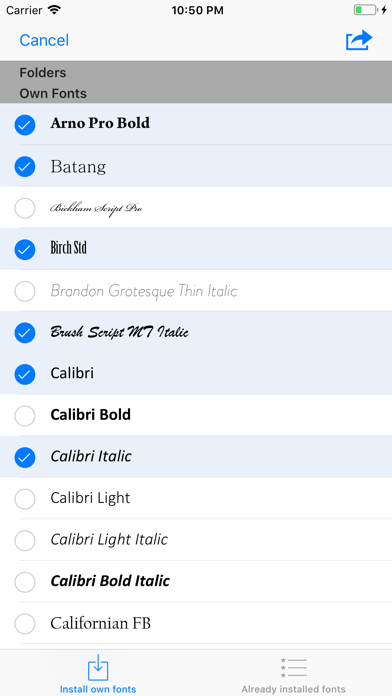
With AnyFont it is finally possible to install any additional font in TrueTypeFont- (.ttf), OpenTypeFont- (.otf) or TrueType Collection- (.ttc) format on your iPhone or iPad. These fonts can then be used throughout the system in other apps like Word, PowerPoint, Pages, Keynote and many more.
No more unexpectedly replaced fonts in presentations because the iPhone or iPad does not know them. The perfect solution for everybody who creates presentations on a Mac or PC to show them on their iPad.
Extremely easy to use. An extensive FAQ and an introductory tutorial help you to understand the app.
Check out this video tutorial: …
Read the full description
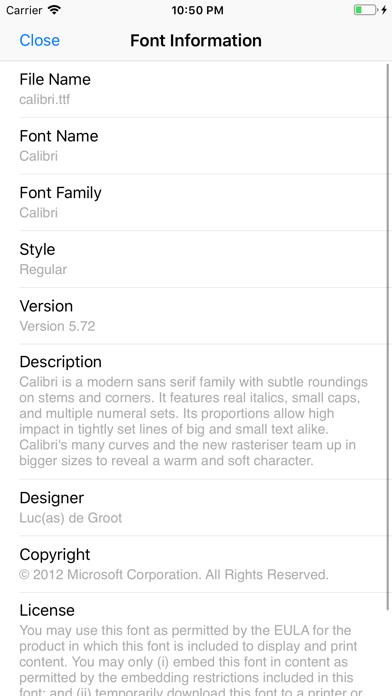
*** COMPATIBLE WITH WORD, EXCEL AND POWERPOINT FOR IOS *** With AnyFont it is finally possible to install any additional font in TrueTypeFont- (.ttf), OpenTypeFont- (.otf) or TrueType Collection- (.ttc) format on your iPhone or iPad. These fonts can then be used throughout the system in other apps like Word, PowerPoint, Pages, Keynote and many more. No more unexpectedly replaced fonts in presentations because the iPhone or iPad does not know them. The perfect solution for everybody who creates presentations on a Mac or PC to show them on their iPad. Extremely easy to use. An extensive FAQ and an introductory tutorial help you to understand the app. Check out this video tutorial: https://www.youtube.com/@AnyFont-iOS Features: - Add new fonts as .ttf, .ttc or .otf file using iTunes file sharing or the „Open in…“ dialog from other apps like Mail or Dropbox - Add single fonts or multiple fonts as a ZIP- or TTC-file - Install single fonts or multiple fonts at once - Preview your fonts in AnyFont’s storage - Access FontBundles.net from within AnyFont - Optional bundle of 1,000+ fonts (In-App Purchase) - Complete list of all installed fonts on the device - Support for Dark Mode (requires iOS 13) Working with: - Word, Excel and PowerPoint - Numbers, Keynote and Pages - Cricut Design Space - Office Suite Pro - Office²HD - and many other apps! AnyFont website: https://www.anyfont.app Tutorial Video: https://www.youtube.com/@AnyFont-iOS NOTE: It is not possible to change the system-font on your device with AnyFont. With AnyFont you can install additional fonts on your device which can then be used by other apps which make use of the device's font book. NOTE II: Some fonts using Cyrillic or Asian characters may not be supported by this way of installing fonts due to their size. The maximum size of a configuration profile for a font is 20 MB. NOTE III: You don't have to purchase the optional font bundle to use AnyFont. You can always add your own fonts to install them on your device.
Installs, last 30 days
Apple does not publish download counts. Estimates are in testing.
Estimated store revenue Estimated Beta
App Store, worldwide, monthly rate from the last 12 chart days to 19 Nov 2026
Below the top 100 grossing apps in the markets we calibrate. In the United States that usually means under about $6.4M a month. App Store purchases and subscriptions only, before Apple's 15 to 30% fee. Ads and web payments are not included.
Ratings
26,194 ratings, 26,194 reviews
No rating breakdown published for this app.
Recent reviews
Latest public reviews from the store
- 13 Apr 2026
Amazingness at a fair price!!!
No other words to say just amazing AND CHEAP!! No expensive subscription plan required which is something I was REALLY looking for! Just bought it today and works like a charm! I was afraid it would not work but it is so easy to set up and install new fonts (that thing some are commenting of being some security breach and risky must be a huge scam u.u) downloaded from websites in .tff format. It is working perfectly as announced and now I can customize my Power Point slides the way I want (no more ugly default system fonts lol). Don’t be afraid, just buy it and be happy with your custom designs! And I was in a hurry because I have to deliver a presentation by next Friday sooo I was kind in a hurry to find something EASY! :) (By the way, this is NOT A FAKE REVIEW!). I see that the supporting team is real also, they always reply to reviews and give their contact info. Good to know in case we buyers need some extra help! HUGE THANKS, Rebeca :)
- 3 Feb 2024
Love your app but custom fonts no longer work with Ipad-help!
I cannot figure out how to contact MIcrosoft. All the numbers direct you to websites of communities where questions and boards have posted. No one is stating exactly my issue. And I cannot speak to any live human on the phone numbers given. I’ve used AnyFont for years and it works terrific. All of my custom fonts show in Word and are usable/typable. I see the font in my document correct. The moment I try to export/print/send by email or anything it changes the font to Calibri. This happened a while ago maybe a year and a half ago and I gave up. No one cares about this. I have all these gorgeous fonts which I cannot use. I use all of this on my IPad Pro with no problems until that update. I suspect MS needs to make a small change to allow the custom fonts to pass through their software. BTW I can use them on Pages, but feel their product is inferior. Do you have any idea how I can get someone’s attention? I do not think it’s an Apple issue-your issue, but a MS issue. All the fonts work correctly on all other apps except Microsoft apps. Please advise or help if possible. Thank you.
- 19 Nov 2021
Massive workaround with many steps
I had originally given AnyFont 5 stars because it used to be impossible to get fonts on iOS. This is not the case any longer, and the current installation method is incredibly cumbersome and slow (getting a family of fonts with extra light, light, regular, medium, bold, black and thin plus italicized versions of each is a 4 step process for 14 fonts that goes between the app and the settings app, for example). iOS now has a specific place for FONTS within settings that does not require creating profiles for each font version (this is also incredibly dangerous, as profiles are system level mods you enable). I would be willing to pay (in app purchase extra for AnyFont) for the ability to install and organize my fonts within the proper environment on iPadOS.
- 12 Nov 2019
I need help please
I have questions and need help. I was told by Apple support I needed to contact Anyfont’s developer. Ive tried everything I could to find a email or a phone number, but i cant. I went to the developers website and went to contact. When I do this a error page pops up and says the requested page cant be found. I don't know where i can send my contact info or anything. I have been using AnyFont for years. I signed up for IOS 13 Beta and was able to go online to Dafont and find free fonts. I was then able to use AnyFont to take the free fonts and download them onto my iPhone and IPad. I was able to use all the fonts in my mail app. It was really easy and worked very well at least it worked very well until IOS 13 came out. Now out of all the fonts I have downloaded over the months only 1 works. I have erased and re-downloaded the fonts and I have also reset my phone and IPad to factory settings a couple of times. I just spoke to Apple support and they where unable to help, even though the mail app I use is Apples and they suggested I contact Anyfont’s developer. Here I am sad 🥺because all I want is to be able to use fun fonts but the only one I can use replaces the O’s w
What reviewers bring up
Topics mentioned in the latest 8 reviews, by how many reviews mention them
Liked in good reviews (4 reviews)
- fonts 4
- contact 3
- downloaded 2
- questions 2
- websites 2
- settings 2
- anyfont 2
- through 2
Raised in bad reviews (3 reviews)
- font 3
- say 3
- variations 2
- microsoft 2
- however 2
- single 2
- figure 2
- search 2
Top chart positions
Latest App Store chart ranks by country, last 10 days
- Countries ranked
- 42 of 50
- Best rank
- #6
- Top 10 placements
- 1
- of 44 chart placements
- Average rank
- #62.9
Best countries on App Store
- 🇸🇦 Saudi Arabia · Top paid, Utilities#6
- 🇮🇱 Israel · Top paid, Utilities#13
- 🇰🇷 South Korea · Top paid, Utilities#17
- 🇵🇪 Peru · Top paid, Utilities#24
- 🇹🇭 Thailand · Top paid, Utilities#26
- 🇯🇵 Japan · Top paid, Utilities#31
| Country | Chart | Category | Rank | Best (10 days) | Date |
|---|---|---|---|---|---|
| 🇸🇦 Saudi Arabia | Top paid | Utilities | #6 | #6 | 19 Nov 2026 |
| 🇮🇱 Israel | Top paid | Utilities | #13 | #13 | 19 Nov 2026 |
| 🇰🇷 South Korea | Top paid | Utilities | #17 | #17 | 19 Nov 2026 |
| 🇵🇪 Peru | Top paid | Utilities | #24 | #23 | 19 Nov 2026 |
| 🇹🇭 Thailand | Top paid | Utilities | #26 | #8 | 19 Nov 2026 |
| 🇯🇵 Japan | Top paid | Utilities | #31 | #10 | 19 Nov 2026 |
| 🇳🇬 Nigeria | Top paid | Utilities | #32 | #24 | 19 Nov 2026 |
| 🇨🇴 Colombia | Top paid | Utilities | #43 | #40 | 19 Nov 2026 |
| 🇮🇩 Indonesia | Top paid | Utilities | #45 | #43 | 19 Nov 2026 |
| 🇪🇬 Egypt | Top paid | Utilities | #46 | #5 | 19 Nov 2026 |
AnyFont history
Release, install milestones, listing and store changes
- First released on the store 21 Feb 2014
Update frequency
How often AnyFont ships a new version, month by month
0 updates in the last 12 months. Less often than most similar apps: they shipped a median of 5 updates in the same year.
Recent versions
Current version 4.0
- Version 3.3.431 Jul 2024
Hello everyone! This update brings you: - small bug fixes If you like AnyFont, please leave a positive rating or review in the App Store. Have a good time!
Listing keywords
Words and phrases AnyFont repeats most in its store listing
Top phrases: excel and powerpoint (2), fonts or multiple (2), iphone or ipad (2), multiple fonts (2), single fonts (2).
Highlighted words also appear in the title. Counts cover the title, short description and description.
Compliance
What the listing and the app package show
- Store status
- Live
- Upkeep
- No update since 31 Jul 2024
- Age rating
- 4+
Apps like AnyFont
 Ubox洪波 王★ 4.77
 Alliant EnergyAlliant Energy★ 4.67
 Vi: Recharge, Payments & GamesVodafone Idea Limited★ 4.54
 v2RayTunDATABRIDGES TECHNOLOGIES LTD★ 4.62
 QR Pro - Easy QR Code ScannerCrypto Inc.★ 4.5
 Adult Emoji Animated Emojis建钧 黎★ 4.32
 Sticky Widgets1881 Digital, LLC★ 4.57
 Unimote : smart TV remoteyohan teixeira★ 4.12
 FoxFM - Offline Video PlayerErdem Erciyas★ 4.4
AnyFont: questions and answers
Who makes AnyFont?
AnyFont is published by Evo Tec Labs @ Pepperbit Online.
When was AnyFont last updated?
The latest version (4.0) was released on 31 Jul 2024.
Is AnyFont free?
No. AnyFont is a paid app priced at $1.99.
Is AnyFont still available?
Yes. AnyFont is live on App Store as of 19 Nov 2026.
Track AnyFont and its competitors
Watch any app for new versions, rating drops, chart moves and removals. Free plan, no card.