
- Installs
- —
- Apple does not publish download counts
- Rating
- 4.63
- Ratings
- 633
- 633 reviews
- Version
- 1.6.13
- Updated 18 Sep 2022
- Released
- 24 Jan 2018
- Tracked since 11 May 2026
- Size
- 15 MB
- Needs 13.0
Screenshots
About Juno Connect: Jupyter Client
The description on the store listing
Juno Connect is a client app for Jupyter, a cloud-based computational environment. Juno Connect lets you leverage the computing power of a remote Jupyter server right from your iPhone or iPad.
With Juno Connect you can:
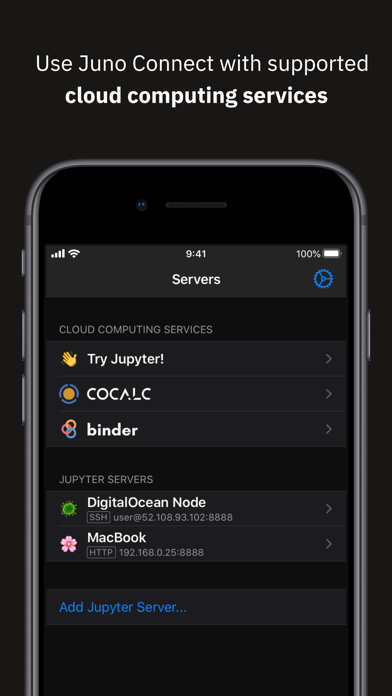
• Connect to cloud-computing services, such as CoCalc, Binder, SageMaker, Gradient or NAAS
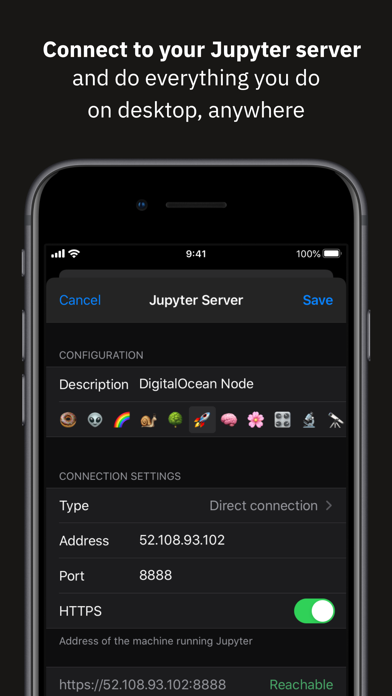
• Add and configure your own remote Jupyter servers
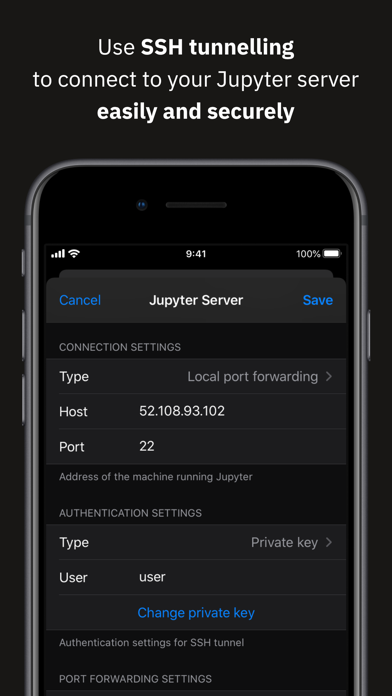
• Leverage SSH tunneling with local port forwarding for secure connections
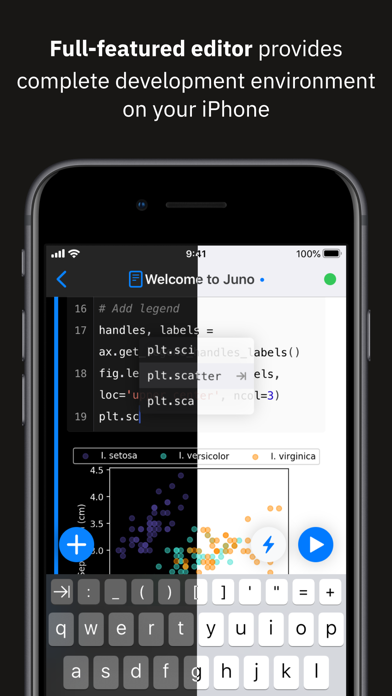
• Take full advantage of your keyboard and trackpad in our full-featured code editor
• Utilise full multitasking capabilities on iPad
When you run code in Juno Connect, the actual computing is happening on a remote Jupyter server, giving you access to …
Read the full description
Juno Connect is a client app for Jupyter, a cloud-based computational environment. Juno Connect lets you leverage the computing power of a remote Jupyter server right from your iPhone or iPad. With Juno Connect you can: • Connect to cloud-computing services, such as CoCalc, Binder, SageMaker, Gradient or NAAS • Add and configure your own remote Jupyter servers • Leverage SSH tunneling with local port forwarding for secure connections • Take full advantage of your keyboard and trackpad in our full-featured code editor • Utilise full multitasking capabilities on iPad When you run code in Juno Connect, the actual computing is happening on a remote Jupyter server, giving you access to virtually unlimited computational resources from your iPhone or iPad. You can either connect to your own Jupyter server — directly via HTTP/HTTPS, or by establishing an SSH tunnel with local port forwarding — or use cloud computing services, such as CoCalc, Binder, SageMaker, Gradient or NAAS. And if you would rather execute code on device instead, check out our other app Juno, it lets you work with Jupyter notebooks autonomously on your iPhone or iPad. Juno Connect offers a full-featured notebook and code editor, providing a complete development environment on your iPad or iPhone. it supports Dark Mode and Dynamic Type, offers extended on-screen keyboard and works beautifully with all hardware keyboards and trackpads. Juno Connect lets you reach your Jupyter server easily and securely with SSH tunnel using local port forwarding. You can launch Juno Connect in Split-screen mode alongside other apps on iPad — run notebooks with documentation, terminal, or other code editor in front of you. WHAT IS JUPYTER? Jupyter is an interactive cloud-based computational environment, where you can combine code execution, rich text, mathematics, plots and rich media. It works with Jupyter notebooks, a computational document format that allows storing live code, markdown text, plots, images and equations in LaTeX — all wrapped into a single notebook file. Notebook documents keep record of all inputs and outputs of the interactive programming session, and the rich output generated by running R, Python or Julia scripts (including HTML, images, video, and plots) is embedded into the Jupyter notebook document. They are especially convenient if you are coding in Python for data analysis, machine learning, or computational science in general. A notebook consists of a sequence of cells, each representing either a narrative text in a form of markdown text or HTML, or a coding script with a text or media output. This makes notebooks both human-readable documents with the analysis description and the results (figures, tables, etc), as well as executable scripts for data analysis or plain programming. You can use Jupyter notebook as a document with optional executable code in it, or simply as a programming playground for data manipulation and experiments. Jupyter supports countless programming languages, including Python, R, Julia, and Scala. Jupyter lets you leverage big data tools, such as Apache Spark, from Python, R, and Scala — or explore that same data with pandas, scikit-learn, ggplot2, PyTorch and TensorFlow. And, of course, Juno Connect lets you use whichever language kernels and libraries are installed on your Jupyter server right on your iPhone or iPad.
Installs since 29 Aug 2026
Apple does not publish download counts. Estimates are in testing.
Estimated store revenue Estimated Beta
App Store, worldwide, monthly rate from the last 12 chart days to 19 Nov 2026
Below the top 100 grossing apps in the markets we calibrate. In the United States that usually means under about $6.4M a month. App Store purchases and subscriptions only, before Apple's 15 to 30% fee. Ads and web payments are not included.
Ratings
633 ratings, 633 reviews
No rating breakdown published for this app.
Recent reviews
Latest public reviews from the store
- 9 Apr 2026
love it
So useful
- 12 Mar 2026
I like it
Now getting the hang of it
- 31 Oct 2025
Overall great app but some minor bugs (ipad 9th gen)
So far interface has been great and really looking forward to text size change integrated into the app so I can fit more text on my screen. I have faced some bugs in the app related to restart and run all command. Clicking this breaks the connection causing an infinite loop and disconnect and reconnect with no cells being run. Another bug has been highlighted code when in cell. I face issues with highlighting multiple lines which is kinda annoying since this seems like something really basic feature. Also faced a small issue with creating a jupyter notebook file on the server (button does not seem to work). While this might make the app seem terrible, just know even with these issues, this app has a made it a joy to take my ipad with me on the go to my classes and being able to edit, run, and create new models!!!
- 8 Sep 2025
Elevates Jupyter and the iPad to their best selves
This is one of my favorite apps on my iPad. It takes Jupyter notebooks from being rather awkward on the iPad, to being a real joy to use. And it turns the iPad into a convenient tablet device for analysis which no other device can exactly replace. In other words, it combines these two products in a way that creates a unique and new version of each one, and it's great! My only complaint about it, really, is my fear that it will go away, because it is not popular enough to support sustained development. I hope it sticks around. My main feature suggestion is that it might be cool to lean into the iPad's capabilities, and add an integrated drawing control to the app, for inserting quick hand-drawn sketches into a notebook. This could also be a way to add equations for OCR in the notebook.
What reviewers bring up
Topics mentioned in the latest 50 reviews, by how many reviews mention them
Liked in good reviews (38 reviews)
- jupyter 15
- juno 14
- notebooks 13
- ipad 13
- server 8
- support 6
- connect 6
- useful 6
Raised in bad reviews (7 reviews)
- option 2
- local 2
Top chart positions
Latest App Store chart ranks by country, last 10 days
- Countries ranked
- 47 of 50
- Best rank
- #10
- Top 10 placements
- 2
- of 79 chart placements
- Average rank
- #54.5
Best countries on App Store
- 🇮🇳 India · Top paid, Developer Tools#10
- 🇰🇷 South Korea · Top paid, Developer Tools#10
- 🇹🇼 Taiwan · Top paid, Developer Tools#12
- 🇿🇦 South Africa · Top paid, Developer Tools#16
- 🇵🇭 Philippines · Top paid, Developer Tools#17
- 🇪🇬 Egypt · Top paid, Developer Tools#18
| Country | Chart | Category | Rank | Best (10 days) | Date |
|---|---|---|---|---|---|
| 🇮🇳 India | Top paid | Developer Tools | #10 | #5 | 19 Nov 2026 |
| 🇰🇷 South Korea | Top paid | Developer Tools | #10 | #5 | 19 Nov 2026 |
| 🇹🇼 Taiwan | Top paid | Developer Tools | #12 | #11 | 19 Nov 2026 |
| 🇿🇦 South Africa | Top paid | Developer Tools | #16 | #16 | 19 Nov 2026 |
| 🇵🇭 Philippines | Top paid | Developer Tools | #17 | #17 | 19 Nov 2026 |
| 🇪🇬 Egypt | Top paid | Developer Tools | #18 | #17 | 19 Nov 2026 |
| 🇸🇬 Singapore | Top paid | Developer Tools | #19 | #7 | 19 Nov 2026 |
| 🇯🇵 Japan | Top paid | Developer Tools | #21 | #4 | 19 Nov 2026 |
| 🇭🇰 Hong Kong SAR China | Top paid | Developer Tools | #23 | #23 | 19 Nov 2026 |
| 🇳🇴 Norway | Top paid | Developer Tools | #23 | #20 | 19 Nov 2026 |
Juno Connect: Jupyter Client history
Release, install milestones, listing and store changes
- First released on the store 24 Jan 2018
Update frequency
How often Juno Connect: Jupyter Client ships a new version, month by month
0 updates in the last 12 months. Less often than most similar apps: they shipped a median of 1 updates in the same year.
Recent versions
Current version 1.6.13
- Version 1.6.1318 Sep 2022
This release fixes several issues related to keyboard and scrolling.
Listing keywords
Words and phrases Juno Connect: Jupyter Client repeats most in its store listing
Top phrases: juno connect (9), jupyter server (5), iphone or ipad (4), juno connect lets (3), local port forwarding (3).
Highlighted words also appear in the title. Counts cover the title, short description and description.
Compliance
What the listing and the app package show
- Store status
- Live
- Upkeep
- No update since 18 Sep 2022
- Age rating
- 17+
Apps like Juno Connect: Jupyter Client
 Moshi: SSH & MOSH TerminalFrontierOne Software★ 4.74
 Taro: Engineering CoursesTech Career Growth Inc.★ 4.87
 Appspree: App Promo ToolsActowise LLC★ 4.59
 Teste - API, Scripts, TerminalFJEDI★ 4.7
 a-ShellNicolas Holzschuch★ 4.57
 Plutus: Create, Play, WinUnicohub Private Limited★ 4.59
 Picai - PhotoKunming Dianhao Technology Co., Ltd.★ 4.65
 html+css+js-web designer,html5小文 黄★ 4.62
 LibTermDevelobile S.p.A.★ 4.45
Juno Connect: Jupyter Client: questions and answers
Who makes Juno Connect: Jupyter Client?
Juno Connect: Jupyter Client is published by Rational Matter.
When was Juno Connect: Jupyter Client last updated?
The latest version (1.6.13) was released on 18 Sep 2022.
Is Juno Connect: Jupyter Client free?
No. Juno Connect: Jupyter Client is a paid app priced at $4.99.
Is Juno Connect: Jupyter Client still available?
Yes. Juno Connect: Jupyter Client is live on App Store as of 14 Nov 2026.
Track Juno Connect: Jupyter Client and its competitors
Watch any app for new versions, rating drops, chart moves and removals. Free plan, no card.