
- Installs
- —
- Apple does not publish download counts
- Rating
- —
- Ratings
- —
- Version
- 1.1.5
- Updated 19 Oct 2026
- Released
- 28 Aug 2026
- Tracked since 10 Nov 2026
- Size
- 14 MB
- Needs 26.0
Screenshots


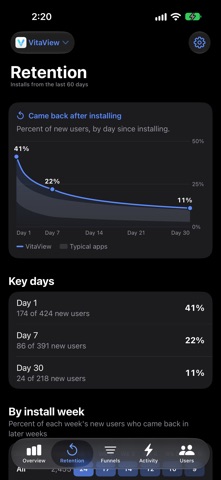
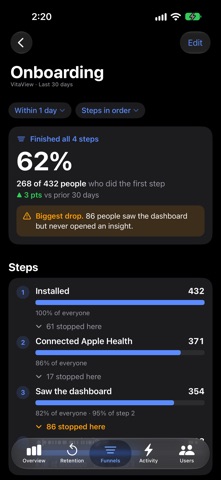
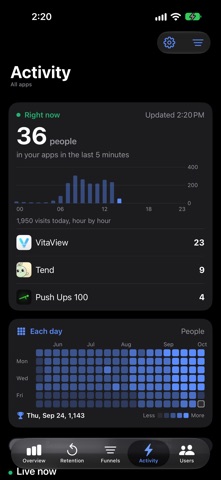
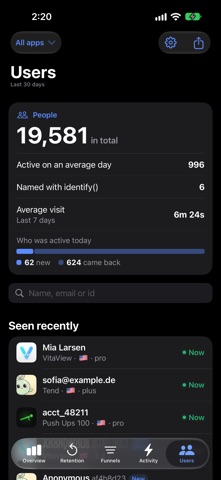
About AppGlance: App Analytics
The description on the store listing
Watch your apps live, from your pocket: installs, sessions and events as they happen, every user's story, and a push the moment someone installs or buys.
AppGlance is privacy-first analytics for the apps you build. Register an app, get a write key, add the SDK with two lines, and the dashboard starts filling the moment the first event lands. No IDFA, no fingerprinting, and nothing that forces a tracking pop-up on your users.
LIVE, NOT LAST WEEK
- Active now: how many people are on your apps at this moment
- Today's pulse, hour by hour, across every app
- Every day of the past year as a grid, so your busiest days stand out
- A live feed of visits: who opened which app, how long they …
Read the full description
Watch your apps live, from your pocket: installs, sessions and events as they happen, every user's story, and a push the moment someone installs or buys. AppGlance is privacy-first analytics for the apps you build. Register an app, get a write key, add the SDK with two lines, and the dashboard starts filling the moment the first event lands. No IDFA, no fingerprinting, and nothing that forces a tracking pop-up on your users. LIVE, NOT LAST WEEK - Active now: how many people are on your apps at this moment - Today's pulse, hour by hour, across every app - Every day of the past year as a grid, so your busiest days stand out - A live feed of visits: who opened which app, how long they stayed, what they did - New installs and purchases as they happen EVERY APP IN ONE PLACE - Up to 20 apps on one account - A per-app breakdown: new users, actives and events for today, 7 days or 30 days, compared with the window before - App Store, TestFlight and your own debug builds kept apart automatically WHO, NOT JUST HOW MANY - Every user as an anonymous install id, or a name if your app chooses to identify them - A full story per user: their sessions, events, device, version and country - Search, property filters and CSV export ANSWERS, NOT JUST CHARTS - Funnels built from your own events, in seconds - Day 1, 7 and 30 retention with the full curve - Countries, versions, session lengths, daily and hourly charts, window-over-window compare ALERTS ON YOUR PHONE - Push notifications for the signals you pick: a new install, a purchase, a trial start, or any event you name - Tap the alert and land on that user's story ANONYMOUS BY DESIGN - Random install ids, never advertising identifiers - Users get names only if your app explicitly provides one - Presence pings are never billed, and you can erase an app's data at any time FREE PLAN Free includes 100,000 events a month, up to 20 apps, every chart, feed, alert and export, and 90 days of event history. Charts and totals never expire. No card needed. Your account and plan are the same on the web at appglance.app. PAID PLANS (AUTO-RENEWABLE SUBSCRIPTIONS) A paid plan raises your monthly event quota and your event history, and adds live auto-refresh (on Free you refresh with a pull). Each plan is sold monthly or yearly: - Indie: 1,000,000 events a month, 6 months of history. $4.99 per month or $49 per year - Studio: 2,500,000 events a month, 12 months of history. $14.99 per month or $149 per year - Scale: 7,000,000 events a month, 12 months of history. $39 per month or $399 per year - Max: 18,000,000 events a month, 12 months of history. $99 per month or $999 per year Prices are in US dollars; the App Store shows the exact price in your own currency before you buy. Payment is charged to your Apple Account when you confirm the purchase. The subscription renews automatically at the same price unless you cancel at least 24 hours before the end of the current period, and your account is charged for the renewal within 24 hours before that period ends. You can manage or cancel the subscription at any time in your App Store account settings. A plan bought on the web covers the app too, so there is nothing to buy twice. Made by a one-person indie studio that wanted to keep an eye on its own apps from the sofa. Questions: [email protected] Terms of Use: https://appglance.app/terms Privacy Policy: https://appglance.app/privacy Apple's standard EULA also applies: https://www.apple.com/legal/internet-services/itunes/dev/stdeula/
Installs
Apple does not publish download counts. Estimates are in testing.
We publish iOS estimates only after they pass a back-test against real numbers. Chart history below is measured.
Estimated store revenue Estimated Beta
App Store, worldwide, monthly rate from the last 12 chart days to 19 Nov 2026
Below the top 100 grossing apps in the markets we calibrate. In the United States that usually means under about $6.4M a month. App Store purchases and subscriptions only, before Apple's 15 to 30% fee. Ads and web payments are not included.
Ratings
No rating breakdown published for this app.
Recent reviews
Latest public reviews from the store
No reviews in our sample for this app yet.
Top chart positions
Latest App Store chart ranks by country, last 10 days
Not in any tracked top chart in the last 10 days.
AppGlance: App Analytics history
Release, install milestones, listing and store changes
- First released on the store 28 Aug 2026
Update frequency
How often AppGlance: App Analytics ships a new version, month by month
1 updates in the last 12 months. More often than most similar apps: they shipped a median of 0 updates in the same year.
Recent versions
Current version 1.1.5
- Version 1.1.519 Oct 2026
The Setup screen's install steps now name AppGlance 1.3.0. It lets your app show its own install id on a support screen, so you can find the install someone writes in about, and it reports iPads as iPadOS. Searching Users now finds the user id you pass to identify from any part of it, in any case. An identify sent while your app runs in the background no longer counts that install as active for the day.
Listing keywords
Words and phrases AppGlance: App Analytics repeats most in its store listing
Top phrases: events month (5), events month months (4), history per month (4), months of history (4), month months (4).
Highlighted words also appear in the title. Counts cover the title, short description and description.
Compliance
What the listing and the app package show
- Store status
- Live
- Upkeep
- Updated 19 Oct 2026
- Age rating
- 4+
Apps like AppGlance: App Analytics
 iProxy - Sys admin toolsN-Lab★ 4.06
 WA Virtual Number - WANoMarkakod Reklam Tasarim ve Yazilim Hizmetleri Ticaret Limited★ 4.44
 C/C++ LLVM Clang小文 黄★ 4.32
 StoreView: App Screenshot ToolElshan Aliyev★ 4.53
 Yomo: Docker & Portainer春晖 杜★ 4.79
 Termux -TERMUX LIMITED LIABILITY COMPANY★ 4.4
 Debug Anywhere浩鑫 庄★ 4.62
 Easy SSHArgsment Limited★ 4.55
 SSL CheckerOrave Technologies★ 4.61
AppGlance: App Analytics: questions and answers
Who makes AppGlance: App Analytics?
AppGlance: App Analytics is published by Dylan Lualdi.
When was AppGlance: App Analytics last updated?
The latest version (1.1.5) was released on 19 Oct 2026.
Is AppGlance: App Analytics free?
Yes. AppGlance: App Analytics is free to download.
Is AppGlance: App Analytics still available?
Yes. AppGlance: App Analytics is live on App Store as of 10 Nov 2026.
Track AppGlance: App Analytics and its competitors
Watch any app for new versions, rating drops, chart moves and removals. Free plan, no card.