
- Installs
- —
- Apple does not publish download counts
- Rating
- 4.53
- Ratings
- 19
- 19 reviews
- Version
- 3.0.0
- Updated 7 Aug 2019
- Released
- 11 Feb 2018
- Tracked since 10 May 2026
- Size
- 10 MB
- Needs 8.0
Also on Google Play: ArduinoBlue
Screenshots

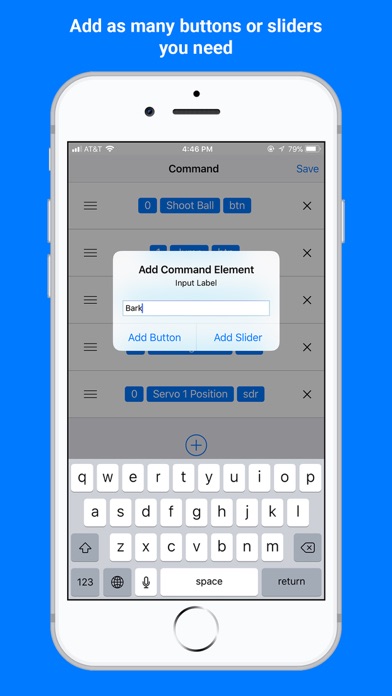

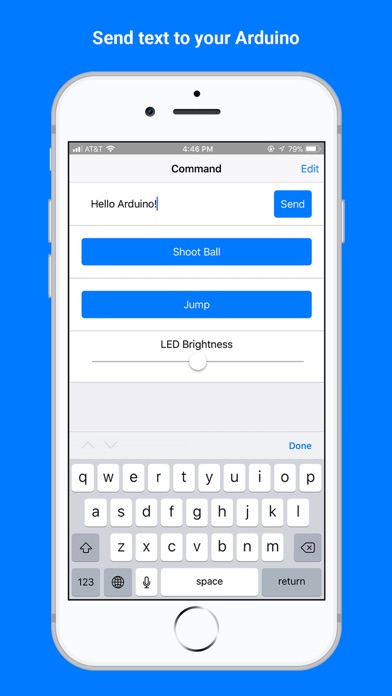
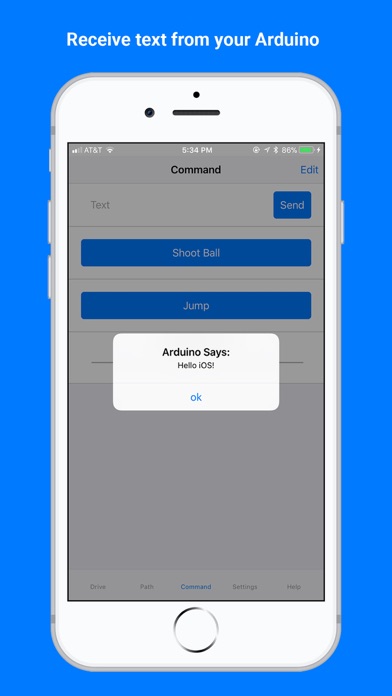
About ArduinoBlue
The description on the store listing
This app allows users to control an Arduino microcontroller connected devices over bluetooth. The app can be used to control your Arduino by sliders, buttons, and a joystick. Custom sliders and buttons can be used to interface with various components such as motors, servos, and sensors connected to the Arduino. This app is compatible with iOS devices with bluetooth low energy (BLE) modules, such as HM10 bluetooth module. Features: - Easy to use Arduino library to use with the app. - Custom sliders and buttons (add as many as you need) - Tilt control - Joystick - Send string text - Receive string text For help visit: https://sites.google.com/stonybrook.edu/arduinoble/documentation
Installs
Apple does not publish download counts. Estimates are in testing.
We publish iOS estimates only after they pass a back-test against real numbers. Chart history below is measured.
Estimated store revenue Estimated Beta
App Store, worldwide, monthly rate from the last 12 chart days to 19 Nov 2026
Below the top 100 grossing apps in the markets we calibrate. In the United States that usually means under about $6.4M a month. App Store purchases and subscriptions only, before Apple's 15 to 30% fee. Ads and web payments are not included.
Ratings
19 ratings, 19 reviews
No rating breakdown published for this app.
Recent reviews
Latest public reviews from the store
- 7 Nov 2021
Easy to implement
Works well, very easy to use. Wish-List though. 1: Would be nice if texts sent to phone would show when app is not actively visible. I.E. alarm alerts are not very useful if I have to be looking at the app itself to see them. (If even possible) 2: would be nice if I could rename buttons and sliders without having to recreate the entire list. 3: would be really cool if I could create a button that was a pull down/scroll list of variables to select from/send. I.E. select from a list colors for led strip. 4: auto reconnect BLE when back in range. (If even possible) If the above were true, it would be a great companion to many of my hardware products.
- 13 Sep 2021
So far the best On iOS
Tried a handful apps and end up concluding this one is so far the best control app on iOS for Arduino DIYers. The documentation and examples are great and informative for beginners.
- 6 Mar 2020
Amazing App
I was having trouble with my Arduino and HM-10 until I found this app. Works great, and joystick and pathfinder are nice features
- 5 Oct 2019
Works well and full of features
Using hm-10 module with esp-12e. Real time results. Wonderful sliders, button design, and the tilt and joystick are awesome features. Plus the follow line has potential to give pwm output. Otherwise, works great and love the features. Awesome developer. Recommend for the supported Bluetooth modules. My first review on App Store over 5 years. 10/10
What reviewers bring up
Topics mentioned in the latest 5 reviews, by how many reviews mention them
Liked in good reviews (5 reviews)
- arduino 3
- wonderful 2
- recommend 2
- bluetooth 2
- joystick 2
- features 2
- sliders 2
- without 2
Raised in bad reviews (0 reviews)
No topic comes up twice.
Top chart positions
Latest App Store chart ranks by country, last 10 days
Not in any tracked top chart in the last 10 days.
ArduinoBlue history
Release, install milestones, listing and store changes
- First released on the store 11 Feb 2018
Update frequency
How often ArduinoBlue ships a new version, month by month
0 updates in the last 12 months. Less often than most similar apps: they shipped a median of 1 updates in the same year.
Recent versions
Current version 3.0.0
- Version 3.0.07 Aug 2019
- Drive Command: Enabling this option will display up to four command elements on the Drive tab. No need to keep switching back and forth. - Path: Draw a path that your robot will follow! Use the PathFollower library for the Arduino to have your robot following a path you draw! For more information on the PathFollower library: https://sites.google.com/stonybrook.edu/premo/ - Bug fixes. Please make sure to update the ArduinoBlue-library for Arduino to the latest version to ensure compatibility.
Listing keywords
Words and phrases ArduinoBlue repeats most in its store listing
Top phrases: sliders and buttons (2), custom sliders (2), string text (2).
Highlighted words also appear in the title. Counts cover the title, short description and description.
Compliance
What the listing and the app package show
- Store status
- Live
- Upkeep
- No update since 7 Aug 2019
- Age rating
- 4+
Apps like ArduinoBlue
 Library of AviationNazmi Yavuz★ 4.82
 MyNOVECNorthern Virginia Electric Cooperative★ 2.28
 打工人小组件光翔 卓★ 4.96
 TruckbaysTruckbays LLC★ 4.3
 Tornado PRO PlayerMohammed Altam★ 4.44
 VDX - Video ManagerARISEPEAK LP★ 1.74
 TV CastingZeasn Info Technology Co., Ltd.★ 1.86
 Mil-Dot BallisticsTom Holsten★ 3.82
 MySontiqSontiq, Inc.★ 2.4
ArduinoBlue: questions and answers
Who makes ArduinoBlue?
ArduinoBlue is published by Mechanismic Inc..
When was ArduinoBlue last updated?
The latest version (3.0.0) was released on 7 Aug 2019.
Is ArduinoBlue free?
Yes. ArduinoBlue is free to download.
Is ArduinoBlue still available?
Yes. ArduinoBlue is live on App Store as of 1 Jul 2026.
Track ArduinoBlue and its competitors
Watch any app for new versions, rating drops, chart moves and removals. Free plan, no card.