
- Installs
- —
- Apple does not publish download counts
- Rating
- —
- Ratings
- —
- Version
- 1.5
- Updated 26 Aug 2018
- Released
- 20 Jan 2016
- Tracked since 11 May 2026
- Size
- 1 MB
- Needs 10.0
Screenshots
About AVA BLE Remote
The description on the store listing
Any self respecting autonomous robot needs a remote control. If you want to use an iPhone as your controller then Bluetooth is one of the better communication options for directing your robot / drone / whatever.
This app has been designed to work with the Romeo BLE and Bluno boards from DFRobot. The Bluno is a combination of an Arduino and a Bluetooth shield. It uses Bluetooth Low Energy (BLE), which is compatible with iOS 7.0+ devices: iPhone 5+,iPad 3+,iPad Mini,and iPod 5th Gen (note that Bluetooth LE capability is required).
Getting Started: The Connection Screen.
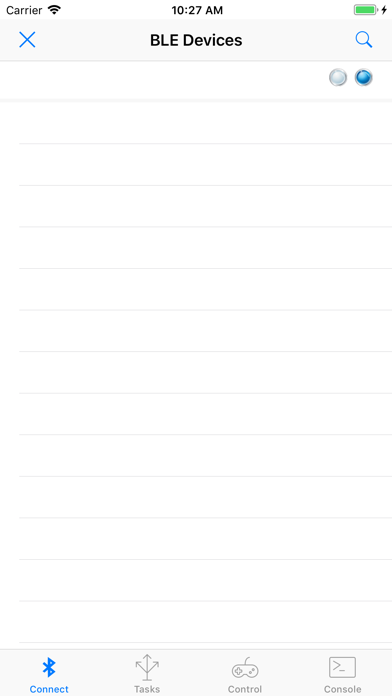
When the app starts, it will open the connection tab and display any compatible BLE devices which are within range. To …
Read the full description
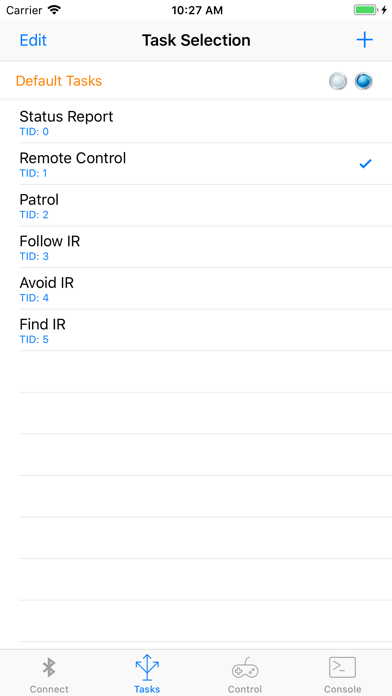
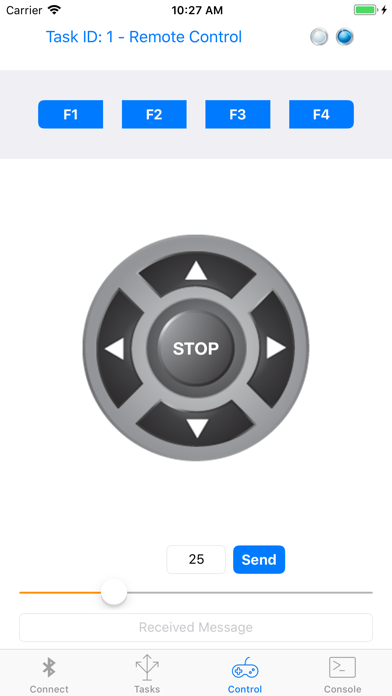
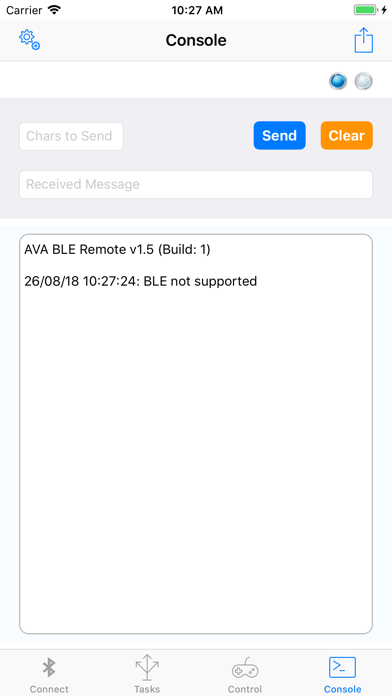
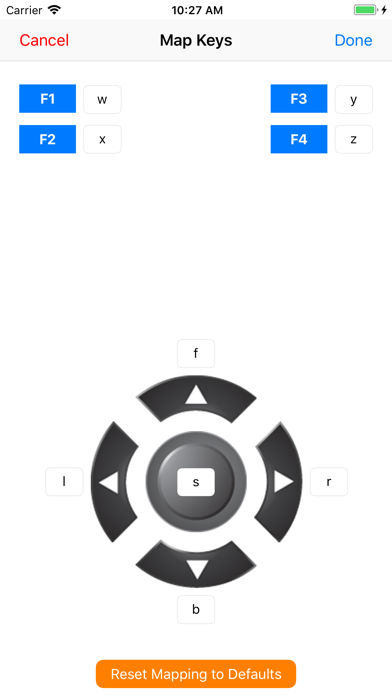
Any self respecting autonomous robot needs a remote control. If you want to use an iPhone as your controller then Bluetooth is one of the better communication options for directing your robot / drone / whatever. This app has been designed to work with the Romeo BLE and Bluno boards from DFRobot. The Bluno is a combination of an Arduino and a Bluetooth shield. It uses Bluetooth Low Energy (BLE), which is compatible with iOS 7.0+ devices: iPhone 5+,iPad 3+,iPad Mini,and iPod 5th Gen (note that Bluetooth LE capability is required). Getting Started: The Connection Screen. When the app starts, it will open the connection tab and display any compatible BLE devices which are within range. To connect to a device just tap on its name. If the connection is successful, the word connected will be displayed and the communication indicator "LEDs" will turn from flashing blue to green. You can start a manual search for BLE devices by tapping the search (magnifying glass) icon in the top right of the connection screen. You can stop the search by tapping the disconnect device button (a cross) in the top left. If you are already connected to a BLE device, tapping the disconnect device button will disconnect you. You can only attach to one BLE device at a time. Setting a Task: The Task tab allows you to send a tasking message to your Bluno. Tapping a task will transmit the tasking ID (e.g. 1) via Bluetooth. Tap the add button (+) to add your own tasks. Tap Edit to delete or rearrange the tasks. Tapping "Default Tasks" will reload the task list that comes with the app. Controlling your BLE Device: The Control tab acts as a virtual gamepad for your BLE device. The currently selected task is displayed at the top of the screen. Tapping the function keys (F1 to F4) will send the designated character via Bluetooth to your BLE Device. The function keys will also adjust the speed. F1 = 25%, F2 = 50%, F3 = 75% and F4 = 100%. The speed is sent automatically. Similarly, tapping the directional dPad or stop button will send the character assigned to those buttons. You can change the characters which are transmitted from the key mapping option in the console tab. The default mappings are: F1 w F2 x F3 y F4 z Up Arrow f Down Arrow b Left Arrow l Right Arrow r Stop s The speed slider will send the selected speed in the following format: - start byte: ! // Which indicates that the next byte is speed - speed byte // encoded as an unsigned char (0-255). We are using 0 - 100. Messages received from the BLE device are displayed at the bottom of the screen. The Console: The console tab allows you to send any character strings that you wish to the Bluno / Romeo. Just type the message in the text field and tap Send. Any received messages will be displayed below. The console tab also contains the system log which records various events, such as device discovery, connection, data transmission and disconnection. You can email the system log by tapping the mail button in the top right of the screen. Tap the settings (gear icon) button if you wish to change the keys mapped to the Control buttons. Romeo / Bluno Code: Sample code to allow you to test the app is available from the Reefwing Gist Repository (https://gist.github.com/reefwing/b6b51197ffe1b238fdbfc558a0c26e56). A full description of how to set up the hardware and software may be found at the Reefwing Robotics Blog (http://reefwingrobotics.blogspot.com.au/). Notes: With a Romeo BLE mounted on the DFRobot Devastator Tank mobility platform I noticed that at full speed the Romeo would sometimes reboot due to excessive current draw on the batteries. If you are losing the BLE link you should check whether this is happening to you. It is hard to pick up as the boards reboot so quickly. Further Information: You can get further information and support for this app at the Reefwing Robotics Blog (http://reefwingrobotics.blogspot.com.au/).
Installs
Apple does not publish download counts. Estimates are in testing.
We publish iOS estimates only after they pass a back-test against real numbers. Chart history below is measured.
Estimated store revenue Estimated Beta
App Store, worldwide, monthly rate from the last 13 chart days to 20 Nov 2026
Below the top 100 grossing apps in the markets we calibrate. In the United States that usually means under about $6.4M a month. App Store purchases and subscriptions only, before Apple's 15 to 30% fee. Ads and web payments are not included.
Ratings
No rating breakdown published for this app.
Recent reviews
Latest public reviews from the store
No reviews in our sample for this app yet.
Top chart positions
Latest App Store chart ranks by country, last 10 days
Not in any tracked top chart in the last 10 days.
AVA BLE Remote history
Release, install milestones, listing and store changes
- First released on the store 20 Jan 2016
Update frequency
How often AVA BLE Remote ships a new version, month by month
0 updates in the last 12 months. Less often than most similar apps: they shipped a median of 1 updates in the same year.
Recent versions
Current version 1.5
- Version 1.526 Aug 2018
This update from Apple will improve the functionality of this app. No new features are included. - BLE signal strength added (RSSI) - Clear Log button added. - Function keys adjust speed. F1 = 25%, F2 = 50%, F3 = 75% and F4 = 100%. Adjusted speed is sent automatically. - In the Control Tab, the speed slider will send the selected speed (when Send is tapped) in the following format: start byte: ! // Which indicates that the next byte is speed speed byte // encoded as an unsigned char (0-255). We are using 0 - 100. You will need to update the code in your Arduino to make use of these features. Sample code is available at: https://gist.github.com/reefwing/b6b51197ffe1b238fdbfc558a0c26e56
Listing keywords
Words and phrases AVA BLE Remote repeats most in its store listing
Top phrases: ble device (6), console tab (3), disconnect device button (2), f1 f2 f3 (2), reefwing robotics blog (2).
Highlighted words also appear in the title. Counts cover the title, short description and description.
Compliance
What the listing and the app package show
- Store status
- Live
- Upkeep
- No update since 26 Aug 2018
- Age rating
- 4+
Apps like AVA BLE Remote
 Library of AviationNazmi Yavuz★ 4.82
 MyNOVECNorthern Virginia Electric Cooperative★ 2.28
 打工人小组件光翔 卓★ 4.96
 TruckbaysTruckbays LLC★ 4.3
 Tornado PRO PlayerMohammed Altam★ 4.44
 VDX - Video ManagerARISEPEAK LP★ 1.74
 TV CastingZeasn Info Technology Co., Ltd.★ 1.86
 Mil-Dot BallisticsTom Holsten★ 3.82
 MySontiqSontiq, Inc.★ 2.4
AVA BLE Remote: questions and answers
Who makes AVA BLE Remote?
AVA BLE Remote is published by Reefwing Software.
When was AVA BLE Remote last updated?
The latest version (1.5) was released on 26 Aug 2018.
Is AVA BLE Remote free?
Yes. AVA BLE Remote is free to download.
Is AVA BLE Remote still available?
Yes. AVA BLE Remote is live on App Store as of 11 May 2026.
Track AVA BLE Remote and its competitors
Watch any app for new versions, rating drops, chart moves and removals. Free plan, no card.