
- Installs
- —
- Apple does not publish download counts
- Rating
- 4.53
- Ratings
- 134K
- 134K reviews
- Version
- 2.5.6
- Updated 5 Nov 2026
- Released
- 18 Feb 2014
- Tracked since 10 May 2026
- Size
- 327 MB
- Needs 16.0
Also on App Store: Background Eraser - AI Remove (570 ratings), Background Eraser - AI Remove (1K ratings)
Screenshots




About Background Eraser: AI Remove
The description on the store listing
This app helps to remove the background of any picture of yours and maintain transparency with just few taps.
Just touch where you want to remove. "Target" function removes the area of similar color automatically.
The image which one maintaining transparency background can be used with other apps
ex) Keynote. Pages, etc.
#Cut Out Tools – Cut images (Zoom in to work for fine pixel-level accuracy)
___#Erase/Restore : Erase/Restore the area you touched
___#Target Area Auto remove tool (Area/Color) : Remove similar color area automatically
___#Reverse tool : Reverse removed area
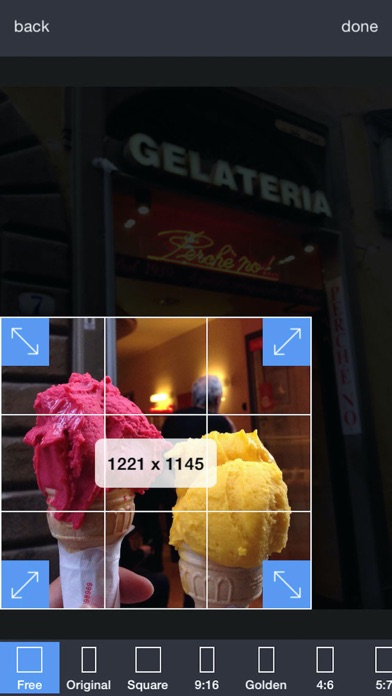
#Crop – Crop your photos with 15 different presets feature quickly and easily.
#Adjust Effect - 9 …
Read the full description
This app helps to remove the background of any picture of yours and maintain transparency with just few taps. Just touch where you want to remove. "Target" function removes the area of similar color automatically. The image which one maintaining transparency background can be used with other apps ex) Keynote. Pages, etc. #Cut Out Tools – Cut images (Zoom in to work for fine pixel-level accuracy) ___#Erase/Restore : Erase/Restore the area you touched ___#Target Area Auto remove tool (Area/Color) : Remove similar color area automatically ___#Reverse tool : Reverse removed area #Crop – Crop your photos with 15 different presets feature quickly and easily. #Adjust Effect - 9 ADJUSTMENT tools (Smooth, brightness, contrast, saturation, exposure, highlights, shadows, temperature, vignette) **”Smooth” - Smoothing image edge #Add Background Photo - Remove & Change your photo background #Full Resolution - Selecting size of output picture (HQ 3264 x 3264 pixel , Normal 1600 x 1600 pixel, LQ 800 x 600 pixel) #PNG/ JPEG File Selection - Selecting size of output picture (PNG_transparent background,JPEG_white background) #Share Instagram, Facebook, Twitter, Mail, Other Apps Terms of Use: https://sites.google.com/view/noonus-ltd/terms-condition Privacy Policy: https://sites.google.com/view/noonus-ltd/privacy-policy SUBSCRIPTION INFO: • Subscription for Background Eraser for full access to all features. • Subscription length: 12 months. • Your payment will be charged to your iTunes Account as soon as you confirm your purchase. • You can manage your subscriptions and turn off auto-renewal from your Account Settings after the purchase. • Your subscription will renew automatically, unless you turn off auto-renew at least 24 hours before the end of the current period. • The cost of renewal will be charged to your account in the 24 hours prior to the end of the current period. • When canceling a subscription, your subscription will stay active until the end of the period. Auto-renewal will be disabled, but the current subscription will not be refunded. • Any unused portion of a free trial period, if offered, will be forfeited when purchasing a subscription.
Installs, last 30 days
Apple does not publish download counts. Estimates are in testing.
Estimated store revenue Estimated Beta
App Store, worldwide, monthly rate from the last 13 chart days to 20 Nov 2026
Below the top 100 grossing apps in the markets we calibrate. In the United States that usually means under about $6.4M a month. App Store purchases and subscriptions only, before Apple's 15 to 30% fee. Ads and web payments are not included.
Ratings
134,272 ratings, 134,272 reviews
- 5 ★73%
- 4 ★16%
- 3 ★6.4%
- 2 ★1.8%
- 1 ★3.3%
Recent reviews
Latest public reviews from the store
- 28 Jul 2024
More problems though I have now updated Nackground Eraser bill Rabinovitch
More problems though I have now updated Background Eraser - Bill Rabinov Thanks I updated, but there are still significant problems for me not only how I use Background Eraser but in how it works. I do not want the new AI to at first automatically take out the entire background - as in my creative process I take out things quite differently in a far more detailed process. The only two options I now initially get to choose from are the AI & the brush eraser which is also not at all good for me in how it works. And even if I try either of them the app often now crashes on my iPad mini. And then I have to restor the whole image. The icon on top says Background Erase but clicking on it does nothing - but this is what I want. I want the option to chose this icon on top to get back the app as it was & I do not want the two new features on the bottom which have completely ruined things for me. How can I get back the old version of Background Eraser which was already perfect for me? I appear to already have the Pro version. Your app was otherwise perfect & genius for me I want to get it back. It was the only eraser app that had all your features such as the ability to chose a color to dele
- 16 Feb 2023
Eraser
This app is like it’s name, simple and to the point, it is an eraser. there’s no thrills or flares, filters or other ways to distract you. This app is normally my first stop on my artistic projects, I use it to bring forward main subjects and erase the backgrounds (duh) it’s solid app that knows it’s value (price wise) and does it job However no app is perfect, to the developers I wish you would add a feathering or refining touch feature, sometimes when erasing by hand the edges are left pixelated and I’m not happy with the end result so I don’t use the image, and end I wasting my time. Secondly, and I know this may bea reach but I think some kind of smart snapping feature added onto the eraser or restore tool would help in making straight and precise cuts instead of going by hand 8/10
- 29 Nov 2022
Easy as pie!
Easily cut out the favorite part of a photo or delete something you don’t want. If this is been at five or 10 years ago, my life would’ve been so much easier as a graphic designer. Images are easily opened in the application. It gives you the option to adjust color, temp, exposure…. And when he select the erase option you have the ability to go into the image and erase the background for elements he do not want if you make an error in your choice you can go back and adjust. NOTE: I suggest that you save all images edits prior trying any other of the apps functions, this will save you some time. Should you change your mind on an edit that you did. This is an awesome application for simplifying work, personal collages creating means and much more . Thanks!!
- 6 Jan 2020
Best app ever while it worked! 😀
This app is amazing! I use it all the time for parts of my editing, and videos that I make! It’s the first thing I look towards for transparent backgrounds. This app was great until this day. I mean it’s still great but... today when I used it to quickly erase a background and then save it. I went to straight to my photos. And when I tap the screen and the background is black, then that means it worked! But today it wasn’t. Witch made me upset 😢 because I needed my hanging stars for an intro! I didn’t realize it until I put it in KineMaster, But then I saw it! I got really upset. But I gave it five stars because it has helped me since a while in 2019 and I really hope this year it’s fixed and that I can use it for more then I mentioned! Thank you so much for helping me! 😀❤️
What reviewers bring up
Topics mentioned in the latest 8 reviews, by how many reviews mention them
Liked in good reviews (7 reviews)
- background 6
- erase 5
- image 4
- other 4
- sometimes 3
- ability 3
- restore 3
- option 3
Raised in bad reviews (1 reviews)
No topic comes up twice.
Top chart positions
Latest App Store chart ranks by country, last 10 days
Not in any tracked top chart in the last 10 days.
Background Eraser: AI Remove history
Release, install milestones, listing and store changes
- First released on the store 18 Feb 2014
Update frequency
How often Background Eraser: AI Remove ships a new version, month by month
3 updates in the last 12 months. Less often than most similar apps: they shipped a median of 5 updates in the same year.
Recent versions
Current version 2.5.6
- Version 2.5.65 Nov 2026
• Refreshed the entire app with a monochrome theme for a cleaner, more focused workspace. • Unified the look across Home, Library, Settings, Share, and the photo picker sheet. • Polished the editor's top & bottom bars, image adjustment panel, badges, and icon buttons.
- Version 2.5.34 Jul 2026
- Improved color eraser precision, plus performance and stability fixes.
- Version 2.5.220 Apr 2026
• Rotate and resize the subject and background separately on the result canvas. • Your position, angle, and scale from the editor now carry over seamlessly. • Shadows now render naturally even when the subject is rotated.
Listing keywords
Words and phrases Background Eraser: AI Remove repeats most in its store listing
Top phrases: size of output (2), turn off auto (2), auto renewal (2), background eraser (2), current period (2).
Highlighted words also appear in the title. Counts cover the title, short description and description.
Compliance
What the listing and the app package show
- Store status
- Live
- Upkeep
- Updated 5 Nov 2026
- Age rating
- 4+
Apps like Background Eraser: AI Remove
 Photo Collage Maker PicJointerMosaic S.r.l.★ 4.54
 Photoleap: AI Photo GeneratorLightricks Ltd.★ 4.68
 Mojo: AI Video & Reels EditorArchery Inc.★ 4.86
 Canon Camera ConnectCanon Inc.★ 4.76
 PhotoCirclePhotoCircle, Inc.★ 4.87
 SCRL: Photo Collage MakerAppostrophe AB★ 4.83
 Toonapp: AI Photo & Video ArtLyrebird Studio★ 4.72
 Videoleap: AI Video EditorLightricks Ltd.★ 4.61
 Tempo - Music Video MakerHangzhou Xiaoying Innovation Technology Co., Ltd.★ 4.74
Background Eraser: AI Remove: questions and answers
Who makes Background Eraser: AI Remove?
Background Eraser: AI Remove is published by SUNWOONG JANG.
When was Background Eraser: AI Remove last updated?
The latest version (2.5.6) was released on 5 Nov 2026.
Is Background Eraser: AI Remove free?
Yes. Background Eraser: AI Remove is free to download.
Is Background Eraser: AI Remove still available?
Yes. Background Eraser: AI Remove is live on App Store as of 20 Nov 2026.
Track Background Eraser: AI Remove and its competitors
Watch any app for new versions, rating drops, chart moves and removals. Free plan, no card.