
- Installs
- —
- Apple does not publish download counts
- Rating
- 1.0
- Ratings
- 1
- 1 reviews
- Version
- 2.5
- Updated 1 Aug 2017
- Released
- 29 May 2009
- Tracked since 10 May 2026
- Size
- 10 MB
- Needs 8.0
Screenshots


About Baseball WhiteBoard
The description on the store listing
Now updated for 64-bit devices and iOS7 (and newer)!
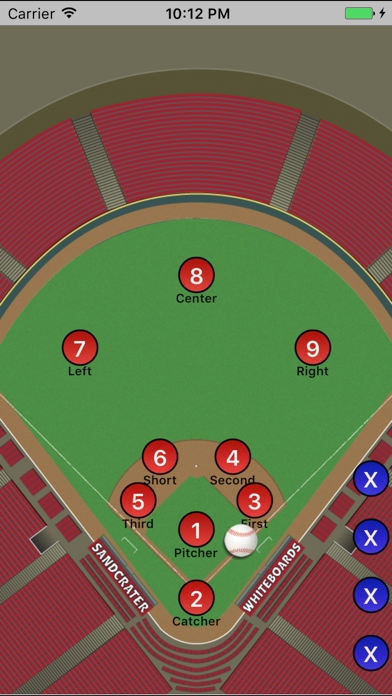
Baseball WhiteBoard is an application which allows you to display player and ball positioning as you would on a portable dry-erase baseball coach's white board. It is a universal application that works on the iPad, iPhone or iPod touch.
Simply drag the players and ball around with your fingertips as you explain to a player how to position themselves on the field! You can utilize pinch/zoom/scroll/rotate gestures and controls to focus on any area of the field you'd like (or leave it at a full-field display). Teams can be represented by a wide variety of colors and you can have any number of players on each team on the field at any …
Read the full description
Now updated for 64-bit devices and iOS7 (and newer)! Baseball WhiteBoard is an application which allows you to display player and ball positioning as you would on a portable dry-erase baseball coach's white board. It is a universal application that works on the iPad, iPhone or iPod touch. Simply drag the players and ball around with your fingertips as you explain to a player how to position themselves on the field! You can utilize pinch/zoom/scroll/rotate gestures and controls to focus on any area of the field you'd like (or leave it at a full-field display). Teams can be represented by a wide variety of colors and you can have any number of players on each team on the field at any time. The letter designation on each player can be left at the default "position" numbers OR you can put a custom letter/number combination (as many as three characters on the iPad, two on other iOS devices) to represent a player's initials or their number. You also have the option of displaying a label (such as the player's name) underneath the circle. Player positions, labels and designations can be saved for future recall. You can also save team data separately for use with multiple white boards. Originally released for the iPhone in summer of 2009, it is one of the original applications of its kind! It's been totally re-written to take advantage of the latest and greatest features in iOS and to implement some of the great suggestions/feature requests received from users over the years! Visit http://www.sandcrater.com for more information and to access the Baseball WhiteBoard user manual, support pages and responses to user feedback. Need to draw lines on the white board? Activate one of the three drawing pens to draw different colored lines on the white board. By default the pens are red, green and blue but you have the option of changing the color of any given pen. To erase lines, simply use the erase control in the icon palette. iPhone and iPod touch users can also give the device a good shake to clear the lines. Want to show where a player came from when moved? Turn on the "trailing lines" feature and a narrow line will be drawn along the path that each player is moved. This illustrates where the player "came from" before that player reached their current position. Configuring Baseball WhiteBoard is as easy as double tapping anywhere on the field (for iPhone and iPod touch users) or simply using the on screen controls to the side of the field (for iPad users). The controls area is where you set the number of players on the field, team colors, the trailing lines function and is where you go to save the current whiteboard and load previously saved ones. Baseball WhiteBoard supports some of the latest features in iOS such as iCloud! Team data and white board data can optionally be saved to iCloud allowing you to access them from any of your iOS devices. The same data can be easily edited from both an iPad and an iPhone/iPod touch with ease and without loss of precision. Other more recent iOS features such as support for retina displays, printing to AirPrint printers and utilizing screen mirroring through AirPlay are supported. Baseball WhiteBoard allows you to use your iPhone, iPod touch or iPad as a tool to help teach players of any age. Younger players are drawn in to the high-tech solution and will not be as easily distracted when compared to using a traditional white/clip board. Not on the field? Use Baseball WhiteBoard to set up a scenario and then ask your players to move the dots to the right position! It can be used as a teaching tool both on and off the bench.
Installs
Apple does not publish download counts. Estimates are in testing.
We publish iOS estimates only after they pass a back-test against real numbers. Chart history below is measured.
Estimated store revenue Estimated Beta
App Store, worldwide, monthly rate from the last 13 chart days to 20 Nov 2026
Below the top 100 grossing apps in the markets we calibrate. In the United States that usually means under about $6.4M a month. App Store purchases and subscriptions only, before Apple's 15 to 30% fee. Ads and web payments are not included.
Ratings
1 ratings, 1 reviews
No rating breakdown published for this app.
Recent reviews
Latest public reviews from the store
No reviews in our sample for this app yet.
Top chart positions
Latest App Store chart ranks by country, last 10 days
Not in any tracked top chart in the last 10 days.
Baseball WhiteBoard history
Release, install milestones, listing and store changes
- First released on the store 29 May 2009
Update frequency
How often Baseball WhiteBoard ships a new version, month by month
0 updates in the last 12 months. Less often than most similar apps: they shipped a median of 3 updates in the same year.
Recent versions
Current version 2.5
- Version 2.51 Aug 2017
This update from Apple will improve the functionality of this app. No new features are included. Updated application for 64-bit platforms, updated User Interface for iOS 7 and later
Listing keywords
Words and phrases Baseball WhiteBoard repeats most in its store listing
Top phrases: baseball whiteboard (7), ipod touch (5), white board (4), features in ios (2), iphone and ipod (2).
Highlighted words also appear in the title. Counts cover the title, short description and description.
Compliance
What the listing and the app package show
- Store status
- Live
- Upkeep
- No update since 1 Aug 2017
- Age rating
- 4+
Apps like Baseball WhiteBoard
 Digital LinkCompetition Electronics★ 3.02
 Powder ProjectAdventure Projects Inc.★ 4.26
 Takes: Sports Quiz & PicksTakes Incorporated★ 4.86
 NFL Collect by Topps®The Topps Company, Inc.★ 3.86
 Temple OwlsTemple University★ 4.6
 Bowling Score Keeper ToolkitBiographics Consultoria e Design LTDA★ 4.42
 Hunting Calls: CrowSergii Nesterenko★ 4.52
 ProdefySaga Group★ 3.82
 Goodland PickleballPINGPOD INC★ 5.0
Baseball WhiteBoard: questions and answers
Who makes Baseball WhiteBoard?
Baseball WhiteBoard is published by Ron DiNapoli.
When was Baseball WhiteBoard last updated?
The latest version (2.5) was released on 1 Aug 2017.
Is Baseball WhiteBoard free?
Yes. Baseball WhiteBoard is free to download.
Is Baseball WhiteBoard still available?
Yes. Baseball WhiteBoard is live on App Store as of 1 Jul 2026.
Track Baseball WhiteBoard and its competitors
Watch any app for new versions, rating drops, chart moves and removals. Free plan, no card.