
- Installs
- —
- Apple does not publish download counts
- Rating
- —
- Ratings
- —
- Version
- 1.0
- Updated 11 Feb 2020
- Released
- 11 Feb 2020
- Tracked since 10 May 2026
- Size
- 68 MB
- Needs 8.0
Also on Google Play: BAU Bus Shuttle
Screenshots
About BAU Bus Shuttle
The description on the store listing
Have you ever missed the university bus and arrived late to your lecture?
Not anymore with our smart bus application.
Now you can check station’s detail and time schedule, book a seat and track your bus.
Let's take a look at the main key features:
The Station's button shows all the available stations in the four main regions: Beirut, Saida, Iqleem and Dorms. Under each region, there are several routes and under each route there are several stations. By pressing on the station button, you will access the followings:
• Real picture for the bus station location.
• Show on map button: shows the exact location that you have to wait the bus in.
• Show schedule button: shows the time table for …
Read the full description
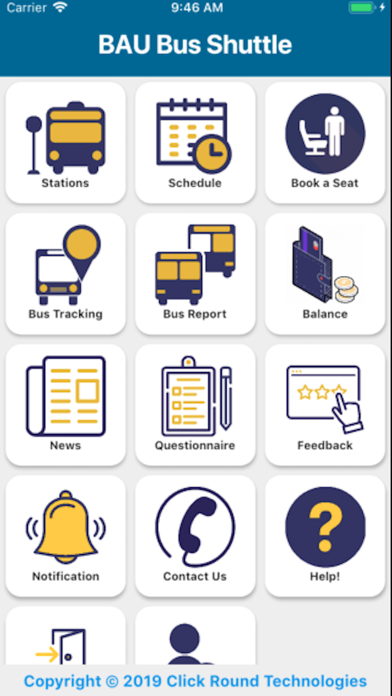
Have you ever missed the university bus and arrived late to your lecture? Not anymore with our smart bus application. Now you can check station’s detail and time schedule, book a seat and track your bus. Let's take a look at the main key features: The Station's button shows all the available stations in the four main regions: Beirut, Saida, Iqleem and Dorms. Under each region, there are several routes and under each route there are several stations. By pressing on the station button, you will access the followings: • Real picture for the bus station location. • Show on map button: shows the exact location that you have to wait the bus in. • Show schedule button: shows the time table for the estimated bus arrival. Under each time, booking time interval is highlighted. The Schedule button offers an option to choose either "From Debbieh" or "To Debbieh". "From Debbieh" shows the bus schedule leaving to various regions from Debbieh campus. "To Debbieh" shows the bus schedule leaving from selected station to Debbieh campus. The Book Seat button helps you reserve a seat on a bus from the selected station. You just have to press the "green button" when booking time is available. In case booking has not started yet, the screen will show you a "yellow icon" with the start booking time. In case booking time has ended for today, the screen will show a "black icon" stating “Booking Ended for Today”. In case there is no booking schedule at all, the screen will show you a "red icon" stating "No Booking Schedule". You will not be able to book a seat unless you have valid semester card or sufficient credits. In case you didn't catch the bus, you will be entitled to a penalty based on your subscription type: Semester card : your card will be deactivated until you pay the ticket price at the transportation office in Debbieh Campus. Prepaid card : the ticket price will be immediately deducted from your credits After booking approval, you will receive a pop up notification stating " you have successfully reserved a seat". Later on, you will receive a pop up notification stating the bus number that will pick you up with driver and bus details. The main screen will change, and new icons will appear showing the following: Bus icon : Bus Number Speed Icon : Bus Speed (kilometer/hour) Schedule icon : Schedule arrival time based on system timetable. RTA : Estimated real time arrival based on delays Delay : Time Delay -ve means early arrival +ve means late arrival Timer : Countdown Timer (min) for the bus to reach the booked station. The Bus Tracking button shows the location of all buses. If you press on any bus icon, it will show you the bus picture, type, speed, available seats and driver's name, picture, and mobile number. On the top left, the map icon can switch the map type from default to a satellite map. And the list-icon shows all the buses on board. The Bus Report button only shows the busses on duty based on region and final destination (From Debbieh or to Debbieh). The screen will show the available seats (Available seats/Total Bus Capacity), bus speed and "show on map button". The green color represents the available seats and the red color represents the occupied seats. This report helps you catch the bus, if you failed to book a seat during the available booking time. The Balance button shows your card balance and allows you to transfer credits to your friends. The news button shows our latest news and activities. The questionnaire button allows you to participate in surveys, sign a petition or vote for a decision. The feedback button allows you to report a bus violation or incident and give feedback about our services. You can write a comment and attach an image. We wish you enjoy our smart bus services. For more details, don't hesitate to contact us.
Installs
Apple does not publish download counts. Estimates are in testing.
We publish iOS estimates only after they pass a back-test against real numbers. Chart history below is measured.
Estimated store revenue Estimated Beta
App Store, worldwide, monthly rate from the last 13 chart days to 20 Nov 2026
Below the top 100 grossing apps in the markets we calibrate. In the United States that usually means under about $6.4M a month. App Store purchases and subscriptions only, before Apple's 15 to 30% fee. Ads and web payments are not included.
Ratings
No rating breakdown published for this app.
Recent reviews
Latest public reviews from the store
No reviews in our sample for this app yet.
Top chart positions
Latest App Store chart ranks by country, last 10 days
Not in any tracked top chart in the last 10 days.
BAU Bus Shuttle history
Release, install milestones, listing and store changes
- First released on the store 11 Feb 2020
Update frequency
How often BAU Bus Shuttle ships a new version, month by month
0 updates in the last 12 months. Less often than most similar apps: they shipped a median of 1 updates in the same year.
Recent versions
Current version 1.0
- Version 1.011 Feb 2020
Listing keywords
Words and phrases BAU Bus Shuttle repeats most in its store listing
Top phrases: button shows (6), screen will show (4), available seats (4), book seat (4), debbieh campus (3).
Highlighted words also appear in the title. Counts cover the title, short description and description.
Compliance
What the listing and the app package show
- Store status
- Live
- Upkeep
- No update since 11 Feb 2020
- Age rating
- 17+
Apps like BAU Bus Shuttle
 Robin - Mobile AppRobin Powered, Inc★ 3.32
 Bright AisleMedia Solutions Corp★ 2.52
 Rhingie: phone call 2nd numberDating onlain, ooo★ 3.96
 PayClockLathem Time Corporation★ 2.08
 云电话-网络电话虚拟隐私小号国辉 李★ 4.74
 QuicklynQuicklyn★ 4.86
 Diligent BoardsDiligent Corporation★ 3.32
 DATABASICSDATABASICS★ 3.8
 vMEyeSuperGuangzhou Kedi Intelligence Technology Co., Ltd.★ 3.14
BAU Bus Shuttle: questions and answers
Who makes BAU Bus Shuttle?
BAU Bus Shuttle is published by Smart Click Technologies SAL.
When was BAU Bus Shuttle last updated?
The latest version (1.0) was released on 11 Feb 2020.
Is BAU Bus Shuttle free?
Yes. BAU Bus Shuttle is free to download.
Is BAU Bus Shuttle still available?
Yes. BAU Bus Shuttle is live on App Store as of 10 May 2026.
Track BAU Bus Shuttle and its competitors
Watch any app for new versions, rating drops, chart moves and removals. Free plan, no card.