
- Installs
- —
- Apple does not publish download counts
- Rating
- 4.82
- Ratings
- 24.8K
- 24.8K reviews
- Version
- 3.5.3
- Updated 23 Oct 2026
- Released
- 14 Sep 2023
- Tracked since 11 May 2026
- Size
- 191 MB
- Needs 17.0
Also on Google Play: Blackmagic Camera (16.2K ratings)
Screenshots


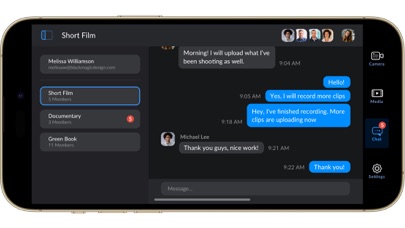
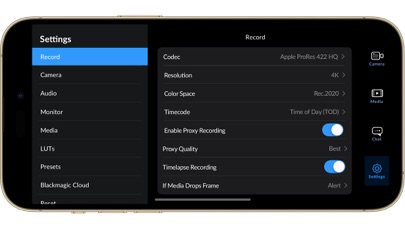
About Blackmagic Camera
The description on the store listing
Introducing Digital Film for iPhone and iPad!
Blackmagic Camera unlocks the power of your iPhone and iPad by adding digital film camera controls and operating systems! Now you can create the same cinematic ‘look’ as Hollywood feature films. You get the same intuitive and user friendly interface as Blackmagic Design’s award winning cameras. So it’s just like using a professional digital film camera! This means you can adjust settings such as frame rate, shutter angle, white balance and ISO all in a single tap. Or record directly to Blackmagic Cloud in industry standard 10-bit Apple ProRes files up to 4K! Recording to Blackmagic Cloud Storage lets you collaborate on DaVinci Resolve projects …
Read the full description
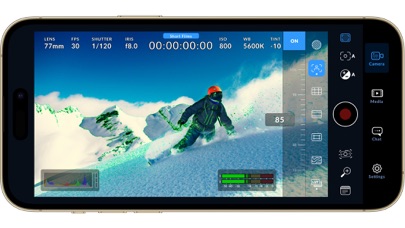
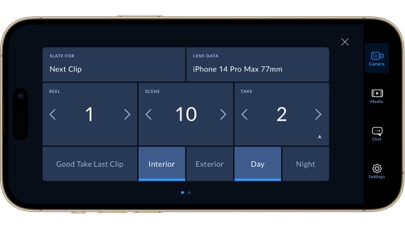
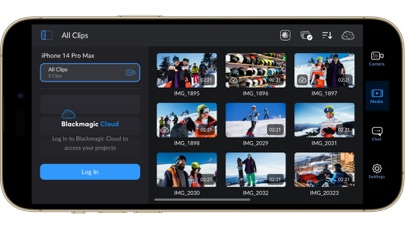
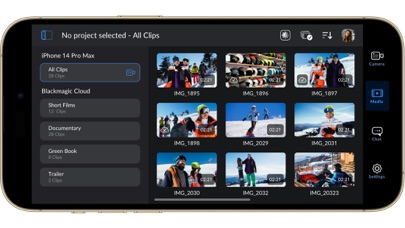
Introducing Digital Film for iPhone and iPad! Blackmagic Camera unlocks the power of your iPhone and iPad by adding digital film camera controls and operating systems! Now you can create the same cinematic ‘look’ as Hollywood feature films. You get the same intuitive and user friendly interface as Blackmagic Design’s award winning cameras. So it’s just like using a professional digital film camera! This means you can adjust settings such as frame rate, shutter angle, white balance and ISO all in a single tap. Or record directly to Blackmagic Cloud in industry standard 10-bit Apple ProRes files up to 4K! Recording to Blackmagic Cloud Storage lets you collaborate on DaVinci Resolve projects with editors anywhere in the world, all at the same time! Get the "Hollywood Look" with Digital Film! Blackmagic Camera puts the professional features you need for feature film, television and documentaries in your pocket. Now you can create YouTube and TikTok content with a cinematic look, and broadcast quality ENG! Imagine having a run and gun camera on hand to capture breaking news whenever it happens! Or use Blackmagic Camera as a B Cam to capture angles that are difficult to reach with traditional cameras, while still retaining control of important settings. Best of all, recording to Blackmagic Cloud allows you to get your footage to the newsroom or post production studio in minutes. Interactive Controls for Fast Setup Blackmagic Camera has all the controls you need to quickly setup and start shooting! Everything is interactive, so you can tap any item and instantly change settings without searching through confusing menus! The HUD shows status and record parameters, histogram, focus peaking indicators, levels, frame guides and more. Show or hide the HUD by swiping up or down. You can auto focus by tapping the screen in the area you want to focus. You can shoot in 16:9 or vertical aspect ratios, plus you can shoot 16:9 while holding your phone vertically if you want to shoot unobtrusively. On Screen Heads Up Display The heads up display, or HUD, controls have the most important camera controls such as lens selection, frame rate, shutter angle, timecode, ISO, white balance, gain and audio levels. You can adjust settings such as exposure by touching the ISO indicator, or you can change the audio levels simply by touching the audio meters. Everything is interactive, so if you tap any item you can instantaneously change its settings without having to search through complex menus! Camera Setup Menus The settings tab unlocks the full power of your phone’s camera, with quick access to advanced settings such as monitoring, audio, camera setup, recording and more! The record tab gives you total control over video resolution and recording format including industry standard Apple ProRes or space efficient H.264 and H.265. Plus, you can set anamorphic de-squeeze and lens correction settings. Professional audio options include AAC and PCM format and VU or PPM audio metering. You can even add external microphones! Or add 3D LUTs to recreate film looks! Media The Blackmagic Camera media tab has all the controls you need to browse or scrub clips for quick review, search and sort and view the upload status of your media. Access your media from Blackmagic Camera’s all clips folder by choosing the Media button to see the thumbnails for each clip you have stored. Plus, you can save to the files folder on the phone, send it to Blackmagic Cloud Storage via Blackmagic Cloud or manually choose which clips to upload to a project library. You can even sync media from Blackmagic Camera directly into the DaVinci Resolve project so you’re ready to edit! Live Sync to Blackmagic Cloud Storage When shooting with Blackmagic Camera, the video you capture can be instantly uploaded as a proxy file, followed by the camera originals, and saved to Blackmagic Cloud Storage. This means you can start editing quickly using your proxies, speeding up your workflow.
Installs since 19 Jul 2026
Apple does not publish download counts. Estimates are in testing.
Estimated store revenue Estimated Beta
App Store, worldwide, monthly rate from the last 8 chart days to 15 Nov 2026
Below the top 100 grossing apps in the markets we calibrate. In the United States that usually means under about $6.4M a month. App Store purchases and subscriptions only, before Apple's 15 to 30% fee. Ads and web payments are not included.
Ratings
24,830 ratings, 24,830 reviews
No rating breakdown published for this app.
Recent reviews
Latest public reviews from the store
- 10 Mar 2026
Literally the perfect app for filmmakers; just missing one thing I hope to see soon…
Everything about this app has given me the control to create perfect cinematic video, there are no limits and I fully believe with an app like this and proper skills, you can make your iPhone footage look like any cinema camera/DSLR. One thing I’m basically begging you guys to incorporate is the cinematic mode that can now be used in 3rd party apps with the IOS 26 update. If that depth of field can be incorporated with high bit rate recording (not sure if that’s how it works exactly I may be wrong), then hands down this would be the most innovative and professional tool for any filmmaker. That’s literally my only slight problem needing to switch to the actual camera app for shots I deem necessary to have a shallow depth. I can’t wait to drop a cinematic reel sharing this all with everyone, many have already been surprised by the clips I’ve shown thinking I was shooting on an Alexa; but it’s just good cinematography with a very incredible app!
- 19 Oct 2025
Great software but..
It's really good software, i used it in my vlogs, unboxing videos, and other stuff. Having so much settings that unavailable in default iphone camera is helps so much. But today i had some issues with it, i can't record for really long, or i just can't record timelapse videos. I don't know why, but for some reason after 3-4 hours of recording, i found that app just closed for no reason. The videos itself seems normal and all okay, but why it keeps doing that? My phone is iPhone 11, i have more than 50gb of free memory, my settings is pretty normal, 4K 30 fps, H265, Timelapse is set to 1 frame every 30 seconds, and i have right now 2 records that about 13-14 seconds long, by calculations is about (14 seconds * 30 fps * 30 seconds / 60 seconds / 60 minutes) 3.5 hours, and after this i find my phone chilling on home screen, no errors, it looks like somebody just closed app. I wanted to record timelapse that is 168 hours long, but seems like default camera just don't have any settings to change speed or intervals between frames, and blackmagic keeps closing for no reason, it's not overheating, i checked it, it's not frame drops, record button not flashed with exclamation mark, it's not
- 28 Jun 2024
Almost perfect, full auto needs to be better
This app is so close to being perfect but for me I’d like a better auto mode as there are several issues with it currently. The shutter speed likes to stay around 1/30th in relatively dark environments, while the ISO moves around, when the shutter is close to 360 degrees there is a MASSIVE dynamic range hit, so forcing it to never go below a 180 degree equivalent would be perfect. In general I would love it if tap to focus/expose could be decoupled so it’s only tap to focus, I can’t tell you the amount of times I’ve had my manual setting dialed in and accidentally tapped somewhere that’s not a control. There should be better built in LUT options, as the Apple 709 one is terrible. Though I have it set up with an Apple Log to HLG LUT that I made so I can actually monitor in HDR, which is essential for seeing what your doing outside, and crucial for me since I target an HDR delivery with these files, so what I see is what I get.
- 15 Mar 2024
Used extensively every day for 3 weeks and it’s ALMOST perfect!
I’ve been backpacking Australia for 3 weeks and have even using this app every single day, all day, while traveling. I absolutely LOVE this app. It’s well beyond any of the settings that Apple allows in their default app. I just have a few things I kept running into that would make this a full 5/5 for me if these updates could happen. Comments for improvement - •Progress bar for file transfers from internal to SSD •Bubble level tool •Remote viewing from Apple Watch •When replugging back in an SSD, remember a default SSD and selected folder location. Even better, have a “favorites location” that populates faster than having to dig through folder structure each time you plug in a drive. •Ability to flip the interface to the left instead of defaulting the record button to the right when shooting horizontal. Sometimes I had to one hand hold the phone and the record and settings always on the right side of the made it hard to operate with one hand at times. •Custom saved settings. I don’t want my 24mm lens to use the same ISO I’m using for the 120mm if the aperture is faster on the 24mm. I keep having to change multiple settings to switch lenses which slo
What reviewers bring up
Topics mentioned in the latest 8 reviews, by how many reviews mention them
Liked in good reviews (6 reviews)
- iphone 4
- control 3
- camera 3
- having 3
- change 3
- almost 3
- better 3
- other 3
Raised in bad reviews (1 reviews)
No topic comes up twice.
Top chart positions
Latest App Store chart ranks by country, last 10 days
- Countries ranked
- 50 of 50
- Best rank
- #9
- Top 10 placements
- 2
- of 52 chart placements
- Average rank
- #29.8
Best countries on App Store
- 🇦🇪 United Arab Emirates · Top free, Photo & Video#9
- 🇵🇪 Peru · Top free, Photo & Video#10
- 🇨🇳 China · Top free, Photo & Video#12
- 🇪🇬 Egypt · Top free, Photo & Video#13
- 🇸🇬 Singapore · Top free, Photo & Video#13
- 🇵🇹 Portugal · Top free, Photo & Video#14
| Country | Chart | Category | Rank | Best (10 days) | Date |
|---|---|---|---|---|---|
| 🇦🇪 United Arab Emirates | Top free | Photo & Video | #9 | #8 | 15 Nov 2026 |
| 🇵🇪 Peru | Top free | Photo & Video | #10 | #8 | 15 Nov 2026 |
| 🇨🇳 China | Top free | Photo & Video | #12 | #10 | 15 Nov 2026 |
| 🇪🇬 Egypt | Top free | Photo & Video | #13 | #11 | 15 Nov 2026 |
| 🇸🇬 Singapore | Top free | Photo & Video | #13 | #12 | 15 Nov 2026 |
| 🇵🇹 Portugal | Top free | Photo & Video | #14 | #11 | 15 Nov 2026 |
| 🇪🇸 Spain | Top free | Photo & Video | #14 | #14 | 15 Nov 2026 |
| 🇨🇴 Colombia | Top free | Photo & Video | #15 | #12 | 15 Nov 2026 |
| 🇵🇱 Poland | Top free | Photo & Video | #16 | #14 | 15 Nov 2026 |
| 🇲🇾 Malaysia | Top free | Photo & Video | #17 | #17 | 15 Nov 2026 |
Blackmagic Camera history
Release, install milestones, listing and store changes
- First released on the store 14 Sep 2023
Update frequency
How often Blackmagic Camera ships a new version, month by month
4 updates in the last 12 months. More often than most similar apps: they shipped a median of 2 updates in the same year.
Recent versions
Current version 3.5.3
- Version 3.5.323 Oct 2026
• Support for iPhone Duo. • General performance and stability improvements.
- Version 3.4.119 Aug 2026
• Apple Watch controls for codec, resolution and colorspace. • Controller displays lens information for supported cameras. • Support for latency specification in SRT stream settings. • Addressed occasional video recording issue when losing app focus. • Addressed issue with viewing Blackmagic Cloud folders. • General performance and stability improvements.
- Version 3.422 Jul 2026
• Additional camera controls with companion app for Apple Watch. • Apple Watch complication for quick access to companion app. • Support for remote control via Blackmagic Camera REST API. • Use external lens setting now locks focus controls. • Map focus and zoom demand controls from accessories settings. • Support for Remote Camera Manager. • Proxy clip manager to view and manage proxy media. • Options to delete proxies when deleting media. • Separate live stream settings for router and destination selection. • Addressed front camera issues for iPhone 17 models. • Addressed peak indicator refresh issue with expanded histogram. • Addressed off speed control range in remote control workflows. • Addressed stereo audio channel inversion in some scenarios. • Support for updating settings to an existing preset. • General performance and stability improvements.
- Version 3.3.118 Apr 2026
• Camera control with companion app for Apple Watch. • Support for full screen portrait mode HDMI output. • Support for ProRes RAW stabilization in iOS 26.1 and above. • Support for ATEM camera control with Blackmagic Camera ProDock. • Support for Blackmagic Focus and Zoom demands. • Front camera now supports portrait and landscape without rotation for iPhone 17. • Addressed possible issue recording ProRes RAW from front lens. • Addressed preview lag with Blackmagic Camera ProDock as audio source. • Addressed open gate H.264 and H.265 using incorrect bit rates. • General performance and stability improvements.
Listing keywords
Words and phrases Blackmagic Camera repeats most in its store listing
Top phrases: blackmagic camera (8), blackmagic cloud (7), blackmagic cloud storage (4), cloud storage (4), digital film (4).
Highlighted words also appear in the title. Counts cover the title, short description and description.
Compliance
What the listing and the app package show
- Store status
- Live
- Upkeep
- Updated 23 Oct 2026
- Age rating
- 4+
Apps like Blackmagic Camera
 LumaFusionLuma Touch LLC★ 4.75
 Hide Photos Video -Hide it ProAnuj Tenani★ 4.65
 Combine Videos: Clip SlideshowLyam Apps★ 4.28
 Safe Lock - Hidden Photo VaultKaterina Akhlebinina★ 4.81
 DJI MimoDJI★ 4.59
 Aura FramesAura Home, Inc.★ 4.84
 Waldo: Shared Photo AlbumsWaldo Photos★ 4.85
 Smart Mirror | TV & Device长江 吴★ 4.19
 Lorex ClassicLorex Corporation★ 4.58
Blackmagic Camera: questions and answers
Who makes Blackmagic Camera?
Blackmagic Camera is published by Blackmagic Design Inc.
When was Blackmagic Camera last updated?
The latest version (3.5.3) was released on 23 Oct 2026.
Is Blackmagic Camera free?
Yes. Blackmagic Camera is free to download.
Is Blackmagic Camera still available?
Yes. Blackmagic Camera is live on App Store as of 15 Nov 2026.
Track Blackmagic Camera and its competitors
Watch any app for new versions, rating drops, chart moves and removals. Free plan, no card.