
- Installs
- —
- Apple does not publish download counts
- Rating
- 4.79
- Ratings
- 14K
- 14K reviews
- Version
- 2.12.2
- Updated 3 Nov 2026
- Released
- 7 May 2021
- Tracked since 10 May 2026
- Size
- 34 MB
- Needs 15.0
Screenshots
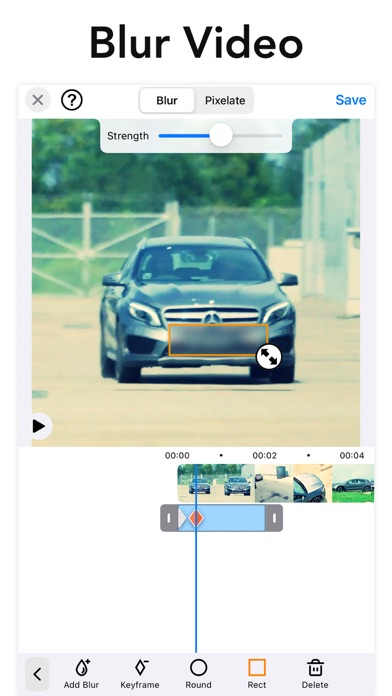
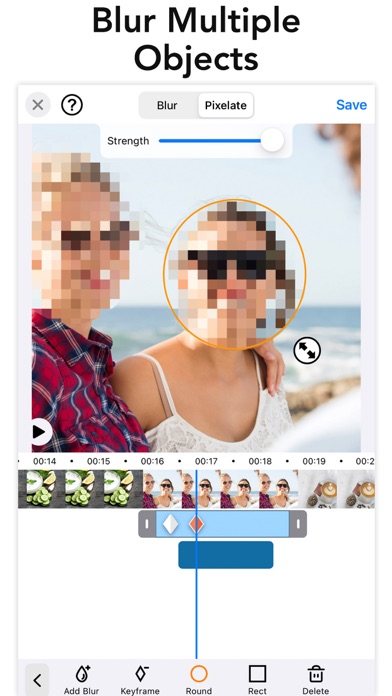

About Blur-Video
The description on the store listing
Improve privacy by blurring faces, logos or objects in the background of your video. Includes auto tracking to get your blurring done super fast.
Apply blur effects on videos for YouTube video, Tiktok + other social media platforms. This blur video editor is the only answer for all your video editing needs regarding pixelating faces or any other unwanted objects and areas of a video.
Unlike other apps you can define more than 1 area to blur/pixelate using ellipse or rectangle shapes with offset so you can easily blur with touch using your finger. Define the duration of each blur area and adjust the intensity.
PRO
You can subscribe to PRO for unlimited access to pro features, including: …
Read the full description
Improve privacy by blurring faces, logos or objects in the background of your video. Includes auto tracking to get your blurring done super fast. Apply blur effects on videos for YouTube video, Tiktok + other social media platforms. This blur video editor is the only answer for all your video editing needs regarding pixelating faces or any other unwanted objects and areas of a video. Unlike other apps you can define more than 1 area to blur/pixelate using ellipse or rectangle shapes with offset so you can easily blur with touch using your finger. Define the duration of each blur area and adjust the intensity. PRO You can subscribe to PRO for unlimited access to pro features, including: Unlocking all object tracking and feathering and No Ads - You'll be able to use all features for the duration of your subscription - Payment will be charged to your iTunes Account at confirmation of purchase - The subscription renews automatically unless auto-renewal is turned off for at least 24-hours before the end of the current period - The account will be charged for renewal within 24-hours prior to the end of the current period at the cost of the chosen package - Subscriptions may be managed by the user and auto-renewal may be turned off by going to the user's Account Settings after purchase - Any unused portion of a free trial period, if offered, will be forfeited when the user purchases a subscription Terms of use: http://cushwayapps.com/app-privacy/blurvideo/terms.html Privacy policy: http://cushwayapps.com/app-privacy/blurvideo/privacy.html Have you found a bug, got a suggestion, or want a new feature? Send us an email at [email protected]
Installs, last 30 days
Apple does not publish download counts. Estimates are in testing.
Estimated store revenue Estimated Beta
App Store, worldwide, monthly rate from the last 12 chart days to 19 Nov 2026
Below the top 100 grossing apps in the markets we calibrate. In the United States that usually means under about $6.4M a month. App Store purchases and subscriptions only, before Apple's 15 to 30% fee. Ads and web payments are not included.
Ratings
14,020 ratings, 14,020 reviews
No rating breakdown published for this app.
Recent reviews
Latest public reviews from the store
- 6 Apr 2025
Some students aren’t allowed to be photographed
I am a kindergarten teacher who takes A LOT of photos and videos—-I just can’t help myself! They do so many cute things! I also share my photos and videos with their parents, who enjoy receiving these precious moments. I have two students whose parents do not want their child’s images to be seen by anyone except their own family. This creates quite the challenge for me. That is, until I discovered this app! Instead of removing both students from the activities that I record, I allow them to be a part of them! I am able to send a video to each set of parents, with the other student blurred out. I then blur out the faces of both students and share it with the rest of the parents. It’s a win-win-win situation!
- 9 Nov 2024
The best facial blurring app I’ve tried, auto-tracking needs perfected but works!
This app IS the EXACT ONE YOU ARE LOOKING FOR!! It specializes in simply blurring a targeted/or frame by frame selected area of the screen… with time you can even add cute emoji expressions to hide your face in those exciting videos you know you share but worry about losing work over? This is that app. Just prepair to have to spend time editing it manually!! Still the best and easiest one I’ve found! I hope the facial tracking gets better and I hope they give more options for Emoji and or perhaps even animated sort of Fake Cartoon expressions that imitate the persons real expression in those moments? That would be great because the primary use for this is often hiding the very best pets of the video we are sharing, would be cool to be able to convey with animation those edited out exiting expressions if you get my drift? All in all, this works! It’s the best one and it’s affordable! Get it if your sharing things and need privacy for you and your loved ones identity!!
- 23 Aug 2024
App works well, easy to use, and in-app purchases are reasonable
The app worked perfectly for my privacy needs and had trustworthy purchase practices so far. Was able to effectively plug a video with a small photo in a locket so I could post a review without worrying about putting my family online and protecting our privacy. I also liked that this app didn’t have a laundry list of weird in-app purchases like the other similar apps, and the two paid options were reasonable. And without the app developer hiding behind a foreign sounding LLC I feel more confident in using the app in terms of privacy and security.
- 13 Mar 2024
Great app, even free
Haven’t paid for this app yet and I’ve edited multiple videos, from 1 min to 15 minutes. Blurring is easy, customizable (strength, shape, etc) and the editing UI is awesome, which is hard for a mobile app. I’m a user experience designer and I give this app 5 stars. Of course the ads are a little annoying but considering how good the free version is, I’m fine with an ad here and there and the best part is that the ads aren’t even the typical app ads that are long and annoying. They’re brief and easily dismissible. Long story short. I don’t review apps unless I’m extremely pleased or extremely disappointed. And I’m not extremely disappointed… Great job team :)
What reviewers bring up
Topics mentioned in the latest 8 reviews, by how many reviews mention them
Liked in good reviews (5 reviews)
- video 4
- able 3
- developer 2
- blurring 2
- allowed 2
- moments 2
- editing 2
- options 2
Raised in bad reviews (2 reviews)
- key frame 2
- tracking 2
- subject 2
- better 2
- frames 2
- bar 2
Top chart positions
Latest App Store chart ranks by country, last 10 days
Not in any tracked top chart in the last 10 days.
Blur-Video history
Release, install milestones, listing and store changes
- First released on the store 7 May 2021
Update frequency
How often Blur-Video ships a new version, month by month
3 updates in the last 12 months. More often than most similar apps: they shipped a median of 2 updates in the same year.
Recent versions
Current version 2.12.2
- Version 2.12.23 Nov 2026
Saving is more reliable. Blur Video now needs much less free space to save your video to Photos. Plus bug fixes and polish. We'd love to hear what you think. Leave a review, and if you have feedback or suggestions, email us at [email protected].
- Version 2.10.017 Jul 2026
Introducing Background Blur! Keep people in focus and blur everything else — one tap, no tracing, no tracking needed. • Tap BG Blur and the background blurs for your whole video while people stay sharp • Flip it with the new Invert option to blur the person instead — great for hiding someone's identity • Fine-tune with the new Edge control to tighten or expand the blur around your subject • Works with blur or pixelate, and layers with your shape and emoji blurs Also in this update: • Invert works on shape blurs too — keep the inside sharp and blur everything around it • A refreshed editor toolbar with clearer icons • Bug fixes and polish We'd love to hear what you think — leave a review, and if you have feedback or suggestions, email us at [email protected].
- Version 2.9.023 Jan 2026
• You can now select a dark or light icon from the settings screen. • We've squashed some bugs and made performance enhancements to improve your experience. For any issues, please reach out to us at [email protected]
Listing keywords
Words and phrases Blur-Video repeats most in its store listing
Top phrases: auto renewal (2), blur video (2), current period (2), turned off (2).
Highlighted words also appear in the title. Counts cover the title, short description and description.
Compliance
What the listing and the app package show
- Store status
- Live
- Upkeep
- Updated 3 Nov 2026
- Age rating
- 4+
Apps like Blur-Video
 Picsify: AI Photo&Video EditorPicsify.Inc★ 4.51
 CameraApple★ 3.4
 Slidebox: Photo Cleaner AppSlidebox LLC★ 4.81
 EFEKT Video Effects & FiltersPicsArt, Inc.★ 4.58
 Vont - Text on Videosyouthhr★ 4.65
 LightCut - AI Video EditorYue-Jie Innovations Science and Technology Co. , Ltd.★ 4.88
 Slow Motion Video Fx EditorBrain Craft Ltd★ 4.67
 PicFrameActive Development Limited★ 4.84
 Cosmo: AI Editor, Hair FiltersSpark Dynamic★ 4.34
Blur-Video: questions and answers
Who makes Blur-Video?
Blur-Video is published by Alan Cushway.
When was Blur-Video last updated?
The latest version (2.12.2) was released on 3 Nov 2026.
Is Blur-Video free?
Yes. Blur-Video is free to download.
Is Blur-Video still available?
Yes. Blur-Video is live on App Store as of 19 Nov 2026.
Track Blur-Video and its competitors
Watch any app for new versions, rating drops, chart moves and removals. Free plan, no card.