
- Installs
- —
- Apple does not publish download counts
- Rating
- 4.6
- Ratings
- 57
- 57 reviews
- Version
- 3.9.3
- Updated 31 Oct 2026
- Released
- 7 Jan 2015
- Tracked since 10 May 2026
- Size
- 19 MB
- Needs 18.6
Screenshots


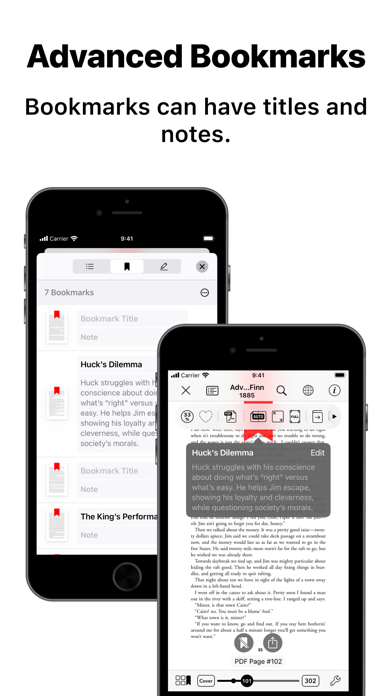
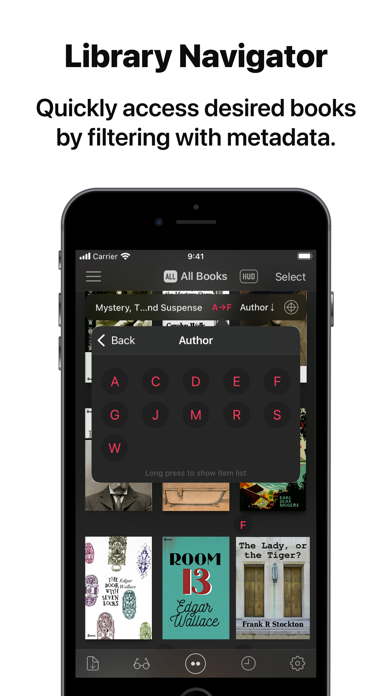
About Booklover - eBook Reader
The description on the store listing
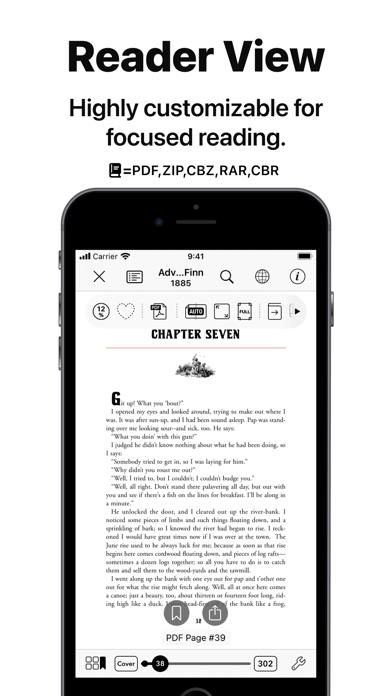
Booklover is a highly responsive and robust eBook reader. It excels at handling PDFs, manga, and scanned books.
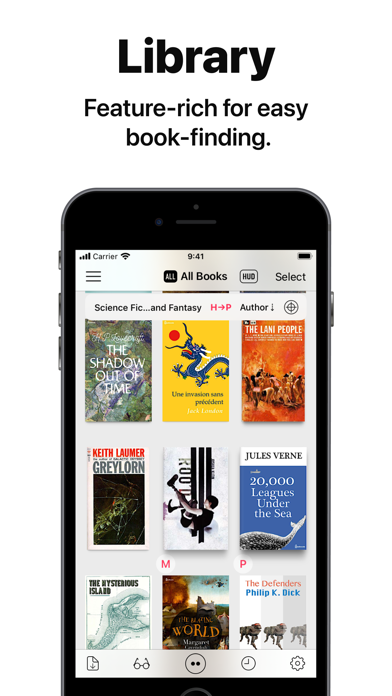
The metadata-driven library management system makes it easy to organize and enjoy a large collection of books in PDF, ZIP/CBZ, and RAR/CBR formats.
Seamlessly integrated with iCloud Drive, books in the iCloud Drive/Booklover folder automatically appear in the app’s library and can be downloaded on demand.
In the library, you can organize books by genres and arrange them using various bibliographic details such as title, author, publisher, and more.
With the search field and powerful Library Navigator, you can quickly locate a book among thousands in your collection.
Customize …
Read the full description
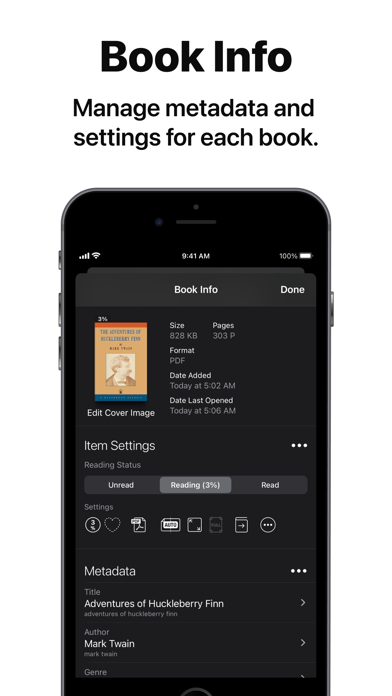
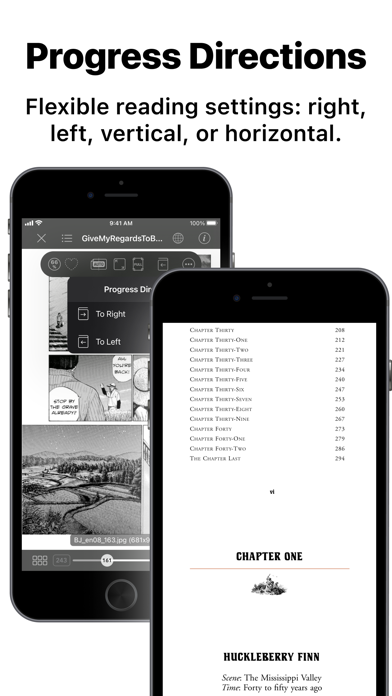
Booklover is a highly responsive and robust eBook reader. It excels at handling PDFs, manga, and scanned books. The metadata-driven library management system makes it easy to organize and enjoy a large collection of books in PDF, ZIP/CBZ, and RAR/CBR formats. Seamlessly integrated with iCloud Drive, books in the iCloud Drive/Booklover folder automatically appear in the app’s library and can be downloaded on demand. In the library, you can organize books by genres and arrange them using various bibliographic details such as title, author, publisher, and more. With the search field and powerful Library Navigator, you can quickly locate a book among thousands in your collection. Customize your reading experience with settings for each book, including page layout, transition axis and style, cropping, filters, progress direction, background, and more. Booklover supports bookmarks with titles and notes, as well as PDF text annotations (highlights), text search, and a table of contents. Main Features: # General • Manage and view eBooks (PDF, ZIP/CBZ, RAR/CBR) • Support for archived image files in JPG, PNG, GIF, HEIF, WEBP, AVIF, and JPEG XL formats • Automatic syncing of book files placed in iCloud Drive/Booklover. On-demand caching (download) of the remote files • Import files via iTunes (Windows), Finder (Mac), AirDrop, Drag & Drop, "Open with..." etc. • Import files via apps from various cloud storage services, such as Dropbox and OneDrive, as well as other services accessible through the iOS Files app. • Slide Over / Split View (iPad) • Hardware keyboard support (mainly in the reader) # Library • Section books by genre (ON/OFF) • The Library Navigator (ON/OFF) • Histories of added and opened books • Context Menu for individual books (long-press a book cover) • Change sort order: By Title, Author, Publisher, Filename, Added Date, etc. • Alphanumeric Index Labels (ON/OFF) • Toggle display of cover accessories • Adjust cover grid size • Responsive Shadow (shows page volume with shadow) • Filter books by Status, Genre, Tags, etc. • Search books by various bibliographic details, file name, and tags # Reader • PDF text annotations (highlights) with notes, text search, and a table of contents • Bookmarks with titles and notes • Lists of bookmarks and PDF annotations • Page transition settings: Axis (Horizontal, Vertical), Style (Scroll, Continuous Scroll, Stack, Crossfade, Zoom fade, Instant) • Progress direction setting: Left to Right, Right to Left (for vertical text, manga, Arabic, etc.) • Page layout setting: Automatic, Single-Page, Two-Pages (spread) • Separate page layout settings for view orientation (Portrait / Landscape) • Page trimming (for images only) • Page sizing: Show All, Width-Fit, Height-Fit • Page thumbnail view (overview, bookmarks) • Image correction filters • Dynamic background (When the "Background Color" option for a book is set to "Dynamic") • Adjust page spread position (Insert adjuster page at the beginning of the book body) • Text recognition within images (with compatible devices only) • Export (share) the currently displayed page # Book Management • Edit metadata: Title, Author, Genre, Publisher, Published Date, ISBN, etc. • Edit Tags (Can be used as filter criteria in the side menu) • Extract metadata (title/author) from PDFs • Extract various metadata from file names with configurable extraction rules • Automatic/Manual cropping of book covers • Batch modification of book settings and metadata • Transfer book files: "Open with...", AirDrop, Drag & Drop, etc. • Can manage the content files and data separately ("Ghost Book") ——————————————— # Acknowledgments [Books used in the screenshots] • "Give My Regards to Black Jack" by SHUHO SATO (Manga on Web: http://mangaonweb.com) • Public domain books from Feedbooks (http://www.feedbooks.com) • Public domain comics from digitalcomicmuseum.com (http://digitalcomicmuseum.com)
Installs since 29 Aug 2026
Apple does not publish download counts. Estimates are in testing.
Estimated store revenue Estimated Beta
App Store, worldwide, monthly rate from the last 13 chart days to 20 Nov 2026
Below the top 100 grossing apps in the markets we calibrate. In the United States that usually means under about $6.4M a month. App Store purchases and subscriptions only, before Apple's 15 to 30% fee. Ads and web payments are not included.
Ratings
57 ratings, 57 reviews
No rating breakdown published for this app.
Recent reviews
Latest public reviews from the store
- 10 May 2026
Great app for reading TTRPG PDFs
I have way to many Table top role playing PDFs. They range from adventure, to rules systems, and monster manuals. I really love that this app has a good visual library, quality global bookmarks, and a two page view. The performance is great and reading in this app is a good experience. I would love to make one feature request. In the two page view some books down count the cover in the page counts and the two page view is out of sync with the layout. Would love a way to off set the two page layout by one page. GoodReader has this feature. It’s the one thing that causes me to still use that app.
- 2 May 2026
The best app for reading comics on iOS by far!
I absolutely love this app. I've tried all of the other popular alternatives on iOS and none compare. The UI looks great, functions well, and has a ton of cool features. If you're like me and enjoy being able to customize everything about the way you read your comics/books/PDFs, this app is the one. One feature I would really like to see is OPDS integration. The idea of being able to see and use files from a server running on my home network is very appealing but I realize this is not a small ask. Regardless, I'll keep using and enjoying this app for as long as it's supported. I'd be more than happy to pay to support future development as well. The "buy once" model is great but so much work has gone into this app since I purchased it that I've more than gotten my $5 worth. Thank you devs!
- 20 Nov 2025
Crash the application
Is there a limit on the amount of books that you can add? I had about 300 books in the system crashed. I still will give you 5 stars. This application is so complete. Amazing job👍🏻👍🏻I’m going to try again to reset and install it. Thank you. It will be nice to create a filter for genres and tags
- 5 Feb 2025
Transition glitch?
I’m using this app to read comic books but every time I turn to next page, previous page flashes and then the next page shows up. It’s noticeable mostly in ‘instant’ and ‘crossfade’ transition style. I like this app but the transition glitch bothers me so much. I hope it’s fixed as soon as possible.
What reviewers bring up
Topics mentioned in the latest 8 reviews, by how many reviews mention them
Liked in good reviews (8 reviews)
- books 6
- reading 3
- feature 3
- comic 3
- page 3
- tags 3
- collection 2
- functions 2
Raised in bad reviews (0 reviews)
No topic comes up twice.
Top chart positions
Latest App Store chart ranks by country, last 10 days
- Countries ranked
- 8 of 50
- Best rank
- #3
- Top 10 placements
- 1
- of 9 chart placements
- Average rank
- #69.8
Best countries on App Store
- 🇯🇵 Japan · Top paid, Books#3
- 🇻🇳 Vietnam · Top paid, Books#48
- 🇰🇷 South Korea · Top paid, Books#65
- 🇭🇺 Hungary · Top paid, Books#76
- 🇲🇽 Mexico · Top grossing, Books#84
- 🇩🇪 Germany · Top paid, Books#85
| Country | Chart | Category | Rank | Best (10 days) | Date |
|---|---|---|---|---|---|
| 🇯🇵 Japan | Top paid | Books | #3 | #2 | 20 Nov 2026 |
| 🇻🇳 Vietnam | Top paid | Books | #48 | #47 | 20 Nov 2026 |
| 🇰🇷 South Korea | Top paid | Books | #65 | #62 | 20 Nov 2026 |
| 🇭🇺 Hungary | Top paid | Books | #76 | #76 | 20 Nov 2026 |
| 🇲🇽 Mexico | Top grossing | Books | #84 | #84 | 16 Nov 2026 |
| 🇲🇽 Mexico | Top paid | Books | #85 | #2 | 20 Nov 2026 |
| 🇩🇪 Germany | Top paid | Books | #85 | #75 | 20 Nov 2026 |
| 🇹🇭 Thailand | Top paid | Books | #86 | #85 | 20 Nov 2026 |
| 🇪🇸 Spain | Top paid | Books | #96 | #94 | 19 Nov 2026 |
Booklover - eBook Reader history
Release, install milestones, listing and store changes
- First released on the store 7 Jan 2015
Update frequency
How often Booklover - eBook Reader ships a new version, month by month
3 updates in the last 12 months. More often than most similar apps: they shipped a median of 0 updates in the same year.
Recent versions
Current version 3.9.3
- Version 3.9.331 Oct 2026
This version includes optimizations for iPhone Duo, along with various fixes and minor improvements. Fixes • [Reader View] Fixed an issue where, depending on aspect ratio, page images may be displayed at lower resolution than optimal in continuous-scrolling mode • [Reader View] Fixed an issue where zooming with double-tap frequently triggered simultaneous toggling of top and bottom bars • Fixed display and layout issues in various parts of user interface • Other miscellaneous bug fixes Improvements • Optimization for iPhone Duo • [Reader View] Improved behavior of tap and double-tap gestures in continuous-scrolling mode • Stability improvements Others • This is planned to be the last version supporting iOS/iPadOS 18.
- Version 3.8.314 Aug 2026
This version includes user interface improvements across multiple areas, as well as a few bug fixes. Improvements • [Library] Long-pressing selected book(s) now displays context menu (single or multiple selections) • [Library/Search] Added "Locate in All Books" to context menu displayed when long-pressing a book in search results • [Genre/Tag Assignments] When assigning a genre or tags to books, items can now be filtered by typing in text field at the top • Other miscellaneous user experience improvements Revisions • [Library] Actions previously shown in toolbar when selecting books have been consolidated into menu accessed via "..." button at the bottom right Fixes • Miscellaneous bug fixes Others: • As previously announced, the in-app "User Authentication" feature has been removed. Please use the operating system's built-in "Lock or Hide Apps" feature instead of Booklover's user authentication. • "Give My Regards to Black Jack" is no longer provided within the Booklover app. Please download it from the official website of its author, Shuho Sato, at https://densho810.com/free/.
- Version 3.7.119 Feb 2026
This version addresses a rendering issue in the reader view and introduces some usability improvements. Fixes • [Reader View] Mitigated small gaps that might be shown at the edge of the pages when magnifying content with small logical sizes Improvements • [Library] Selections for books are preserved after making editing actions for selected books, so that another editing action can be made successively • Other miscellaneous user experience improvements Others • As previously announced, the in-app "User Authentication" feature has been removed. Please use the operating system's built-in “Lock or Hide Apps” feature instead of Booklover’s user authentication. • Starting with new installations of this version (3.7.0), “Give My Regards to Black Jack” is no longer provided within the Booklover app. For users updating from versions prior to 3.7.0, availability will also be discontinued in the next release. Please download it from the official website of the author Shuho Sato at https://densho810.com/free/ .
Listing keywords
Words and phrases Booklover - eBook Reader repeats most in its store listing
Top phrases: title author (4), icloud drive (3), page layout (3), airdrop drag drop (2), bookmarks with titles (2).
Highlighted words also appear in the title. Counts cover the title, short description and description.
Compliance
What the listing and the app package show
- Store status
- Live
- Upkeep
- Updated 31 Oct 2026
- Age rating
- 17+
Apps like Booklover - eBook Reader
 Holy Quran with Offline Audio by Sheikh Nasser Al Qatami الشيخ ناصر القطاميRaja Imran★ 4.38
 Jubilees, Jasher & Enoch PROHaven Tran★ 4.75
 Tefsira SanahiSalar Noori★ 4.88
 Free Books - 23,469 Classics For Less Than A Cup Of Coffee. An Extensive Ebooks And Audiobooks LibraryDigital Press Publishing★ 3.07
 U.S. Presidents Facts & Myths!Michael Quach★ 4.0
 Cinderella Fairy Tale HDTabTale LTD★ 3.25
 VeVe Comics ReaderECOMI Technology PTE Ltd★ 4.23
 Kidbox StoriesKIDBOX CORPORATION★ 4.89
 دعاء المتوفى ورسائل تعزيةQais Ali★ 4.73
Booklover - eBook Reader: questions and answers
Who makes Booklover - eBook Reader?
Booklover - eBook Reader is published by Plastic Software, Inc..
When was Booklover - eBook Reader last updated?
The latest version (3.9.3) was released on 31 Oct 2026.
Is Booklover - eBook Reader free?
No. Booklover - eBook Reader is a paid app priced at $3.99.
Is Booklover - eBook Reader still available?
Yes. Booklover - eBook Reader is live on App Store as of 14 Nov 2026.
Track Booklover - eBook Reader and its competitors
Watch any app for new versions, rating drops, chart moves and removals. Free plan, no card.