
- Installs
- —
- Apple does not publish download counts
- Rating
- 4.71
- Ratings
- 1.8K
- 1.8K reviews
- Version
- 1.24
- Updated 7 Jul 2022
- Released
- 16 Sep 2020
- Tracked since 11 May 2026
- Size
- 71 MB
- Needs 12.0
Screenshots

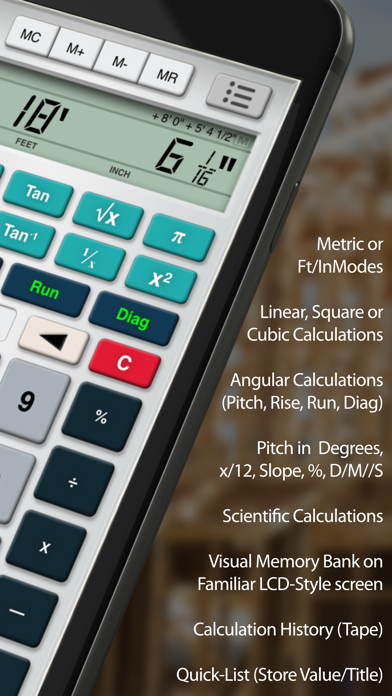
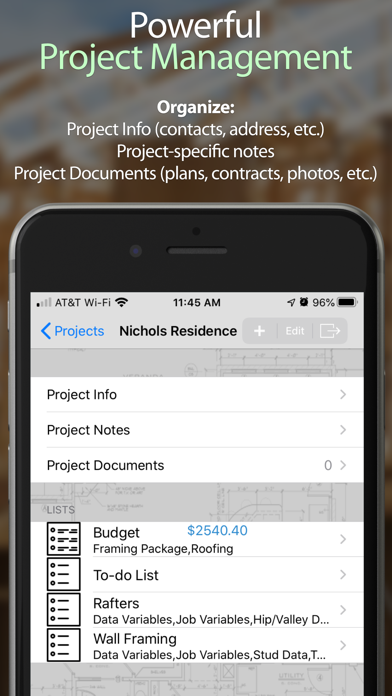


About Builder's Helper MAX
The description on the store listing
The most advanced, feature-rich, intuitive & user-friendly construction app available is BACK, Rebuilt from the ground up for modern devices, with universal support for both iPhone and iPad!
With its easy-to-use layout & features, it is capable of handling even the most demanding construction projects, and blows expensive stand-alone construction calculators out of the water at a fraction of the cost!
Whether an experienced tradesman or novice DIYer, you will find Carpenter’s Helper the perfect companion for every project, in the office and in the field.
----
Features:
• Calculator: Includes all of the features you would expect to find on an advanced Construction Calculator, but …
Read the full description
The most advanced, feature-rich, intuitive & user-friendly construction app available is BACK, Rebuilt from the ground up for modern devices, with universal support for both iPhone and iPad! With its easy-to-use layout & features, it is capable of handling even the most demanding construction projects, and blows expensive stand-alone construction calculators out of the water at a fraction of the cost! Whether an experienced tradesman or novice DIYer, you will find Carpenter’s Helper the perfect companion for every project, in the office and in the field. ---- Features: • Calculator: Includes all of the features you would expect to find on an advanced Construction Calculator, but redesigned and optimized for the touch screen. Easily calculate linear, square & cubic measurements in English (Yards, Feet, Inches, Inch Fractions [up to x/128”]) & Metric (Millimeters, Centimeters, Meters), and convert easily between the two unit modes with a convenient [E/M] toggle. Store & recall triangular measurements to calculate roof pitch, rafter lengths, stair lengths, and more with the convenient [Pitch], [Rise], [Run] and [Diagonal] buttons. When any 2 values are stored, the other 2 are generated automatically! The [Tape] feature keeps an easy-to-read list of your calculations for error-checking, while the Memory Bank feature allows you to Add, Subtract, and recall stored values with a running ticker displayed in the LCD area. Plus we just added a NEW Quick-List feature, which allows you to label and store often-used values for quicker entry into your equation! • Notepad: Keep important notes within one tap of your calculator, supporting multiple pages and exporting to PDF. • Projects: Create lists of data in Text-Only, Simplified, or Detailed lists, and store in organized Projects. Useful for take-offs, estimating, budgets, material lists, etc. Lists can even be tabulated to include running totals on the bottom! Not only does it keep track of important project info & create powerful lists, but you can also store project documents (like budgets, contracts, plans, etc.) & images (either by attaching images from you photo library or taking new ones). And of course you can Print or export your Project data via email as a PDF! • Quick-Jobs: Graphical interface to easily calculate all kinds of construction projects, large or small. With just a few known parameters, Quick-Jobs will automatically fill-in and calculate the rest of the project for you. These Quick-Jobs are included: -Rafters -Stairs -Arc/Circle -Column/Cone -Crown/Miter -Concrete -Conc. Block -Drywall -Flooring -Painting -Roof -Convert -Fencing (Imperial-Mode Only) -Decking (Imperial-Mode Only) -Wall Framing (Imperial-Mode Only) -Board Feet Calc. (Imperial-Mode Only) You can also export all of your QJ data to be included with a Project, or export separately. ---- With Builder’s Helper, you’ll always have the calculating power you need on you, every time you need it. And with all of the additional features, you’ll be able to take estimating, take-offs, & on-site job performance to a whole new level!
Installs, last 30 days
Apple does not publish download counts. Estimates are in testing.
Estimated store revenue Estimated Beta
App Store, worldwide, monthly rate from the last 13 chart days to 20 Nov 2026
Below the top 100 grossing apps in the markets we calibrate. In the United States that usually means under about $6.4M a month. App Store purchases and subscriptions only, before Apple's 15 to 30% fee. Ads and web payments are not included.
Ratings
1,757 ratings, 1,757 reviews
No rating breakdown published for this app.
Recent reviews
Latest public reviews from the store
- 17 Feb 2022
This app made me look good
I was out in the middle of a job, stubbing up electrical raceway, 50’ from the nearest point to measure from, downloaded this app, added the measurements off of the architectural prints, and hit my 4” walls. It’s great.
- 26 Sep 2021
Don’t worry about math errors.
This calc. is the bomb. Saves time and money by eliminating mental math errors. Easy to use and always handy since my phone is now always in my carpenter’s tool bag. The Pythagorean theorem calc feature is great for squaring things up.
- 27 May 2021
It’s a good app but...
As a Project Manager I absolutely love the idea of this app but there are a few things I have an issue with: 1. Issues with Crashing - This is the most crucial out of all the issues. During the process of filling out quick jobs and saving, there is a significant amount of crashing to where I am having to start over. Obviously when time is of the essence, this is a problem. 2. Quick jobs - Example: Let’s say I have drywall, painting and flooring for a single room. Well it would be lovely that when after filling out the proper fields that I can save all trades under one field rather than Saving each individual trade into the project. 3. When using the notepad; you have very limited space so technically there is not enough area to type on each sheet. Example: When typing from left to right of the notepad, you get a little over half of the notepad before it moves to the next line. SIDE NOTE: I did notice that if you save to the project then make an additional edit you will have more space to type. Device: IPad Pro 12.9 (4th Generation) So far these are the issues that I have noticed. If any other issues arise I will make a note. Other than that, the idea of this app is a remarka
- 19 May 2021
Project Superintendent
Love this app, for yrs I used a Constuction calculator, one more item to carry around. Now it’s on all my devices and in my pocket wherever I go, ready for uses. Works great, just as good as the ones I bought at The big box stores in the past.
What reviewers bring up
Topics mentioned in the latest 8 reviews, by how many reviews mention them
Liked in good reviews (7 reviews)
- builders helper 3
- construction 3
- tool 3
- calculating materials 2
- materials needed 2
- calculator 2
- concrete 2
- several 2
Raised in bad reviews (0 reviews)
No topic comes up twice.
Top chart positions
Latest App Store chart ranks by country, last 10 days
Not in any tracked top chart in the last 10 days.
Builder's Helper MAX history
Release, install milestones, listing and store changes
- First released on the store 16 Sep 2020
Update frequency
How often Builder's Helper MAX ships a new version, month by month
0 updates in the last 12 months. Less often than most similar apps: they shipped a median of 1 updates in the same year.
Recent versions
Current version 1.24
- Version 1.247 Jul 2022
Bug fixes and feature enhancements
Listing keywords
Words and phrases Builder's Helper MAX repeats most in its store listing
Top phrases: imperial mode (4), quick jobs (3), construction projects (2), take offs (2).
Highlighted words also appear in the title. Counts cover the title, short description and description.
Compliance
What the listing and the app package show
- Store status
- Live
- Upkeep
- No update since 7 Jul 2022
- Age rating
- 4+
Apps like Builder's Helper MAX
 نفاذ | NAFATHNATIONAL INFORMATION CENTER★ 2.95
 Wand Pro Remote (WeMod)WeMod LLC★ 4.65
 MyWaterSD - City of San DiegoSmart Energy Systems LLC★ 4.56
 Folder LockNewSoftwares.net★ 4.15
 Settings App For PhonePhone Utilities★ 4.44
 HondataAlphabit Software Inc.★ 4.71
 Akaso SmartProexpress Distributor LLC★ 4.65
 PDF Merge - Combine & Join PDFHaris Tayyab★ 4.65
 ANDM:Bahra Ibrahim★ 3.97
Builder's Helper MAX: questions and answers
Who makes Builder's Helper MAX?
Builder's Helper MAX is published by My Pie Interactive.
When was Builder's Helper MAX last updated?
The latest version (1.24) was released on 7 Jul 2022.
Is Builder's Helper MAX free?
Yes. Builder's Helper MAX is free to download.
Is Builder's Helper MAX still available?
Yes. Builder's Helper MAX is live on App Store as of 20 Nov 2026.
Track Builder's Helper MAX and its competitors
Watch any app for new versions, rating drops, chart moves and removals. Free plan, no card.