
- Installs
- —
- Apple does not publish download counts
- Rating
- 1.0
- Ratings
- 1
- 1 reviews
- Version
- 4.4
- Updated 20 Jan 2023
- Released
- 16 Jul 2020
- Tracked since 10 May 2026
- Size
- 25 MB
- Needs 13.0
Screenshots


About CashflowPlan
The description on the store listing
+ What is CashflowPlan
CashflowPlan archives your financial transactions to create and edit a sources-costs budget with detailed views and charts.
Simple yet powerful: CashflowPlan helps you to manage your future Cash Flow in a meaningful way. Treat yourself to a greater peace of mind and instead of back-tracking your finances, take a deep look into your future.
+ CashflowPlan is universal
You can use CashflowPlan on your iPhone, iPad and Mac. With your Apple Id CashflowPlan syncs your budgets on all your devices.
+ CashflowPlan first setup
Just out of the startup welcome slides, name your accounts for setup: up to four. You can choose name, color and order.
Press the button with three …
Read the full description
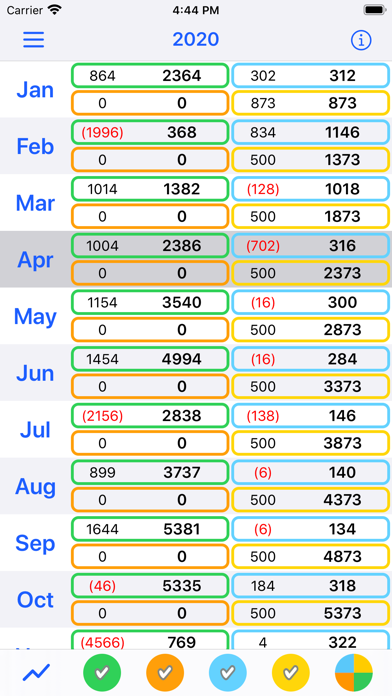
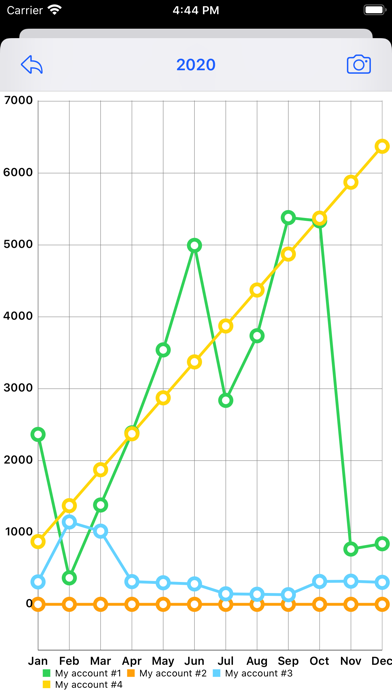
+ What is CashflowPlan CashflowPlan archives your financial transactions to create and edit a sources-costs budget with detailed views and charts. Simple yet powerful: CashflowPlan helps you to manage your future Cash Flow in a meaningful way. Treat yourself to a greater peace of mind and instead of back-tracking your finances, take a deep look into your future. + CashflowPlan is universal You can use CashflowPlan on your iPhone, iPad and Mac. With your Apple Id CashflowPlan syncs your budgets on all your devices. + CashflowPlan first setup Just out of the startup welcome slides, name your accounts for setup: up to four. You can choose name, color and order. Press the button with three stripes (Menu button) which has various choices including 'Settings', the icon with the gears, where you find: - Accounts: for names and order - Accounts color - Assets and Snapshots: assets and accounts added together to create a list of Snapshots at user-defined dates - Years Archive: archive management menu to save and load whole years + Build your first budget CashflowPlan has two main views: - Year view - Month view CashflowPlan, just downloaded, presents the current year at zero, with all months each containing just one pre-set transaction with the initial balance at zero. Select the view of the month you are currently in: you can start adding transactions to the accounts that interest you there. For each transaction you have a description and a date for which you enter movements on the accounts such as uses/costs (-) or sources/revenues (+): transactions already executed can be marked as 'Done'. Foreseen transactions will be left unmarked. By doing so, in the month view, you will have an eye on what has already happened and what you foresee that will happen and when, in the near future. For the first transaction, for example, enter the description 'Initial balance' and the balance on that date of your accounts. By continuing to enter transactions, in each month, you will build your sources-costs budget. + Selection of visible accounts In the year view you find five buttons with colored icons: the first four for each account. If they are marked the account is visible, hidden otherwise. The fifth icon allows you to choose the view, for all visible accounts: - separate, or - summary, cumulative. Just a single tap or click. + More details for editing transactions Edit a transaction simply with a tap or click on the transaction row. To delete a transaction just swipe the row left on iPhone/iPad, or use the swipe of your finger on the Apple Magic Mouse on the Mac. 'Repeat' checkboxes: you can mark them active for a periodic 'Weekly' or 'Monthly' transaction. The whole year will then be weekly or monthly filled with the transaction. Another very useful checkbox is the 'Active' checkbox: it is used to answer the question 'What if?'. If the checkbox is not checked, the transaction is inactive and will appear greyed out in the month: you can thus see the effect that the inactive transaction has and the future consequences. Just check the 'Active' check box again to reactivate the transaction. A context menu is also provided for transactions: on the iPhone and iPad, keep the transaction pressed for a few seconds. On Mac, use the right mouse button on the transaction, or use the keyboard [ctrl] key with a mouse click. From the menu that opens you can select the editing form or copy/cut/paste the transaction, or delete it. + Charts At any time you can view a user selected line chart or a bar chart, that shows you the trend of the accounts both for the whole year or for each month. Accounts are tracked using their colors. + CashflowPlan is freemium App evaluation is free for a 30-day trial period beginning when you enter your first transaction. In the app you find in-app purchases for the premium version without time limits or limited time subscriptions
Installs
Apple does not publish download counts. Estimates are in testing.
We publish iOS estimates only after they pass a back-test against real numbers. Chart history below is measured.
Estimated store revenue Estimated Beta
App Store, worldwide, monthly rate from the last 14 chart days to 21 Nov 2026
Below the top 100 grossing apps in the markets we calibrate. In the United States that usually means under about $6.4M a month. App Store purchases and subscriptions only, before Apple's 15 to 30% fee. Ads and web payments are not included.
Ratings
1 ratings, 1 reviews
No rating breakdown published for this app.
Recent reviews
Latest public reviews from the store
No reviews in our sample for this app yet.
Top chart positions
Latest App Store chart ranks by country, last 10 days
Not in any tracked top chart in the last 10 days.
CashflowPlan history
Release, install milestones, listing and store changes
- First released on the store 16 Jul 2020
Update frequency
How often CashflowPlan ships a new version, month by month
0 updates in the last 12 months. Less often than most similar apps: they shipped a median of 2 updates in the same year.
Recent versions
Current version 4.4
- Version 4.420 Jan 2023
• taps on a day with multiple transactions shows/hides the transactions grouped into a single transaction • bug fix
Listing keywords
Words and phrases CashflowPlan repeats most in its store listing
Top phrases: sources costs budget (2), tap or click (2), weekly or monthly (2), costs budget (2), initial balance (2).
Highlighted words also appear in the title. Counts cover the title, short description and description.
Compliance
What the listing and the app package show
- Store status
- Live
- Upkeep
- No update since 20 Jan 2023
- Age rating
- 4+
Apps like CashflowPlan
 BofA Point of Sale - MobileBank of America★ 3.88
 Purpl Digital WalletPurpl SAL★ 4.54
 Expedier: Send Money GloballyEXPEDIER INC★ 4.52
 Cenoa: Get Paid GloballyCENOA PTE. LTD.★ 4.62
 Texas Traditions MobileTexas Traditions Bank★ 4.74
 Minhas Finanças | PessoaisNimtech Tecnologia da Informacao LTDA★ 4.94
 SkyCashSkyCash★ 2.78
 FactSet 2.0 (legacy)FactSet Research Systems, Inc.★ 3.96
 My Funds - Portfolio TrackerQTech Solutions Pty Ltd★ 3.78
CashflowPlan: questions and answers
Who makes CashflowPlan?
CashflowPlan is published by iStArtApp.
When was CashflowPlan last updated?
The latest version (4.4) was released on 20 Jan 2023.
Is CashflowPlan free?
Yes. CashflowPlan is free to download.
Is CashflowPlan still available?
Yes. CashflowPlan is live on App Store as of 1 Jul 2026.
Track CashflowPlan and its competitors
Watch any app for new versions, rating drops, chart moves and removals. Free plan, no card.