
- Installs
- —
- Apple does not publish download counts
- Rating
- 3.07
- Ratings
- 729
- 729 reviews
- Version
- 4.130.0
- Updated 29 Sep 2026
- Released
- 27 Aug 2014
- Tracked since 10 May 2026
- Size
- 45 MB
- Needs 15
Screenshots




About Classkick
The description on the store listing
Classkick is a free app that students work on and get help instantly from their teacher and peers.
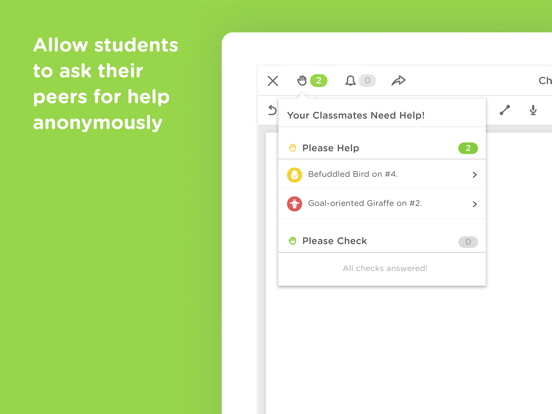
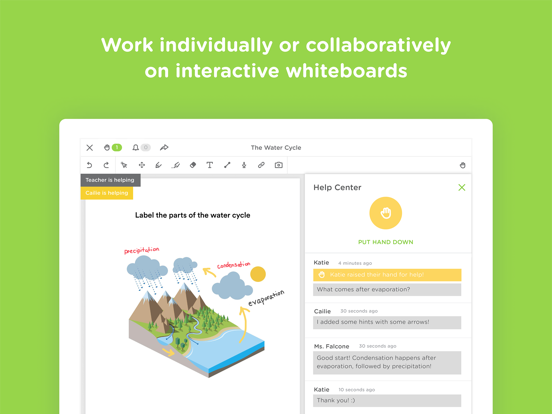
Students work on assignments with their Chromebooks, laptops, or iPads, while getting help from teachers and peers instantly. Teachers create assignments, see all their students’ work in real-time, and give LOTS of student feedback. Best of all, students can help each other anonymously.
Using Classkick, feedback to students increases by 300% and grading time is cut in half.
“Classkick is every teacher’s dream.” - Lynne Shalman, Chapin School
“Students love Classkick...it was magic!” - Greg Port, Seton College
TEACHERS...
- CREATE paperless assignments using existing worksheets, audio, …
Read the full description
Classkick is a free app that students work on and get help instantly from their teacher and peers. Students work on assignments with their Chromebooks, laptops, or iPads, while getting help from teachers and peers instantly. Teachers create assignments, see all their students’ work in real-time, and give LOTS of student feedback. Best of all, students can help each other anonymously. Using Classkick, feedback to students increases by 300% and grading time is cut in half. “Classkick is every teacher’s dream.” - Lynne Shalman, Chapin School “Students love Classkick...it was magic!” - Greg Port, Seton College TEACHERS... - CREATE paperless assignments using existing worksheets, audio, video or web content. - SEE every students’ work simultaneously. - GIVE instant feedback when it is most important. - FACILITATE peer-to-peer feedback and learning. STUDENTS... - WORK at their own pace and even on their own time. - ASK for help privately. - HELP their peers. USE IT... - in class or at home. - in traditional or flipped classrooms. - as a group together or on your own time individually. FOR… - assignments - quizzes - station work - do nows/exit slips - guided practice - independent practice - homework
Installs since 29 Aug 2026
Apple does not publish download counts. Estimates are in testing.
Estimated store revenue Estimated Beta
App Store, worldwide, monthly rate from the last 13 chart days to 20 Nov 2026
Below the top 100 grossing apps in the markets we calibrate. In the United States that usually means under about $6.4M a month. App Store purchases and subscriptions only, before Apple's 15 to 30% fee. Ads and web payments are not included.
Ratings
729 ratings, 729 reviews
No rating breakdown published for this app.
Recent reviews
Latest public reviews from the store
- 8 Feb 2025
Stickers placing incorrectly . . .
When grading students’ math work using my iPad, things appear to be going smoothly, but once I move back over to my work PC (Windows 11), the stickers are floating off the right side of the page. Even worse, some of the points don’t register, and I have to delete the sticker and place another sticker. Given how many students I have, this is unacceptable; and despite the convenience of working on my iPad, I’m beginning to mistrust this app — a shame given how useful Classkick can be.
- 14 Feb 2024
The Best App for Giving Live, Immediate Feedback
No other app have I found easier to see students’ work and be able to give feedback WHILE they are working. I can have answer boxes on my assignments for my students to type in, and I can choose if they see if they got it correct or if just I see it. I can also write on their assignment and see them writing live. I have a Birds Eye view of everyone’s work as well. Great app for assignments in class. The first app that’s come close to replacing pencil and paper in a math class.
- 29 Sep 2021
Does the job but needs updating
I’m a Junior student in High School I’ve been using class kick for my math classes on my personal iPad. Does and gets the job done how it should. However it would be nice if you could update it where one can use the Split View feature that Apple IOS update came out with. There’s been many times I’ve been needing to go back and forth from my calculator app to Classkick just to be able to type a math problem. Meanwhile all my other school applications do function with the Split View feature. In addition the class kick screen does not fully fill up my entire iPad. It looks like as it’ll fit perfectly for the previous model iPads but for mine the screen is smaller then my actually screen size. But other than that the app works how it’s supposed to.
- 18 Sep 2021
Creative digital space for me and my students.
I teach high school theatre arts and love the creative space that Classkick allows. My students have the option to choose text color, add photos & links. It has become our interactive notebook where I can easily join their slides as they work and write them to guide their work. I love adding sticker grades and use my Bitmoji. Even my 18 year old students enjoy seeing a fun Bitmoji on their work. The back channel is awesome as students can chat directly on the slide. Raising a yellow hand for help and green hand for completion is very helpful in streamlining my grading. I love that I can accommodate for my students who have an IEP by leaving them an audio message or linking a video explanation of an assignment. It has changed my classroom. I cannot speak highly enough of Classkick. I personally pay for the portfolios. I also love that students can collaborate on each other’s slides (or you can turn that function off).They think it is fun to join others. Classkick has modernized my classroom and provided a communication tool that has helped my students and I bond further in both synchronous and asynchronous learning.
What reviewers bring up
Topics mentioned in the latest 8 reviews, by how many reviews mention them
Liked in good reviews (3 reviews)
- assignment 3
- students 3
- immediate 2
- feedback 2
- grading 2
- giving 2
- answer 2
- choose 2
Raised in bad reviews (3 reviews)
- notability 3
- screen 3
- writing 2
- pencil 2
- easily 2
- apple 2
Top chart positions
Latest App Store chart ranks by country, last 10 days
Not in any tracked top chart in the last 10 days.
Classkick history
Release, install milestones, listing and store changes
- First released on the store 27 Aug 2014
Update frequency
How often Classkick ships a new version, month by month
3 updates in the last 12 months. More often than most similar apps: they shipped a median of 0 updates in the same year.
Recent versions
Current version 4.130.0
- Version 4.128.029 Sep 2026
New in this release: • Control who sees audio transcripts — turn transcriptions on or off for a whole roster assignment, and override that setting on individual recordings. • AI fill-in-the-blank questions — support for collapsible fill-in-the-blank questions, with easier-to-grab handles. • Bug fix to restore support for deep links and Google Classroom links. New in recent releases: • Bring students to this slide: Teachers can now pull the whole class to the question they're talking about. • The whole class view now supports animated gifs! • Performance updates and improvements. • Lasso tool: Adds a basic lasso selection tool to the legacy teacher canvas. (Lasso is now available for students in the Classkick Student app). • Adds support for read only AI Fill In The Blank (Students have access to AI Fill In The Blank in the Classkick Student app). • Legacy app can now read calligraphic pen strokes and render oversized textboxes created in the new app. • Classkick now proudly offers support for the following languages: Arabic, Chinese (Hong Kong), French, French (Canadian), German, Japanese, Korean, Spanish, and Spanish (United States). • Student Helper is now live. Now with dramatically improved launch times for teachers and students alike! • Updates brand colors throughout the app. • Student Helper • Turning it on applies to that specific roster on that specific assignment. You can turn it off at any time, and all conversations on that assignment and roster will end. • When you turn it on, your students can summon an Instant Helper. • It looks at the assignment and the student's work and helps them where they're stuck! • It takes them one step closer to the correct answer at a time. • Instant Helper speaks to students on their level. • Instant Helper does not give students the answer. • All conversations occur in the student work chat history and can be reviewed by the teacher at any time. • You spoke, we listened. The math keyboard now boasts increased compatibility and stability with assignments created on the web! • Image caching added for newly uploaded images, saving time on downloads! • Adds Assignments in this Class. Now the Manage Roster View has a tab devoted specifically to handing out and viewing assignments in this class. • Fix for the math tool. • Fix for PDF Export affecting a good number of teachers and students. • Fix for an old bug causing the cover slide to temporarily expose the contents of a slide when students first visit it. Recent bug fixes: • Other stability fixes and improvements.
- Version 4.122.01 Aug 2026
New in this release: • Bring students to this slide: Teachers can now pull the whole class to the question they're talking about. • The whole class view now supports animated gifs! • Performance updates and improvements. New in recent releases: • Classkick now proudly offers support for the following languages: Arabic, Chinese (Hong Kong), French, French (Canadian), German, Japanese, Korean, Spanish, and Spanish (United States). • Classkick is adding better support for accessibility! • Student Helper is now live. Now with dramatically improved launch times for teachers and students alike! • Updates brand colors throughout the app. • Student Helper • Turning it on applies to that specific roster on that specific assignment. You can turn it off at any time, and all conversations on that assignment and roster will end. • When you turn it on, your students can summon an Instant Helper. • It looks at the assignment and the student's work and helps them where they're stuck! • It takes them one step closer to the correct answer at a time. • Instant Helper speaks to students on their level. • Instant Helper does not give students the answer. • All conversations occur in the student work chat history and can be reviewed by the teacher at any time. • You spoke, we listened. The math keyboard now boasts increased compatibility and stability with assignments created on the web! • Image caching added for newly uploaded images, saving time on downloads! • Adds Assignments in this Class. Now the Manage Roster View has a tab devoted specifically to handing out and viewing assignments in this class. • Fix for the math tool. • Fix for PDF Export affecting a good number of teachers and students. • Fix for an old bug causing the cover slide to temporarily expose the contents of a slide when students first visit it. Recent bug fixes: • Other stability fixes and improvements.
- Version 4.120.29 Feb 2026
New in this release: • Performance updates and improvements. New in recent releases: • Classkick now proudly offers support for the following languages: Arabic, Chinese (Hong Kong), French, French (Canadian), German, Japanese, Korean, Spanish, and Spanish (United States). • Classkick is adding better support for accessibility! • Student Helper is now live. Now with dramatically improved launch times for teachers and students alike! • Updates brand colors throughout the app. • Student Helper • Turning it on applies to that specific roster on that specific assignment. You can turn it off at any time, and all conversations on that assignment and roster will end. • When you turn it on, your students can summon an Instant Helper. • It looks at the assignment and the student's work and helps them where they're stuck! • It takes them one step closer to the correct answer at a time. • Instant Helper speaks to students on their level. • Instant Helper does not give students the answer. • All conversations occur in the student work chat history and can be reviewed by the teacher at any time. • You spoke, we listened. The math keyboard now boasts increased compatibility and stability with assignments created on the web! • Image caching added for newly uploaded images, saving time on downloads! • Adds Assignments in this Class. Now the Manage Roster View has a tab devoted specifically to handing out and viewing assignments in this class. • Fix for the math tool. • Fix for PDF Export affecting a good number of teachers and students. • Fix for an old bug causing the cover slide to temporarily expose the contents of a slide when students first visit it. Recent bug fixes: • Other stability fixes and improvements.
Listing keywords
Words and phrases Classkick repeats most in its store listing
Top phrases: students work (5), teachers create (2).
Highlighted words also appear in the title. Counts cover the title, short description and description.
Compliance
What the listing and the app package show
- Store status
- Live
- Upkeep
- Updated 29 Sep 2026
- Age rating
- 4+
Apps like Classkick
 Moon GlobeMidnight Martian★ 4.64
 Freaky FocusErik Wegener★ 4.19
 CCNY Student LifeNovalsys, Inc★ 4.65
 Baby games for girls 3+Viacheslav Fonderkin★ 4.29
 قياس القدراتbader alshammari★ 4.32
 IANKI Flashcardstomokazu murase★ 4.19
 Simpia – Learn piano by songsSMULIE COMPANY LIMITED★ 4.66
 Kids Word Search LiteMaelstrom Interactive★ 3.77
 Little Fire Station For KidsFox and Sheep GmbH★ 4.35
Classkick: questions and answers
Who makes Classkick?
Classkick is published by Classwork Co.
When was Classkick last updated?
The latest version (4.130.0) was released on 29 Sep 2026.
Is Classkick free?
Yes. Classkick is free to download.
Is Classkick still available?
Yes. Classkick is live on App Store as of 14 Nov 2026.
Track Classkick and its competitors
Watch any app for new versions, rating drops, chart moves and removals. Free plan, no card.