
- Installs
- —
- Apple does not publish download counts
- Rating
- 4.07
- Ratings
- 99
- 99 reviews
- Version
- 1.1
- Updated 21 Jul 2023
- Released
- 31 Mar 2023
- Tracked since 10 May 2026
- Size
- 28 MB
- Needs 14.0
Screenshots
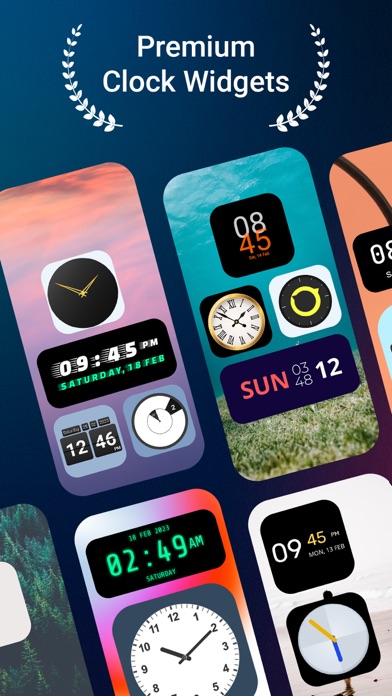


About Clock Widgets - Custom Clock
The description on the store listing
Clock Widgets : Custom Clock comes with both digital and analog clock widgets for iPhone.
If you are looking for a clock app that also comes with the widget function, then this clock widget is your only solution. Clock Widgets : Custom Clock app brings you both analog and digital large clock displays with accurate time and date. You don't have to open a calendar or a clock again if you are using our amazing time widget app. You can set up wallpapers of your choice and use the watch widget on the home screen. Install Clock Widgets : Custom Clock app free from the store and set it up right away!
You probably have some sort of clock app on your phone always as it is necessary to check time. …
Read the full description
Clock Widgets : Custom Clock comes with both digital and analog clock widgets for iPhone. If you are looking for a clock app that also comes with the widget function, then this clock widget is your only solution. Clock Widgets : Custom Clock app brings you both analog and digital large clock displays with accurate time and date. You don't have to open a calendar or a clock again if you are using our amazing time widget app. You can set up wallpapers of your choice and use the watch widget on the home screen. Install Clock Widgets : Custom Clock app free from the store and set it up right away! You probably have some sort of clock app on your phone always as it is necessary to check time. We are here to make it easier for you with our clock widget. You can check the current time and date on the screen using this digital clock widget. ** How to Use Clock Widgets : Custom Clock : If you are searching for a large clock widget that can be displayed on the screen, then this custom clock is here to help. We have designed this widget time app in such a way that it contains both classic analog clock and digital time clock with date. Classic clock widgets display the time and date in a traditional analog format. They come in a variety of styles, including vintage, modern, and minimalist, and are the best choice if you prefer a timeless look. Free digital clocks, on the other hand, display the time and date in a digital format. Whether you like big clock displays or easy to view watches, this digital lock screen clock widget is your right choice. Time widgets app is customizable so you can use any wallpaper you like and customize the clock according to your preference. Download the Clock Widgets : Custom Clock app and check time and date anytime, anywhere in the world. KEY FEATURES: -Customisable appearance: The clock widget app comes with customisable functions. From a wide range of wallpapers and designs, you can select your favourite time widget effortlessly. Whether you want new analog clock widgets for home screen for or digital date and time widgets to access quickly, trying our clocks for the home screen will be worth the effort. Custom clock widgets can be placed anywhere on the screen, allowing you to see the time and date at a glance easily. -Improved functionality: Clock widget comes with updated features for every user. You can choose your desired clock from different widgets, place it on the home screen, and see the date and time anytime. Also, we have designed this clock widget with seconds for everyone worldwide. -Ads removed Whether you're looking for a simple and functional analog clock widget, or a more advanced digital clock widget that provides additional features, this home screen clock is the solution. You can customize the widgets according to your requirements and place it anywhere on the home screen for easier accessibility. Without going through any complicated functions, you can simply open the clock widget and use it. Overall, Clock Widgets is a great application for users interested in time-telling widgets. It's easy to use, intuitive, and highly functional. SUBSCRIPTION PRICING AND TERMS Order one of our Premium widget plans to remove all ads and unlock all exclusive widgets. Premium widgets 1 month - $0.99 / Per Month Premium widgets 1 Year - $5.99 / Per Year *The price is for the US. Price may be different for other countries. - Payment will be charged to your Apple ID account at the confirmation of purchase. - Subscription automatically renews unless it is canceled at least 24 hours before the end of the current period. - Your account will be charged for renewal within 24 hours prior to the end of the current period. - You can manage and cancel your subscriptions by going to your account settings on the App Store after purchase. Terms of Use: https://anpexa.com/terms-conditions/ Privacy Policy: https://anpexa.com/privacy-policy/ Install the Clock Widgets : Custom Clock app right now!
Installs since 29 Aug 2026
Apple does not publish download counts. Estimates are in testing.
Estimated store revenue Estimated Beta
App Store, worldwide, monthly rate from the last 13 chart days to 20 Nov 2026
Below the top 100 grossing apps in the markets we calibrate. In the United States that usually means under about $6.4M a month. App Store purchases and subscriptions only, before Apple's 15 to 30% fee. Ads and web payments are not included.
Ratings
99 ratings, 99 reviews
No rating breakdown published for this app.
Recent reviews
Latest public reviews from the store
No reviews in our sample for this app yet.
Top chart positions
Latest App Store chart ranks by country, last 10 days
Not in any tracked top chart in the last 10 days.
Clock Widgets - Custom Clock history
Release, install milestones, listing and store changes
- First released on the store 31 Mar 2023
Update frequency
How often Clock Widgets - Custom Clock ships a new version, month by month
0 updates in the last 12 months. Less often than most similar apps: they shipped a median of 2 updates in the same year.
Recent versions
Current version 1.1
- Version 1.121 Jul 2023
-Ads Removed -Minor Bug fixed.
Listing keywords
Words and phrases Clock Widgets - Custom Clock repeats most in its store listing
Top phrases: clock widgets (12), clock widget (11), custom clock (9), clock widgets custom (7), widgets custom clock (7).
Highlighted words also appear in the title. Counts cover the title, short description and description.
Compliance
What the listing and the app package show
- Store status
- Live
- Upkeep
- No update since 21 Jul 2023
- Age rating
- 4+
Apps like Clock Widgets - Custom Clock
 Remes: Deleted MessagesEkrem Boyabat★ 4.22
 Hidden Cameras Finder, ScannerISAAC MARTINEAU GERMAIN★ 4.48
 Reptile Rocket: pet trackerMikhail Agapov★ 4.29
 الو ليبياAlmadar Aljadid★ 3.82
 NetScan - IP ScannerSenol Cagir★ 4.32
 Digital Analog Clock Widget江 邱★ 3.76
 Fast Cast - Screen Mirror意 田★ 2.99
 OTR DiagnosticsOTR Performance★ 4.0
 World Clock - Time TravelerDavid Richmond★ 4.4
Clock Widgets - Custom Clock: questions and answers
Who makes Clock Widgets - Custom Clock?
Clock Widgets - Custom Clock is published by Atomdev Labs.
When was Clock Widgets - Custom Clock last updated?
The latest version (1.1) was released on 21 Jul 2023.
Is Clock Widgets - Custom Clock free?
Yes. Clock Widgets - Custom Clock is free to download.
Is Clock Widgets - Custom Clock still available?
Yes. Clock Widgets - Custom Clock is live on App Store as of 14 Nov 2026.
Track Clock Widgets - Custom Clock and its competitors
Watch any app for new versions, rating drops, chart moves and removals. Free plan, no card.