
- Installs
- —
- Apple does not publish download counts
- Rating
- 2.92
- Ratings
- 268
- 268 reviews
- Version
- 3.40.1
- Updated 18 Apr 2024
- Released
- 25 Jul 2014
- Tracked since 10 May 2026
- Size
- 105 MB
- Needs 11.0
Screenshots




About ClockShark
The description on the store listing
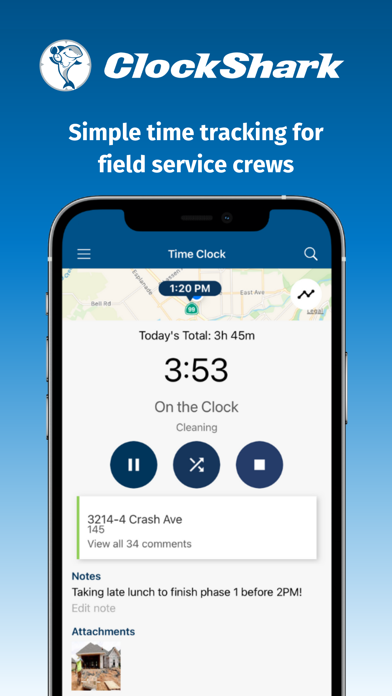
ClockShark is a cloud-based timekeeping and scheduling app used by construction and other field service companies to track time, schedule shifts, see who’s working, and help manage jobs from start to finish.
Companies with mobile teams can manage their time, teams, and jobs from anywhere with any device.
Hear what customers have to say:
“We save so much time and it makes our job much easier.” Stephen M. CEO/Owner, Construction Company (saved 10+ hours/month)
“The system integrated perfectly to QuickBooks and it made payroll a breeze.” Adrian P., Owner (saved $1200/month and 10 hours/month)
“The crew loves that they can take pictures and insert it into the app to show that their work …
Read the full description
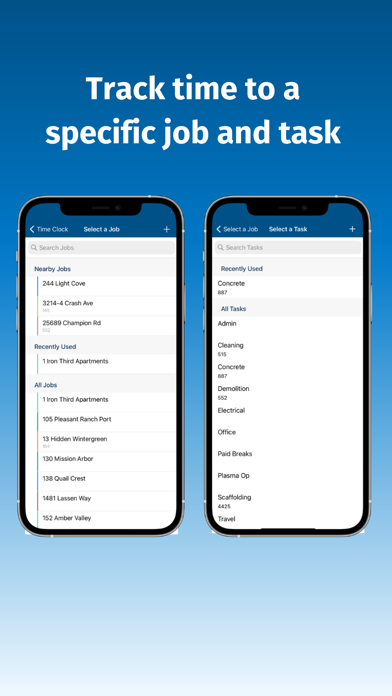
ClockShark is a cloud-based timekeeping and scheduling app used by construction and other field service companies to track time, schedule shifts, see who’s working, and help manage jobs from start to finish. Companies with mobile teams can manage their time, teams, and jobs from anywhere with any device. Hear what customers have to say: “We save so much time and it makes our job much easier.” Stephen M. CEO/Owner, Construction Company (saved 10+ hours/month) “The system integrated perfectly to QuickBooks and it made payroll a breeze.” Adrian P., Owner (saved $1200/month and 10 hours/month) “The crew loves that they can take pictures and insert it into the app to show that their work has been completed.” - Abel C., President, Janitorial Company (saved 25+ hours/month) FEATURES: Easy Time Tracking ● Track your team’s time in one place—no more messy paper timesheets ● Easily switch between jobs and tasks, take a break, or clock in or out ● Clock in and out of a new shift right from the scheduler ● Track time against each job or task for better job costing, payroll, and billing ● Review and approve your team’s time ● Allow a crew leader to track time for everyone on their crew with CrewClock™ ● Turn a tablet or phone into a kiosk so multiple people can track their time using a single device Accurate Timesheets ● Confirm your team’s exact clock in and clock out locations for more accurate timesheets ● Get GPS coordinates every time your team uses the mobile app to clock in, start a new job or task, and clock out ● Remind your crew to clock in and out when they’re near the jobsite with geofencing technology ● Receive notifications when employees clock in or out early, late, miss a shift, go into overtime, or clock in or out outside the geofence See Who’s Working ● See your entire team on the map with Who’s Working Now ● Know when your crew is on the jobsite and how long they were there ● Use the GPSTrak™ feature to confirm your team’s location with a breadcrumb trail you can play back anytime ● When enabled, the GPSTrak feature updates your team’s location every 15 – 20 minutes ● Only see your team’s location when they’re clocked in—not when they’re clocked out or on a break Get the Job Done Fast ● Easily schedule your team for shifts ● Teams can see their schedule at a glance and know exactly what to do each day ● Navigate directly to the jobsite by clicking the job address in the app ● Leave comments, attach photos and other documents, and chat in real time about each job in the app Handle Complex Time Policies ● Set up paid or unpaid time off policies ● Receive and approve time off requests ● Set up overtime rules and apply them to multiple groups or a single person ● Receive overtime alerts Save Time and Money ● Create detailed reports to estimate labor costs more accurately ● Integrate with QuickBooks, ADP, Gusto, Sage, xero, Paychex, MYOB, or any other app you use regularly through our integration with Zapier Respect Your Team’s Privacy ● GPS location tracking doesn’t work when your team is off the clock or on a break ● You’ll only receive GPS location updates when your team is clocked in ● Configure the app to track only the information you want to track Build Trust ● Your customers can see exactly how long the job took ● Your team can easily check their hours against their paycheck ● You can rest easy knowing your team is where they say they are, doing the job they say they’re doing ● Everyone can use the data in ClockShark as a record if there’s ever a question about payroll, invoicing, time, or location Excellent Customer Support ● Call or chat with real people who care about you and your business ● Our customer support team loves helping customers get the most out of their ClockShark subscription ● Contact [email protected] with any questions or call (800) 828-0689 Note: To use the ClockShark mobile app, you need an active trial or paid subscription. Start a free trial at www.clockshark.com/signup.
Installs since 29 Aug 2026
Apple does not publish download counts. Estimates are in testing.
Estimated store revenue Estimated Beta
App Store, worldwide, monthly rate from the last 13 chart days to 20 Nov 2026
Below the top 100 grossing apps in the markets we calibrate. In the United States that usually means under about $6.4M a month. App Store purchases and subscriptions only, before Apple's 15 to 30% fee. Ads and web payments are not included.
Ratings
268 ratings, 268 reviews
No rating breakdown published for this app.
Recent reviews
Latest public reviews from the store
- 19 Jan 2023
Convenient but frustrating to use
I use clockshark to enter daily time sheet info. The data I enter is consistent from day to day; time in, time out, job and task. It takes me up to 20 screen presses to enter that info when it could be a 2 screen press entry. One press to duplicate consistent info from precious day but with current date and time filled in, one press to confirm and submit. I don't like being in this app and having to manually modify data that is consistent from day to day. App developer responded to feedback about technical issues. Improving rating to 3/5. Still could make some general improvements to make daily repeat data entry more efficient.
- 4 Jun 2019
Better than paper, not perfect
I really like the simple UI. Easy to use, and I love that my companies time tracking is all electronic. Saves a lot of hassle and allows me to work from home. The GPS feature is cool. It has a neat timesheet summary page which is handy. It really needs a feature for amending/correcting time mistakes. I forget to clock in or clock out sometimes and I have to hassle the secretaries at my company every time I forget. It’s not like there’s a punch out box by the door to remind you to clock in or out. I’ve stared doing it in the notes but sometimes the secretaries don’t look. Also it crashes or gets into failed sync states. Tech support is very good and helpful, but even they have had to resort to telling me to just reinstall the app because it was an unrecoverable glitch.
- 25 Jul 2018
Super User Friendly, Game Changer!
This app is great great great! Easy to use and add to phones. The gps tracking is great so we can verify our employees marked the correct job, we can pull hours easily for job costing, the employees can see their total hours to verify their paychecks, etc. I used to spend hours on timesheets and no more now that we have the app! Some of the other reviews that are negative say that the employer is always tracking the employee, but the employer can only see the gps location if the employee is “clocked in”, so it doesn’t track gps data when someone is not working. And yes, it does use a very small amount of data, but we use Verizon’s unlimited business plan for 10 phones and the data use always really low.
- 18 Oct 2017
Awesome Application!
I feel like ClockShark is definitely going through growing pains right now but it’s an excellent application with a wealth of functions our company utilizes daily. They’re constantly adding to their program & even though I’ve had a smattering of issues here & there, our team of over 20 has been using the app with ease for nearly two years now. User friendly, great customer service, awesome interface.
What reviewers bring up
Topics mentioned in the latest 8 reviews, by how many reviews mention them
Liked in good reviews (2 reviews)
- user friendly 2
Raised in bad reviews (4 reviews)
- clock 4
- tracking 3
- allow 3
- employees 2
- location 2
- without 2
- tracks 2
- owners 2
Top chart positions
Latest App Store chart ranks by country, last 10 days
Not in any tracked top chart in the last 10 days.
ClockShark history
Release, install milestones, listing and store changes
- First released on the store 25 Jul 2014
Update frequency
How often ClockShark ships a new version, month by month
0 updates in the last 12 months. Less often than most similar apps: they shipped a median of 2 updates in the same year.
Recent versions
Current version 3.40.1
- Version 3.40.118 Apr 2024
Updated support hours
Listing keywords
Words and phrases ClockShark repeats most in its store listing
Top phrases: hours month (3), team’s location (3), who’s working (3), company saved hours (2), confirm your team’s (2).
Highlighted words also appear in the title. Counts cover the title, short description and description.
Compliance
What the listing and the app package show
- Store status
- Live
- Upkeep
- No update since 18 Apr 2024
- Age rating
- 4+
Apps like ClockShark
 JBDev MobileJB Developers, Inc.★ 4.51
 АЗС ЛУКОЙЛ - топливо, бензинООО "ЛУКОЙЛ-Интер-Кард"★ 4.53
 Baltimore Business JournalAmerican City Business Journals★ 4.76
 HR Cloud | Streamlining HRHR Cloud Inc.★ 4.85
 Tecoloco.comTecoloco.com S.A.★ 4.69
 CDK Modern Retail CRMElead1One★ 2.16
 Bonsai - Track Time & Get PaidBonsai Technologies Inc.★ 4.3
 Elevate UCServerdata.Net, Inc.★ 4.05
 Photo Translator - Scanner AppMilan Unjiya★ 4.28
ClockShark: questions and answers
Who makes ClockShark?
ClockShark is published by ClockShark, LLC.
When was ClockShark last updated?
The latest version (3.40.1) was released on 18 Apr 2024.
Is ClockShark free?
Yes. ClockShark is free to download.
Is ClockShark still available?
Yes. ClockShark is live on App Store as of 14 Nov 2026.
Track ClockShark and its competitors
Watch any app for new versions, rating drops, chart moves and removals. Free plan, no card.