
- Installs
- —
- Apple does not publish download counts
- Rating
- —
- Ratings
- —
- Version
- 1.05
- Updated 21 Jan 2023
- Released
- 25 Jan 2013
- Tracked since 10 May 2026
- Size
- 17 MB
- Needs 12.0
Screenshots




About Co-ordinates
The description on the store listing
Co-ordinates introduces basic to more complex skills of map reading and ordered pairs or co-ordinates. The App contains five modules, which focus on a different element of map reading skills and includes, compass directions, alpha-numeric (like a road map B6, F7), numerical (3,4) and negative xy co-ordinates (3, -7). The App includes game like situations, asking users to manipulate, create and interpret maps as well as become more familiar with plotting on xy co-ordinates, including negative xy co-ordinate charts in four quadrants. This App has a wide age range from the first year of school to Year Nine. (Ages 5-14) It is a great pre-cursor to linear equations!
As with all Little …
Read the full description
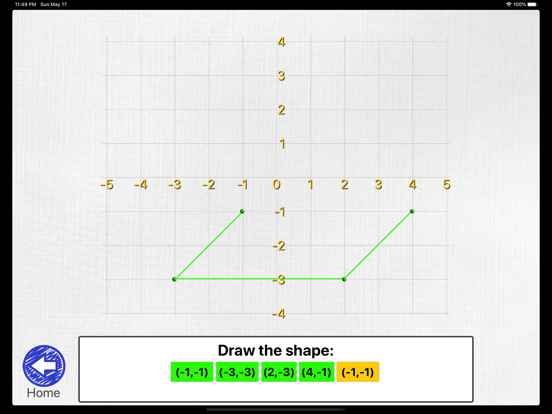
Co-ordinates introduces basic to more complex skills of map reading and ordered pairs or co-ordinates. The App contains five modules, which focus on a different element of map reading skills and includes, compass directions, alpha-numeric (like a road map B6, F7), numerical (3,4) and negative xy co-ordinates (3, -7). The App includes game like situations, asking users to manipulate, create and interpret maps as well as become more familiar with plotting on xy co-ordinates, including negative xy co-ordinate charts in four quadrants. This App has a wide age range from the first year of school to Year Nine. (Ages 5-14) It is a great pre-cursor to linear equations! As with all Little Monkey Apps, this App is designed to be used in conjunction with hands on activities and teacher interaction. Whilst some of the sections or 'modules' can be completed without teacher direction and encourage student-directed learning, our Apps are NEVER designed to be used as a 'learn by yourself' without teacher-student interaction. =Teacher Tool= This is a blank chart in either negative xy chart or a 0-12 grid. It is best used with a teacher/tutor or for peer activities. The numbers are presented as an ordered pair, x, then y axis, or across then up (or down) Use the tools to plot positions, draw shapes, check user understanding through verbal teacher-student interaction. Email or save a picture for use later. If you'd like a teacher tool for alpha-numeric (B6) I suggest you use the Map Maker or put a grid of masking tape on the floor. =Map Maker= Create your own map! Choose from Co-ordinates, Negative Co-ordinates, Alpha-numeric (B6 like a road map), then from Pirate Map, Park Map or Town Map. Drag and drop the features onto the map. Once you have selected and placed at least five objects onto the map, press the next arrow to answer questions about your own map! You could get partners make a map on their own iPad, then swap for the questions (or take it in turn for the placing and questioning!) Off the iPad, use a map from a local area, park or street directory. Come up with some basic questions, or have students write their own questions and answers. Have students DRAW a map of the local park or school, discuss how this might help visitors to find their way around. =Compass Directions= Press the compass rose to move the pirate to the X marks the spot to get to the treasure! Choose from co-ordinates or negative co-ordinates. As an off-iPad activity, set up a grid on the floor in masking tape. Tell students to move North, South etc. Have them move from one position to another in five moves, or seven moves or the shortest way. Put 'road blocks' in the way eg a plastic truck or tree. =Map Reading= Select from Co-ordinates, Negative Co-ordinates, Alpha-numeric, then from Pirate Map, Park Map or Town Map. Answer the questions about the map you see! Reading skills are required to answer the multiple choice style answer. Off the iPad, use a map from a zoo, theme park or local attraction. Look at the symbols used on the map. Discuss why it is important to locate these symbols? Why do map makers use symbols and not words? Are there other features on the map? =Make the Shape= An introduction to plotting co-ordinates on a chart and graph. The numbers are presented as an ordered pair, x, then y axis, or across then up (or down). Select from Co-ordinates and Negative Co-ordinates. Users are asked to plot the positions on the chart to create a shape. Correct plots will turn green, current plot will be yellow. (You can't plot the next spot unless you get the previous one correct!) Encourages following directions. See Teacher Tool for some more off iPad activities.
Installs
Apple does not publish download counts. Estimates are in testing.
We publish iOS estimates only after they pass a back-test against real numbers. Chart history below is measured.
Estimated store revenue Estimated Beta
App Store, worldwide, monthly rate from the last 14 chart days to 21 Nov 2026
Below the top 100 grossing apps in the markets we calibrate. In the United States that usually means under about $6.4M a month. App Store purchases and subscriptions only, before Apple's 15 to 30% fee. Ads and web payments are not included.
Ratings
No rating breakdown published for this app.
Recent reviews
Latest public reviews from the store
No reviews in our sample for this app yet.
Top chart positions
Latest App Store chart ranks by country, last 10 days
Not in any tracked top chart in the last 10 days.
Co-ordinates history
Release, install milestones, listing and store changes
- First released on the store 25 Jan 2013
Recent versions
Current version 1.05
- Version 1.0521 Jan 2023
Dark mode bug fix
Listing keywords
Words and phrases Co-ordinates repeats most in its store listing
Top phrases: co ordinates (14), negative co ordinates (4), alpha numeric (4), negative co (4), map reading (3).
Highlighted words also appear in the title. Counts cover the title, short description and description.
Compliance
What the listing and the app package show
- Store status
- Live
- Upkeep
- No update since 21 Jan 2023
- Age rating
- 4+
Apps like Co-ordinates
 Populations and Resources SimAmplify Education, Inc.★ 2.38
 Rune WriterPaul Burlov★ 4.34
 Being Moroccan ( Darija )Yasir TIRAK★ 4.56
 方格单词²上海译动智能科技有限公司★ 4.68
 Handwriting Tracing PracticeVladimir Zavada★ 4.02
 Oklahoma Learners Permit TestNilu Rathod★ 4.72
 SU CampusCharles Robinson★ 4.76
 NC CDL Permit Test PracticeNilu Rathod★ 4.82
 Mjølnir NorwegianMjølnir Learning Apps★ 4.92
Co-ordinates: questions and answers
Who makes Co-ordinates?
Co-ordinates is published by Aleesha Kondys.
When was Co-ordinates last updated?
The latest version (1.05) was released on 21 Jan 2023.
Is Co-ordinates free?
No. Co-ordinates is a paid app priced at $1.99.
Is Co-ordinates still available?
Yes. Co-ordinates is live on App Store as of 10 May 2026.
Track Co-ordinates and its competitors
Watch any app for new versions, rating drops, chart moves and removals. Free plan, no card.