
- Installs
- —
- Apple does not publish download counts
- Rating
- 4.04
- Ratings
- 24
- 24 reviews
- Version
- 3.7
- Updated 3 Jun 2021
- Released
- 17 Sep 2014
- Tracked since 10 May 2026
- Size
- 19 MB
- Needs 13.0
Screenshots
About Codecam
The description on the store listing
All the power of the iPhone camera at your fingertips!
With the incredibly capable camera that is your iPhone, and Codecam, the most simple, easy to use, yet very powerful app, you can enjoy the unlimited possiblities that the complete control over your iPhone's camera can provide!
Photo features:
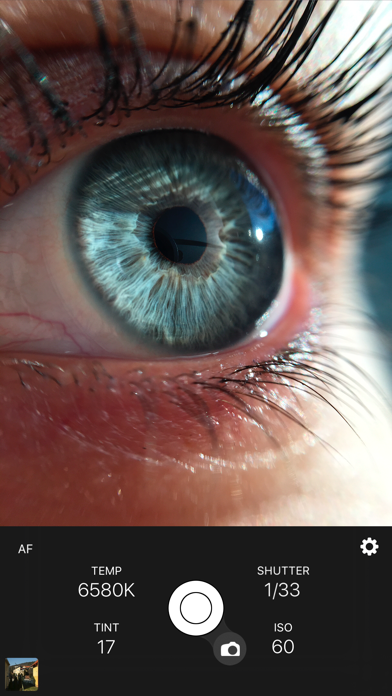
- shoot in JPEG, like the stock camera app, or shoot JPEG+RAW, which also records a DNG file next to your jpeg (it will still look like a single photo in the photos app). You can import the DNG to you computer, or edit it on your iPhone with an app that supports DNG raw files.
- manual shutter speed, ISO. Lock your exposure by picking a new value, or by long pressing the automatically selected …
Read the full description
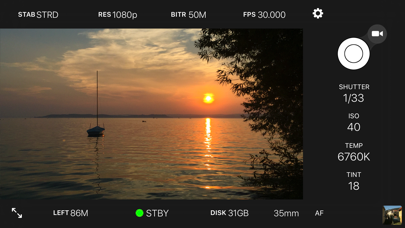
All the power of the iPhone camera at your fingertips! With the incredibly capable camera that is your iPhone, and Codecam, the most simple, easy to use, yet very powerful app, you can enjoy the unlimited possiblities that the complete control over your iPhone's camera can provide! Photo features: - shoot in JPEG, like the stock camera app, or shoot JPEG+RAW, which also records a DNG file next to your jpeg (it will still look like a single photo in the photos app). You can import the DNG to you computer, or edit it on your iPhone with an app that supports DNG raw files. - manual shutter speed, ISO. Lock your exposure by picking a new value, or by long pressing the automatically selected one. Long press again to go back to auto. You can also swipe up and down on the screen to apply an exposure compensation while in automatic exposure mode. - manual white balance: temperature and tint. You can lock the current value just like the exposure, or pick the exact values. White balance presets are also available: Daylight, Cloudy, Shade, plus two Incandescent and Fluorescent presets. - manual focus: switch between auto an manual focus by tapping the button, or by tapping an area on the image to focus on it. A slider to manually focus is also available. Video features: - video zoom: you can zoom by pinching the image, up until the point where upscaling would occur. For 4K, you can override this behaviour to allow zooming until the 1080p crop. The approximate focal length for the given zoom is also shown on the screen (converted to the equivalent focal length of a Super 35 or Full Frame sensor). - the same manual controls for shutter speed, ISO, white balance and focus as in photo mode. Smooth autofocus using Focus Pixels on the iPhone 6 or newer is available. - compressions supported: 15 Mbit, 25 Mbit, 50 Mbit, 75 Mbit, 100 Mbit, 200 Mbit, 400 Mbit in H.264 (or H.265 in newer devices) with selectable IPB or ALL-I modes, and MPJEG compression with either optimal (9/10 or 8/10 for 4K) or full quality (10/10) setting (note: the displayed bitrate in MJPEG mode is an estimation of the maximum possible bitrate) - frame rates supported: 1080p24, 1080p25, 1080p30 - additional frame rates supported by iPhone 5s: 720p50, 720p60 - additional frame rates supported by the iPhone 5s and the iPhone 6: 720p120 - additional frame rates supported by the iPhone 6: 1080p50, 1080p60, 720p240 - additional frame rates supported by the iPhone 6s and 7: 1080p120, 2160p30, 2160p25, 2160p24 - additional frame rates supported by the iPhone 8, X, 11, 11 Pro: 1080p240, 2160p50, 2160p60 - video stabilization is supported, you can toggle between on, off or cinematic, depending on availability on your device - show shutter angle instead of shutter speed - cinematic 1:2.35 overlay: crop mark option is available in the settings menu to switch between 16:9 and cinemascope. This feature is for composition only, the image that will be recorded is the full 16:9 frame. Additional features: - automatic save to camera roll: all images and supported videos are saved to the camera roll - gallery: You can see the images and videos you took in a grid or loupe view, with full metadata. You can also share them, or delete them right in the app.
Installs
Apple does not publish download counts. Estimates are in testing.
We publish iOS estimates only after they pass a back-test against real numbers. Chart history below is measured.
Estimated store revenue Estimated Beta
App Store, worldwide, monthly rate from the last 15 chart days to 22 Nov 2026
Below the top 100 grossing apps in the markets we calibrate. In the United States that usually means under about $6.4M a month. App Store purchases and subscriptions only, before Apple's 15 to 30% fee. Ads and web payments are not included.
Ratings
24 ratings, 24 reviews
No rating breakdown published for this app.
Recent reviews
Latest public reviews from the store
- 11 Oct 2020
I love this app but
But it get burry in the day please fix that
- 11 Mar 2020
This is a such a great app cam.
This will make your iphone takes amazing video and picture in 1080p nothing like your regular camera. Download and guarantee you will not use you regular camera
- 12 Feb 2020
Amazing
This is one of the only camera apps that lets you record mjpeg videos. I wish it would support 10/10 quality for mjpeg in 4K30 mode, please add this for a future update or make it into a pro version. I would gladly pay money for this. Also is 4K60 mode for mjpeg just too intensive to run or is it coming at a later time? I have an iPhone XS Max. Thanks for the awesome app!
- 24 Oct 2019
Instructions? Flash?
Did I miss something? I liked this app very much, but I couldn’t figure out how to use the flash. I couldn’t find any instructions for this app. I searched online also. Unfortunately, I had to delete... but I would use if I could figure out how.
What reviewers bring up
Topics mentioned in the latest 8 reviews, by how many reviews mention them
Liked in good reviews (4 reviews)
- iphone 3
- camera 3
- video 2
- pro 2
Raised in bad reviews (2 reviews)
No topic comes up twice.
Top chart positions
Latest App Store chart ranks by country, last 10 days
Not in any tracked top chart in the last 10 days.
Codecam history
Release, install milestones, listing and store changes
- First released on the store 17 Sep 2014
Recent versions
Current version 3.7
- Version 3.73 Jun 2021
- added support for iPhone 12 devices - added ability to shoot photos using Apple ProRaw
Listing keywords
Words and phrases Codecam repeats most in its store listing
Top phrases: frame rates supported (6), frame rates (6), mbit mbit (6), rates supported (6), additional frame rates (5).
Highlighted words also appear in the title. Counts cover the title, short description and description.
Compliance
What the listing and the app package show
- Store status
- Live
- Upkeep
- No update since 3 Jun 2021
- Age rating
- 4+
Apps like Codecam
 Video CollageaZeR DiLLs★ 4.08
 Vee for VideoMedious★ 2.98
 Beauty Camera -Selfie, StickerBhuvan Gupta★ 4.5
 FinalCamXShenzhen Xiaozhen Technology Co.,Ltd.★ 4.44
 Magic Studio - AI Photo EditorMagicStudio.com★ 4.62
 Foto Impresiones: 1 Hr PhotoSoftwareX★ 4.98
 SnapGeo - AI Location FinderRECEP ASLAN★ 4.24
 Family Photo Maker - AIRick-y Media★ 4.12
 BeautifAI: AI Try OnJAI UYGULAMA VE YAPAY ZEKA TEKNOLOJILERI ANONIM SIRKETI★ 4.36
Codecam: questions and answers
Who makes Codecam?
Codecam is published by László Váradi.
When was Codecam last updated?
The latest version (3.7) was released on 3 Jun 2021.
Is Codecam free?
Yes. Codecam is free to download.
Is Codecam still available?
Yes. Codecam is live on App Store as of 1 Jul 2026.
Track Codecam and its competitors
Watch any app for new versions, rating drops, chart moves and removals. Free plan, no card.