
- Installs
- —
- Apple does not publish download counts
- Rating
- 4.52
- Ratings
- 75
- 75 reviews
- Version
- 6.0.1
- Updated 18 Sep 2026
- Released
- 25 Oct 2018
- Tracked since 10 May 2026
- Size
- 113 MB
- Needs 11.0
Screenshots




About Countdown! Reminders and Timer
The description on the store listing
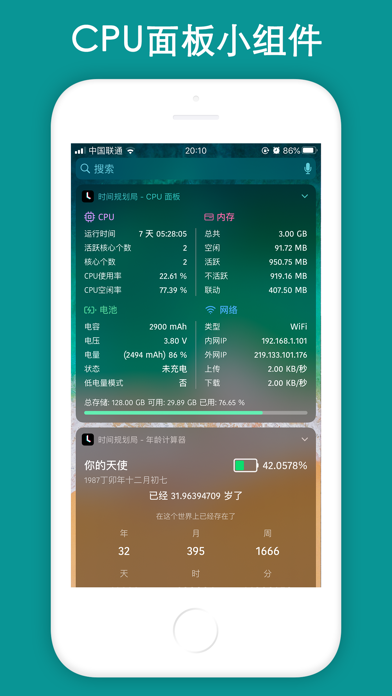
Countdown is a reminder and time management app, it will remind you to cherish your time at all times, which can be accurate to the second. Support lunar calendar display, support classification management function, support custom widget background, support percentage form, change percentage accuracy, so that you can see the time change every minute and every second, remind you to cherish time. At the same time, it supports "CPU Panel", "Hourly Reporting", "Age Calculator", "Full Screen clock", "Date cCalculator", "QR Code Generation" and other tools.
It can help you make project plans, set reminders for meetings, arrange your schedule, and keep you focused. It can also be used to record …
Read the full description
Countdown is a reminder and time management app, it will remind you to cherish your time at all times, which can be accurate to the second. Support lunar calendar display, support classification management function, support custom widget background, support percentage form, change percentage accuracy, so that you can see the time change every minute and every second, remind you to cherish time. At the same time, it supports "CPU Panel", "Hourly Reporting", "Age Calculator", "Full Screen clock", "Date cCalculator", "QR Code Generation" and other tools. It can help you make project plans, set reminders for meetings, arrange your schedule, and keep you focused. It can also be used to record memo events and help you better manage your time. [Features] # 70+ Lock Screen Widgets and 100+ Desktop Widgets; # Can be accurate to the second, always remind you to cherish the time and see the time change; # Support reminders, remind you of upcoming events through push notifications; # Support dynamic wallpapers; # Support lunar calendar selection, do not miss every lunar festival; # Customizable widget backgrounds, custom widget colors, and custom widget definitions; # Support recalculation every day, every week, every month; # Built-in multiple tools, including "CPU Panel", "Dynamic Island", "Hourly Reporting", "Device Panel", "Age Calculator", "Full Screen clock", "Date cCalculator", "QR Code Generation" and other tools; # Desktop widgets can customize the background, font, font color, transparency and blur; # Support event pin; # Support automatic event sequencing; # Support classification management function, better help you manage all event reminders; # You can set the background for each event, small and beautiful time reminder application; # Support the function of backing up data to iCloud, no longer have to worry about data loss; # Provide a variety of cool animations to give you a different mood; # Customizable push notification ringtones to make you unique; # Support network search to provide you with richer content; # New and concise operation interface makes operation more concise; # Supports percentage form. VIP features include: All Widgets, all Tools, all Static wallpapers and Dynamic wallpapers, 100% pure ad-free and automatic data backup, and can enjoy all future VIP features. 【Monthly VIP Instructions】 1. Subscription period: 1 month 2. Subscription price: 3 yuan per month 3. Payment: After the user confirms the purchase and pays, it will be credited to the itunes account 4. Cancellation of payment: If you need to cancel the renewal, please manually turn off the automatic renewal function in the iTunes/Apple ID settings management 24 hours before the current subscription expires 5. Renewal: Apple iTunes account will be debited within 24 hours before expiration, and the subscription period will be extended by one month after the deduction is successful 【Yearly VIP Instructions】 1. Subscription period: 1 year 2. Subscription price: 24 yuan per year 3. Payment: After the user confirms the purchase and pays, it will be credited to the itunes account 4. Cancellation of payment: If you need to cancel the renewal, please manually turn off the automatic renewal function in the iTunes/Apple ID settings management 24 hours before the current subscription expires 5. Renewal: Apple iTunes account will be debited within 24 hours before expiration, and the subscription period will be extended by one year after the deduction is successful 【Permanent VIP】 Unlimited permanent use of VIP features, all Widgets, all Tools, all Static wallpapers and Dynamic wallpapers, 100% pure ad-free and automatic data backup, and can enjoy all future VIP features. Privacy Policy: https://shijianguihuaju.cn/2020/01/01/countdown-law/ User Agreement: https://shijianguihuaju.cn/2020/01/01/countdown-law/
Installs since 29 Aug 2026
Apple does not publish download counts. Estimates are in testing.
Estimated store revenue Estimated Beta
App Store, worldwide, monthly rate from the last 19 chart days to 27 Nov 2026
Below the top 100 grossing apps in the markets we calibrate. In the United States that usually means under about $6.4M a month. App Store purchases and subscriptions only, before Apple's 15 to 30% fee. Ads and web payments are not included.
Ratings
75 ratings, 75 reviews
No rating breakdown published for this app.
Recent reviews
Latest public reviews from the store
No reviews in our sample for this app yet.
Top chart positions
Latest App Store chart ranks by country, last 10 days
- Countries ranked
- 5 of 50
- Best rank
- #2
- Top 10 placements
- 1
- of 6 chart placements
- Average rank
- #41.5
Best countries on App Store
- 🇨🇳 China · Top paid, Utilities#2
- 🇸🇬 Singapore · Top paid, Utilities#29
- 🇹🇷 Türkiye · Top paid, Utilities#41
- 🇹🇭 Thailand · Top paid, Utilities#49
- 🇺🇸 United States · Top paid, Utilities#98
| Country | Chart | Category | Rank | Best (10 days) | Date |
|---|---|---|---|---|---|
| 🇨🇳 China | Top paid | Utilities | #2 | #2 | 27 Nov 2026 |
| 🇸🇬 Singapore | Top paid | Utilities | #29 | #5 | 22 Nov 2026 |
| 🇨🇳 China | Top paid | All apps | #30 | #29 | 27 Nov 2026 |
| 🇹🇷 Türkiye | Top paid | Utilities | #41 | #16 | 26 Nov 2026 |
| 🇹🇭 Thailand | Top paid | Utilities | #49 | #9 | 22 Nov 2026 |
| 🇺🇸 United States | Top paid | Utilities | #98 | #98 | 22 Nov 2026 |
Countdown! Reminders and Timer history
Release, install milestones, listing and store changes
- First released on the store 25 Oct 2018
Update frequency
How often Countdown! Reminders and Timer ships a new version, month by month
3 updates in the last 12 months. More often than most similar apps: they shipped a median of 2 updates in the same year.
Recent versions
Current version 6.0.1
- Version 5.2.118 Sep 2026
Countdown version 5.2.1 is officially launched. 1. Full support for Apple Watch. Enjoy a clean‑looking interface with a rich selection of watch complications. 2. Add sorting function on the home page. 3. Add the "Pomodoro Timer" tool to the mini toolbox. 4. Optimize the overall desktop calendar feature. Add leave information to the desktop calendar, so holidays and leave data can be displayed clearly and intuitively. 5. Adapt to the latest iOS version and new iPhone models. RRecently added the Desktop Calendar · Schedule and Desktop Calendar · Upcoming Overview features. Add the Dynamic Island function, add CPU Panel Widget, add List • Year Month Day Desktop Widget, iOS 17 standby mode has been supported, added the "Floating window" function, which can be used for floating clock, network speed, CPU, timing, countdown and other functions, and added a custom repeat function, The new "Traffic statistics", "Nucleic acid records", "Punch", "Time Remaining" and "Remaining Year" widgets have been added. "Magic Puzzle", "Live Photo", "Timer" and many other widgets, and optimize user experience. Widgets such as "Weather" and "List-Classic" have been added. Now desktop widgets can customize the background, font, font color, transparency and blurriness. More widgets are working overtime to adapt, and the overall performance of the App is also optimized. It supports single events and list events, as well as various styles. Added the full-screen clock desktop widget, now it supports widgets in units of day, day, hour, minute, and year, month, and day. Age calculator and birthday widget have been added, more gadgets are being developed overtime. Recent updates: 1. Added the Desktop Calendar · Schedule feature at the top-right corner of the homepage, medium and large-sized Desktop Calendar · Schedule desktop widgets, and the Custom Alert Ringtone feature. 2. Optimized the functions of Data Backup, Category Management, Event Reminder and Notification Alert. 3. Added Dynamic Island adaptation, which can display real-time data including network speed, CPU usage, RAM and storage on the Dynamic Island. 4. Added the CPU Panel tool (available for widget addition, with background customization supported now); added the Age Calculator and Birthday Lifespan Tracker tools (also widget-supported with editable backgrounds); added the Hourly Voice Time Announcement tool to broadcast the current hour audibly. 5. Add "Full Screen Clock" tools, support various style customization, including modifying background, font color, style, etc .; 6. Add "Date Calculator" tools to help you calculate accurately; 7. Add "QR Code Generation" and "QR Code Scan" tools; [Features] # 70+ Lock Screen Widgets and 100+ Desktop Widgets; # Full support for Apple Watch. Enjoy a clean‑looking interface with a rich selection of watch complications. View key information directly on your watch face without launching the app. # Can be accurate to the second, always remind you to cherish the time and see the time change; # Support reminders, remind you of upcoming events through push notifications; # Support dynamic wallpapers; # Support lunar calendar selection, do not miss every lunar festival; # Customizable widget backgrounds, custom widget colors, and custom widget definitions; # Support recalculation every day, every week, every month; # Built-in multiple tools, including "CPU Panel", "Hourly Reporting", "Pomodoro Timer", "Device Panel", "Magic Puzzle", "Live Photo", "Timer", "Age Calculator", "Full Screen clock", "pedometer", "Date cCalculator", "QR Code Generation" and other tools; # Desktop widgets can customize the background, font, font color, transparency and blur; # Support classification management function, better help you manage all event reminders; # You can set the background for each event, small and beautiful time reminder application; # Customizable push notification ringtones to make you unique;
- Version 5.2.017 Aug 2026
Countdown version 5.2.0 is officially launched. 1. Full support for Apple Watch. Enjoy a clean‑looking interface with a rich selection of watch complications. 2. Optimized home page performance. 3. Improved notification alerts. RRecently added the Desktop Calendar · Schedule and Desktop Calendar · Upcoming Overview features. Add the Dynamic Island function, add CPU Panel Widget, add List • Year Month Day Desktop Widget, iOS 17 standby mode has been supported, added the "Floating window" function, which can be used for floating clock, network speed, CPU, timing, countdown and other functions, and added a custom repeat function, The new "Traffic statistics", "Nucleic acid records", "Punch", "Time Remaining" and "Remaining Year" widgets have been added. "Magic Puzzle", "Live Photo", "Timer" and many other widgets, and optimize user experience. Widgets such as "Weather" and "List-Classic" have been added. Now desktop widgets can customize the background, font, font color, transparency and blurriness. More widgets are working overtime to adapt, and the overall performance of the App is also optimized. It supports single events and list events, as well as various styles. Added the full-screen clock desktop widget, now it supports widgets in units of day, day, hour, minute, and year, month, and day. Age calculator and birthday widget have been added, more gadgets are being developed overtime. Recent updates: 1. Added the Desktop Calendar · Schedule feature at the top-right corner of the homepage, medium and large-sized Desktop Calendar · Schedule desktop widgets, and the Custom Alert Ringtone feature. 2. Optimized the functions of Data Backup, Category Management, Event Reminder and Notification Alert. 3. Added Dynamic Island adaptation, which can display real-time data including network speed, CPU usage, RAM and storage on the Dynamic Island. 4. Added the CPU Panel tool (available for widget addition, with background customization supported now); added the Age Calculator and Birthday Lifespan Tracker tools (also widget-supported with editable backgrounds); added the Hourly Voice Time Announcement tool to broadcast the current hour audibly. 5. Add "Full Screen Clock" tools, support various style customization, including modifying background, font color, style, etc .; 6. Add "Date Calculator" tools to help you calculate accurately; 7. Add "QR Code Generation" and "QR Code Scan" tools; [Features] # 70+ Lock Screen Widgets and 100+ Desktop Widgets; # Full support for Apple Watch. Enjoy a clean‑looking interface with a rich selection of watch complications. View key information directly on your watch face without launching the app. # Can be accurate to the second, always remind you to cherish the time and see the time change; # Support reminders, remind you of upcoming events through push notifications; # Support dynamic wallpapers; # Support lunar calendar selection, do not miss every lunar festival; # Customizable widget backgrounds, custom widget colors, and custom widget definitions; # Support recalculation every day, every week, every month; # Built-in multiple tools, including "CPU Panel", "Hourly Reporting", "Device Panel", "Magic Puzzle", "Live Photo", "Timer", "Age Calculator", "Full Screen clock", "pedometer", "Date cCalculator", "QR Code Generation" and other tools; # Desktop widgets can customize the background, font, font color, transparency and blur; # Support classification management function, better help you manage all event reminders; # You can set the background for each event, small and beautiful time reminder application; # Support the function of backing up data to iCloud, no longer have to worry about data loss; # Provide a variety of cool animations to give you a different mood; # Customizable push notification ringtones to make you unique;
- Version 5.0.030 Mar 2026
This update from Apple will improve the functionality of this app. No new features are included. Countdown version 5.0.0 is officially launched. Fixed known minor issues, improved user experience. Recently, add the Dynamic Island function (which can display information such as network speed, CPU, memory, storage, etc. on Dynamic Island), add CPU Panel Widget, add List • Year Month Day Desktop Widget, iOS 17 standby mode has been supported, added the "Floating window" function, which can be used for floating clock, network speed, CPU, timing, countdown and other functions, and added a custom repeat function, The new "Traffic statistics", "Nucleic acid records", "Punch", "Time Remaining" and "Remaining Year" widgets have been added. "Magic Puzzle", "Live Photo", "Timer" and many other widgets, and optimize user experience. Widgets such as "Weather" and "List-Classic" have been added. Now desktop widgets can customize the background, font, font color, transparency and blurriness. More widgets are working overtime to adapt, and the overall performance of the App is also optimized. It supports single events and list events, as well as various styles (including Minimalist White, Minimalist Black, Cool Black and Custom Background). Added the full-screen clock desktop widget, now it supports widgets in units of day, day, hour, minute, and year, month, and day. Age calculator and birthday widget have been added, more gadgets are being developed overtime. Recent updates: 1. Add the "Dynamic Island" function (which can display information such as network speed, CPU, memory, storage, etc. on Dynamic Island) 2. Add the "CPU Panel" tools and add it to the widget (now supports background modification); 3. Add the "Hourly Reporting" tools to help you announce the time with your voice; 4. Add the "Age Calculator" tools and it can be added to the widget (now supports background modification); 5. Add "Full Screen Clock" tools, support various style customization, including modifying background, font color, style, etc .; 6. Add "Date Calculator" tools to help you calculate accurately; 7. Add "QR Code Generation" and "QR Code Scan" tools; 8. Add the "Transparent Widget" function; 9. Add the "Pedometer" widget; 10. Optimized the vision of the entire App; 11. Optimize the fluency of the app; 12. Fixed some minor issues. [Features] # 70+ Lock Screen Widgets and 100+ Desktop Widgets; # Can be accurate to the second, always remind you to cherish the time and see the time change; # Support reminders, remind you of upcoming events through push notifications; # Support dynamic wallpapers; # Support lunar calendar selection, do not miss every lunar festival; # Customizable widget backgrounds, custom widget colors, and custom widget definitions; # Support recalculation every day, every week, every month; # Built-in multiple tools, including "CPU Panel", "Hourly Reporting", "Device Panel", "Magic Puzzle", "Live Photo", "Timer", "Age Calculator", "Full Screen clock", "pedometer", "Date cCalculator", "QR Code Generation" and other tools; # Desktop widgets can customize the background, font, font color, transparency and blur; # Support event pin; # Support automatic event sequencing; # Support classification management function, better help you manage all event reminders; # You can set the background for each event, small and beautiful time reminder application; # Support the function of backing up data to iCloud, no longer have to worry about data loss; # Provide a variety of cool animations to give you a different mood; # Customizable push notification ringtones to make you unique; # Support network search to provide you with richer content; # New and concise operation interface makes operation more concise; # Supports percentage form.
Listing keywords
Words and phrases Countdown! Reminders and Timer repeats most in its store listing
Top phrases: hours before (4), itunes account (4), subscription period (4), vip features (4), custom widget (3).
Highlighted words also appear in the title. Counts cover the title, short description and description.
Compliance
What the listing and the app package show
- Store status
- Live
- Upkeep
- Updated 18 Sep 2026
- Age rating
- 4+
Apps like Countdown! Reminders and Timer
 Reptile Rocket: pet trackerMikhail Agapov★ 4.29
 الو ليبياAlmadar Aljadid★ 3.82
 NetScan - IP ScannerSenol Cagir★ 4.32
 Fast Cast - Screen Mirror意 田★ 2.99
 World Clock - Time TravelerDavid Richmond★ 4.4
 iFBAs -Arcade Emulator国琛 邱★ 3.83
 Dark Mode for Safari: NightEyePROMOTINO LTD★ 4.18
 CATLINKShanghai Catlink Intelligent Technology Co.,Ltd★ 2.73
 Actions - HTTP Request SenderMichele Gruppioni (Gruppio)★ 4.23
Countdown! Reminders and Timer: questions and answers
Who makes Countdown! Reminders and Timer?
Countdown! Reminders and Timer is published by 霞 王.
When was Countdown! Reminders and Timer last updated?
The latest version (6.0.1) was released on 18 Sep 2026.
Is Countdown! Reminders and Timer free?
No. Countdown! Reminders and Timer is a paid app priced at $0.99.
Is Countdown! Reminders and Timer still available?
Yes. Countdown! Reminders and Timer is live on App Store as of 21 Nov 2026.
Track Countdown! Reminders and Timer and its competitors
Watch any app for new versions, rating drops, chart moves and removals. Free plan, no card.