
- Installs
- —
- Apple does not publish download counts
- Rating
- 4.17
- Ratings
- 120
- 120 reviews
- Version
- 1.0.3
- Updated 28 Feb 2022
- Released
- 21 Aug 2021
- Tracked since 10 May 2026
- Size
- 11 MB
- Needs 12
Screenshots
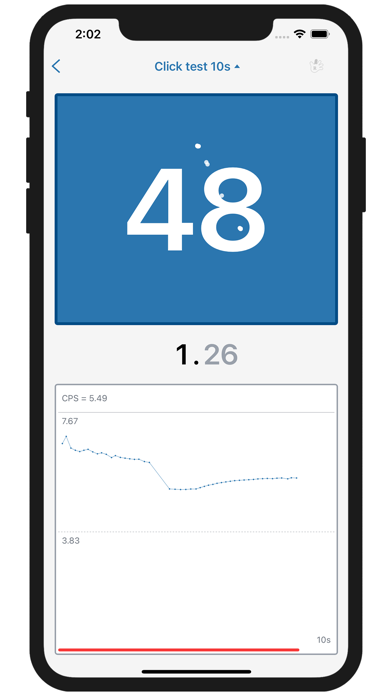


About CPS Test - clicks per second
The description on the store listing
This APP is designed to accurately determine your click-through rate. Click speed is usually measured in CPS (clicks per second in English). The number of CPS is obtained by dividing the number of clicks by time. You can use a stopwatch to manually operate and count the number of clicks yourself, but the result is not as accurate as the automatic test on this APP.
What is it? On CPS-Test, we provide:
Great click
Great show
Click-through rate graph after each test
Your click rate history
Click speed level after each test
CPS-Test draws a chart of the click speed during the test so that you can see the change in the click speed over time. This is a very important function that helps to …
Read the full description
This APP is designed to accurately determine your click-through rate. Click speed is usually measured in CPS (clicks per second in English). The number of CPS is obtained by dividing the number of clicks by time. You can use a stopwatch to manually operate and count the number of clicks yourself, but the result is not as accurate as the automatic test on this APP. What is it? On CPS-Test, we provide: Great click Great show Click-through rate graph after each test Your click rate history Click speed level after each test CPS-Test draws a chart of the click speed during the test so that you can see the change in the click speed over time. This is a very important function that helps to detect muscle fatigue, especially during prolonged testing. What is a good click speed? The average person can easily click for 10-60 seconds at a clicking speed of 5-7. This is a very common number that can be achieved through conventional click technology. Any click speed higher than 7 can be considered a good result. Ordinary players can get this number in a short-term trial. A click speed of 10 or higher is a good result, usually cannot be achieved with conventional click techniques, and requires some advanced skills. Click Technology As mentioned above, there is more than one way to click. Let's take a quick look at these methods. Regular Click (Butterfly Click) Just like when you are working on a PC, just click. This is natural and easy to do, but not very fast-ordinary players can achieve a maximum click speed of 5-8 using this method. Butterfly click This technique requires the use of two fingers on the mouse button. In short, it is to click continuously with two fingers. Using this method, professional gamers can get up to 30 click speeds. This technique is most suitable for a mouse that allows double-clicking. Otherwise, the click speed gain will not be too great. Jitter Click Jitter clicks are another way to increase click speed, but require more training to use the game. The basis of this method is to force the hand to the position where the mouse clicks, and then quickly press the mouse button with your finger like a woodpecker. Seen from the side, the hand is shaking, and it feels the same. This technique is almost impossible to aim, and requires non-slip mouse buttons and desktop surfaces. Low DPI, heavy mouse and good pads will make aiming possible. 12-20 maximum click speed Drag Click If the above two methods are slightly dependent on the mouse, then "drag and click" is almost only related to the mouse you use. With this method, the click is not generated by pressing the button, but the vibration caused by dragging the finger on the button. These vibrations can only occur when the button surface is rough or not smooth. Far from all rats can do it. The click speed of click and drag depends on the mouse, up to 100. Autoclick Just program the mouse to quickly click. Many mice are programmable, and you can attach scripts to certain buttons. Or there is software that can automatically click any mouse or even keyboard. Theoretically, the maximum click speed of the automatic oscillator is 1000 (pause time is 1 millisecond), but the game usually records a much smaller click speed. Of course, this method is illegal in most online games and can be called cheating because it requires the use of third-party scripts. If you do not want to be banned, please do not do it online.
Installs since 29 Aug 2026
Apple does not publish download counts. Estimates are in testing.
Estimated store revenue Estimated Beta
App Store, worldwide, monthly rate from the last 12 chart days to 19 Nov 2026
Below the top 100 grossing apps in the markets we calibrate. In the United States that usually means under about $6.4M a month. App Store purchases and subscriptions only, before Apple's 15 to 30% fee. Ads and web payments are not included.
Ratings
120 ratings, 120 reviews
No rating breakdown published for this app.
Recent reviews
Latest public reviews from the store
No reviews in our sample for this app yet.
Top chart positions
Latest App Store chart ranks by country, last 10 days
Not in any tracked top chart in the last 10 days.
CPS Test - clicks per second history
Release, install milestones, listing and store changes
- First released on the store 21 Aug 2021
Update frequency
How often CPS Test - clicks per second ships a new version, month by month
0 updates in the last 12 months. Less often than most similar apps: they shipped a median of 1 updates in the same year.
Recent versions
Current version 1.0.3
- Version 1.0.328 Feb 2022
Support iOS15, fix bugs.
Listing keywords
Words and phrases CPS Test - clicks per second repeats most in its store listing
Top phrases: click speed (14), maximum click speed (3), cps test (3), maximum click (3), after each test (2).
Highlighted words also appear in the title. Counts cover the title, short description and description.
Compliance
What the listing and the app package show
- Store status
- Live
- Upkeep
- No update since 28 Feb 2022
- Age rating
- 4+
Apps like CPS Test - clicks per second
 WardBulletJared Green★ 4.31
 Tally Counter WidgetT-Logic★ 4.42
 Widget: Custom Widgets GalleryPlanner X LLC★ 4.32
 Zoho Sheet—Spreadsheet on iPadZoho Corporation★ 4.58
 Texts on VideoGyoom★ 4.58
 NuminarNuminar Inc★ 4.56
 KilnLinkSkutt Ceramic Products, Inc.★ 1.88
 Mowr TechnologiesMowr Technologies LLC★ 4.55
 Jungle.Yaccov Snir★ 3.34
CPS Test - clicks per second: questions and answers
Who makes CPS Test - clicks per second?
CPS Test - clicks per second is published by 学成 黄.
When was CPS Test - clicks per second last updated?
The latest version (1.0.3) was released on 28 Feb 2022.
Is CPS Test - clicks per second free?
Yes. CPS Test - clicks per second is free to download.
Is CPS Test - clicks per second still available?
Yes. CPS Test - clicks per second is live on App Store as of 14 Nov 2026.
Track CPS Test - clicks per second and its competitors
Watch any app for new versions, rating drops, chart moves and removals. Free plan, no card.