
- Installs
- —
- Apple does not publish download counts
- Rating
- 4.66
- Ratings
- 990
- 990 reviews
- Version
- 3.0.3
- Updated 21 Oct 2026
- Released
- 2 Feb 2018
- Tracked since 10 May 2026
- Size
- 39 MB
- Needs 13.0
Screenshots

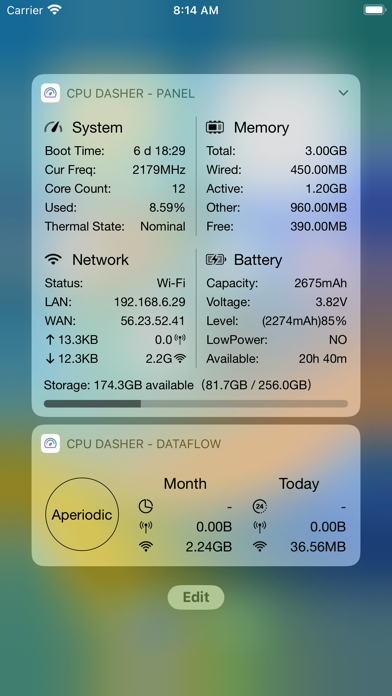

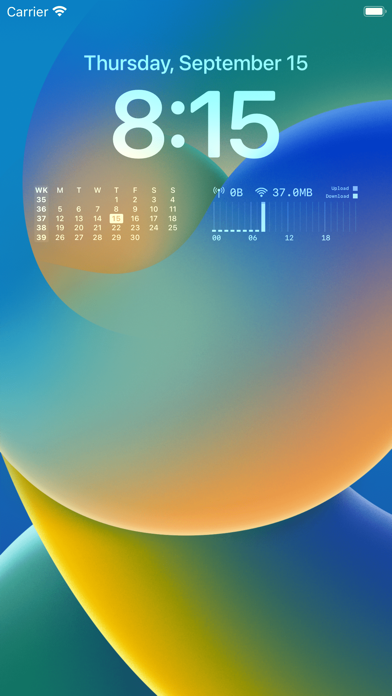


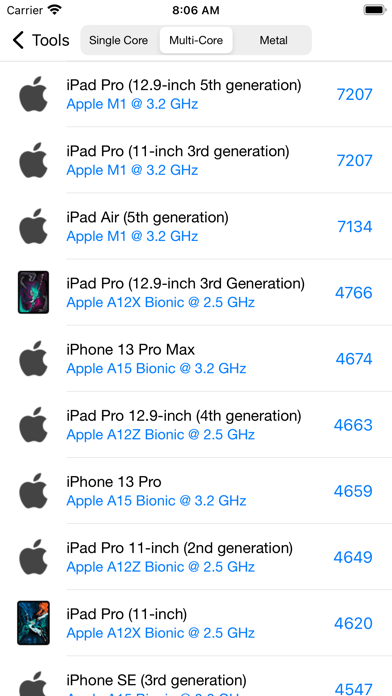

About CPU Dasher Mobile Master Tools
The description on the store listing
CPU Dasher Master ! is a versatile assistant to view device information
Mainly divided into some sections
1, Equipment information
2, CPU information
3, Memory information
4, Battery information
5, Network information
6. Quick view of widgets
7. Widget skin customization
8. Common tools: heart rate test, network tool, noise test, make a decision, traffic statistics, screen test, etc.
This is the current App Store rare, you can easily view the device information, detailed parameters of the device to be aware of, jia driving safety.
The key is: the current frequency, memory details, detailed battery, network information is updated in real time. wow!
HealthKit: Step count and distance …
Read the full description
CPU Dasher Master ! is a versatile assistant to view device information Mainly divided into some sections 1, Equipment information 2, CPU information 3, Memory information 4, Battery information 5, Network information 6. Quick view of widgets 7. Widget skin customization 8. Common tools: heart rate test, network tool, noise test, make a decision, traffic statistics, screen test, etc. This is the current App Store rare, you can easily view the device information, detailed parameters of the device to be aware of, jia driving safety. The key is: the current frequency, memory details, detailed battery, network information is updated in real time. wow! HealthKit: Step count and distance widgets, you need to authorize the App to obtain HealthKit data permission before displaying your step count and exercise distance data today.
Installs since 29 Aug 2026
Apple does not publish download counts. Estimates are in testing.
Estimated store revenue Estimated Beta
App Store, worldwide, monthly rate from the last 12 chart days to 19 Nov 2026
Below the top 100 grossing apps in the markets we calibrate. In the United States that usually means under about $6.4M a month. App Store purchases and subscriptions only, before Apple's 15 to 30% fee. Ads and web payments are not included.
Ratings
990 ratings, 990 reviews
- 5 ★84%
- 4 ★7.4%
- 3 ★2.5%
- 2 ★1.2%
- 1 ★4.5%
Recent reviews
Latest public reviews from the store
- 19 Jan 2026
Great appp
I lovin it
- 6 Aug 2025
My iPhone 12 Mini CPU is Liable To Overheating!
So, I Might As Well Go Up One Version Of iPhone Mini To iPhone 13 Mini! Avalanche And Blizzard sounds cool! Serious Overheating on the Browser and YouTube Video Watching! Firestorm CPU! Check my funds to invest! It’s sad that this i12 Mini requires two times the back charging tank power and it, the tank gets depleted!
- 16 Jul 2025
该更新适配ios26了
如题
- 15 Jul 2025
Love it, but…
Why have only a 24hr time format? Where’s the 12hr time format please?
What reviewers bring up
Topics mentioned in the latest 50 reviews, by how many reviews mention them
Liked in good reviews (41 reviews)
- widget 6
- cpu 5
- add 5
- useful 4
- other 4
- info 4
- application 3
- developer 3
Raised in bad reviews (6 reviews)
- ads 3
- screen 2
- close 2
Top chart positions
Latest App Store chart ranks by country, last 10 days
Not in any tracked top chart in the last 10 days.
CPU Dasher Mobile Master Tools history
Release, install milestones, listing and store changes
- First released on the store 2 Feb 2018
Update frequency
How often CPU Dasher Mobile Master Tools ships a new version, month by month
3 updates in the last 12 months. About as often as similar apps, which shipped a median of 3 updates in the same year.
Recent versions
Current version 3.0.3
- Version 3.0.321 Oct 2026
- Compatible with iOS 27, iPhone Duo and the new iPhone 18 models - New settings for the info panel: open the info panel directly on app launch and support always-on display - Added iPerf3 network throughput test with TCP uplink/downlink, parallel streams, real-time charts and result sharing - Added multiple new network tools and optimized the experience of existing tools - Improved estimated battery runtime, real-time/history chart switching and report export, supporting HTML, PDF and image formats - Fixed various stability and UI display issues Note: After the app update, widgets such as those on the Today View may fail to load or disappear. Restart your device to restore them. Here are our recent updates: - Optimized the Dhrystone benchmark - Added a time-range data usage statistics widget - Home Screen widgets support refreshing by tapping specific areas - Added Night Vision (not available on devices without a LiDAR scanner) - Added Scheme URLs for opening tools, available on the tool configuration page - Large hardware info widgets support data usage display - Home Screen widgets support custom fonts - Added a toggle for week number display on calendar widgets - Added the Tile Panel widget - Calendar widgets show reminders for statutory holidays and compensatory workdays - Added simulated transparent widget backgrounds - Added new widgets including step counter - Hardware info widgets can display router names (location permission for widgets is required) - Added a battery level display toggle for time and calendar widgets - Home Screen widgets support skin configurations (old widgets still work; widget skins are independent) - Optimized data usage statistics (adding a data usage Home Screen widget on iOS 14 improves accuracy) - Added over ten downloadable fonts - Noise test supports saving test results - Further optimized data usage statistics accuracy - Added heart rate measurement feature Please submit your questions and suggestions through the in-app feedback form.
- Version 3.0.122 Aug 2026
- Added info panel settings: option to show the info panel on app startup, and always-on display support. - Added an iPerf3 network throughput test with TCP upload/download, parallel streams, live charts, and result sharing. - Added several new network tools and improved the experience of existing tools. - Improved battery runtime estimates, live/history chart switching, and report export with support for HTML, PDF, and image formats. - Fixed multiple stability and UI display issues. Note: After updating, Today View widgets and other legacy widgets may fail to load or disappear. Restart your device to restore them. Recent Updates - Improved the Dhrystone benchmark. - Added a time-range traffic statistics widget. - Added support for refreshing Home Screen widgets by tapping configured areas. - Added Night Vision. Devices without a LiDAR scanner may not support this feature. - Added URL Schemes for opening tools directly. View them in the Tools settings page. - Added traffic statistics to the large Hardware Info widget. - Added custom font support for Home Screen widgets. - Added a week-number display option to the Calendar widget. - Added the Tile Panel widget. - Added public holiday and make-up workday notices to the Calendar widget. - Added simulated transparent widget backgrounds. - Added new widgets, including step-count widgets. - Added router name display to the Hardware Info widget. Location permission is required. - Added a battery-level display option to the Time & Calendar widget. - Added skin customization for Home Screen widgets. Legacy widgets remain available, and their skins are configured separately. - Improved traffic statistics accuracy. Adding an iOS 14 Home Screen traffic widget can further improve accuracy. - Added more than ten downloadable fonts. - Added the ability to save Noise Test results. - Further improved traffic statistics accuracy. - Added a Heart Rate Test. Please send us any questions or suggestions through the Feedback section.
- Version 2.8.113 Jan 2026
- Optimized for iOS 26 and iPhone 17 series (Note: Today View widgets are no longer available on iOS 18 and above due to system limitations on real-time refreshing). - Added Info Panel feature. - Added Firework Simulator (Happy New Year!). - Added Date Progress widgets. - Fixed known issues. Note: After the update, Today View widgets may fail to load or disappear; restarting your device should resolve this. Recent updates: - Optimized Dhrystone testing. - Added Time-Period Data Usage widgets. - Home Screen widgets now support refreshing by tapping specific areas. - Added Night Vision feature (Devices without LiDAR Scanner are not supported). - Added URL Schemes for tools, viewable on the tool configuration page. - Large Hardware Info widgets now support data usage display. - Home Screen widgets now support custom fonts. - Calendar widgets now include a toggle for week numbers. - Added Tile Panel widgets. - Calendar widgets now display official holiday and workday adjustment reminders. - Added simulated transparency for widget backgrounds. - Added new widgets including Step Count and more. - Hardware Info widgets now display the Router Name (requires Location permission). - Time & Calendar widgets now include a battery level toggle. - Home Screen widgets now support skin configurations (Legacy widgets remain functional; skins are independent of Home Screen widget themes). - Optimized Data Usage tracking (Adding a Data widget on iOS 14+ improves accuracy). - Added 10+ downloadable fonts. - Noise Test now supports saving test results. - Improved data usage tracking accuracy. - Added Heart Rate testing feature. If you have any questions or suggestions, please let us know through the "Feedback" section.
Listing keywords
Words and phrases CPU Dasher Mobile Master Tools repeats most in its store listing
Top phrases: cpu dasher (2), device information (2), network information (2), step count (2).
Highlighted words also appear in the title. Counts cover the title, short description and description.
Compliance
What the listing and the app package show
- Store status
- Live
- Upkeep
- Updated 21 Oct 2026
- Age rating
- 4+
Apps like CPU Dasher Mobile Master Tools
 TotalGuard: Privacy&ProtectionZIVA TEKNOLOJI DANISMANLIK ANONIM SIRKETI★ 4.39
 Remote For LG Smart TVsMatan Yamin★ 4.45
 MovieFlix : Movies & TV ShowsJules Bernavate★ 4.04
 Label ExpertXiamen AiYin Technology Co.,Ltd★ 4.43
 AR Drawing: Trace to Sketch 'Taalaibek Abakirov★ 4.47
 Property Line FinderBiographics Consultoria e Design LTDA★ 4.23
 iQR Pro EAndres Ramirez★ 4.65
 CatCat SearchGoodsearch LLC★ 4.89
 SMS Scheduler: sent text laterAn Banh★ 3.73
CPU Dasher Mobile Master Tools: questions and answers
Who makes CPU Dasher Mobile Master Tools?
CPU Dasher Mobile Master Tools is published by 培培 邢.
When was CPU Dasher Mobile Master Tools last updated?
The latest version (3.0.3) was released on 21 Oct 2026.
Is CPU Dasher Mobile Master Tools free?
Yes. CPU Dasher Mobile Master Tools is free to download.
Is CPU Dasher Mobile Master Tools still available?
Yes. CPU Dasher Mobile Master Tools is live on App Store as of 14 Nov 2026.
Track CPU Dasher Mobile Master Tools and its competitors
Watch any app for new versions, rating drops, chart moves and removals. Free plan, no card.