
- Installs
- —
- Apple does not publish download counts
- Rating
- —
- Ratings
- —
- Version
- 2.4
- Updated 6 Jan 2026
- Released
- 25 May 2023
- Tracked since 10 May 2026
- Size
- 84 MB
- Needs 12.4
Also on Google Play: D Image Editor (568 ratings)
Screenshots




About D Image Editor
The description on the store listing
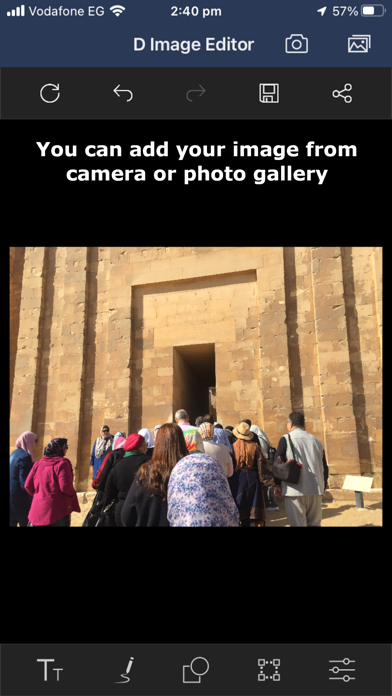
D Image Editor is a very convenient tool for editing an image by annotating it with freehand drawing paths, text, and built-in shapes. It also allows you to crop and flip the image.
- Now you have an exciting new feature that lets you remove the background from any image and save or share it with transparency!
- D Image Editor support freehand drawing over images with customizable stroke thickness options.
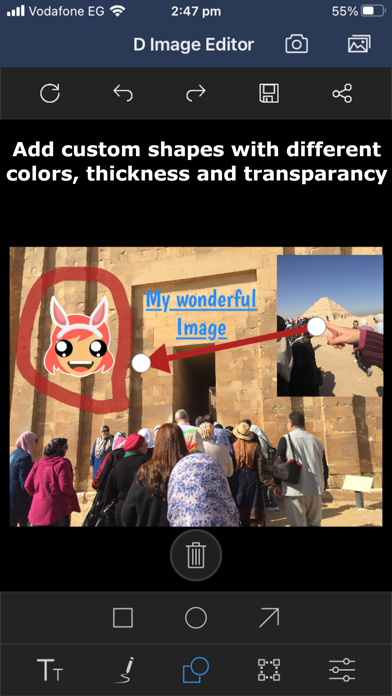
- Annotate images with shapes (rectangle, arrow, and circle), text, and freehand drawings that can be dragged and dropped, and resized.
- D Image Editor provides an option to perform image transformations such as rotate and flip.
- D Image Editor provides an option to crop a particular …
Read the full description
D Image Editor is a very convenient tool for editing an image by annotating it with freehand drawing paths, text, and built-in shapes. It also allows you to crop and flip the image. - Now you have an exciting new feature that lets you remove the background from any image and save or share it with transparency! - D Image Editor support freehand drawing over images with customizable stroke thickness options. - Annotate images with shapes (rectangle, arrow, and circle), text, and freehand drawings that can be dragged and dropped, and resized. - D Image Editor provides an option to perform image transformations such as rotate and flip. - D Image Editor provides an option to crop a particular region of an image as desired with the help of the built-in cropping tool. - D Image Editor supports image zooming and panning. It is free software, so whether you are a graphic designer, photographer, illustrator, or scientist. You will have a sophisticated tools to get your job done. You can further enhance your productivity with it thanks to many customization options. You have the tools you needed for high quality image manipulation. From retouching to restoring to creative composites, the only limit is your imagination. You have the power and flexibility to transform images into truly unique creations. So it is a freely distributed program for such tasks as photo retouching, image composition and image authoring. D Image Editor is a versatile graphics manipulation package. This page should help you get a taste of what is capable of. Each task requires a different environment and D Image Editor allows you to customize the view and behavior the way you like it. Starting from the widget theme, allowing you to change colors, widget spacings and icon sizes to custom tool sets in the toolbox. The interface is modulized into so called docks, allowing you to stack them into tabs or keep them open in their own window. Pressing the tab key will toggle them hidden. Numerous digital photo imperfections can be easily compensated for using D Image Editor. Fix perspective distortion caused by lens tilt simply choosing the corrective mode in the transform tools. Eliminate lens’ barrel distortion and vignetting with a powerful filter but a simple interface. The included channel mixer gives you the flexibility and power to get your B/W photography stand out the way you need. D Image Editor is ideal for advanced photo retouching techniques. Get rid of unneeded details using the clone tool, or touch up minor details easily with the new healing tool. With the perspective clone tool, it’s not difficult to clone objects with perspective in mind just as easily as with the orthogonal clone.
Installs
Apple does not publish download counts. Estimates are in testing.
We publish iOS estimates only after they pass a back-test against real numbers. Chart history below is measured.
Estimated store revenue Estimated Beta
App Store, worldwide, monthly rate from the last 12 chart days to 19 Nov 2026
Below the top 100 grossing apps in the markets we calibrate. In the United States that usually means under about $6.4M a month. App Store purchases and subscriptions only, before Apple's 15 to 30% fee. Ads and web payments are not included.
Ratings
No rating breakdown published for this app.
Recent reviews
Latest public reviews from the store
No reviews in our sample for this app yet.
Top chart positions
Latest App Store chart ranks by country, last 10 days
Not in any tracked top chart in the last 10 days.
D Image Editor history
Release, install milestones, listing and store changes
- First released on the store 25 May 2023
Update frequency
How often D Image Editor ships a new version, month by month
1 updates in the last 12 months. More often than most similar apps: they shipped a median of 0 updates in the same year.
Recent versions
Current version 2.4
- Version 2.46 Jan 2026
Now you have an exciting new feature that lets you remove the background from any image and save or share it with transparency! This powerful tool is available on devices running iOS or iPadOS 17 and later. Older devices will continue to work as usual, but to unlock background removal with transparent export, you’ll need to update to iOS/iPadOS 17 or higher.
Listing keywords
Words and phrases D Image Editor repeats most in its store listing
Top phrases: image editor (10), image editor provides (2), provides an option (2), clone tool (2), editor provides (2).
Highlighted words also appear in the title. Counts cover the title, short description and description.
Compliance
What the listing and the app package show
- Store status
- Live
- Upkeep
- Updated 6 Jan 2026
- Age rating
- 4+
Apps like D Image Editor
 Video CollageaZeR DiLLs★ 4.08
 Vee for VideoMedious★ 2.98
 Beauty Camera -Selfie, StickerBhuvan Gupta★ 4.5
 FinalCamXShenzhen Xiaozhen Technology Co.,Ltd.★ 4.44
 Magic Studio - AI Photo EditorMagicStudio.com★ 4.62
 Foto Impresiones: 1 Hr PhotoSoftwareX★ 4.98
 SnapGeo - AI Location FinderRECEP ASLAN★ 4.24
 Family Photo Maker - AIRick-y Media★ 4.12
 BeautifAI: AI Try OnJAI UYGULAMA VE YAPAY ZEKA TEKNOLOJILERI ANONIM SIRKETI★ 4.36
D Image Editor: questions and answers
Who makes D Image Editor?
D Image Editor is published by Osama Emara.
When was D Image Editor last updated?
The latest version (2.4) was released on 6 Jan 2026.
Is D Image Editor free?
Yes. D Image Editor is free to download.
Is D Image Editor still available?
Yes. D Image Editor is live on App Store as of 10 May 2026.
Track D Image Editor and its competitors
Watch any app for new versions, rating drops, chart moves and removals. Free plan, no card.