
- Installs
- —
- Apple does not publish download counts
- Rating
- —
- Ratings
- —
- Version
- 1.2.1
- Updated 16 Jan 2025
- Released
- 8 Jan 2024
- Tracked since 10 May 2026
- Size
- 23 MB
- Needs 15.0
Screenshots


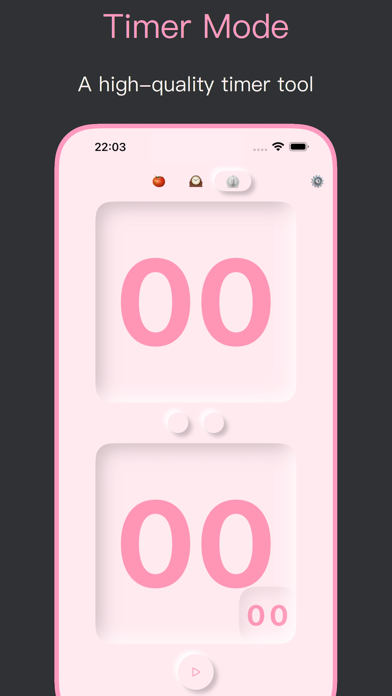
About Desk Clock: Pomodoro Timer
The description on the store listing
Desktop Clock is a desktop clock app designed for students and professionals. It provides three modes: Clock, Pomodoro, and Timer. It helps you focus and be more efficient, and also makes your phone's desktop more beautiful.
#Who needs it?
1. Difficult to focus on your work or studies
2. Feelings of worry, nervousness, or unease
3. Looking to improve your productivity
4. Making phone's desktop more stylish
#Key features:
1. Minimalist clock: No ads, no clutter, just a large, clear clock face that's easy to read. The minimalist clock face won't distract you from your work.
2. Pomodoro: Flexible settings for focus and break times, plus a selection of ambient sounds to help you get into the …
Read the full description
Desktop Clock is a desktop clock app designed for students and professionals. It provides three modes: Clock, Pomodoro, and Timer. It helps you focus and be more efficient, and also makes your phone's desktop more beautiful. #Who needs it? 1. Difficult to focus on your work or studies 2. Feelings of worry, nervousness, or unease 3. Looking to improve your productivity 4. Making phone's desktop more stylish #Key features: 1. Minimalist clock: No ads, no clutter, just a large, clear clock face that's easy to read. The minimalist clock face won't distract you from your work. 2. Pomodoro: Flexible settings for focus and break times, plus a selection of ambient sounds to help you get into the zone. 3. Timer: Simple, easy-to-use interface for timing workouts, cooking, or anything else you need to keep track of. 4. Customization options: Choose from a variety of themes, including landscape mode, dark mode, a variety of colorful themes and personalized icons. Get started today and see how Desk Clock can help you focus, be more productive, and make your phone's desktop more beautiful! #Payments and Renewal After confirming the purchase, your Apple account will be charged, and the subscription will be automatically renewed if you purchase a monthly or yearly subscription, your Apple account will be charged 24 hours before the expiration date, and the subscription cycle will be postponed to the next subscription cycle after the successful deduction of the charge. If you want to cancel the automatic subscription, please turn off the auto-renewal function 24 hours before the end of the current subscription cycle. You can cancel your subscription by going to "Settings" --> click "Apple ID", click "Subscribe" and select "Desktop Clock" to unsubscribe. If the recharge does not arrive, please send your Apple ID and debit voucher to [email protected]. Terms of Service: https://privacy.bapaws.com/calendar/terms.html. Privacy Policy: https://privacy.bapaws.com/calendar/privacy.html. #Contact us: If you have any suggestions, welcome to chat with us. E-mail: [email protected]
Installs
Apple does not publish download counts. Estimates are in testing.
We publish iOS estimates only after they pass a back-test against real numbers. Chart history below is measured.
Estimated store revenue Estimated Beta
App Store, worldwide, monthly rate from the last 14 chart days to 21 Nov 2026
Below the top 100 grossing apps in the markets we calibrate. In the United States that usually means under about $6.4M a month. App Store purchases and subscriptions only, before Apple's 15 to 30% fee. Ads and web payments are not included.
Ratings
No rating breakdown published for this app.
Recent reviews
Latest public reviews from the store
No reviews in our sample for this app yet.
Top chart positions
Latest App Store chart ranks by country, last 10 days
Not in any tracked top chart in the last 10 days.
Desk Clock: Pomodoro Timer history
Release, install milestones, listing and store changes
- First released on the store 8 Jan 2024
Update frequency
How often Desk Clock: Pomodoro Timer ships a new version, month by month
0 updates in the last 12 months. Less often than most similar apps: they shipped a median of 1 updates in the same year.
Recent versions
Current version 1.2.1
- Version 1.2.116 Jan 2025
What's New: - Fix some issues.
Listing keywords
Words and phrases Desk Clock: Pomodoro Timer repeats most in its store listing
Top phrases: desktop clock (3), phone's desktop (3), subscription cycle (3), desktop more beautiful (2), dev bapaws com (2).
Highlighted words also appear in the title. Counts cover the title, short description and description.
Compliance
What the listing and the app package show
- Store status
- Live
- Upkeep
- Updated 16 Jan 2025
- Age rating
- 4+
Apps like Desk Clock: Pomodoro Timer
 采撷练字临帖大师 - 遇见中文汉字和毛笔钢笔书法练字帖淑环 关★ 4.58
 Bluesky Client: Blue CloudHuy Nguyen★ 4.48
 WA Chat : Backup & RestoreRinkesh Patel★ 4.5
 Coin Identifier & Scanner AppITincubator UAB★ 4.88
 Stamp Identifier - Scan ValueYoussef Agnaou★ 4.36
 Score Keeper for Five CrownsAlt Development Labs, Inc.★ 4.4
 Coin Identifier, Value ScannerVladyslav Knysh★ 4.26
 QuietTimeMichael Farah Software★ 4.96
 iPhemeris Astrology EphemerisClifford Ribaudo★ 4.86
Desk Clock: Pomodoro Timer: questions and answers
Who makes Desk Clock: Pomodoro Timer?
Desk Clock: Pomodoro Timer is published by 筱彤 余.
When was Desk Clock: Pomodoro Timer last updated?
The latest version (1.2.1) was released on 16 Jan 2025.
Is Desk Clock: Pomodoro Timer free?
Yes. Desk Clock: Pomodoro Timer is free to download.
Is Desk Clock: Pomodoro Timer still available?
Yes. Desk Clock: Pomodoro Timer is live on App Store as of 10 May 2026.
Track Desk Clock: Pomodoro Timer and its competitors
Watch any app for new versions, rating drops, chart moves and removals. Free plan, no card.