
- Installs
- —
- Apple does not publish download counts
- Rating
- 5.0
- Ratings
- 1
- 1 reviews
- Version
- 1.0.9
- Updated 23 Feb 2024
- Released
- 11 Mar 2023
- Tracked since 10 May 2026
- Size
- 35 MB
- Needs 13.0
Screenshots


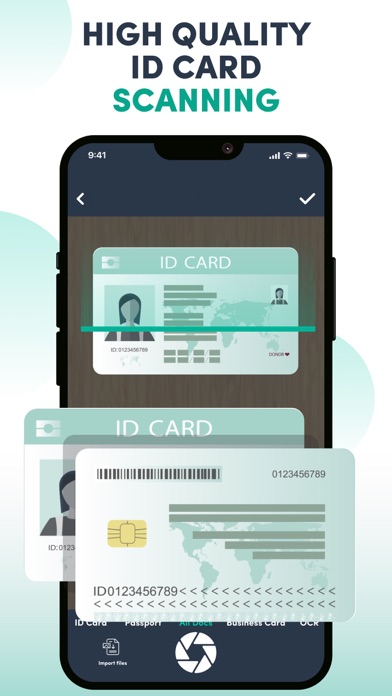

About Document & pdf scanner app
The description on the store listing
Looking for a scanner app that can turn your mobile into a portable scanner? Well, this document scanner is one of the popular utilities for this purpose. Our App is capable of scanning hard-copy documents and images for extracting all sorts of visible text from them.
Our scanner app is cost-effective and is ideal for converting text on hard copies to digital formats like .txt, .docx, and many others. It can take a lot of time and effort if you manually type down text from an image or physical document into Word or Notepad. This is why you must try doc scanner app tools.
The doc scanner is an easy solution for extracting text from physical documents, business cards, licenses, and even …
Read the full description
Looking for a scanner app that can turn your mobile into a portable scanner? Well, this document scanner is one of the popular utilities for this purpose. Our App is capable of scanning hard-copy documents and images for extracting all sorts of visible text from them. Our scanner app is cost-effective and is ideal for converting text on hard copies to digital formats like .txt, .docx, and many others. It can take a lot of time and effort if you manually type down text from an image or physical document into Word or Notepad. This is why you must try doc scanner app tools. The doc scanner is an easy solution for extracting text from physical documents, business cards, licenses, and even images. My PDF scanner uses the default camera of your mobile or tablet for capturing the image or document having textual information on it. After scanning the document/image the scanner app is going to analyze visible text and starts extracting it. Our PDF scanner app uses artificial intelligence and optical character recognition algorithms. Features of PDF Scanner App! Modern scanners advanced algorithms to scan your documents in high quality. • You can import & scan documents directly using your mobile camera scanner. • Multiple document scanning options such as ID cards, business cards, licenses, docs, passports, etc. • Save the scanned copy of documents in PDF, DOC, & JPEG • Accurate scanning from blurry docs. • Photo scanner provides high-quality scanning for your different types of documents. Who Should Consider Using this Document Scanner App? Below are a few benefits of the PDF scan app: Students Students can use a scanner to scan their handwritten notes and other papers to save them digitally. Saving notes in form of scanned copies would also optimize the device storage space. The docs scanned by the PDF scan can’t be shared with any third parties so, don’t worry. Business Managers Business managers can also use our App. In the past businesses used to maintain and organize their documentation on registers. Today it is impossible to manage data on paper because it is no longer a secure way. So use the free app for scanning confidential printed documents. The photo scanner would help convert all visible text into digital formats. Not only documents but you can also make a scan to pdf for your license, ID cards, etc also. Detail of Key Features of Our PDF Scanner App High-Quality Scanning The photo scanner offers high-quality document scanning and converts your physical documents to digital ones. Import or scan documents using your mobile camera to scan the documents in high quality. The doc scanner provides the most accurate conversions in PDF, PNG, & JPEG formats. No doubt, It is hard to get clear images of old documents. Not to worry try this application using advanced scanning algorithms which can easily optimize the quality of the scanned file/image to make the text more visible. Multiple Documents Scanning PDF scanner camera is a one-stop for all types of document scanning, as this app offers multiple doc scanning. It includes your physical paper documents, ID card, Business cards, passports, and Licenses. The document scanner app and photo scanner can help you convert docs to PDF & other formats. With the scanner app, you can rename scanned documents that are saved with a default name. If you have any suggestions regarding our free app for iPhone or iPad we would urge you to email us your query or give us a detailed review!
Installs
Apple does not publish download counts. Estimates are in testing.
We publish iOS estimates only after they pass a back-test against real numbers. Chart history below is measured.
Estimated store revenue Estimated Beta
App Store, worldwide, monthly rate from the last 13 chart days to 20 Nov 2026
Below the top 100 grossing apps in the markets we calibrate. In the United States that usually means under about $6.4M a month. App Store purchases and subscriptions only, before Apple's 15 to 30% fee. Ads and web payments are not included.
Ratings
1 ratings, 1 reviews
No rating breakdown published for this app.
Recent reviews
Latest public reviews from the store
No reviews in our sample for this app yet.
Top chart positions
Latest App Store chart ranks by country, last 10 days
Not in any tracked top chart in the last 10 days.
Document & pdf scanner app history
Release, install milestones, listing and store changes
- First released on the store 11 Mar 2023
Recent versions
Current version 1.0.9
- Version 1.0.923 Feb 2024
- Bug fix - Implement new UI/UX - Enhance user experience
Listing keywords
Words and phrases Document & pdf scanner app repeats most in its store listing
Top phrases: pdf scanner (6), high quality (5), photo scanner (4), business cards (3), doc scanner (3).
Highlighted words also appear in the title. Counts cover the title, short description and description.
Compliance
What the listing and the app package show
- Store status
- Live
- Upkeep
- No update since 23 Feb 2024
- Age rating
- 4+
Apps like Document & pdf scanner app
 Super VPN: Fast Private ProxyGeek Incorporated★ 4.4
 Hubtel RetailerHubtel Limited★ 4.32
 Monthly Calendar 2022 - CalistOmoboto LLC★ 4.38
 Firstly: To-Do List & PlannerfocusCove LLC★ 4.7
 CBUS 311City of Columbus, Ohio★ 1.8
 Themes for Powerpoint - DesiGNGraphic Node★ 4.22
 iSiloDC & Co.★ 3.82
 Flashlight Pro [Multipurpose LED light]KAVAPOINT★ 3.88
 WiPryOscium LLC★ 2.68
Document & pdf scanner app: questions and answers
Who makes Document & pdf scanner app?
Document & pdf scanner app is published by Dzine Media.
When was Document & pdf scanner app last updated?
The latest version (1.0.9) was released on 23 Feb 2024.
Is Document & pdf scanner app free?
Yes. Document & pdf scanner app is free to download.
Is Document & pdf scanner app still available?
Yes. Document & pdf scanner app is live on App Store as of 1 Jul 2026.
Track Document & pdf scanner app and its competitors
Watch any app for new versions, rating drops, chart moves and removals. Free plan, no card.