
- Installs
- —
- Apple does not publish download counts
- Rating
- 4.49
- Ratings
- 427
- 427 reviews
- Version
- 1.1.1
- Updated 30 May 2023
- Released
- 26 Sep 2020
- Tracked since 10 May 2026
- Size
- 20 MB
- Needs 16.0
Screenshots
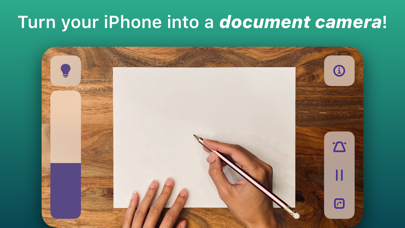


About Document Camera
The description on the store listing
Transform your iPhone into the best document camera on the market with Doc Cam!
Doc Cam is a straightforward app for sharing your workspace with your students, just like a document camera or old school overhead projector. Doc Cam was designed with the needs of the remote learning classroom in mind. It’s compatible with Zoom, Google Meet, Microsoft Teams, and other services through screen mirroring, all with easy step-by-step guides for setup. For teachers who have already transitioned back to the classroom, you can still use Doc Cam with modern classrooms outfitted with computers or projectors compatible with AirPlay Screen Mirroring.
DOC CAM FEATURES
1. Works with Zoom, Google Meet, …
Read the full description
Transform your iPhone into the best document camera on the market with Doc Cam! Doc Cam is a straightforward app for sharing your workspace with your students, just like a document camera or old school overhead projector. Doc Cam was designed with the needs of the remote learning classroom in mind. It’s compatible with Zoom, Google Meet, Microsoft Teams, and other services through screen mirroring, all with easy step-by-step guides for setup. For teachers who have already transitioned back to the classroom, you can still use Doc Cam with modern classrooms outfitted with computers or projectors compatible with AirPlay Screen Mirroring. DOC CAM FEATURES 1. Works with Zoom, Google Meet, Screen Mirroring and more. 2. Perfect for remote learning. 3. Zoom and pan the camera. 4. Smart Flashlight - distributes the lighting evenly across the entire document camera image when the flashlight is enabled. 5. Auto Level - keeps the document camera image level even when your phone isn't. 6. Freeze video frame. 7. Transition back to the classroom with AirPlay support. 8. And more!
Installs since 29 Aug 2026
Apple does not publish download counts. Estimates are in testing.
Estimated store revenue Estimated Beta
App Store, worldwide, monthly rate from the last 14 chart days to 21 Nov 2026
Below the top 100 grossing apps in the markets we calibrate. In the United States that usually means under about $6.4M a month. App Store purchases and subscriptions only, before Apple's 15 to 30% fee. Ads and web payments are not included.
Ratings
427 ratings, 427 reviews
No rating breakdown published for this app.
Recent reviews
Latest public reviews from the store
- 10 Feb 2026
Overhead Projector!
We wanted to turn a phone into an overhead projector, and the camera app wasn’t cutting it. This app is great for that, with panning, keystone, and orientation toggle. Flashlight is a nice touch.
- 14 Jan 2025
I love it that way I can play teacher with it it’s so fun
I give it 10 out of ten
- 22 Oct 2021
Amazing!
I loved using this app for screen mirroring and it has worked beyond amazing for the past few days totally recommended!
- 16 Dec 2020
Better
Updated review: They seem to have fixed the camera quality issue and I use this app almost every day now to help teach the students I work with! The app is very intuitive and does what I need. I wish it had support for portrait mode for displaying worksheets, notebooks, etc. Besides that, I think the app is great! Original review: I really want to like this app, but the camera quality it produces is so bad! I have an iPhone 11 which has a wonderful camera, but with this app the quality looks so fuzzy and grainy and I’m not sure why...
What reviewers bring up
Topics mentioned in the latest 8 reviews, by how many reviews mention them
Liked in good reviews (6 reviews)
- camera 3
- intuitive 2
- portrait 2
Raised in bad reviews (2 reviews)
- open 2
- doc 2
Top chart positions
Latest App Store chart ranks by country, last 10 days
Not in any tracked top chart in the last 10 days.
Document Camera history
Release, install milestones, listing and store changes
- First released on the store 26 Sep 2020
Update frequency
How often Document Camera ships a new version, month by month
0 updates in the last 12 months. Less often than most similar apps: they shipped a median of 1 updates in the same year.
Recent versions
Current version 1.1.1
- Version 1.1.130 May 2023
* Fix broken contact email * Additional bug fixes
Listing keywords
Words and phrases Document Camera repeats most in its store listing
Top phrases: doc cam (5), document camera (5), screen mirroring (3), document camera image (2), zoom google meet (2).
Highlighted words also appear in the title. Counts cover the title, short description and description.
Compliance
What the listing and the app package show
- Store status
- Live
- Upkeep
- No update since 30 May 2023
- Age rating
- 4+
Apps like Document Camera
 Math problem solver, photoSergey Vladimirovich★ 3.37
 CosmologyAaron Day★ 4.73
 Pizza Game: Cooking for KidsKidloLand Kids & Toddler Games★ 4.19
 Danger AwarenessMage Media and Entertainment Service Joint Stock Company★ 4.53
 Tizi Town - My Pirate GamesKidloLand Kids & Toddler Games★ 4.8
 SIFT TutoringDebbrata Das★ 4.6
 WordHolic | DIY Flash Cards!Langholic Ltd.★ 4.75
 IELTS-Speaking・Writing・ReadingInviral Tech★ 4.68
 Blueprint PA PrepBLUEPRINT TEST PREPARATION LLC★ 4.84
Document Camera: questions and answers
Who makes Document Camera?
Document Camera is published by SwiftKick Mobile LLC.
When was Document Camera last updated?
The latest version (1.1.1) was released on 30 May 2023.
Is Document Camera free?
Yes. Document Camera is free to download.
Is Document Camera still available?
Yes. Document Camera is live on App Store as of 21 Nov 2026.
Track Document Camera and its competitors
Watch any app for new versions, rating drops, chart moves and removals. Free plan, no card.