- Installs
- —
- Apple does not publish download counts
- Rating
- 4.53
- Ratings
- 4.5K
- 4.5K reviews
- Version
- 27.2
- Updated 30 Oct 2026
- Released
- 20 Nov 2008
- Tracked since 10 May 2026
- Size
- 41 MB
- Needs 12.0
Screenshots

About Documents
The description on the store listing
Documents - by SavySoda™
• Take your documents anywhere •
• Downloaded by over 50 MILLION iOS users •
• Now with full latest iOS, Watch, Widget, iCloud Support •
WE ARE MAKING DOCUMENTS THE ABSOLUTE CHEAPEST FULL OFFICE & DOCUMENTS MANAGEMENT SUITE FOR THE IPHONE! now everyone can have full documents functionality on their iPhone and iPad!
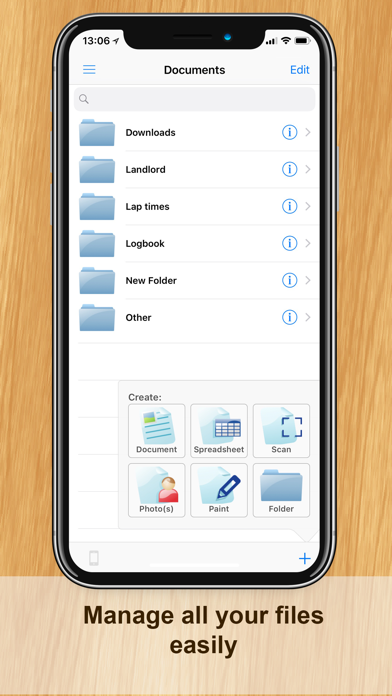
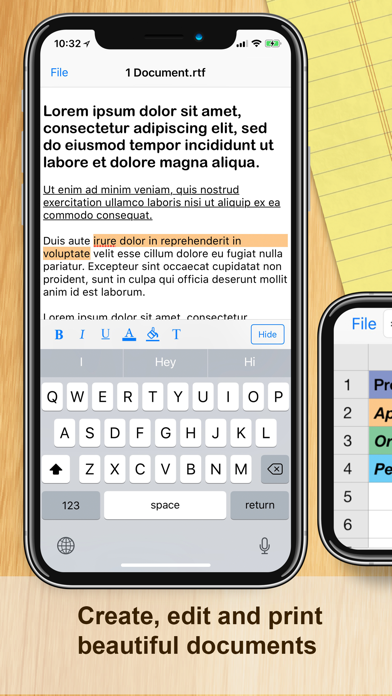
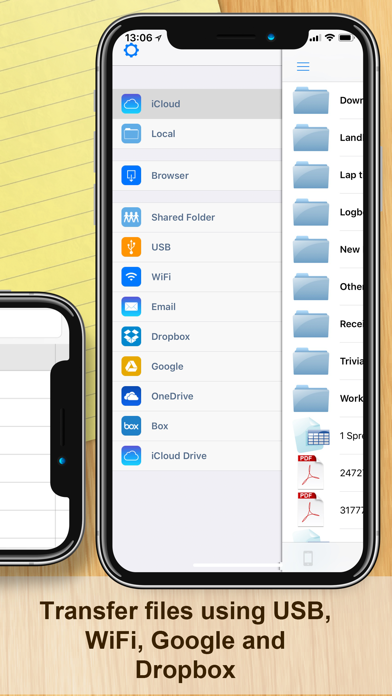
Introducing the iPhone's only light weight mobile office suite and file manager. This essential application allows you to edit and manage spreadsheet, text, and image files on your iPhone. Works both online and offline. You can transfer files between your iCloud, Google Docs and Dropbox accounts; and you can transfer files to your PC or Mac using …
Read the full description
Documents - by SavySoda™ • Take your documents anywhere • • Downloaded by over 50 MILLION iOS users • • Now with full latest iOS, Watch, Widget, iCloud Support • WE ARE MAKING DOCUMENTS THE ABSOLUTE CHEAPEST FULL OFFICE & DOCUMENTS MANAGEMENT SUITE FOR THE IPHONE! now everyone can have full documents functionality on their iPhone and iPad! Introducing the iPhone's only light weight mobile office suite and file manager. This essential application allows you to edit and manage spreadsheet, text, and image files on your iPhone. Works both online and offline. You can transfer files between your iCloud, Google Docs and Dropbox accounts; and you can transfer files to your PC or Mac using USB and WiFi. Created files can be opened using Microsoft Word and Excel, Open Office, Numbers, and all major office suites. Works with Dropbox™ Works with Microsoft OneDrive™ Works with Google Drive™ INCLUDES • iSpreadsheet (a premier spreadsheet app) • Text Editor (to edit basic text) • File Manager (browse and manage your files) • Google Sync (to upload/download documents) • Dropbox (manage dropbox files) • Instant Email (send those files to your boss) BONUS EXTRAS • Photo Album (a easier way to organize photos) FEATURES • Smooth User Interface • Portrait & Landscape mode • Full support for .txt and .csv files • Limited support for .doc, .xls files via Google Docs • Google upload & download • Created files can be opened in Microsoft Excel, Word, Apple Numbers, TextEdit, Notepad, Openoffice & all leading office suites. • Create, View & Manage Photos and Documents • Works anywhere online or offline. • Spreadsheet supports formulas, formatting, resizing, and all basic spreadsheet features. • Beautiful UI. • Free updates SOME USES • Lightweight office work on the run • Backup of documents • Quick access to spreadsheets, notes, memos • Basic word processing • Pocket Spreadsheet COMING SOON - Support for more file types - Additional functions & features iPhone Office Apps http://www.savysoda.com/Documents/
Installs, last 30 days
Apple does not publish download counts. Estimates are in testing.
Estimated store revenue Estimated Beta
App Store, worldwide, monthly rate from the last 12 chart days to 19 Nov 2026
Below the top 100 grossing apps in the markets we calibrate. In the United States that usually means under about $6.4M a month. App Store purchases and subscriptions only, before Apple's 15 to 30% fee. Ads and web payments are not included.
Ratings
4,505 ratings, 4,505 reviews
- 5 ★78%
- 4 ★10%
- 3 ★3.7%
- 2 ★1.4%
- 1 ★6.1%
Recent reviews
Latest public reviews from the store
- 20 Mar 2025
No more stacks Post-It’s or cheat sheets
I’m a physician, and beginning in Residency l’d carry around a collection of hand-written notes with critical information I needed to keep on hand. Then invested some time to type it all up into Word files. Began using Documents for more than 20 years to organize the files into folders (such as heat, lung, kidney) which at first I uploaded to a PDA and keep in my pocket. This evolved into having the Documents app on my mobile device. Now I have several hundred files with up-to-date information to share with my colleges and patients. Documents has played a significant role in my medical career of over 30 years!
- 23 Feb 2024
This comes from experience when I say this!
I have been using the “Documents App” for about three years now, so this comes from experience when I say this. I am definitely impressed and grateful for its efficient and effective design. I use it for both personal and business letters, as well as any other documents I may need. The main function I use it for is writing a book, using each document as a separate chapter. It may not be full proof, but over time it has become incredibly smooth to use the vocal function, making things extremely easy and fast. I really lucked out when I found this wonderful app.
- 24 Feb 2022
longterm User for a few years now
Love this app sometimes the setup can be a little confusing but it’s extremely reliable and it’s been around for a while. One scary defect is the possibility of losing your documents if you switch or lose your phone. Using your iCloud Backup may help precent this so if you don’t want your documents lost be extremely vigilant and careful how you save it in the app itself. Save it to the cloud not your iPhone. .Also the upgrades on all the Apple Apps are not always distinguishable and confuses us.
- 26 Aug 2021
Problem with Selecting the Font in “Documents”
“I have really liked Documents, but grew weary of dealing with all the ads that kept popping up on my original Version of Documents. My computer-savvy friend recently upgraded my iPad and iPhone to the ‘Documents’ version with No Ads. It’s much easier to use, with ONE exception. When I’m in the specific Document I’m trying to make changes in, I run into a new problem when I try to change the Font. Normally, a little box displaying the Font Selection appears in the lower left corner of the Document, and you just select your choice of Fonts. But now, I end up losing the Document page I was on, replaced by a blank page with the Font choices taking up the entire Screen. Consequently, there’s no way to go back to your original Document page, as you can’t exit out of this blank page with the Font Selections. It’s otherwise been a great Version, but this “glitch” or “bug” has really caused continuous problems for me, I’m sorry to say”.
What reviewers bring up
Topics mentioned in the latest 8 reviews, by how many reviews mention them
Liked in good reviews (5 reviews)
- documents 3
- definitely 2
- extremely 2
- function 2
- several 2
- around 2
- making 2
- losing 2
Raised in bad reviews (2 reviews)
- look 2
Top chart positions
Latest App Store chart ranks by country, last 10 days
- Countries ranked
- 50 of 50
- Best rank
- #5
- Top 10 placements
- 12
- of 54 chart placements
- Average rank
- #22.6
Best countries on App Store
- 🇫🇮 Finland · Top paid, Business#5
- 🇷🇴 Romania · Top paid, Business#5
- 🇳🇬 Nigeria · Top paid, Business#6
- 🇩🇰 Denmark · Top paid, Business#6
- 🇪🇬 Egypt · Top paid, Business#7
- 🇭🇺 Hungary · Top paid, Business#8
| Country | Chart | Category | Rank | Best (10 days) | Date |
|---|---|---|---|---|---|
| 🇫🇮 Finland | Top paid | Business | #5 | #5 | 19 Nov 2026 |
| 🇷🇴 Romania | Top paid | Business | #5 | #2 | 19 Nov 2026 |
| 🇳🇬 Nigeria | Top paid | Business | #6 | #6 | 19 Nov 2026 |
| 🇩🇰 Denmark | Top paid | Business | #6 | #4 | 19 Nov 2026 |
| 🇪🇬 Egypt | Top paid | Business | #7 | #6 | 19 Nov 2026 |
| 🇭🇺 Hungary | Top paid | Business | #8 | #6 | 19 Nov 2026 |
| 🇵🇹 Portugal | Top paid | Business | #8 | #8 | 19 Nov 2026 |
| 🇮🇩 Indonesia | Top paid | Business | #8 | #8 | 19 Nov 2026 |
| 🇭🇰 Hong Kong SAR China | Top paid | Business | #9 | #9 | 19 Nov 2026 |
| 🇵🇭 Philippines | Top paid | Business | #9 | #6 | 19 Nov 2026 |
Documents history
Release, install milestones, listing and store changes
- First released on the store 20 Nov 2008
Update frequency
How often Documents ships a new version, month by month
1 updates in the last 12 months. Less often than most similar apps: they shipped a median of 3 updates in the same year.
Recent versions
Current version 27.2
- Version 27.130 Oct 2026
iPhone Duo Support added.
- Version 18.031 Jan 2025
- iOS 18 Compatibility Update - Improvements to Dropbox and Google Drive access
Listing keywords
Words and phrases Documents repeats most in its store listing
Top phrases: created files (2), file manager (2), google docs (2), office suites (2), transfer files (2).
Highlighted words also appear in the title. Counts cover the title, short description and description.
Compliance
What the listing and the app package show
- Store status
- Live
- Upkeep
- Updated 30 Oct 2026
- Age rating
- 4+
Apps like Documents
 Power AutomateMicrosoft Corporation★ 4.73
 Central Maine PowerAVANGRID INC.★ 4.52
 Google AnalyticsGoogle★ 4.63
 Stessa: Smart Rental ManagerStessa, Inc.★ 4.8
 DC DMVGovernment of the District of Columbia★ 4.63
 AWS EventsAMZN Mobile LLC★ 4.59
 JustworksJustworks★ 4.85
 Business Card Maker, CreatorNirav Alagiya★ 4.72
 UniFi AccessUbiquiti Inc.★ 4.92
Documents: questions and answers
Who makes Documents?
Documents is published by Savy Soda Pty Ltd.
When was Documents last updated?
The latest version (27.2) was released on 30 Oct 2026.
Is Documents free?
No. Documents is a paid app priced at $4.99.
Is Documents still available?
Yes. Documents is live on App Store as of 19 Nov 2026.
Track Documents and its competitors
Watch any app for new versions, rating drops, chart moves and removals. Free plan, no card.