
- Installs
- —
- Apple does not publish download counts
- Rating
- 4.83
- Ratings
- 332
- 332 reviews
- Version
- 2.57
- Updated 16 Oct 2026
- Released
- 1 Apr 2020
- Tracked since 10 May 2026
- Size
- 131 MB
- Needs 15.6
Screenshots



About Drambo
The description on the store listing
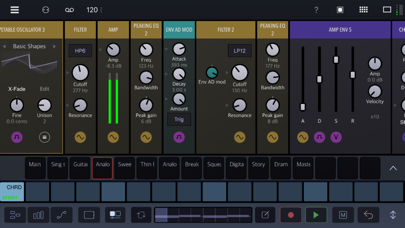
Drambo is your all-in-one sound laboratory that adapts to your workflow: build beats as a groovebox, design synths, or transform audio with effects, standalone or inside your favorite DAW.
At the core of Drambo is a fresh approach to modular design that makes creating with modules easy, fun, and accessible. Connections happen automatically as you add or move modules, so there are no messy cables to slow you down. The interface adapts to your workflow, generating modulation controls when you need them, and even lets modules contain other modules for perfect organization. You’re always free to override the automatic connections, but most of the time, you can just dive in, experiment, and …
Read the full description
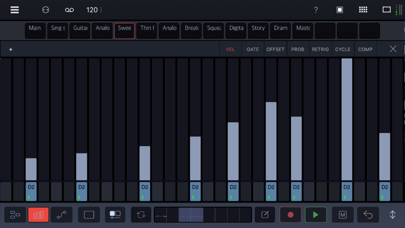
Drambo is your all-in-one sound laboratory that adapts to your workflow: build beats as a groovebox, design synths, or transform audio with effects, standalone or inside your favorite DAW. At the core of Drambo is a fresh approach to modular design that makes creating with modules easy, fun, and accessible. Connections happen automatically as you add or move modules, so there are no messy cables to slow you down. The interface adapts to your workflow, generating modulation controls when you need them, and even lets modules contain other modules for perfect organization. You’re always free to override the automatic connections, but most of the time, you can just dive in, experiment, and shape sounds without getting tangled in wires. Use a deep and innovative sequencer to compose patterns and whole tracks, for production or live performance. Go beyond simple looping sequences with parameter locking, conditional step components, parameters automation and powerful scene morphing. Drambo works equally well as a self-contained standalone app or audio unit plugin with audio and MIDI connectivity as an AUV3 instrument, audio effect and MIDI effect. "Drambo changes the face of iOS music apps." Cult of Mac You can use Drambo as • A complete music production and performance environment • Endless modular playground, that allows you to build, modify and store custom instruments and effects. For instance: build a custom synth, sample and resample, build a Theremin using a gyroscope module, or turn your table into a playable surface, by processing microphone input with physical modelling modules. Get weird or make functional instruments and tools. • MIDI sequencer, that works with hardware and AUv3 instruments (e.g. Drambo sequences other instruments in an AU host app). Moreover Drambo can generate custom MIDI CC messages or modulation signals to control modular synths via DC coupled interfaces. • AUv3 synthesizer, effect or sequencer in other DAWs. Drambo can replace a lot of audio plugins. For instance: you may use it as a chorus, phaser, reverb, filter, equalizer, complex modular delay, decimator, frequency shifter, MIDI effect or complex modulator for other synths. You may combine, modulate and sequence them in no time. Features: • Polyphonic, stereo processing and audio-rate modulation. All signals are equal. Up to 16 voices per modular instrument rack. • Unique modular concept: cable-less, drag'n'drop, color coding dynamic interface, automatic connections, and customizable compact, rack views. • Directional flow makes Drambo routing and patching straightforward. Signal flows only left to right, so there are no instant feedback routings in Drambo. Delayed feedback is possible using certain modules. • Simple and clean interface, that scales to every size and device orientation • Over 140 modules available, such as: oscillators, samplers, physical modelling modules, LFOs, envelope generators, filters, audio effects, mixers, MIDI processors, sequencers and math functions. (Includes a macro oscillator based on the famous Eurorack Plaits module, with 24 synth engines) • Custom modular racks that can be nested, with presets at the track, rack, and module level. • Clip launcher / song arrager. • 16-tracks, polyphonic sequencer with parameter locks, automation and step components. 8 dedicated step sequence editor types, piano-roll, powerful automation designer with drawing modes and cubic Bezier curves. • Audio Units hosting ( standalone app only ) • Morph groups: you can morph many parameters using a single slider. • Available as a standalone app, AUv3 instrument, effect and MIDI effect. • MIDI and Ableton Link support With Drambo, you are in charge. Create the music from your vision to reality. Visit the BeepStreet page for help and tutorials, and Patchstorage for community content.
Installs since 29 Aug 2026
Apple does not publish download counts. Estimates are in testing.
Estimated store revenue Estimated Beta
App Store, worldwide, monthly rate from the last 12 chart days to 19 Nov 2026
Below the top 100 grossing apps in the markets we calibrate. In the United States that usually means under about $6.4M a month. App Store purchases and subscriptions only, before Apple's 15 to 30% fee. Ads and web payments are not included.
Ratings
332 ratings, 332 reviews
No rating breakdown published for this app.
Recent reviews
Latest public reviews from the store
- 11 Nov 2025
Stellar. Drambo does all the things, and does them well.
I’ve had Drambo for a few months, and it just keeps impressing and surprising me. There is a bit of a learning curve, but there is also plenty of help via the dev’s site and included tutorials (not to mention the new Help system with the last update.) That said, once you get over the hump Drambo is fast and intuitive. This is one of those humbling apps that makes you think twice before buying that new shiny hardware or app… “can I build it Drambo?” The answer is most likely “yes.” The in-app purchases are worth every penny. The UI makes excellent use of screen real estate, and helps keep you focused on the task at hand. I can’t stress how important that part is, and how other iOS apps drop the ball in that realm. The modules sound great. Is this the best, smoothest, angriest Sallen-Key filter I’ve heard in the digital domain? Probably. I’m a “hardware” guy and it takes a lot for me to get excited about iPad music apps. Drambo, Koala Sampler, and a knobby MIDI controller will keep m happy for the foreseeable future.
- 20 May 2024
This is the best electronic music app on IOS full stop.
I’ve tried many iPad music apps over the years, and it’s always been enjoyable, but I’ve always felt quite constrained, and iPad has for the most part been a toy, for me. Drambo changes all of that. It’s hard to explain exactly what this app does to a newbie, and in fact it’s almost easier to list what it doesn’t do, which is audio tracks. Apart from that it does basically everything else you could want and can fit into the workflow of basically anyone. You can use this app as a standalone modular grove box, that can host auv3s. It’s similar to Bitwig or Reaktor stapled to a Digitact, but it really doesn’t stop there. You can also use Drambo itself as an AUV3 inside of other hosts such as AUM, or Logic Pro and that’s where it gets crazy. It can be a modular synth complete with wavetables and tons of other toys. It can be a a robust full featured sampler. It can be a midi sequencer with clip launching and song mode, which is a game changer for aum. It can be a midi CC modulator, with LFOs and MSEGs, which is also a game changer for aum. It can be a multi effect processor with reverbs, delays, compressor, ect. Even if you only want it for one of those use cases, it�
- 13 Apr 2023
I can’t believe how much stuff is in here
Hey psst kid! You like various kinds of synths and mixing various types of synth voices together such as FM or Wavetable? This has it You like digitakt style sequencing with ability to program per step modulation parameter locks? This has it! Wait you also like modular workflow and using CV for gate, velocity and note data? This… also has it! An ableton style clip launcher that doubles as tracker song mode sequencer??? Yesssir!! An AUv3 host for all your synths, effects or even midi processors??? Its somehow there too Its almost unbelievable how good these distinct elements are and how well they perform together! Due to its unique design it has some learning curve to it but if you had experience with both modular and groovebox sequencing you should be able to pick it up nicely. Drambo also does a lot of heavy lifting for you so its not super obscure (it autoconnects most modules although you are always welcome to change it) The only nitpicks Id have is that the piano roll maybe isnt as good or customizable as it could have been. Although note quantizing modules can take care of it, Id love to maybe see scale locking or a more readable UI for piano roll. It is however… a
- 7 Jul 2022
This changes everything
I’ve been experimenting with music production on the iPad since the early days of GarageBand on the iPad 1. I’ve tried just about everything that's come out since then, from Korg Gadget to BeatMaker to AUM, and while each has its strengths, every app has invariably left me feeling like it was good “for an app.” Nothing ever truly rivaled the immediacy of a hardware groovebox or the plain versatility of a DAW. And then Drambo 2.0 came out. Like a light turning on for the first time, I realized that why those other apps never really clicked with me was that they were all trying to transplant workflows that were never really the best fit for the iPad. Drambo is different: its workflow fits the iPad like a glove. Neither fully DAW nor groovebox, it’s its own thing, and what it is is an amazingly fluid and inspiring music workstation. As far as I’m concerned, Drambo finally delivers on the promise of iPad music production. It was a long time coming – and I can’t wait to see where it goes from here.
What reviewers bring up
Topics mentioned in the latest 8 reviews, by how many reviews mention them
Liked in good reviews (8 reviews)
- drambo 6
- other 5
- sequencer 4
- workflow 4
- modules 4
- those 4
- music 4
- ipad 4
Raised in bad reviews (0 reviews)
No topic comes up twice.
Top chart positions
Latest App Store chart ranks by country, last 10 days
- Countries ranked
- 7 of 50
- Best rank
- #25
- Top 10 placements
- 0
- of 9 chart placements
- Average rank
- #70.7
Best countries on App Store
- 🇭🇺 Hungary · Top paid, Music#25
- 🇮🇩 Indonesia · Top paid, Music#29
- 🇩🇪 Germany · Top paid, Music#61
- 🇪🇸 Spain · Top paid, Music#68
- 🇮🇹 Italy · Top paid, Music#91
- 🇺🇸 United States · Top paid, Music#95
| Country | Chart | Category | Rank | Best (10 days) | Date |
|---|---|---|---|---|---|
| 🇭🇺 Hungary | Top paid | Music | #25 | #9 | 19 Nov 2026 |
| 🇮🇩 Indonesia | Top paid | Music | #29 | #18 | 12 Nov 2026 |
| 🇩🇪 Germany | Top paid | Music | #61 | #61 | 11 Nov 2026 |
| 🇪🇸 Spain | Top paid | Music | #68 | #68 | 10 Nov 2026 |
| 🇭🇺 Hungary | Top grossing | Music | #70 | #70 | 17 Nov 2026 |
| 🇮🇹 Italy | Top paid | Music | #91 | #56 | 14 Nov 2026 |
| 🇺🇸 United States | Top paid | Music | #95 | #95 | 19 Nov 2026 |
| 🇬🇧 United Kingdom | Top paid | Music | #98 | #98 | 11 Nov 2026 |
| 🇮🇩 Indonesia | Top grossing | Music | #99 | #99 | 10 Nov 2026 |
Drambo history
Release, install milestones, listing and store changes
- First released on the store 1 Apr 2020
Update frequency
How often Drambo ships a new version, month by month
4 updates in the last 12 months. More often than most similar apps: they shipped a median of 1 updates in the same year.
Recent versions
Current version 2.57
- Version 2.5716 Oct 2026
New: • Added on-screen Pitch Bend and Modulation wheels, including recording, playback, and editing of their automation. The wheels follow automation playback and incoming MIDI, while automation curves update live during wheel and knob recording. • Added Signal Monitor Recorder for capturing audio and MIDI phrases on the fly. Hold an input to open the Signal Monitor, select Recorder, and press REC. Press it again to stop, then drag recorded audio into a sampler or MIDI notes into a clip. Enable SYNC to start and stop recording on bar boundaries. • Added Dual Oscillator with eight shapeable waveforms, five cross-modulation modes (PM, exponential FM, AM, Ring, and Shape modulation), hard sync, phase control, and optional 2x oversampling. • Updated the LFO module with 16 waveforms, from classic shapes to Bounce, Random Walk, and Organic Motion. Each waveform includes a contextual Shape control. Poly Spread can distribute voice phases evenly or create drifting rates independently of gate retriggering. Also includes simplified tempo sync, smooth Shape modulation, and a more compact layout. • Added a new Noise module with nine modes: White (Fast), White / Pink, White Filter, Chip Long, Chip Short, Velvet, Static, Metal 808, and Metal KR55. A compact source for audio and modulation with a mode-specific Color control, optional polyphony, and stereo operation. • Added Buffer Live module, a tempo-synced live buffer effect for looping, scratching, and rearranging audio. Features variable playback speed and offset, rhythmic snapping, feedback routing, Freeze/Record controls, and click-reducing crossfades. • Supersaw Oscillator: added a new V2 mode that closely models the original JP8K supersaw. • Added Multi Envelope. Build custom envelopes using freely added segments, each with Level, Time, and Curve controls. Includes editable Hold, Loop, and Release markers, polyphonic modulation, quantized beat timing, and semitone ranges of +/-12, +/-24, or +/-48. • Added Morph Switch, which stores and recalls parameter states using a polyphonic Index input or MIDI notes. Includes Quantized, Crossfade, Latched Note, and Note Punch modes for note-based parameter locks. Supports smooth transitions, global Amount control, p-lockable state selection, and note-to-state assignment with Copy and Paste. • MIDI to CV now outputs Mod Wheel position and voice number. Improvements: • Doubled automation recording resolution. • Slightly increased the brightness of the default skin. Fixed: • Fixed AUv3 MIDI output handling for mixed-length messages and improved performance with large MIDI packets. • Fixed navigation arrows disappearing with long wavetable filenames in Wavetable Oscillator, Wavetable LFO, and Wavetable Waveshaper. • Fixed MIDI CC64 sustain pedal events handling. Visual Extension IAP: • Added Visual Processor Switch under Visual > Processor > Utility. Switch between processing chains using buttons, CV, or MIDI, with optional live crossfades. All layers share a single Frame input, while empty layers act as bypass. Only active processing chains run, keeping processing efficient. • New visual presets • Fixed camera issues on 7th-generation iPads.
- Version 2.5628 Aug 2026
- New MIDI Generative Sequencer module - Generates melodies and voice-led chords within a selected scale. Includes separate trigger and pitch loops, controlled variation, velocity, legato and polyphony. Generated sequences can be copied to the current clip. - Pattern time signature: numerator range extended to 16. - Improved knob interaction reliability on iPad and Mac: reduced accidental tap/double-tap actions while keeping parameter editing and automation recording immediate. Important; needs testing. - Fixed sample-rate-related pitch inaccuracies in Flexi Sampler stretching, Wave Scanner playback, and Looper audio restored from automatically loaded projects. - Fixed misaligned MIDI Learn overlays in the Scene Morph panel. - Fixed a rare crash in the Spectral Filter module. - Fixed a rare crash in the curve editor while recording automation. - Improved incoming MIDI clock transport synchronization. Drambo Visual extension (IAP): - Added MIDI Texture Scanner – turns visual textures into MIDI notes by scanning a line, ellipse, or circle. Map path segments to a custom scale, use the bipolar brightness threshold to trigger notes from light or dark regions, and monitor activity directly on the texture. - Added Visual Mute, a utility that can disable visual processing manually, via modulation, or by following its track’s mute state. - New presets in Shader/patterns, XY Transform/Projection and Processor Shader/Feedback and FX - Fixed: Scene, beatTime() variable was not updated properly. DSP Extensions 1 (IAP): - New Spectral Delay module - Shape delay time across the frequency spectrum to create rhythmic echoes, stereo movement and evolving textures. Includes tempo sync, quantization, feedback, diffusion and Hold.
- Version 2.5410 Jul 2026
Introducing Drambo Visual A new optional expansion for modular graphic synthesis, generative art and audio-reactive visuals inside Drambo. Work with video, camera input, images, 2D/3D modules, shaders and per-pixel processing, all driven by Drambo’s unique modulation system. Modulate motion, color, shape and visual effects with sequencers, LFOs, envelopes, MIDI, morphs and performance gestures. Available as an optional in-app purchase.
- Version 2.5327 Apr 2026
- Fixed: Crash when creating a new project with the Sequencer module on a track. - Updated: Random module: Added the Steps parameter. It quantizes the output and guarantees non-repeating sequences.
Listing keywords
Words and phrases Drambo repeats most in its store listing
Top phrases: midi effect (3), effect and midi (2), physical modelling modules (2), automatic connections (2), auv3 instrument (2).
Highlighted words also appear in the title. Counts cover the title, short description and description.
Compliance
What the listing and the app package show
- Store status
- Live
- Upkeep
- Updated 16 Oct 2026
- Age rating
- 4+
Apps like Drambo
 TEFviewTablEdit★ 4.66
 EverySound: Music DiscoveryTeragon One LLC★ 4.94
 Radio Singapore - SG Online FMPeterApps★ 4.66
 Muzik Box - An elegant playerNguyen Cong Huy★ 4.61
 KeyFinderScoreless Music★ 2.75
 Rhythm PadJSplash Apps★ 4.55
 Ravenscroft 275 PianoUVI★ 4.36
 Music transfer & stats: SwapyMaryana Yurieva★ 4.5
 JEMP RadioRace Allen★ 4.96
Drambo: questions and answers
Who makes Drambo?
Drambo is published by BeepStreet.
When was Drambo last updated?
The latest version (2.57) was released on 16 Oct 2026.
Is Drambo free?
No. Drambo is a paid app priced at $24.99.
Is Drambo still available?
Yes. Drambo is live on App Store as of 14 Nov 2026.
Track Drambo and its competitors
Watch any app for new versions, rating drops, chart moves and removals. Free plan, no card.