
- Installs
- —
- Apple does not publish download counts
- Rating
- —
- Ratings
- —
- Version
- 3.5
- Updated 5 Jun 2026
- Released
- 6 Feb 2014
- Tracked since 2 Jul 2026
- Size
- 10 MB
- Needs 12.0
Screenshots


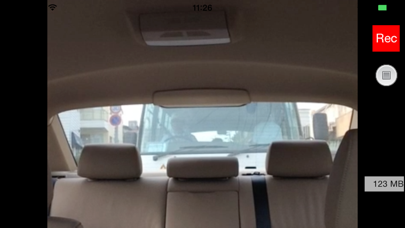

About DrvRec
The description on the store listing
This drive recorder app is intended for practical use.
We aimed to use this app for day-to-day drive easily without constraint pursuing bare and really necessary functions thoroughly as a drive recorder.
This drive recorder has the following functions.
a. It has two modes; the continuous recording mode and the latest recording mode that retains about 2 or 5 minutes long of the most recent recording.
b. It offers three recording qualities; high quality, medium quality and low quality.
c. The recording quality can correspond to the performance of each iPhone from iPhone4S to the latest.
d. It marks all frames of the recording with the time and date and the longitude and latitude.
e. It …
Read the full description
This drive recorder app is intended for practical use. We aimed to use this app for day-to-day drive easily without constraint pursuing bare and really necessary functions thoroughly as a drive recorder. This drive recorder has the following functions. a. It has two modes; the continuous recording mode and the latest recording mode that retains about 2 or 5 minutes long of the most recent recording. b. It offers three recording qualities; high quality, medium quality and low quality. c. The recording quality can correspond to the performance of each iPhone from iPhone4S to the latest. d. It marks all frames of the recording with the time and date and the longitude and latitude. e. It can record using rear camera or face camera by switching them. f. You can adjust the brightness of the rear video using face camera manually. g. It stops recording in one minute after iPhone gets strong impulse. h. Real-time display of the recording capacity. i. Playback of recorded files. j. The video file recorded will be saved locally and can be saved in the camera roll of the iPhone body. k. Voice recording. l. Displaying map and drived route. m. To playback saved drive recorder video. n. Eco-mode It offers the continuous recording mode. It can keep all recording of the drive from departure to arrival in continuous recording mode.If you use it securely without worrying about recording capacity when the remaining memory capacity is small, you can select the latest recording mode. The recording quality can be automatically controlled corresponding to the CPU’s performance of each iPhone model; and beside you can also select three (low, medium, high) recording qualities. It marks all frames of recorded video with the time and date and the longitude and latitude. Since the video copied in the camera roll also has time and location information, you can reproduce and display the time and date and the longitude and latitude without depending on the playback application. iPhone is equipped with two cameras; one as rear camera(the back of LCD) and other as face camera(LCD side). You can record using rear camera or face camera by switching them. The rear camera is assumed to take an image of the front direction of the car and the face camera takes the direction of the rear car. When you shoot backward, it is usually too difficult to distinguish the image of the outside of the car because of the difference of the inside and outside brightness of the car. As this app can adjust the brightness of the rear video manually, it makes possible to distinguish the image by continuing to tap the bright part of the outside image. When the iPhone catches a strong impulse, it stops recording in one minute after the impulse. You can keep a recorded video before and after the impulse. As the recording capacity is being displayed at all times, you can monitor the capacity. The video file is made in the memory area of this app at first. When you tap the play button, it plays back the video file in the memory.The memory area of this app is overwrote every recording. This application uses following OSS. AssetsAccessor(Copyright (c) 2013 Shintaro Morikawa) [Note] It does not guarantee reliably recording at any time in any case. Even if you get strong impulse, there could be some possibility not to stop recording. The operation may become unstable because the iPhone body gets very hot if it is exposed to direct sunlight. Please set the iPhone to the place that does not interfere with driving or operation of the air bag. This application uses the location-based services. Please activate the location-based services. We are not able to compensate you for any damages or losses by any reason.
Installs
Apple does not publish download counts. Estimates are in testing.
We publish iOS estimates only after they pass a back-test against real numbers. Chart history below is measured.
Estimated store revenue Estimated Beta
App Store, worldwide, monthly rate from the last 13 chart days to 20 Nov 2026
Below the top 100 grossing apps in the markets we calibrate. In the United States that usually means under about $6.4M a month. App Store purchases and subscriptions only, before Apple's 15 to 30% fee. Ads and web payments are not included.
Ratings
No rating breakdown published for this app.
Recent reviews
Latest public reviews from the store
No reviews in our sample for this app yet.
Top chart positions
Latest App Store chart ranks by country, last 10 days
Not in any tracked top chart in the last 10 days.
DrvRec history
Release, install milestones, listing and store changes
- First released on the store 6 Feb 2014
Update frequency
How often DrvRec ships a new version, month by month
1 updates in the last 12 months. About as often as similar apps, which shipped a median of 1 updates in the same year.
Recent versions
Current version 3.5
- Version 3.55 Jun 2026
- The code has been completely rewritten to improve stability. - Recorded video playback and route map display can now be specified separately.
Listing keywords
Words and phrases DrvRec repeats most in its store listing
Top phrases: face camera (5), recording mode (5), drive recorder (4), rear camera (4), continuous recording mode (3).
Highlighted words also appear in the title. Counts cover the title, short description and description.
Compliance
What the listing and the app package show
- Store status
- Live
- Upkeep
- Updated 5 Jun 2026
- Age rating
- 4+
Apps like DrvRec
 Library of AviationNazmi Yavuz★ 4.82
 MyNOVECNorthern Virginia Electric Cooperative★ 2.28
 打工人小组件光翔 卓★ 4.96
 TruckbaysTruckbays LLC★ 4.3
 Tornado PRO PlayerMohammed Altam★ 4.44
 VDX - Video ManagerARISEPEAK LP★ 1.74
 TV CastingZeasn Info Technology Co., Ltd.★ 1.86
 Mil-Dot BallisticsTom Holsten★ 3.82
 MySontiqSontiq, Inc.★ 2.4
DrvRec: questions and answers
Who makes DrvRec?
DrvRec is published by HIROFUMI MARUO.
When was DrvRec last updated?
The latest version (3.5) was released on 5 Jun 2026.
Is DrvRec free?
No. DrvRec is a paid app priced at $0.99.
Is DrvRec still available?
Yes. DrvRec is live on App Store as of 2 Jul 2026.
Track DrvRec and its competitors
Watch any app for new versions, rating drops, chart moves and removals. Free plan, no card.