
- Installs
- —
- Apple does not publish download counts
- Rating
- 4.66
- Ratings
- 2.9K
- 2.9K reviews
- Version
- 12.1
- Updated 21 Sep 2026
- Released
- 18 Sep 2014
- Tracked since 10 May 2026
- Size
- 234 MB
- Needs 18.0
Screenshots
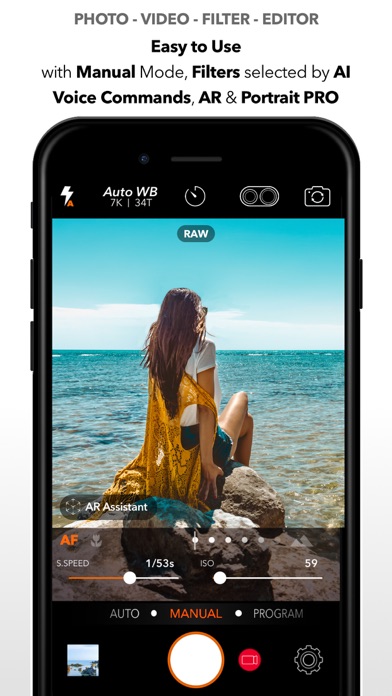

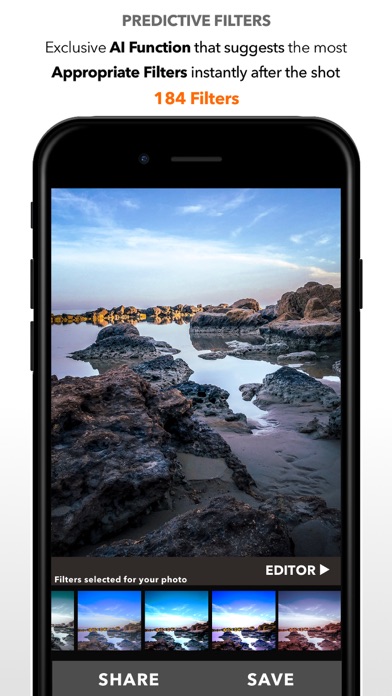


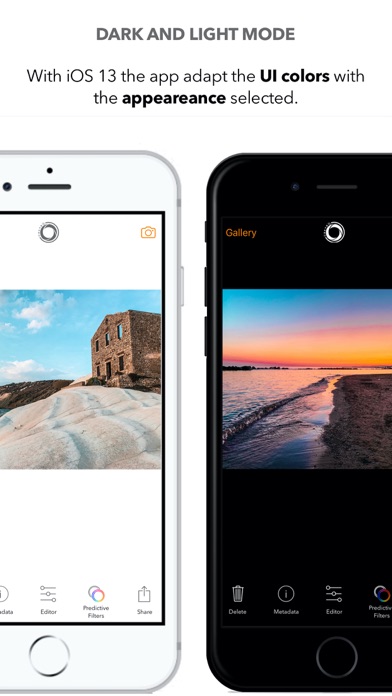

About DSLR Camera
The description on the store listing
DSLR Camera for iPhone, iPad, Apple Watch and iMessage the complete app for Photo and Video with Manual Controls, Advanced Editor and 200+ Professional Filters.
You can shoot and record with the full advantage of the camera on your device, for spectacular shots and videos even at night.
• Constantly updated since 2014 to ensure better performance
- Most downloaded app in 30 World Stores
- Selected like "App of the Day" in many world stores
Made with love in Sicily
The app is designed to be used by beginners and experts.
3 modes:
Auto Mode - for automatically perfect photos and videos
Manual Mode - modifies: Shutter Times, ISO Sensitivity, Manual Focus, Manual WB
P Mode - to shoot …
Read the full description
DSLR Camera for iPhone, iPad, Apple Watch and iMessage the complete app for Photo and Video with Manual Controls, Advanced Editor and 200+ Professional Filters. You can shoot and record with the full advantage of the camera on your device, for spectacular shots and videos even at night. • Constantly updated since 2014 to ensure better performance - Most downloaded app in 30 World Stores - Selected like "App of the Day" in many world stores Made with love in Sicily The app is designed to be used by beginners and experts. 3 modes: Auto Mode - for automatically perfect photos and videos Manual Mode - modifies: Shutter Times, ISO Sensitivity, Manual Focus, Manual WB P Mode - to shoot and record, choose perfect exposure quickly and easily Then only one with AI to predict the best filters for your photo • Perfect shots and videos DSLR Camera offers you the ability to capture and film your subjects, automatically with the ability of controlling manual function to control shooting time and ISO. The controls are designed to be simple and complete • Hand Timer Use your hand to tell your iPhone how many seconds to wait before taking a shot • RAW Shot beautiful photographs in RAW format for a Professional quality • Predictive Filters A powerful feature that automatically select the filters most appropriate for your photos • AR Portrait Take unique portraits using the LiDAR sensor and AR. Easily place stickers and graphics between the subject and the background, adjust the blur and enjoy the new photo taking experience. • Bokeh Take shots by adjusting the intensity of the blur and the depth at which the effect is applied. • Widgets Use exclusive widgets that automatically select and improve every shots • AR Assistant Use the augmented reality to study and choose the best point of view for your photo or video. Use the tutorial to learn various photographic techniques • Siri Shortcuts Control the app with the voice You can say "Hey Siri filter last shot" and Siri will automatically use a predictive filters to correct your photo • Advanced Focus Choose the focus to highlight the subject using Focus Macro to capture even minute details, Focus "Infinity" to perfectly define subjects that are far away. • AFC - No more blurry photos Hold down a point of the frame to track the subject you chose and DSLR Camera app will focus on what you have chosen. • Face Tracking - Selfie and Perfect Portraits Faces in your photos will always be at the right brightness • Selfie Comparison Thanks to ML the app evaluate face quality in a picture to help you in selecting the best shot • Music Filters This exclusive feature creates and recommends filters based on the music you are listening to and the mood of the moment. • Dual Filter The Dual Filter feature allows you to correct and post-produce the subject and background separately. • Advanced Editor Edit easily all your photos thanks to the integrated editor. Photo Editor is fast and complete, allowing you to make your shot even better. You can adjust: Exposure, Contrast, Lights, Shadows, Color Temperature, Saturation, Vividness, Structure, Sharpness, Photo Noise, and Vignette. Complete with all the Tools to resize, crop, and adjust your photos. • 200+ Filters 200+ exclusive Photo Filters to make your photo unique • Cinematic Videos Select recording quality and take videos in 4k, lock exposure, for a cinematic result • MultiCam You will be able to take photos and record videos using two cameras simultaneously, to obtain unique and innovative results • iMessage App • Apple Watch Remote DSLR Camera also offers: 3 Shots mode, Predictive Filters, AFC, RAW (DNG), Manual Controls, Photo Editor, 200+ Photo Filters, 3D Touch Support, 4k Video, Manual Focus, Night Mode, Auto WB, Jump Shot, Timer, Photos Effect, Tone Curves, Advanced Blur, Advanced Correction Tools, Text, Splash, Resize, Crop, Dual Camera Zoom, Digital Zoom, Selfie Flash. Easy, Complete and Powerful!
Installs, last 30 days
Apple does not publish download counts. Estimates are in testing.
Estimated store revenue Estimated Beta
App Store, worldwide, monthly rate from the last 12 chart days to 19 Nov 2026
Below the top 100 grossing apps in the markets we calibrate. In the United States that usually means under about $6.4M a month. App Store purchases and subscriptions only, before Apple's 15 to 30% fee. Ads and web payments are not included.
Ratings
2,879 ratings, 2,879 reviews
- 5 ★80%
- 4 ★13%
- 3 ★2.8%
- 2 ★1.3%
- 1 ★2.9%
Recent reviews
Latest public reviews from the store
- 7 Dec 2021
Not close to my fujifilm but i love it
I won't deny it. I feel like my fujifilm is an extension of my arms and my imagination but it can't to everywhere with me. But when all I have is my phone, it's this one camera app I go to every time. Not my iPhone camera. Why? Not just the manual controls but the way the manual controls are done. So easy to reach everything. No fancy stupid nonsense like other apps. Just controls and end of story. I don't take photos as a gimmicky way to pass time. This app was made by people who understand those of us who express our emotions and thoughts through photos but staying simple and keeping out of the way so we can be ourselves without struggling to figure out controls.
- 11 Apr 2020
T. Adventures
I own an iPhone 11 and was excited to use this app. Unfortunately, as soon as I open the app, it crashes. Again and again. I can't even use this new app on my new phone. I saw the 5 star reviews and was all in. What disappointment... 3 hours later, I long-tap the app icon which reveals camera modes to choose from. I tap one of the modes, and yes! I'm in. It crashed multiple times in the beginning, but since I got into the app through the long-tap and it's still working, I will give it 4 stars for now because it works fast on my iPhone 11 my. I am excited to use the PIP function (I'm usually the one behind the camera). I will be back to re-rate after this pandemic (or maybe during...) Be safe out there everyone.
- 18 Jan 2020
Feature rich, but output resolution disappointing
After all the hype in the AppStore, I spent my $.99 and was pleasantly surprised to find such a feature rich app, both for taking photos, and editing images after the fact. While I take very few photos using an I-device, on my iPad and iPad Pro I edit “real” DSLR images usually in the 16-24mp range depending on which camera they come from. While I really like the feature set of this app, I was really disappointed to find the output resolution being throttled by the limits of the devices graphics processor, i.e., a maximum of 4096 px on either side yielding about a 11.2 mp for a rectangular aspect image. Downsampling a 24mp image to 11mp is a real disappointment from a printing perspective. It makes little difference for social media, e-mailing and web apps, but it defeats the purpose of having hi-res images for printing large size prints. Maybe in new devices, Apple has improved the on-board graphics engine, but since so many other excellent apps have worked there way around this hardware shortcoming, it seems like such a robust app as this deserves better.
- 7 Sep 2019
Turn your phone into an amazing camera
I own a 6 (old) my camera was not taking good selfies. I researched and found this app. Read the reviews and compared. I am amazed at how beautiful the pictures came out. My budget is tight but this was the best purchase. It doesn’t slow me down. I can even take video with filters. My favorite is the predicative filters feature. It helps me decide the best filter or I can choose from many others. My selfies are not grainy and I love, love, love this app. I even use it to fix other photos. I highly recommend this app. 5 Stars
What reviewers bring up
Topics mentioned in the latest 8 reviews, by how many reviews mention them
Liked in good reviews (5 reviews)
- camera 5
- photos 3
- other 3
- disappointment 2
- multiple 2
- through 2
- reviews 2
- usually 2
Raised in bad reviews (3 reviews)
- people 2
- manual 2
- test 2
Top chart positions
Latest App Store chart ranks by country, last 10 days
- Countries ranked
- 43 of 50
- Best rank
- #8
- Top 10 placements
- 1
- of 46 chart placements
- Average rank
- #51.8
Best countries on App Store
- 🇳🇬 Nigeria · Top paid, Photo & Video#8
- 🇪🇬 Egypt · Top paid, Photo & Video#11
- 🇷🇴 Romania · Top paid, Photo & Video#17
- 🇭🇺 Hungary · Top paid, Photo & Video#18
- 🇮🇩 Indonesia · Top paid, Photo & Video#24
- 🇵🇹 Portugal · Top paid, Photo & Video#25
| Country | Chart | Category | Rank | Best (10 days) | Date |
|---|---|---|---|---|---|
| 🇳🇬 Nigeria | Top paid | Photo & Video | #8 | #6 | 19 Nov 2026 |
| 🇪🇬 Egypt | Top paid | Photo & Video | #11 | #8 | 19 Nov 2026 |
| 🇷🇴 Romania | Top paid | Photo & Video | #17 | #13 | 19 Nov 2026 |
| 🇭🇺 Hungary | Top paid | Photo & Video | #18 | #15 | 19 Nov 2026 |
| 🇮🇩 Indonesia | Top paid | Photo & Video | #24 | #8 | 19 Nov 2026 |
| 🇵🇹 Portugal | Top paid | Photo & Video | #25 | #25 | 19 Nov 2026 |
| 🇬🇷 Greece | Top paid | Photo & Video | #26 | #18 | 19 Nov 2026 |
| 🇵🇪 Peru | Top paid | Photo & Video | #27 | #26 | 19 Nov 2026 |
| 🇨🇿 Czechia | Top paid | Photo & Video | #27 | #15 | 19 Nov 2026 |
| 🇲🇾 Malaysia | Top paid | Photo & Video | #30 | #27 | 19 Nov 2026 |
DSLR Camera history
Release, install milestones, listing and store changes
- First released on the store 18 Sep 2014
Update frequency
How often DSLR Camera ships a new version, month by month
5 updates in the last 12 months. More often than most similar apps: they shipped a median of 2 updates in the same year.
Recent versions
Current version 12.1
- Version 12.121 Sep 2026
What’s New in DSLR Camera – Version 12.1 Discover a new level of photographic control with physical aperture support for iPhone 18 Pro and iPhone 18 Pro Max, and camera-inspired Pro Controls for every supported iPhone. Physical Aperture – from effortless to fully hands-on Take control of the variable aperture on the compatible Main camera of iPhone 18 Pro and iPhone 18 Pro Max: • Aperture Priority (Av) – choose your aperture while the camera adjusts shutter speed and ISO, with exposure compensation available • Manual – adjust aperture, shutter speed and ISO together • Auto – let the camera manage exposure, including aperture where supported Physical aperture controls are available with compatible cameras and capture formats. Introducing Pro Controls Inspired by camera dials, clear vertical scales and live values bring precise, hands-on adjustments to your fingertips: • Slide to adjust, or tap a marked value to move straight to it, with tactile feedback as you scroll • Control shutter speed and ISO in Manual, exposure compensation in Program, and aperture on compatible cameras • Available across supported iPhones, including models without variable aperture, with matching shutter speed, ISO and exposure compensation controls for photo and video Also included from Version 12: Version 12 introduces a major update focused on bringing more control to your photos, both before and after the shot, with new focus tools and a redesigned editing experience. The app is optimized and ready for the new iOS. New features include: • Refocus – on supported iPhones and compatible photos, tap a detected subject to keep it sharp while softening the rest of the image, and adjust the intensity of the blur • Aperture – on supported iPhones and photos with depth information, choose where to focus and adjust the blur with digital aperture control from f/16 to f/1.4 • Redesigned Photo Editor – a more consistent Liquid Glass interface, with refreshed controls for adjustments, filters, crop, text and effects • 48 MP capture on compatible iPhone cameras, with a new format and resolution selector Other major improvements: • Improved AFC subject tracking and face detection • Better preservation of photo metadata and supported depth information in the updated iPhone capture workflow • Improved crop and filter saving in Predictive Filters • Improvements to navigation, editing responsiveness and app stability in the previous update: The previous update introduced major improvements to shooting, editing, and library browsing. Predictive Filters, one of the app’s most appreciated features, has been completely redesigned with a new Core ML model, capable of suggesting filters with even greater accuracy and intelligence based on the visual characteristics of each photo. New features include: • New Liquid Glass interface, more modern and consistent across the app • Integrated crop tools directly within the editing workflow • Automatic horizon rotation powered by Core ML • Faster and smoother filter selection Other major improvements: • Significant UI and UX update • New Camera Roll experience • Faster iCloud photo loading • Richer and more reliable photo metadata • Full support for the new iPad window system • Internal refactor to improve performance, stability, and future scalability Previous updates: • Full support for new iOS and the latest iPhone camera systems • Camera Control support • Multicam improvements • Interactive widgets with StandBy support • Advanced HDR support • On-device AI improvements and new filter optimizations
- Version 11.1.125 Jun 2026
What’s New in DSLR Camera – Version 11 Version 11 introduces a major update focused on a significant evolution of the shooting, editing, and library browsing experience. Predictive Filters, one of the app’s most appreciated features, has been completely redesigned with a new Core ML model, capable of suggesting filters with even greater accuracy and intelligence based on the visual characteristics of each photo. New features include: • New Liquid Glass interface, more modern and consistent across the app • Integrated crop tools directly within the editing workflow • Automatic horizon rotation powered by Core ML • Faster and smoother filter selection Other major improvements: • Significant UI and UX update • New Camera Roll experience • Faster iCloud photo loading • Richer and more reliable photo metadata • Full support for the new iPad window system • Internal refactor to improve performance, stability, and future scalability Previous updates: • Full support for new iOS and the latest iPhone camera systems • Camera Control support • Multicam improvements • Interactive widgets with StandBy support • Advanced HDR support • On-device AI improvements and new filter optimizations
- Version 11.110 Jun 2026
What’s New in DSLR Camera – Version 11 Version 11 introduces a major update focused on a significant evolution of the shooting, editing, and library browsing experience. Predictive Filters, one of the app’s most appreciated features, has been completely redesigned with a new Core ML model, capable of suggesting filters with even greater accuracy and intelligence based on the visual characteristics of each photo. New features include: • New Liquid Glass interface, more modern and consistent across the app • Integrated crop tools directly within the editing workflow • Automatic horizon rotation powered by Core ML • Faster and smoother filter selection Other major improvements: • Significant UI and UX update • New Camera Roll experience • Faster iCloud photo loading • Richer and more reliable photo metadata • Full support for the new iPad window system • Internal refactor to improve performance, stability, and future scalability Previous updates: • Full support for new iOS and the latest iPhone camera systems • Camera Control support • Multicam improvements • Interactive widgets with StandBy support • Advanced HDR support • On-device AI improvements and new filter optimizations
- Version 11.0.28 Jun 2026
What’s New in DSLR Camera – Version 11 Version 11 introduces a major update focused on a significant evolution of the shooting, editing, and library browsing experience. Predictive Filters, one of the app’s most appreciated features, has been completely redesigned with a new Core ML model, capable of suggesting filters with even greater accuracy and intelligence based on the visual characteristics of each photo. New features include: • New Liquid Glass interface, more modern and consistent across the app • Integrated crop tools directly within the editing workflow • Automatic horizon rotation powered by Core ML • Faster and smoother filter selection Other major improvements: • Significant UI and UX update • New Camera Roll experience • Faster iCloud photo loading • Richer and more reliable photo metadata • Full support for the new iPad window system • Internal refactor to improve performance, stability, and future scalability Previous updates: • Full support for iOS 26 and the latest iPhone camera systems • Camera Control support • Multicam improvements • Interactive widgets with StandBy support • Advanced HDR support • On-device AI improvements and new filter optimizations
Listing keywords
Words and phrases DSLR Camera repeats most in its store listing
Top phrases: dslr camera (5), predictive filters (3), shoot and record (2), shots and videos (2), advanced editor (2).
Highlighted words also appear in the title. Counts cover the title, short description and description.
Compliance
What the listing and the app package show
- Store status
- Live
- Upkeep
- Updated 21 Sep 2026
- Age rating
- 4+
Apps like DSLR Camera
 Photo Collage Maker & PrinterVitalij Schaefer★ 4.7
 Reelsy Reel Maker IG TemplatesZed Italia S.r.l.★ 4.67
 Gram AI: Art CreatorUBI MEDIA FZE LLC★ 4.52
 Love Pic - Photo Collage MakerZipoApps★ 4.61
 Affinity Photo 2 for iPadSerif Labs★ 4.6
 Wallpaper _ Dynamic IslandEuropean Apps Solutions★ 4.52
 How Old Do I Look? Age Camera长金 胡★ 4.49
 Retouch - AI Face EditorSCALEUP YAZILIM HIZMETLERI★ 4.67
 instax UP! -Scan instax photosFUJIFILM Corporation★ 4.76
DSLR Camera: questions and answers
Who makes DSLR Camera?
DSLR Camera is published by Fulvio Scichilone.
When was DSLR Camera last updated?
The latest version (12.1) was released on 21 Sep 2026.
Is DSLR Camera free?
No. DSLR Camera is a paid app priced at $0.99.
Is DSLR Camera still available?
Yes. DSLR Camera is live on App Store as of 19 Nov 2026.
Track DSLR Camera and its competitors
Watch any app for new versions, rating drops, chart moves and removals. Free plan, no card.