- Installs
- —
- Apple does not publish download counts
- Rating
- 3.38
- Ratings
- 24
- 24 reviews
- Version
- 5.7
- Updated 22 Feb 2024
- Released
- 15 Jun 2018
- Tracked since 10 May 2026
- Size
- 72 MB
- Needs 13.0
Screenshots



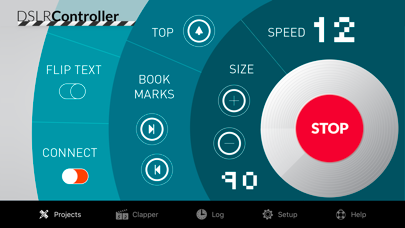
About DSLR Clapperboard
The description on the store listing
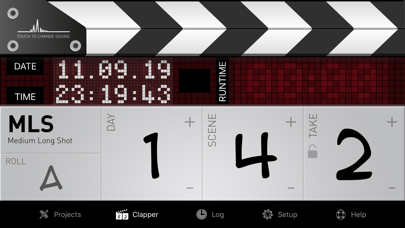
A few taps and you are on-air: select the angle, scene and take of your shot and tap on the clapper. You can edit the items and the descriptions in the setup page of the app to fully customize it.
Features' list:
CLAPPERBOARD
• Full customization of the clapboard: design your own slate with a few touches. (IPad version)
• Project based clapboard: start, stop and recall your work at your needs.
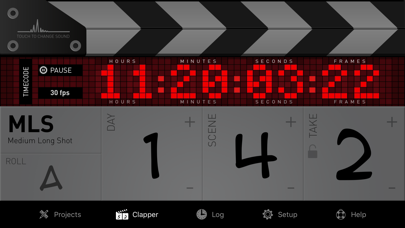
• Switch from timer to timecode (24, 25, 30, 50 and 60 fps).
• Choose among 3 different clap sounds.
• Auto takes advance, to update the take after each shot.
• Stopwatch, to have time under your control.
• Full customization, to have a clapperboard exactly the way you like.
• Remarks, allows you to …
Read the full description
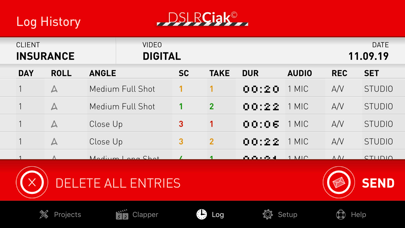
A few taps and you are on-air: select the angle, scene and take of your shot and tap on the clapper. You can edit the items and the descriptions in the setup page of the app to fully customize it. Features' list: CLAPPERBOARD • Full customization of the clapboard: design your own slate with a few touches. (IPad version) • Project based clapboard: start, stop and recall your work at your needs. • Switch from timer to timecode (24, 25, 30, 50 and 60 fps). • Choose among 3 different clap sounds. • Auto takes advance, to update the take after each shot. • Stopwatch, to have time under your control. • Full customization, to have a clapperboard exactly the way you like. • Remarks, allows you to add notes during the shooting. • Log history, to keep everything under your eyes. • Summary e-mail report, to send the result of your shooting in your inbox (in-app purchase). • NEW Multi-camera clapboard: you can synchronize up to 8 devices to execute the clapboard simultaneously on all of them. In-App Purchase (for a short period of time at a very competitive price): PROMPTER (IPad version) • Unlimited number of scripts. • Bookmarks, to jump directly to the point. • Remote control, with full preview at your fingertips. • Easy connection, over bluetooth or wi-fi. • Speed wheel, for an innovative user interaction. • Change font size from the remote control. • Flip text on the fly. • Drag text on the remote control, the prompter will follow accordingly. • Auto prompter: set up your speed and then start playing it. STORYBOARD (IPad version) • Import any image or picture you have as a frame of your storyboard. • Give it a number (also 12B-2C#2) and a description. • You can automatically import you storyboard with the new DSLR Template available for download at your fingertip. • Synchronize your storyboard with the clapperboard (scene number and final summary email). --- To ask for new features and to report bugs, please refer to dslrslate.com and visit the page "customer care".
Installs
Apple does not publish download counts. Estimates are in testing.
We publish iOS estimates only after they pass a back-test against real numbers. Chart history below is measured.
Estimated store revenue Estimated Beta
App Store, worldwide, monthly rate from the last 14 chart days to 21 Nov 2026
Below the top 100 grossing apps in the markets we calibrate. In the United States that usually means under about $6.4M a month. App Store purchases and subscriptions only, before Apple's 15 to 30% fee. Ads and web payments are not included.
Ratings
24 ratings, 24 reviews
No rating breakdown published for this app.
Recent reviews
Latest public reviews from the store
No reviews in our sample for this app yet.
Top chart positions
Latest App Store chart ranks by country, last 10 days
Not in any tracked top chart in the last 10 days.
DSLR Clapperboard history
Release, install milestones, listing and store changes
- First released on the store 15 Jun 2018
Recent versions
Current version 5.7
- Version 5.722 Feb 2024
• A great new feature: the ability to synchronize multiple iPads and iPhones for multi-camera clapboard. After calibrating your devices, you can use one of them to control all the others, executing the clapperboard perfectly synchronized. • Minor bug fixings. • A new, more rational and clear clapboard menu. • Clapboard: the screen brightness increases to make the information more visible. • New lens selector.
Listing keywords
Words and phrases DSLR Clapperboard repeats most in its store listing
Top phrases: ipad version (3), remote control (3), full customization (2).
Highlighted words also appear in the title. Counts cover the title, short description and description.
Compliance
What the listing and the app package show
- Store status
- Live
- Upkeep
- No update since 22 Feb 2024
- Age rating
- 4+
Apps like DSLR Clapperboard
 Video CollageaZeR DiLLs★ 4.08
 Vee for VideoMedious★ 2.98
 Beauty Camera -Selfie, StickerBhuvan Gupta★ 4.5
 FinalCamXShenzhen Xiaozhen Technology Co.,Ltd.★ 4.44
 Magic Studio - AI Photo EditorMagicStudio.com★ 4.62
 Foto Impresiones: 1 Hr PhotoSoftwareX★ 4.98
 SnapGeo - AI Location FinderRECEP ASLAN★ 4.24
 Family Photo Maker - AIRick-y Media★ 4.12
 BeautifAI: AI Try OnJAI UYGULAMA VE YAPAY ZEKA TEKNOLOJILERI ANONIM SIRKETI★ 4.36
DSLR Clapperboard: questions and answers
Who makes DSLR Clapperboard?
DSLR Clapperboard is published by Daniele Morelli.
When was DSLR Clapperboard last updated?
The latest version (5.7) was released on 22 Feb 2024.
Is DSLR Clapperboard free?
Yes. DSLR Clapperboard is free to download.
Is DSLR Clapperboard still available?
Yes. DSLR Clapperboard is live on App Store as of 1 Jul 2026.
Track DSLR Clapperboard and its competitors
Watch any app for new versions, rating drops, chart moves and removals. Free plan, no card.