
- Installs
- —
- Apple does not publish download counts
- Rating
- —
- Ratings
- —
- Version
- 2.0
- Updated 24 Apr 2026
- Released
- 16 Mar 2014
- Tracked since 11 Nov 2026
- Size
- 4 MB
- Needs 16.0
Screenshots


About e-Nurse
The description on the store listing
This application program let you know the dosage times by three continuous chimes. The dosage notification works even in the back ground.
This app supports some QR codes for electronic medication records (JAHIS).
Your medication will be recorded when you tap the blinking button after medication.
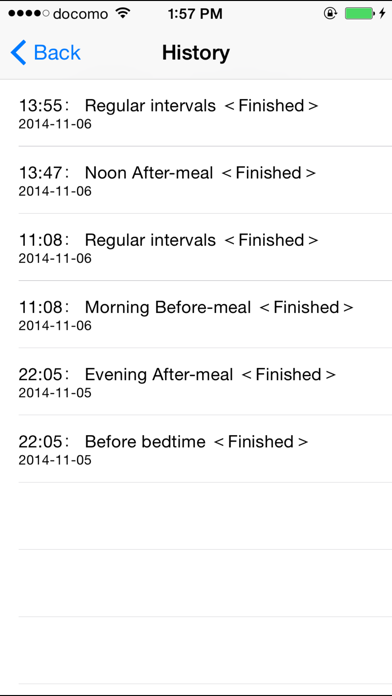
You can see your medication history by tapping the 'History' button. Old history is automatically deleted after three months.
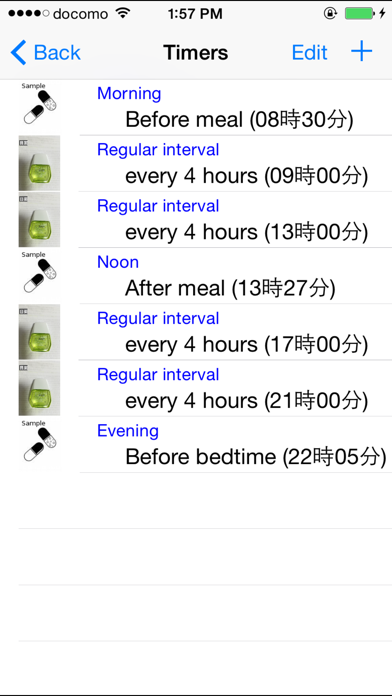
Soon after having downloaded the app, medicine samples of ‘Morning before meal’, ‘Noon after meal’ and ‘Before bedtime’ are displayed on a time table for example usage.
The chime rings to urge you to take medicine if the dosage times are things of the past already. The …
Read the full description
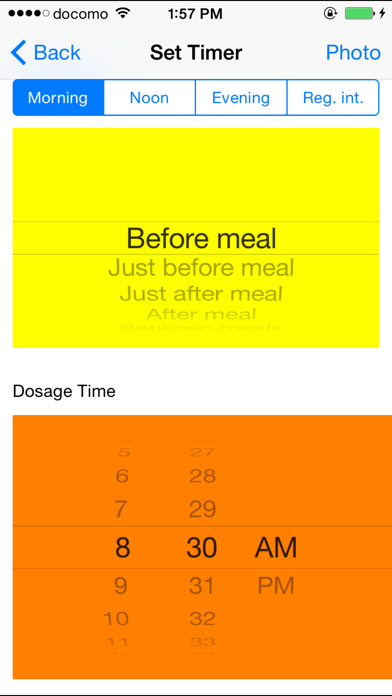
This application program let you know the dosage times by three continuous chimes. The dosage notification works even in the back ground. This app supports some QR codes for electronic medication records (JAHIS). Your medication will be recorded when you tap the blinking button after medication. You can see your medication history by tapping the 'History' button. Old history is automatically deleted after three months. Soon after having downloaded the app, medicine samples of ‘Morning before meal’, ‘Noon after meal’ and ‘Before bedtime’ are displayed on a time table for example usage. The chime rings to urge you to take medicine if the dosage times are things of the past already. The blink stops if you tap blinking buttons. Tapping upper right 'Setting' button on the screen to move to setting times screen, you can change the dosage times and add new dosage timings such as 'Morning after meal' or clear dosage timing. How to set dosage timing. - move to operation selection screen by tapping 'Setting' button in the upper right corner on the initial screen. (1) How to set dosage timing from QR code - Tap the "Register medication timing by scanning QR code" button to move to the QR code scanning screen. - Scan all available QR codes. Once scanning is complete, the QR code will be surrounded by a green frame, and the "Number of scanned QR codes" will be displayed. Confirm that all QR codes have been scanned. - Tap the "Scanning Complete" button to automatically set some of the QR code content as medication timing. The following Japanese medication instruction phrases can be interpreted by this app: "Breakfast," "Lunch," "Dinner," "Every Meal" "Before Meals," "After Meals," "x Times a Day" - move to 'Setting' screen by tapping 'Register/Update the dosage schedule' button. (2) Updating dosage time By tapping the line of medication item, you can move to 'set timer' screen and update the dosage time by the wheel. (3) Resister a new medication item By tapping the plus icon in the upper right corner, you can move to 'set timer' screen and resist a new medication item. The following are the categories of the medication item. In the morning: before meal, just before meal, just after meal, after meal, between meals (morning and noon) At noon: before meal, just before meal, just after meal, after meal, between meals (noon and evening) In the evening: before meal, just before meal, just after meal, after meal, before bedtime Regular Interval: every one hour, every two hours, - - - , every twelve hours How to associate the photo of medicines with the dosage timing. - You can associate photos of medicine with dosage timings which were set above. - Tap the top right 'Medicine' button on the 'Time' screen. - In the photo selection screen, when you tap the 'Select' button and select pictures on the screen and then tap the 'Done' button, the photos can be associated with the dosage timing. Multiple Photos can be selected at a time. ** If you want to mute the chime, you should set one of the following. - Clear all dosage timings. (Medicine notification vanish) - In Settings app with iPhone, tap "Do Not Disturb" and enable “Manual” or “Scheduled”.While iPhone is locked state, alerts will be silenced and moon icon will appear in the status bar. - Pressing and holding the power button with iPhone and turn off the power. [Note] - It does not guarantee reliably sounding chimes at specific times at any time in any case. - If you do not start the app for more than a day, chimes will be silenced. When you start the app, the chimes begin to sound. - We are not able to compensate for any damages or losses by any reason.
Installs
Apple does not publish download counts. Estimates are in testing.
We publish iOS estimates only after they pass a back-test against real numbers. Chart history below is measured.
Estimated store revenue Estimated Beta
App Store, worldwide, monthly rate from the last 13 chart days to 20 Nov 2026
Below the top 100 grossing apps in the markets we calibrate. In the United States that usually means under about $6.4M a month. App Store purchases and subscriptions only, before Apple's 15 to 30% fee. Ads and web payments are not included.
Ratings
No rating breakdown published for this app.
Recent reviews
Latest public reviews from the store
No reviews in our sample for this app yet.
Top chart positions
Latest App Store chart ranks by country, last 10 days
- Countries ranked
- 1 of 50
- Best rank
- #82
- Top 10 placements
- 0
- of 1 chart placements
- Average rank
- #82
Best countries on App Store
- 🇦🇺 Australia · Top paid, Health & Fitness#82
| Country | Chart | Category | Rank | Best (10 days) | Date |
|---|---|---|---|---|---|
| 🇦🇺 Australia | Top paid | Health & Fitness | #82 | #68 | 13 Nov 2026 |
e-Nurse history
Release, install milestones, listing and store changes
- First released on the store 16 Mar 2014
Update frequency
How often e-Nurse ships a new version, month by month
0 updates in the last 12 months. Less often than most similar apps: they shipped a median of 1 updates in the same year.
Listing keywords
Words and phrases e-Nurse repeats most in its store listing
Top phrases: after meal (8), before meal (7), dosage timing (5), qr code (5), medication item (4).
Highlighted words also appear in the title. Counts cover the title, short description and description.
Compliance
What the listing and the app package show
- Store status
- Live
- Upkeep
- Updated 24 Apr 2026
- Age rating
- 12+
Apps like e-Nurse
 Advocate Centre ClubThe Center Club★ 4.26
 知源中医Chongqing Caochen Technology Co., Ltd.★ 4.96
 Easy Keto: Low Carb RecipesMartin Stein★ 4.56
 GFX NewGemini Fit Personal Training, Inc★ 4.98
 U Look So Good: Cycle SyncingUS Digital★ 4.64
 Aquila 360 Fitness AppAquila Fitness Consulting Systems, Ltd.★ 4.74
 iCondomRaaza Ltd★ 4.1
 Ultrasonic RepellerAleksandr Balyberdin★ 3.56
 Sleep Tools - Free HD Alarm Clock - Sleep Cycle Calculator - Soothing Night and Bed Time Audio Music Player to Fall Asleep - With Dream Utilities - Universal TonesBigBang, Inc.★ 3.44
e-Nurse: questions and answers
Who makes e-Nurse?
e-Nurse is published by HIROFUMI MARUO.
When was e-Nurse last updated?
The latest version (2.0) was released on 24 Apr 2026.
Is e-Nurse free?
No. e-Nurse is a paid app priced at $0.99.
Is e-Nurse still available?
Yes. e-Nurse is live on App Store as of 11 Nov 2026.
Track e-Nurse and its competitors
Watch any app for new versions, rating drops, chart moves and removals. Free plan, no card.