
- Installs
- —
- Apple does not publish download counts
- Rating
- —
- Ratings
- —
- Version
- 3.0.0
- Updated 31 Oct 2025
- Released
- 19 Mar 2018
- Tracked since 10 May 2026
- Size
- 2 MB
- Needs 13.0
Screenshots


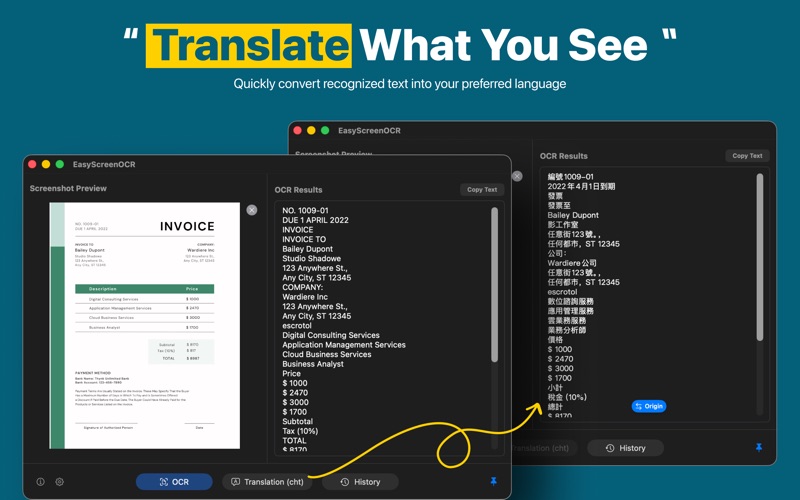
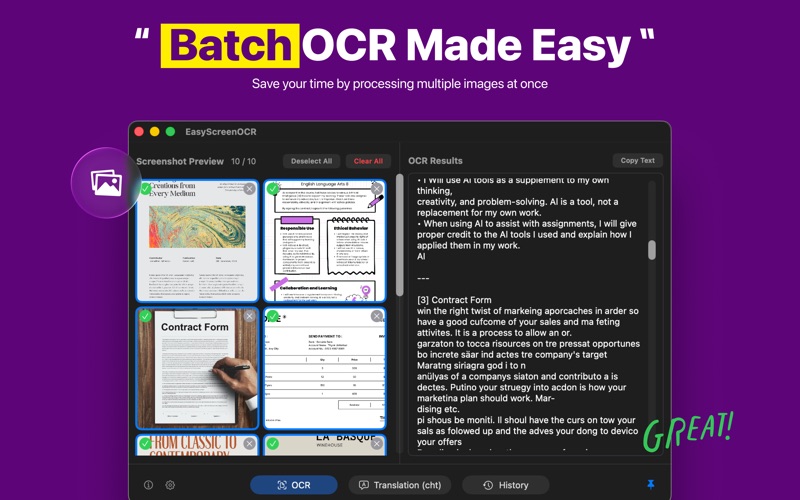

About EasyScreenOCR - Image to Text
The description on the store listing
EasyScreenOCR 3.0 – Smarter, Faster, Offline, More Accurate
The brand-new EasyScreenOCR 3.0 is here! Fully optimized for Apple Silicon (M1/M2/M3/M4) and tested on macOS Tahoe 26, this release brings higher OCR accuracy, smoother performance, and enhanced security.
With 100% offline OCR, automatic language detection, batch processing, and text translation, EasyScreenOCR is your reliable tool to extract text instantly from screenshots and images.
Awards
----------------------
#1 Product of the Week from ProductHunt
#1 Product of the Day from ProductHunt
https://www.producthunt.com/posts/screenocr
Why Choose EasyScreenOCR?
----------------------
Instant OCR – Capture any part of your …
Read the full description
EasyScreenOCR 3.0 – Smarter, Faster, Offline, More Accurate The brand-new EasyScreenOCR 3.0 is here! Fully optimized for Apple Silicon (M1/M2/M3/M4) and tested on macOS Tahoe 26, this release brings higher OCR accuracy, smoother performance, and enhanced security. With 100% offline OCR, automatic language detection, batch processing, and text translation, EasyScreenOCR is your reliable tool to extract text instantly from screenshots and images. Awards ---------------------- #1 Product of the Week from ProductHunt #1 Product of the Day from ProductHunt https://www.producthunt.com/posts/screenocr Why Choose EasyScreenOCR? ---------------------- Instant OCR – Capture any part of your screen and extract editable text in seconds. Auto Language Detection – No need to set OCR language manually; the app detects it for you. 100+ Languages Supported – Recognize characters from a wide range of languages with ease. Built-in Translation – Translate recognized text into other languages quickly and accurately. Batch Processing – Process multiple images at once to save time. Offline Privacy – All OCR runs locally on your Mac. No uploads, no risk of data leakage. Hotkey Customization – Set your own shortcuts for faster screenshots and OCR workflow. History Records – Keep track of your past OCR results for easy reference. How It Works ---------------------- Launch EasyScreenOCR and enable Screen Recording under System Preferences > Security & Privacy. Use the hotkey to take a screenshot. Click OCR when the window pops up. The extracted text is automatically copied to your clipboard. Subscription Plans ---------------------- EasyScreenOCR offers full functionality for free users. Upgrade to Pro for advanced usage such as batch OCR (more than 5 images at once) and extended translation capacity (over 1000 characters). Monthly Plan: $6.99 – unlimited access Yearly Plan: $19.99 – best value Lifetime Plan: $29.99 – pay once, use forever Languages for OCR ---------------------- AutoDetection / Albanian / Arabic / Armenian / Belorussian / Bengali / Bulgarian / Catalan / Chinese / Cloatian / Czech / Danish / Dutch / English / Estonian / Filipino / Finnish / French / German / Greek / Gujarati / Hebrew / Hindi / Hungarian / Icelandic / Indonesian / Italian / Japanese / Kannada / Khmer / Korean / Lao / Latvian / Lithuanian / Macedonian / Malay / Malayalam / Marathi / Nepali / Norwegian / Persian / Polish / Portuguese / Punjabi / Romanian / Russian / Serbian / Russian /Slovak / Slovenian / Spanish / Swedish / Tamil / Telugu / Thai / Turkish / Ukrainian / Vietnamese / Yiddish Languages for Translation ---------------------- We support the following languages for translation: Chinese-Simplified / English / Cantonese / Japanese / Korean / French / Spanish / Thailand / Arabic / Russian/ Portuguese/ German / Italian / Greek / Dutch / Polish / Bulgarian / Estonian / Danish / Finnish / Czech / Romanian / Slovenian / Swedish / Hungarian / Chinese Traditional / Vietnamese Note ---------------------- No data will be restored. It is essential to set the permission and allow EasyScreenOCR to record the screen. Contact ---------------------- Have questions? Please get in touch with [email protected] or go to https://easyscreenocr.com Privacy Policy: https://easyscreenocr.com/privacy-policy/ Terms of Use: https://easyscreenocr.com/terms
Installs
Apple does not publish download counts. Estimates are in testing.
We publish iOS estimates only after they pass a back-test against real numbers. Chart history below is measured.
Estimated store revenue Estimated Beta
App Store, worldwide, monthly rate from the last 15 chart days to 22 Nov 2026
Below the top 100 grossing apps in the markets we calibrate. In the United States that usually means under about $6.4M a month. App Store purchases and subscriptions only, before Apple's 15 to 30% fee. Ads and web payments are not included.
Ratings
No rating breakdown published for this app.
Recent reviews
Latest public reviews from the store
No reviews in our sample for this app yet.
Top chart positions
Latest App Store chart ranks by country, last 10 days
Not in any tracked top chart in the last 10 days.
EasyScreenOCR - Image to Text history
Release, install milestones, listing and store changes
- First released on the store 19 Mar 2018
Recent versions
Current version 3.0.0
- Version 3.0.031 Oct 2025
Rebuilt the app for faster, safer, and more stable OCR & translation. Added History feature to store screenshots, recognized text, and translations. Integrated macOS Vision framework for a 100% offline OCR process. Improved automatic language and text detection for smoother workflow.
Listing keywords
Words and phrases EasyScreenOCR - Image to Text repeats most in its store listing
Top phrases: images at once (2), languages for translation (2), batch processing (2), language detection (2).
Highlighted words also appear in the title. Counts cover the title, short description and description.
Compliance
What the listing and the app package show
- Store status
- Live
- Upkeep
- Updated 31 Oct 2025
- Age rating
- 4+
Apps like EasyScreenOCR - Image to Text
 GoTime RepairAudatex North America Inc.★ 3.94
 Super VPN: Fast Private ProxyGeek Incorporated★ 4.4
 Hubtel RetailerHubtel Limited★ 4.32
 Monthly Calendar 2022 - CalistOmoboto LLC★ 4.38
 CBUS 311City of Columbus, Ohio★ 1.8
 Themes for Powerpoint - DesiGNGraphic Node★ 4.22
 iSiloDC & Co.★ 3.82
 Flashlight Pro [Multipurpose LED light]KAVAPOINT★ 3.88
 WiPryOscium LLC★ 2.68
EasyScreenOCR - Image to Text: questions and answers
Who makes EasyScreenOCR - Image to Text?
EasyScreenOCR - Image to Text is published by 通 张.
When was EasyScreenOCR - Image to Text last updated?
The latest version (3.0.0) was released on 31 Oct 2025.
Is EasyScreenOCR - Image to Text free?
Yes. EasyScreenOCR - Image to Text is free to download.
Is EasyScreenOCR - Image to Text still available?
Yes. EasyScreenOCR - Image to Text is live on App Store as of 10 May 2026.
Track EasyScreenOCR - Image to Text and its competitors
Watch any app for new versions, rating drops, chart moves and removals. Free plan, no card.