
- Installs
- —
- Apple does not publish download counts
- Rating
- 4.56
- Ratings
- 6.1K
- 6.1K reviews
- Version
- 3.5
- Updated 3 May 2026
- Released
- 17 Apr 2019
- Tracked since 10 May 2026
- Size
- 15 MB
- Needs 13.0
Screenshots




About Exif Metadata
The description on the store listing
Exif Metadata lets you quickly and easily view, edit, and remove metadata, including GPS location, from your iPhone and iPad photos. It is a must-have tool for serious photographers and casual iPhoneographers alike.
10 reasons to use Exif Metadata:
- It's free to try
- View, edit, or remove Exif metadata on the fly
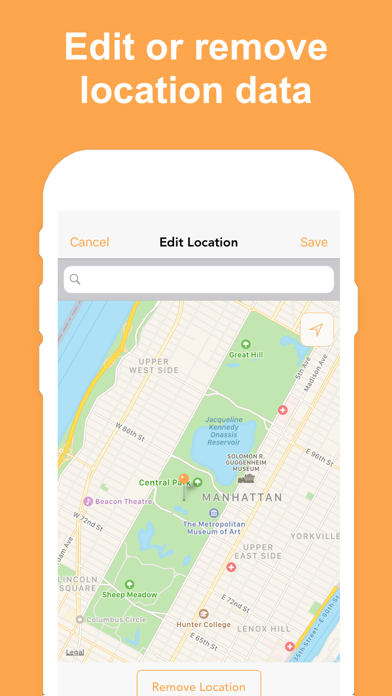
- View, edit, or remove location data from your photos
- Bulk edit multiple photos at the same time
- Filter photos missing location or metadata
- Your photos are processed on device and never sent to a server
- Extension lets you view metadata directly from the Photos app
- Works on both iPhone and iPad
- Supports Dark Mode
- Highly rated with an average of 4.5 stars
REAL …
Read the full description
Exif Metadata lets you quickly and easily view, edit, and remove metadata, including GPS location, from your iPhone and iPad photos. It is a must-have tool for serious photographers and casual iPhoneographers alike. 10 reasons to use Exif Metadata: - It's free to try - View, edit, or remove Exif metadata on the fly - View, edit, or remove location data from your photos - Bulk edit multiple photos at the same time - Filter photos missing location or metadata - Your photos are processed on device and never sent to a server - Extension lets you view metadata directly from the Photos app - Works on both iPhone and iPad - Supports Dark Mode - Highly rated with an average of 4.5 stars REAL REVIEWS FROM REAL USERS "Still the best app for editing Exif metadata." -- by iPad User 0222 "As a conscientious parent, I am reluctant to share photos of my children on-line. This app clears any personal data and eases my concerns. Plus it is very straight forward and easy to use." -- by T puffin "This app is perfect in its simplicity. It’s the only exif app i have found which allows you to view metadata within the camera roll - awesome!" -- by Fshhshsns "EXIF Metadata does exactly what it says it will do. It’s extremely easy to use and the customer support is great. The inexpensive lifetime Pro version is worth every penny." -- by Apple TV Fan "Very clean interface, does its job very well. If you want to bulk update the metadata on a collection of photos (eg imported from somewhere else) this is your solution. Highly recommend." -- by JT Player FEATURES SPOTLIGHT View Exif metadata: - View basic photo information at a glance - View 50+ metadata tags - View location data such as GPS data, address, map location Edit Exif metadata: - Edit aperture, exposure, date, time, author, description, copyright, and more - Edit geotags or spoof location Filter photos: - Pro users can filter photos missing location and Exif metadata Remove Exif metadata: - Remove GPS location data independently of other Exif data - Remove all metadata at once Bulk edit metadata: - Pro users can edit metadata of multiple photos at once Clean & simple design: - Optimized for iPhone and iPad - Supports Dark Mode Photo extension: - Access metadata of your photos directly from the Photos app Protect your privacy: - Easily share photos online without any metadata This app works with: - All photos in your iPhone or iPad camera roll, except ProRAW photos - Photos in iCloud Photo Library - Photos in Photo Stream Exif Metadata Pro: The Pro version of Exif Metadata can be purchased via an annual subscription or one-time payment to remove ads and gain the ability to edit metadata for multiple photos at once. Payment will be charged to your Apple ID account at the confirmation of purchase. The subscription automatically renews every year unless it is canceled at least 24 hours before the end of the current period. Your account will be charged for renewal within 24 hours prior to the end of the current period. You can manage and cancel your subscriptions by going to your App Store account settings after purchase. Terms of use: https://www.sixstarapps.com/terms/ Privacy policy: https://www.sixstarapps.com/privacy/ HAVE QUESTIONS OR NEED HELP? If you have any question about the app, or need help about something, please do not hesitate to contact us at www.SixStarApps.com. We’ll be happy to help!
Installs, last 30 days
Apple does not publish download counts. Estimates are in testing.
Estimated store revenue Estimated Beta
App Store, worldwide, monthly rate from the last 12 chart days to 19 Nov 2026
Below the top 100 grossing apps in the markets we calibrate. In the United States that usually means under about $6.4M a month. App Store purchases and subscriptions only, before Apple's 15 to 30% fee. Ads and web payments are not included.
Ratings
6,097 ratings, 6,097 reviews
- 5 ★80%
- 4 ★8.9%
- 3 ★3.2%
- 2 ★1.6%
- 1 ★5.8%
Recent reviews
Latest public reviews from the store
- 17 Jun 2024
Great & free
it does what it says it does and it removes all that Apple will let you remove. in case other people didn’t know Apple won’t let you remove absolutely everything so that’s not the developers problem that’s Apple‘s problem… As for the ads after you download a picture just exit out the app & reenter if u dont wanna pay to get rid of the ads instead of acting like a child in the reviews.
- 10 Jul 2021
Should Be 5 Stars
I have used nearly every EXIF app for iOS. They ALL seem to be missing something another app has. Even all the paid ones. This one is no different. This one is the most complete however. It shows things others don’t (like HDR rendering for example), and it allows you to edit almost all data, which is fantastic. But the problem is, it only works for photos, not videos. This is very disappointing, as it’s incomplete for this reason. Please add videos, and I will revisit my review. Thanks for an otherwise fantastic photo metadata app!
- 26 May 2021
Good app for basic info from pics in the Camera app, missing some key features
I would like to know Focus mode, preview size and type, white balance and other information not found here. Most importantly, I am unable to access images that are not in the camera app. I would also like to access pictures on the file system and I keep many of my pictures in a folder on a OneDrive. I’d probably upgrade if it were a bit more complete.
- 20 May 2020
It’s functional (-:
Free version can edit EXIF data, e.g. dates, on iPhone photos, only one file at a time. The interface is clear and well-designed. Ad viewing takes a few seconds after each edit in the free version. Files are saved as JPGs after editing, not in the native iPhone photo format. I am not sure if that’s a shortcoming that can be fixed, or an iOS limitation. Four stars, because it’s a solid app overall despite those minor quirks.
What reviewers bring up
Topics mentioned in the latest 8 reviews, by how many reviews mention them
Liked in good reviews (5 reviews)
- photos 3
- edit 3
- complete 2
- problem 2
- missing 2
- another 2
- access 2
- exif 2
Raised in bad reviews (3 reviews)
- keeps 3
- metadata option 2
- deleted 2
- removed 2
- first 2
- issue 2
- few 2
Top chart positions
Latest App Store chart ranks by country, last 10 days
Not in any tracked top chart in the last 10 days.
Exif Metadata history
Release, install milestones, listing and store changes
- First released on the store 17 Apr 2019
Update frequency
How often Exif Metadata ships a new version, month by month
1 updates in the last 12 months. About as often as similar apps, which shipped a median of 1 updates in the same year.
Recent versions
Current version 3.5
- Version 3.53 May 2026
This update makes small improvements to how photos inside an existing album are saved to that same album after being edited.
Listing keywords
Words and phrases Exif Metadata repeats most in its store listing
Top phrases: exif metadata (12), iphone and ipad (3), edit metadata (3), filter photos (3), location data (3).
Highlighted words also appear in the title. Counts cover the title, short description and description.
Compliance
What the listing and the app package show
- Store status
- Live
- Upkeep
- Updated 3 May 2026
- Age rating
- 4+
Apps like Exif Metadata
 Cartoon yourself & caricatureLinerock Investments LTD★ 4.19
 Collage Maker - AI PolaroidAdeeb Haddad★ 4.56
 LG TV Screen Mirroring CastAirBeamTV BV★ 4.24
 Roku Remote Control・Cast to TVAirBeamTV BV★ 3.98
 (Not Boring) CameraNot Boring Software LLC★ 4.55
 Christmas Photo Frames ゜Informe Laboratories, Inc.★ 4.72
 Avatan – Photo EditorAvatan Studio, LLC★ 4.7
 Kamon - Vintage Film CameraRO IT Consulting LLC★ 4.71
 Catch Santa ARDualverse, Inc.★ 4.57
Exif Metadata: questions and answers
Who makes Exif Metadata?
Exif Metadata is published by New Marketing Lab, Inc.
When was Exif Metadata last updated?
The latest version (3.5) was released on 3 May 2026.
Is Exif Metadata free?
Yes. Exif Metadata is free to download.
Is Exif Metadata still available?
Yes. Exif Metadata is live on App Store as of 19 Nov 2026.
Track Exif Metadata and its competitors
Watch any app for new versions, rating drops, chart moves and removals. Free plan, no card.