
- Installs
- —
- Apple does not publish download counts
- Rating
- 2.6
- Ratings
- 10
- 10 reviews
- Version
- 4.2.11
- Updated 13 Nov 2019
- Released
- 12 Mar 2015
- Tracked since 10 May 2026
- Size
- 50 MB
- Needs 8.0
Also on Google Play: EXILIM Connect (3.3K ratings)
Screenshots
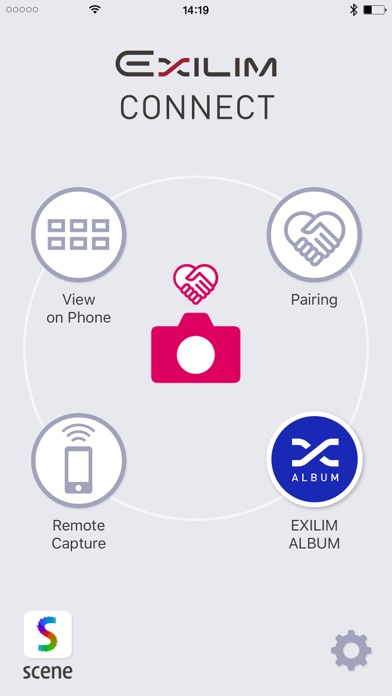

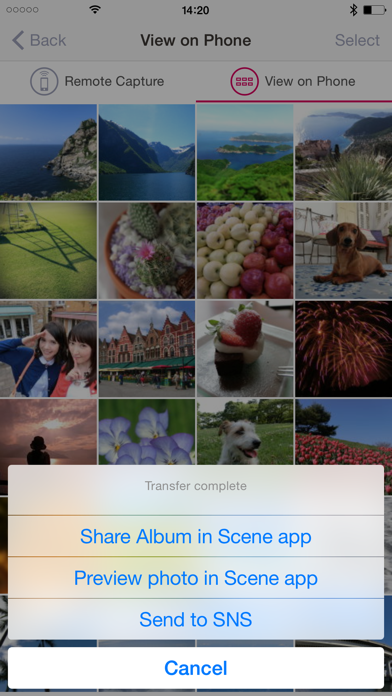

About EXILIM Connect
The description on the store listing
‘EXILIM Connect’ is an application for CASIO digital cameras with Wi-Fi/Bluetooth functions that is packed with fun and useful features. With ‘EXILIM Connect’, you can use your iPhone or iPad as a remote control for your camera and transfer images to your iPhone or iPad.
【What's New in Version 4]
■Up to 2 cameras can now be paired
■Launch the User's Guide from within the application
■Easily launch directly into the EXILIM ALBUM image-browsing application
・EXILIM ALBUM makes it even more fun to look at the images you've taken and lets you easily share them with friends.
Compatible digital cameras:
TR-M11, EX-FR200, EX-FR200CA, EX-FR100, EX-FR100CA, EX-FR100L, EX-ZR5100, EX-ZR5000, …
Read the full description
‘EXILIM Connect’ is an application for CASIO digital cameras with Wi-Fi/Bluetooth functions that is packed with fun and useful features. With ‘EXILIM Connect’, you can use your iPhone or iPad as a remote control for your camera and transfer images to your iPhone or iPad. 【What's New in Version 4] ■Up to 2 cameras can now be paired ■Launch the User's Guide from within the application ■Easily launch directly into the EXILIM ALBUM image-browsing application ・EXILIM ALBUM makes it even more fun to look at the images you've taken and lets you easily share them with friends. Compatible digital cameras: TR-M11, EX-FR200, EX-FR200CA, EX-FR100, EX-FR100CA, EX-FR100L, EX-ZR5100, EX-ZR5000, EX-ZR3600, EX-ZR3500,EX-ZR2100, EX-ZR2000, EX-ZR1750, EX-ZR65, EX-ZR62, EX-ZR55, EX-TR80, EX-TR70, EX-TR60 [ What’s New in Ver. 3 ] ■Location data saved for camera photos at the time they were taken can be attached to images that are copied to iPhone/iPad. ■Using the ‘Scene’ photo application, still photos can be easily shared. (One Time Share) Compatible digital cameras: TR-M11, EX-ZR5100, EX-ZR5000, EX-ZR3600, EX-ZR2100, EX-ZR1750, EX-ZR65, EX-TR80 [ What’s New in Ver. 2 ] ■Enables adjustment of the camera settings. Compatible digital cameras: TR-M11, EX-FR200, EX-FR200CA, EX-FR100, EX-FR100CA, EX-FR100L, EX-ZR5100, EX-ZR5000, EX-ZR3600, EX-ZR2100, EX-ZR1750, EX-ZR65, EX-TR80, EX-TR70 [ Key Features ] ■Camera can be connected to iPhone or iPad by Bluetooth. (Pairing) ■Enables automatic copying of images taken with the camera to your iPhone or iPad. ■Enables copying of selected images taken with the camera to your iPhone or iPad. ■Allows you to remotely operate your camera with your Smartphone to capture images. (Remote Capture) - Enables taking of pictures while viewing the angle, pose, and other details on your iPhone or iPad screen. - Enables automatic copying of images to your iPhone or iPad after taking of picture. - Enables adding of location information to image received by iPhone or iPad. ■Enables viewing of images stored in the camera using your iPhone or iPad. (View on Phone) - Enables viewing of images stored in the camera using your iPhone or iPad and copying of images to your iPhone or iPad. - Copied images can be instantly shared using the Photo application ‘Scene’ or uploaded to SNS. ■Images copied from the camera to your iPhone or iPad can be automatically saved to an album in the Photo application ‘Scene’. (Share Album) - This allows you to share and enjoy your albums with friends and family. ■Photo application ‘Scene’ can easily be activated. Compatible digital cameras: TR-M11, EX-FR200, EX-FR200CA, EX-FR100, EX-FR100CA, EX-FR100L, EX-ZR5100, EX-ZR5000, EX-ZR3600, EX-ZR3500, EX-ZR2100, EX-ZR2000, EX-ZR1750, EX-ZR65, EX-ZR62, EX-ZR55, EX-TR80, EX-TR70, EX-TR60 [Compatible OS] iOS 8.0-13.2 [Note] - Bluetooth’s Automatic Transmit and ‘Scene’ album Automatic Registration functions can be used by iPhone/iPad’s supporting Bluetooth 4.0. - This application will not function on non-supported cameras. - For details about how to use this application, see the EXILIM Connect User Guide (http://www.exilim.com/app/en/exilim_connect/). - For details of the camera’s operation, please check the camera's operating manual. - Location info is required for communication with the camera. - To customers who cannot connect to Wi-Fi Customers who were pairing, please try pairing again. Customers who were not pairing, please follow the operating procedure below. 1. On your camera, run the wireless LAN function and display the SSID and password. 2. Tap the iPhone/iPad’s Wi-Fi setting. 3. Tap [i] on the right of the SSID (model name and number) displayed in CHOOSE A NETWORK…. 4. Tap [Forget This Network] and then tap [Forget] to execute. 5. After deleting, repeat Wi-Fi setting, enter a new password and try to connect again.
Installs
Apple does not publish download counts. Estimates are in testing.
We publish iOS estimates only after they pass a back-test against real numbers. Chart history below is measured.
Estimated store revenue Estimated Beta
App Store, worldwide, monthly rate from the last 12 chart days to 19 Nov 2026
Below the top 100 grossing apps in the markets we calibrate. In the United States that usually means under about $6.4M a month. App Store purchases and subscriptions only, before Apple's 15 to 30% fee. Ads and web payments are not included.
Ratings
10 ratings, 10 reviews
No rating breakdown published for this app.
Recent reviews
Latest public reviews from the store
No reviews in our sample for this app yet.
Top chart positions
Latest App Store chart ranks by country, last 10 days
Not in any tracked top chart in the last 10 days.
EXILIM Connect history
Release, install milestones, listing and store changes
- First released on the store 12 Mar 2015
Recent versions
Current version 4.2.11
- Version 4.2.1113 Nov 2019
Improved stability, minor bug fixes.
Listing keywords
Words and phrases EXILIM Connect repeats most in its store listing
Top phrases: iphone or ipad (12), digital cameras (5), cameras tr m11 (4), compatible digital cameras (4), digital cameras tr (4).
Highlighted words also appear in the title. Counts cover the title, short description and description.
Compliance
What the listing and the app package show
- Store status
- Live
- Upkeep
- No update since 13 Nov 2019
- Age rating
- 4+
Apps like EXILIM Connect
 Video CollageaZeR DiLLs★ 4.08
 Vee for VideoMedious★ 2.98
 Beauty Camera -Selfie, StickerBhuvan Gupta★ 4.5
 FinalCamXShenzhen Xiaozhen Technology Co.,Ltd.★ 4.44
 Magic Studio - AI Photo EditorMagicStudio.com★ 4.62
 Foto Impresiones: 1 Hr PhotoSoftwareX★ 4.98
 SnapGeo - AI Location FinderRECEP ASLAN★ 4.24
 Family Photo Maker - AIRick-y Media★ 4.12
 BeautifAI: AI Try OnJAI UYGULAMA VE YAPAY ZEKA TEKNOLOJILERI ANONIM SIRKETI★ 4.36
EXILIM Connect: questions and answers
Who makes EXILIM Connect?
EXILIM Connect is published by CASIO COMPUTER CO., LTD..
When was EXILIM Connect last updated?
The latest version (4.2.11) was released on 13 Nov 2019.
Is EXILIM Connect free?
Yes. EXILIM Connect is free to download.
Is EXILIM Connect still available?
Yes. EXILIM Connect is live on App Store as of 1 Jul 2026.
Track EXILIM Connect and its competitors
Watch any app for new versions, rating drops, chart moves and removals. Free plan, no card.