
- Installs
- —
- Apple does not publish download counts
- Rating
- —
- Ratings
- —
- Version
- 1.0.4
- Updated 26 Jun 2022
- Released
- 30 Apr 2022
- Tracked since 16 May 2026
- Size
- 31 MB
- Needs 12.0
Also on Google Play: EZSplit : Easy Split Payments
Screenshots



About EZSplit : Easy Split Payments
The description on the store listing
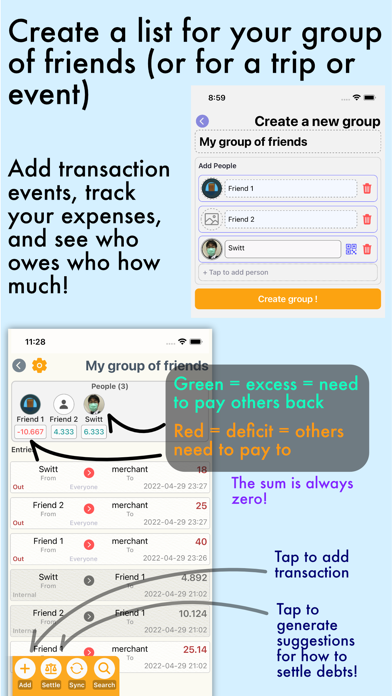
If you go out with friends often (and they're generally the same groups), then you know those scenarios where you eat together, and one person pays the bill, then you pay the guy who paid later.
This is sometimes rather tedious, and generally also sometimes inaccurate.
If this scenario is part of your daily life, then EZSplit might be the app for you.
** We support fraction values for almost everything so it could be as precise as possible.
How it works : (If this doesn't make much sense to you, don't worry about it)
==========
This application works on a "zero-sum" basis. Basically, when a person pays a bill, what happens is that they pay partly for their own purchases, but they also …
Read the full description
If you go out with friends often (and they're generally the same groups), then you know those scenarios where you eat together, and one person pays the bill, then you pay the guy who paid later. This is sometimes rather tedious, and generally also sometimes inaccurate. If this scenario is part of your daily life, then EZSplit might be the app for you. ** We support fraction values for almost everything so it could be as precise as possible. How it works : (If this doesn't make much sense to you, don't worry about it) ========== This application works on a "zero-sum" basis. Basically, when a person pays a bill, what happens is that they pay partly for their own purchases, but they also pay "extra" for other people. Basically the debts of other people could be represented as them having "excess" money, while the person who paid for them could be considered as having "deficit" money. The sum of these amounts will equal to zero. How to use ======== 1. Create a new list for the group of friends you tend to hang out with (or create a list for some event/some trip you're going to) - Add people to the list, and optionally (if you want) add images - You can also sync over people's profiles using QR codes (entirely offline) or online 2. Once you create a list, you can start adding transaction events to it (payments, refunds, etc) - There are two types of transactions; External and Internal. - External is for payments and refunds - Internal is for transfers between members of the group (e.g. settling debts). - You can enter details in various ways! You have the option to pick the type of scenario that fits your use case best 1. Specify individual items, their prices and how much each people bought in that transaction - You can specify individual item prices, how much each person bought (and you can even enter fractions! Like Mr. Champ owes 1/3 of the pizza price while you owe 2/3 of the price!) - You can specify the paid amount to be different from the sum of the prices. This is useful for when there are discounts, etc during checkout, which causes the paid amount to be different. EZSplit will simply scale down/scale up the amount each person owes by the same ratio of difference between the total sum of the price and the actual price paid. 2. Specify ratios between each person, and specify the total amount paid - This will split how much each person owes by the ratio you specify - This one sees use when you do things like buy multiple of the same items together (like I buy 2 sushis while Champ there buys 5 of them, and you know the total amount paid) 3. The transaction involves all people in the list, equally - A rarely used option, but you'd be glad it exists sometimes 3. (At this point you've added a transaction) Look at who owes who how much - At the top of the list, you'll see members of the list along with their tallies of how much they owe. - People in the green have excess money and need to pay back others by that amount - People in the red have money deficit, and needs people to pay them back by that amount (The sum of all values is zero at all times) 4. Settle debts - Simply have people in the red pay people in the green - To do this, you can either 1. using the information given by the app, discuss between yourselves, then create internal transactions to represent the settlements 2. use the auto "Settle" button at the bottom of the screen to generate settlements for you - For auto Settlement suggestion generation, press on the "Settle" button at the bottom left of the screen, and it'll show you the appropriate transactions between your friends to settle your debts (who has to pay who how much) - simply actually pay your friends by that much and press OK to complete settlement To sync lists between multiple devices, press the "Sync" button and follow instructions. I hope you find this useful.
Installs
Apple does not publish download counts. Estimates are in testing.
We publish iOS estimates only after they pass a back-test against real numbers. Chart history below is measured.
Estimated store revenue Estimated Beta
App Store, worldwide, monthly rate from the last 13 chart days to 20 Nov 2026
Below the top 100 grossing apps in the markets we calibrate. In the United States that usually means under about $6.4M a month. App Store purchases and subscriptions only, before Apple's 15 to 30% fee. Ads and web payments are not included.
Ratings
No rating breakdown published for this app.
Recent reviews
Latest public reviews from the store
No reviews in our sample for this app yet.
Top chart positions
Latest App Store chart ranks by country, last 10 days
Not in any tracked top chart in the last 10 days.
EZSplit : Easy Split Payments history
Release, install milestones, listing and store changes
- First released on the store 30 Apr 2022
Update frequency
How often EZSplit : Easy Split Payments ships a new version, month by month
0 updates in the last 12 months. Less often than most similar apps: they shipped a median of 1 updates in the same year.
Recent versions
Current version 1.0.4
- Version 1.0.426 Jun 2022
Minor bug fixes
Listing keywords
Words and phrases EZSplit : Easy Split Payments repeats most in its store listing
Top phrases: total amount paid (2), amount paid (2), create list (2), excess money (2), paid amount (2).
Highlighted words also appear in the title. Counts cover the title, short description and description.
Compliance
What the listing and the app package show
- Store status
- Live
- Upkeep
- No update since 26 Jun 2022
- Age rating
- 4+
Apps like EZSplit : Easy Split Payments
 Library of AviationNazmi Yavuz★ 4.82
 MyNOVECNorthern Virginia Electric Cooperative★ 2.28
 打工人小组件光翔 卓★ 4.96
 TruckbaysTruckbays LLC★ 4.3
 Tornado PRO PlayerMohammed Altam★ 4.44
 VDX - Video ManagerARISEPEAK LP★ 1.74
 TV CastingZeasn Info Technology Co., Ltd.★ 1.86
 Mil-Dot BallisticsTom Holsten★ 3.82
 MySontiqSontiq, Inc.★ 2.4
EZSplit : Easy Split Payments: questions and answers
Who makes EZSplit : Easy Split Payments?
EZSplit : Easy Split Payments is published by Switt Kongdachalert.
When was EZSplit : Easy Split Payments last updated?
The latest version (1.0.4) was released on 26 Jun 2022.
Is EZSplit : Easy Split Payments free?
Yes. EZSplit : Easy Split Payments is free to download.
Is EZSplit : Easy Split Payments still available?
Yes. EZSplit : Easy Split Payments is live on App Store as of 16 May 2026.
Track EZSplit : Easy Split Payments and its competitors
Watch any app for new versions, rating drops, chart moves and removals. Free plan, no card.