- Installs
- —
- Apple does not publish download counts
- Rating
- 4.65
- Ratings
- 60
- Version
- 8.09.03
- Updated 10 Oct 2023
- Released
- 31 Mar 2018
- Tracked since 10 May 2026
- Size
- 3 MB
- Needs 16.6
Also on Google Play: Fiber Optic Color Code (51 ratings)
Screenshots

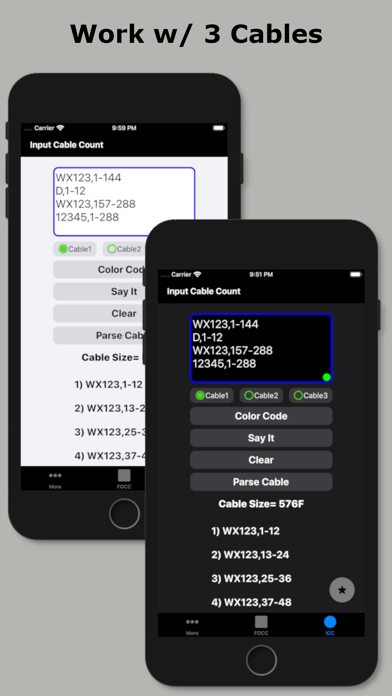
About Fiber Optic Color Code
The description on the store listing
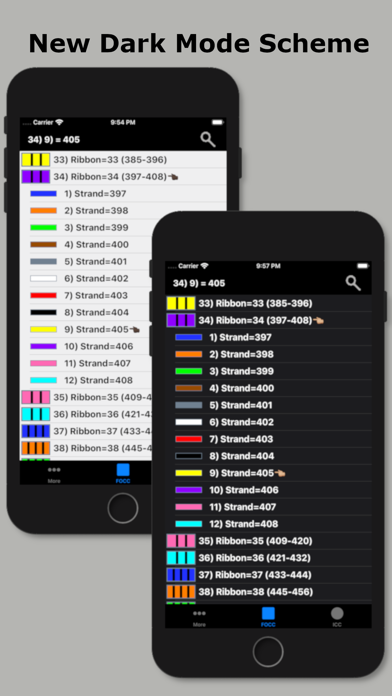
Fiber Optic Color Code is a searchable expanding chart of fiber strands that translates the color code of Loose Tube, Ribbon and other high count fiber optic cables.
~Feature highlights:
customizable cables from 12F to 6912F, custom color codes, customizable fiber # searches, searchable cable count (with reverse cable count) and color code drill down.
This app shall be used only as a handy secondary reference tool as we know there are mistakes made in the field and incorrect records that always need to be taken into account. Use of a tone source as a primary identifier will always be more accurate.
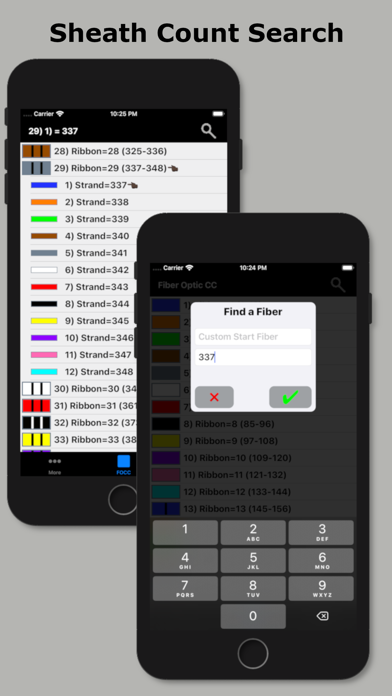
Locate fibers with or without cable counts. Simply enter a strand # without a cable count …
Read the full description
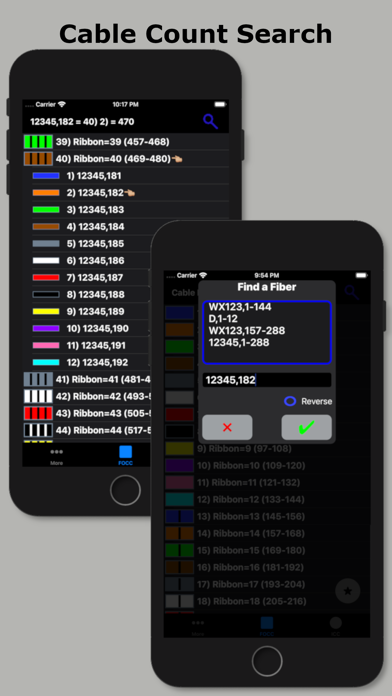
Fiber Optic Color Code is a searchable expanding chart of fiber strands that translates the color code of Loose Tube, Ribbon and other high count fiber optic cables. ~Feature highlights: customizable cables from 12F to 6912F, custom color codes, customizable fiber # searches, searchable cable count (with reverse cable count) and color code drill down. This app shall be used only as a handy secondary reference tool as we know there are mistakes made in the field and incorrect records that always need to be taken into account. Use of a tone source as a primary identifier will always be more accurate. Locate fibers with or without cable counts. Simply enter a strand # without a cable count or enter the 'Cable,Fiber' if you're using a complex cable count (app auto detects if there's a count or not). The app will then auto expand and place index pointers at your found fibers locations. ~To configure High Density cables (RILT#1-5 positions) to include Ribbon in loose tube, Spår/slotted core or yarn bundled cable : 1) Select the round cable type configuration button at the bottom right of the main screen. 2) Select any of the last 5 items in the list labeled as RILT#1-5. 3) Select the bottom left "More" tab. 4) Select "Set RILT" and configure RILT#1-5 maximum configuration of any combination (not to exceed 6912F): Super Tubes: 1-24max Ribbons: 1-144max Fibers: 1-48max ~Create customized color codes: 1) Select the bottom left "More" tab. 2) Then select 'Set Color Code' from the 'More Menu'. 3) Scroll down to the very bottom of the populated color code list and select 'Custom Setup'. 4) At the next screen that appears; click the 'Start here' button, then select a color code position you'd like to edit from the list. 5) Edit the list name. 6) Start with tube colors then edit super & fiber colors (starting with tube colors will pre-populate super and fiber colors) 7) Then click the green check button on the fibers screen after reviewing your selections to save. ~Input Cable Count screen While not necessary to use in the app. You can enter a full complex cable count that can be split into a cable type sub-unit configuration of your choice (2, 4, 6, 8, 12, 14, 16, 18, 24, 32, 36, 48, RILT #1-5). ~Smart Save Saving a cable count by a cable position turns the Search Button Icon and related cable count text box borders to a distinguishable color for keeping track of which cable cable is being currently used within the app. 1) Select the round Cable Type button 2) Enter cable count 3) Optionally select a position to save count to 4) Click the "Color Code" button Cable1 = Blue Cable2 = Orange Cable3 = Green Custom Start Fiber (Without a cable count) = Red Unsaved cable count or Start fiber is #1 = Gray Smart Save radio button color key: green = vacant black = existing count stored red = existing count to be overwritten blue = saved successfully To remove a previously saved cable count. Select the position to be deleted and long click the Clear button. ~Cable Count Input validation dot: Provides the user with a simple way to know if the cable count entered is valid for the color code chart. It will turn red if missing a cable name, missing a comma, the low fiber range is greater than the high fiber range, or the sum of the whole cable count is greater than the chosen cable type. ~Double Space Auto Punctuation: Easily enter a cable count using the apps built in double space auto-punctuation feature by: 1) Enter cable name followed by 2 spaces (app automatically places a comma) 2) Enter the low fiber followed by 2 spaces (app automatically places a dash) 3) Enter the high fiber followed by 2 spaces (app automatically drops down for next line of count)
Installs since 29 Aug 2026
Apple does not publish download counts. Estimates are in testing.
Estimated store revenue Estimated Beta
App Store, worldwide, monthly rate from the last 19 chart days to 27 Nov 2026
Below the top 100 grossing apps in the markets we calibrate. In the United States that usually means under about $6.4M a month. App Store purchases and subscriptions only, before Apple's 15 to 30% fee. Ads and web payments are not included.
Ratings
60 ratings
No rating breakdown published for this app.
Recent reviews
Latest public reviews from the store
- 28 Dec 2025
Super Useful!
Very handy, saves you so much time and headaches. various fiber counts Ribbon or Loose tube
- 28 Jul 2025
Bring back for android
Hate using my iPad would love to have the app back for android
- 12 Aug 2021
Good app however am I missing something?
Great app, this is perfect. However, with the 1728 cables I’m using and sure a lot of us are, they are in buffers. 288 in each buffer, Blue-White, ribiijs are labeled 1-24. This app would be so much better if it would tell you what color buffer and what ribbon to break. Is this already in the app? If not, it would be a great addition. Thanks
- 18 Mar 2021
Very well written, very helpful!!!
If at all possible, can a future button calculate the relation between counts amongst the 3 cables counts inserted??? When splicing multiple cables and counts, it would be awesome to have a screen that shows which ribbons roll to which ribbons from cable to cable. So far, this is a very helpful app, and very well written!!!!
What reviewers bring up
Topics mentioned in the latest 8 reviews, by how many reviews mention them
Liked in good reviews (5 reviews)
- useful 2
- counts 2
- ribbon 2
- cables 2
- color 2
Raised in bad reviews (3 reviews)
- android 2
- access 2
Top chart positions
Latest App Store chart ranks by country, last 10 days
Not in any tracked top chart in the last 10 days.
Fiber Optic Color Code history
Release, install milestones, listing and store changes
- First released on the store 31 Mar 2018
Recent versions
Current version 8.09.03
- Version 8.09.0310 Oct 2023
Thanks for choosing the Fiber Optic Color Code app! This update includes a couple of user requests to the straight fiber sheath count search screen. First is X=Y: The x=y update allows a user to set a custom straight sheath count if they might only know only one of the fibers identity. So say you know fiber 36 is identified as 55. Above the Custom Start Fiber is a X=Y option. Clicking the option will open up 2 inputs. The first input is the X input where you enter the physical Fiber #. In the above scenario you enter the 35. The second input is the Y input. Here you'll enter the ID of 55. Doing the above enters a starting fiber of 20 into the app. 2nd part update "Update Ranges (##-##)": When entering a custom start fiber this option updates the the numbers inside the parentheses ( ) to reflect the custom fibers id'd within for quick glancing. You the user will need to enable the "Update Ranges (##-##)" option from within the app settings located in the More tab on the bottom navigation bar 3rd part of update "Reverse" lookup: When a custom start fiber is entered there is now a option to search by physical sheath count. So entering a custom start fiber of 20 and reverse searching for physical sheath fiber of 2 results in displaying the second fiber in the sheath id'd as 21. Thanks again! GT
Listing keywords
Words and phrases Fiber Optic Color Code repeats most in its store listing
Top phrases: cable count (16), color code (9), cable type (4), followed by spaces (3), spaces app automatically (3).
Highlighted words also appear in the title. Counts cover the title, short description and description.
Compliance
What the listing and the app package show
- Store status
- Live
- Upkeep
- No update since 10 Oct 2023
- Age rating
- 4+
Apps like Fiber Optic Color Code
 iKon.MNiKon.MN★ 4.56
 Amharic ReaderAntenehSeifu★ 3.85
 Light Lux MeterAexol Studio★ 4.02
 Energy CURBCurb, Inc.★ 2.18
 Decibel Meter - Sound AnalyzerRychard Matskevich★ 3.51
 VPN - Super Smart Proxy VPNXienhag Technology★ 4.09
 Calibre SyncDUONG THUY PHAM★ 3.95
 Finder - Find My Lost DeviceAlex Bavdey★ 3.69
 VPN - SuperX Unlimited ProxyAppios Bilisim★ 4.2
Fiber Optic Color Code: questions and answers
Who makes Fiber Optic Color Code?
Fiber Optic Color Code is published by Grant Thompson.
When was Fiber Optic Color Code last updated?
The latest version (8.09.03) was released on 10 Oct 2023.
Is Fiber Optic Color Code free?
No. Fiber Optic Color Code is a paid app priced at $2.99.
Is Fiber Optic Color Code still available?
Yes. Fiber Optic Color Code is live on App Store as of 21 Nov 2026.
Track Fiber Optic Color Code and its competitors
Watch any app for new versions, rating drops, chart moves and removals. Free plan, no card.