
- Installs
- —
- Apple does not publish download counts
- Rating
- 4.52
- Ratings
- 101
- 101 reviews
- Version
- 6.0.1
- Updated 30 Oct 2018
- Released
- 21 Mar 2013
- Tracked since 10 May 2026
- Size
- 66 MB
- Needs 9.0
Screenshots

About File Manager 11
The description on the store listing
File Manager - Advance File Manager and Document Reader
Manage your Documents & Files with File Manager
# File Manager
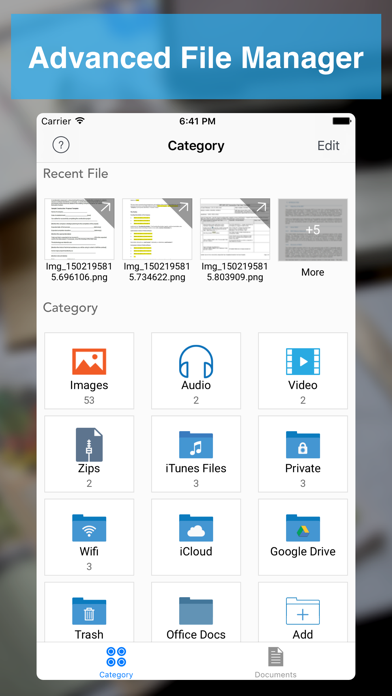
- Create Folder - Create new folders and sub folders
- Copy - Copy files/folders between different folders
- Move - Move files/folders between different folders
- Delete - Select and Delete multiple files/folders
- Rename - Rename a file/folder
- Trash - Move files to trash recover them if required
- Get Info with General and More Info of all type of document.
# Read Files
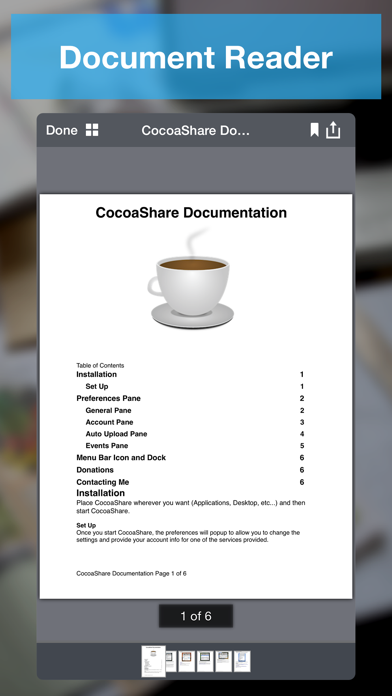
- PDF Files
- MS Office Documents (Word, Excel and PowerPoint)
- iWork Documents (Pages, Numbers and Keynotes)
- Images Files (JPG, PNG, GIF, TIFF and others)
- Audio Files (MP3, AAC, Apple …
Read the full description
File Manager - Advance File Manager and Document Reader Manage your Documents & Files with File Manager # File Manager - Create Folder - Create new folders and sub folders - Copy - Copy files/folders between different folders - Move - Move files/folders between different folders - Delete - Select and Delete multiple files/folders - Rename - Rename a file/folder - Trash - Move files to trash recover them if required - Get Info with General and More Info of all type of document. # Read Files - PDF Files - MS Office Documents (Word, Excel and PowerPoint) - iWork Documents (Pages, Numbers and Keynotes) - Images Files (JPG, PNG, GIF, TIFF and others) - Audio Files (MP3, AAC, Apple Lossless, AIFF, WAV) - Video Files (standard iPhone format : H.264, MPEG-4) - OpenOffice Documents (Text, Spreadsheet, Presentation) basic formatting only - Plain Text and RTF (Rich Text Format) - HTML Files - ZIP Files (Uncompress Zip Archives) # Advance Document Viewers - Image Viewer - With thumbnail view - Audio Player - Audio player with different playback controls, AirPlay support, Control with Ear Phone and Ear Pods, Support playing music in background - Video Player - Air Play support and different playback controls # Make Zip - Select Multiple files/folders and make them zip # Create PDF Files - Create PDF - With Different Kind of Page Content - Rich Text Pages - Create Rich Text Pages in File Manager Rich Text Editor - Camera Snaps - Take Snap of your documents - Photos from library - Pick photos from your iPhone/iPad/iPod touch Photo Library - Map Snaps - Create Map Snap - With Address Annotation - Hand Drawing - Create Hand Drawing and add it as PDF Page # Create Protected PDF - Create Password Protected PDF - (PDF file will require password when someone want to open PDF file in any software) - Create Copy Protected PDF - End users will not be able to copy the content of PDF file. - Create Print Protected PDF - End users will not be able to Print the content of PDF file. # Text Files - Create and Edit text files # Audio Recorder - Record Audio With different qualities - Record Audio in background # Hand Drawing - Make Hand Drawing with different colors and save as image # Secure Your Documents - Private Documents Section - Protect App With Password - Touch ID Support # WiFi Sharing - Access Your FileManager Documents From Your Computer With WiFi Sharing - Upload Documents From Your Computer to FileDesk # FTP Sharing - Access Your FileDesk Documents From Your Computer With FTP Client - Upload multiple documents to FileDesk from your computer together # Cloud Share - Dropbox - Google Drive - OneDrive - Evernote - Box.net - SugarSync - WebDav Server - FTP Server - Email Files # Import Files - Photo Library (Video/Audio/Photos) - Camera Capture (Video/Photos) - Clipboard If you enjoy using File Manager, please support us by leaving review in the App Store, or updating you previous review for the new version. Each review matters a lot, and helps us grow and improve our app.
Installs since 29 Aug 2026
Apple does not publish download counts. Estimates are in testing.
Estimated store revenue Estimated Beta
App Store, worldwide, monthly rate from the last 12 chart days to 19 Nov 2026
Below the top 100 grossing apps in the markets we calibrate. In the United States that usually means under about $6.4M a month. App Store purchases and subscriptions only, before Apple's 15 to 30% fee. Ads and web payments are not included.
Ratings
101 ratings, 101 reviews
No rating breakdown published for this app.
Recent reviews
Latest public reviews from the store
- 10 Apr 2025
Review
Good app
- 20 Jun 2020
Electrican Specialist Leader
Great App Multi Functional Everything All In One Spot and Easy Assessable Love it All the Way !!!!
- 14 Aug 2017
Awesome
This is a great and reliable file manager. Would be better with 3D Touch integration.
- 4 Mar 2017
Rename your photos!!!!!!
Renaming images is the only reason I tried this app. I've used about 7 or 8 apps looking for a simple solution. With this app I can easily rename my images. Other users commented this app needs an update and it does, but I still paid for the pro version and would have paid more to get this job done. The update may not have been done since so few people tried this app. That said, if they do update it and I hope they do, here are the pros and cons after using it for 30 min. Pros Rename images Easy navigation Security settings Lighting fast uploads (less than 15 sec for over 200 images) Nice image edit options Create any file and sub file Cons Select all is not an option. It's time consuming to click on hundreds of images, but click I did. A preview of the image. Some images showed the San disk image instead of the photo. BTW. My need to rename images was so important I didn't remove a star for the cons. That's it. If I come across more I'll check in, but I'm very thankful for this app.
What reviewers bring up
Topics mentioned in the latest 8 reviews, by how many reviews mention them
Liked in good reviews (6 reviews)
- options 2
- easily 2
- that's 2
- other 2
- file 2
Raised in bad reviews (1 reviews)
No topic comes up twice.
Top chart positions
Latest App Store chart ranks by country, last 10 days
- Countries ranked
- 2 of 50
- Best rank
- #73
- Top 10 placements
- 0
- of 2 chart placements
- Average rank
- #85.5
Best countries on App Store
- 🇻🇳 Vietnam · Top paid, Business#73
- 🇳🇬 Nigeria · Top paid, Business#98
File Manager 11 history
Release, install milestones, listing and store changes
- First released on the store 21 Mar 2013
Update frequency
How often File Manager 11 ships a new version, month by month
0 updates in the last 12 months. Less often than most similar apps: they shipped a median of 1 updates in the same year.
Recent versions
Current version 6.0.1
- Version 6.0.130 Oct 2018
- Improvements and fixes.
Listing keywords
Words and phrases File Manager 11 repeats most in its store listing
Top phrases: file manager (7), files folders (4), hand drawing (4), pdf file (4), protected pdf (4).
Highlighted words also appear in the title. Counts cover the title, short description and description.
Compliance
What the listing and the app package show
- Store status
- Live
- Upkeep
- No update since 30 Oct 2018
- Age rating
- 4+
Apps like File Manager 11
 Text2DriveText2Drive★ 1.85
 Lemongrass Spa CentralLemongrass Spa★ 4.88
 Cinquo - Reviews optimizationLOCALBOSS SL★ 4.94
 Jeenie: 24/7 Live InterpretingGlobal Professional Search★ 4.26
 123NET Softphone123.Net, Inc.★ 4.33
 Deskera: Business & AccountingDeskera Holdings Ltd.★ 4.83
 Invoice Maker LiteAnthony Chuinard★ 4.79
 Nectar - Employee RecognitionPerkCity LLC★ 4.36
 Road Ranger: Ranger RewardsRoad Ranger★ 4.41
File Manager 11: questions and answers
Who makes File Manager 11?
File Manager 11 is published by LiveBird Technologies Private Limited.
When was File Manager 11 last updated?
The latest version (6.0.1) was released on 30 Oct 2018.
Is File Manager 11 free?
No. File Manager 11 is a paid app priced at $2.99.
Is File Manager 11 still available?
Yes. File Manager 11 is live on App Store as of 14 Nov 2026.
Track File Manager 11 and its competitors
Watch any app for new versions, rating drops, chart moves and removals. Free plan, no card.