
- Installs
- —
- Apple does not publish download counts
- Rating
- 4.69
- Ratings
- 39
- 39 reviews
- Version
- 4.1
- Updated 29 Oct 2018
- Released
- 29 Dec 2015
- Tracked since 10 May 2026
- Size
- 56 MB
- Needs 10.0
Also on Google Play: File Manager 2018 (530 ratings)
Screenshots
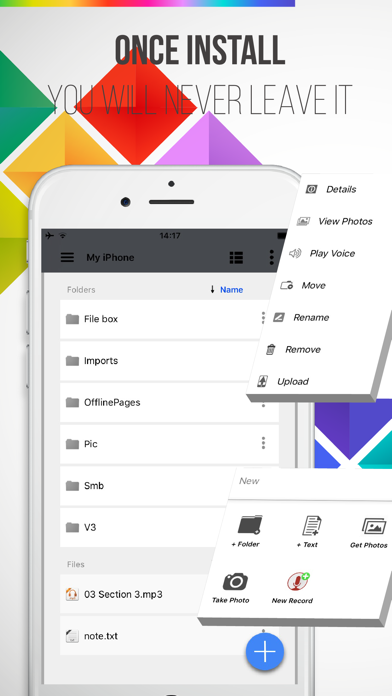


About File Manager 2018
The description on the store listing
File-Box is a comprehensive App for manage file on iOS device. File-Box is a file management centre. More than 40+ file types support. You can view work documents; listen calm music; enjoy favorite movies; see photos recall the wonderful time with your family. You can record voice of interview, meeting, funny, family, memo. Transfer the file to Cloud easily. Easily transfer files between computer or iOS devices and manage files via browser on computer.
FILE CENTRE
• More than 40+ file types support. Browse or play files easily:XLS/MP3/PAGES/DOC/ZIP/TXT/PDF/MOV/PNG...
• Create folder, TXT file,Paste Text,New Record,Take Photos.
• Import photo & video from Photos Library.
• Move the select …
Read the full description
File-Box is a comprehensive App for manage file on iOS device. File-Box is a file management centre. More than 40+ file types support. You can view work documents; listen calm music; enjoy favorite movies; see photos recall the wonderful time with your family. You can record voice of interview, meeting, funny, family, memo. Transfer the file to Cloud easily. Easily transfer files between computer or iOS devices and manage files via browser on computer. FILE CENTRE • More than 40+ file types support. Browse or play files easily:XLS/MP3/PAGES/DOC/ZIP/TXT/PDF/MOV/PNG... • Create folder, TXT file,Paste Text,New Record,Take Photos. • Import photo & video from Photos Library. • Move the select file or folders to destination folder. • Rename the file or folder. • Delete the file or folder. • View all the photos in the folder, support open in, copy, save... • Play Voice:Built-in sound player. • Sort files by "Name","Date", "Size","Kind" fields. • Keep touching the files or folders for several seconds, you can select several files or folders to control. • Switch among horizontal and vertical screen if you like. CLOUD TRANSFER • Support OneDrive,GoogleDrive and Dropbox now. • High efficiency download and upload files & paths between cloud and local under multithreading. • In the background when upload or download, you can do anything you want, and warn you when finish. • Visual progress for very thread. • Multith-reading, Breakpoint transmission. • Support download Google Docs files. • You will be able to see a preview of the image that in your Google Drive, Dropbox, OneDrive. • Support upload a huge file(the file is greater than 3G) . NEAR COMPUTER • Search the nearby computers automatically. • Add "Near Computer" function: You can set share folders on Mac OS X or Windows computer(as SMB server), then upload iPad or iPhone's files to the sharing folders. • Meanwhile, download the files to iPad or iPhone from sharing folders on Mac OS X or Windows computer(SMB server) . • SMB file or folder download progress bar. VOICE RECORDER • The recording time length only depends on the disk space and battery power. • Export recording with Email, Cloud Drive:Google Drive, Dropbox, OneDrive. • Support background recording. • Best recording quality! • The recording file auto save as mp3 file format. It will save space. • You can record conversation, meeting, funny, family, memo. PLAY SOUND • Play Voice:Built-in sound player. • Rate - Play speed adjustable from 0.6 to 3.0. • Clear - Play faster, still clear sound . • Repeat - Set cycle time interval, you can listen this interval several times. • Background - background play, does not affect the use of other programs. • Play many voice as a list. ENJOY VIDEO • Do not copy video, use "NEAR COMPUTER" function, the desktop computer and laptop computer as the iPhone's "network hard drive." • Supports majority video formats: MP4/MOV/M4V/AVI/FLV/WMV/MKV/RMVB/MPG/RM/WMA/F4V/M4A... • Upload or download the video files through Wi-Fi or Cloud. • Full screen mode automatically to play video. • Continue playing video when come back from background. • Continue playing video when network reconnect. FAMILY PHOTOS • View all photos in a folder, includes file formats:GIF/JPG/PNG... • Pinch gesture support. • Copy photo to clipboard. • Save photo to Camera Rolls. • Send photo by email & twitter. • AirPrint support. • Support Share, Open in. EASY SHARING • Supports iTunes USB file sharing. • Supports AirDrop,WeChat,Email…transfer. • Support upload and download from cloud:Google Drive, Dropbox, OneDrive. SECRECY * You can add a passcode before opening the app. Have suggestions or problems? Contact us via email :[email protected]
Installs
Apple does not publish download counts. Estimates are in testing.
We publish iOS estimates only after they pass a back-test against real numbers. Chart history below is measured.
Estimated store revenue Estimated Beta
App Store, worldwide, monthly rate from the last 13 chart days to 20 Nov 2026
Below the top 100 grossing apps in the markets we calibrate. In the United States that usually means under about $6.4M a month. App Store purchases and subscriptions only, before Apple's 15 to 30% fee. Ads and web payments are not included.
Ratings
39 ratings, 39 reviews
No rating breakdown published for this app.
Recent reviews
Latest public reviews from the store
No reviews in our sample for this app yet.
Top chart positions
Latest App Store chart ranks by country, last 10 days
Not in any tracked top chart in the last 10 days.
File Manager 2018 history
Release, install milestones, listing and store changes
- First released on the store 29 Dec 2015
Update frequency
How often File Manager 2018 ships a new version, month by month
0 updates in the last 12 months. Less often than most similar apps: they shipped a median of 1 updates in the same year.
Recent versions
Current version 4.1
- Version 4.129 Oct 2018
Load files from USB storage at Wi-Fi router.
Listing keywords
Words and phrases File Manager 2018 repeats most in its store listing
Top phrases: drive dropbox onedrive (3), file or folder (3), google drive dropbox (3), drive dropbox (3), dropbox onedrive (3).
Highlighted words also appear in the title. Counts cover the title, short description and description.
Compliance
What the listing and the app package show
- Store status
- Live
- Upkeep
- No update since 29 Oct 2018
- Age rating
- 17+
Apps like File Manager 2018
 Library of AviationNazmi Yavuz★ 4.82
 MyNOVECNorthern Virginia Electric Cooperative★ 2.28
 打工人小组件光翔 卓★ 4.96
 TruckbaysTruckbays LLC★ 4.3
 Tornado PRO PlayerMohammed Altam★ 4.44
 VDX - Video ManagerARISEPEAK LP★ 1.74
 TV CastingZeasn Info Technology Co., Ltd.★ 1.86
 Mil-Dot BallisticsTom Holsten★ 3.82
 MySontiqSontiq, Inc.★ 2.4
File Manager 2018: questions and answers
Who makes File Manager 2018?
File Manager 2018 is published by 韩 明洁.
When was File Manager 2018 last updated?
The latest version (4.1) was released on 29 Oct 2018.
Is File Manager 2018 free?
Yes. File Manager 2018 is free to download.
Is File Manager 2018 still available?
Yes. File Manager 2018 is live on App Store as of 1 Jul 2026.
Track File Manager 2018 and its competitors
Watch any app for new versions, rating drops, chart moves and removals. Free plan, no card.