
- Installs
- —
- Apple does not publish download counts
- Rating
- 4.69
- Ratings
- 224
- 224 reviews
- Version
- 9.0.2
- Updated 12 May 2026
- Released
- 13 Jul 2010
- Tracked since 10 May 2026
- Size
- 56 MB
- Needs 26.0
Screenshots



About Files HD Pro
The description on the store listing
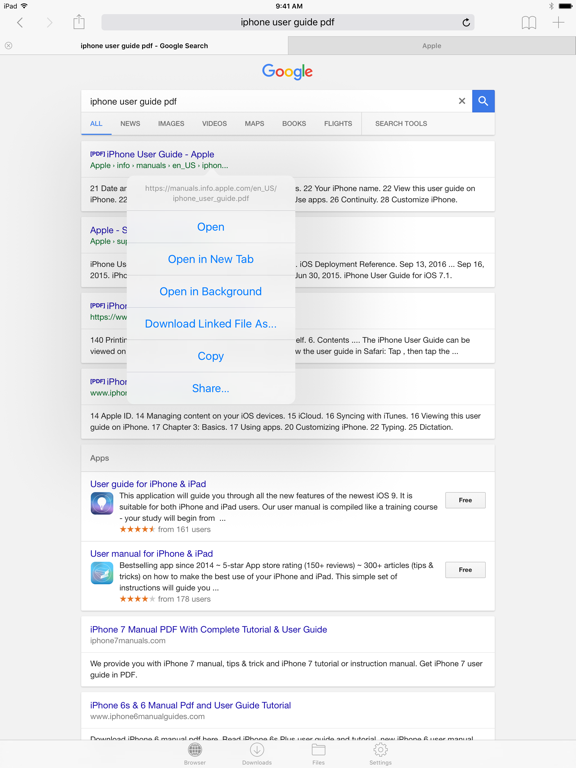
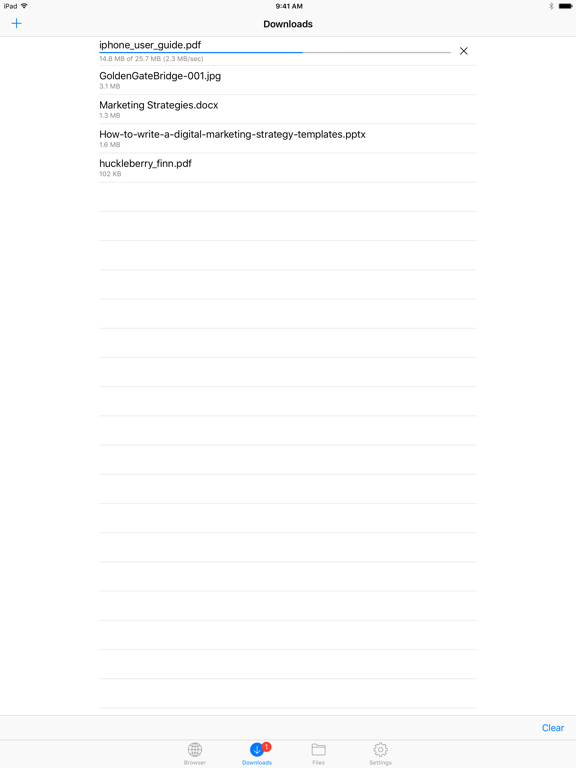
Files HD (formerly known as Downloads HD - Download Manager for iPad) features a Web browser that lets you save documents to your iPad so that you can work with them offline. It has a built-in file manager, with robust viewer for all iOS supported document types, powerful photo browser, advanced PDF reader, full Dropbox support, and more.
FEATURES
√ Tabbed browser
- Provides a user experience very similar to Safari
- Supports unlimited tabs
- Tap and hold on a link to open it in new tab or download it
- Fully featured bookmark manager
- History support
- Address bar auto-completion
- HTTP basic authentication
- Form-based authentication
- Integrated Google or Yahoo! search
- Ability to …
Read the full description
Files HD (formerly known as Downloads HD - Download Manager for iPad) features a Web browser that lets you save documents to your iPad so that you can work with them offline. It has a built-in file manager, with robust viewer for all iOS supported document types, powerful photo browser, advanced PDF reader, full Dropbox support, and more. FEATURES √ Tabbed browser - Provides a user experience very similar to Safari - Supports unlimited tabs - Tap and hold on a link to open it in new tab or download it - Fully featured bookmark manager - History support - Address bar auto-completion - HTTP basic authentication - Form-based authentication - Integrated Google or Yahoo! search - Ability to spoof browser's User-Agent string to display web pages like Firefox - Unified smart search field. Type a URL or search term in the unified smart search field, the browser automatically suggests the closest match to what you’re looking for. √ Download manager - Fast downloading speed - Save pages with images for offline viewing - Supports resuming of interrupted downloads reliably - Live download progress bar and speed indicator - Active downloads badge number - Add arbitrary download link - Always download with correct filename - Ability to download file of unknown size √ File manager - Folders support - Move, rename and delete files - Search by file name - Document viewer that supports .pdf, .doc, .xls, .ppt, .txt, .html, .webarchive and .rtf file formats - Extract ZIP and RAR archives - Import photos from camera roll √ Dropbox integration - Upload, download and manage files - Sync what you want, keep files on your device √ Advanced PDF viewer - Huge PDF files work flawlessly - Text search - Tap PDF links to jump across the file √ Photo viewer - Swipe to move between images in a folder - Zoom in and out with pinch gesture - Thumbnails view of all images in a folder - Ability to save images to photo album √ File transfer - iTunes USB File Sharing lets you drag and drop files between your iPad and computer - Supports HTTP and FTP protocols - Transfer files to and from computer that is in the same Wi-Fi network - Send files as email attachments √ Passcode lock √ Mobile Safari integration - Bookmarklet that lets you send links from Mobile Safari to Files HD √ Multitasking - Background downloading √ Inter-app document interchange - Other apps can save their files to Files HD (e.g. Email app can save attachments to Files HD) √ Recovery Mode - If the browser caught in an endless loop of pop-up alerts, go to the iOS built-in "Settings" app, find "Files HD Pro", turn on "Recovery Mode", then force-quit and relaunch the app. Terms of Use: https://downloadsapp.info/terms Privacy Policy: https://downloadsapp.info/privacy
Installs since 29 Aug 2026
Apple does not publish download counts. Estimates are in testing.
Estimated store revenue Estimated Beta
App Store, worldwide, monthly rate from the last 14 chart days to 21 Nov 2026
Below the top 100 grossing apps in the markets we calibrate. In the United States that usually means under about $6.4M a month. App Store purchases and subscriptions only, before Apple's 15 to 30% fee. Ads and web payments are not included.
Ratings
224 ratings, 224 reviews
No rating breakdown published for this app.
Recent reviews
Latest public reviews from the store
- 1 Jul 2025
Good program, but needs improvements
I really like this program. It works real well, but could use a few improvements. - The Search box needs to be fixed instead of scrolling with the file list. - Need to be able to delete files while in filtered search mode. - Need to be able to set length of time each picture shows in Slide Show. - The program usually crashes when viewing a number of animated GIFs one after another or trying to view them in thumbnail mode. - Need to be able to see file name while viewing images or videos. A toggle would be nice. - Sometimes Web browser won’t let you scroll all the way to the bottom and stay there. Upon releasing finger, the page scrolls back down.
- 17 Feb 2025
Incredibly Useful Application
Apple should purchase the rights to this essential application and include it in IOS! Incredibly easy to use and really helpful in locating and downloading user manuals and other documents.
- 13 Dec 2022
No feasible way to integrate HD Files in Roboform App
As of early October 2022, Apple displayed the version 16.1.1 available for iPad users. I did the upgrade to 16.1.1 in fact, but there’s a problem: The on-screen keyboard does not show any way of File HD Pro being integrated into Roboform Password Manager. This is very unfortunate, because I do need this integration as it will let me download files from certain webpages.
- 13 Apr 2021
Perfect for demonstrations on the fly
Great tool for demos on the go, especially when I travel between different offices and have to come up with custom video demos. I wish it had a continuous playback if videos.
What reviewers bring up
Topics mentioned in the latest 8 reviews, by how many reviews mention them
Liked in good reviews (7 reviews)
- file 4
- application 2
- videos 2
- apple 2
- able 2
- show 2
- let 2
- ios 2
Raised in bad reviews (1 reviews)
No topic comes up twice.
Top chart positions
Latest App Store chart ranks by country, last 10 days
Not in any tracked top chart in the last 10 days.
Files HD Pro history
Release, install milestones, listing and store changes
- First released on the store 13 Jul 2010
Update frequency
How often Files HD Pro ships a new version, month by month
2 updates in the last 12 months. More often than most similar apps: they shipped a median of 0 updates in the same year.
Recent versions
Current version 9.0.2
- Version 9.0.212 May 2026
Bug fixes and performance improvements.
- Version 9.0.122 Apr 2026
Bug fixes and performance improvements.
Listing keywords
Words and phrases Files HD Pro repeats most in its store listing
Top phrases: files hd (6), files hd pro (2), images in folder (2), smart search field (2), unified smart search (2).
Highlighted words also appear in the title. Counts cover the title, short description and description.
Compliance
What the listing and the app package show
- Store status
- Live
- Upkeep
- Updated 12 May 2026
- Age rating
- 17+
Apps like Files HD Pro
 动森助手 - 森友必备图鉴指南Guangzhou XFun Co., Ltd.★ 3.32
 Pupillary Distance Measure XVisTech.Projects LLC★ 4.48
 CareHome start smart new life深圳市看护家科技有限公司★ 4.72
 Morse Code Keys - TrainerCaesar Salad Software LLC★ 4.37
 Yuix Privacy Proxy & VPNHumble VPN Ltd.★ 3.68
 KurdKeykarzan kamal★ 4.17
 Reverse Image Search: Eye LensGregory Strigunov★ 4.39
 Prints.app - 1hr Print PhotosBrevify Inc.★ 4.83
 Bluetooth BLE Finder & ScannerCORNELIS LAURENS VAN DER VLIET★ 4.23
Files HD Pro: questions and answers
Who makes Files HD Pro?
Files HD Pro is published by Hian Zin Jong.
When was Files HD Pro last updated?
The latest version (9.0.2) was released on 12 May 2026.
Is Files HD Pro free?
No. Files HD Pro is a paid app priced at $4.99.
Is Files HD Pro still available?
Yes. Files HD Pro is live on App Store as of 21 Nov 2026.
Track Files HD Pro and its competitors
Watch any app for new versions, rating drops, chart moves and removals. Free plan, no card.