- Installs
- —
- Apple does not publish download counts
- Rating
- —
- Ratings
- —
- Version
- 1.3
- Updated 26 Sep 2021
- Released
- 28 Apr 2011
- Tracked since 10 May 2026
- Size
- 1 MB
- Needs 10.8
Screenshots
About FormatStripper
The description on the store listing
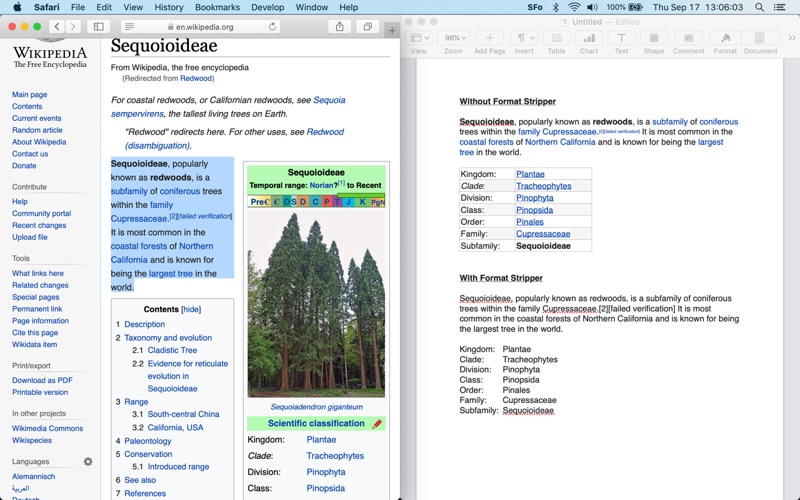
FormatStripper allows you to automatically adjust the format of copied text from one environment to match the format of text in another. Simultaneously it can also remove line breaks, redundant spaces, or change the capitalization while you're at it. All you do is copy and paste, FormatStripper does the rest.
Are you sick of untangling wacky text formatting from websites, PDFs and PowerPoint slides? Or how about reading THOSE ANNOYING ALL CAPS MESSAGES from people who don't understand netiquette? FormatStripper is the app for you! That pesky bold-underlined-size-82-hot-purple-heading-you-can’t-seem-to-get-rid-of-in-less-than-five-steps is no match for FormatStripper!
FormatStripper …
Read the full description
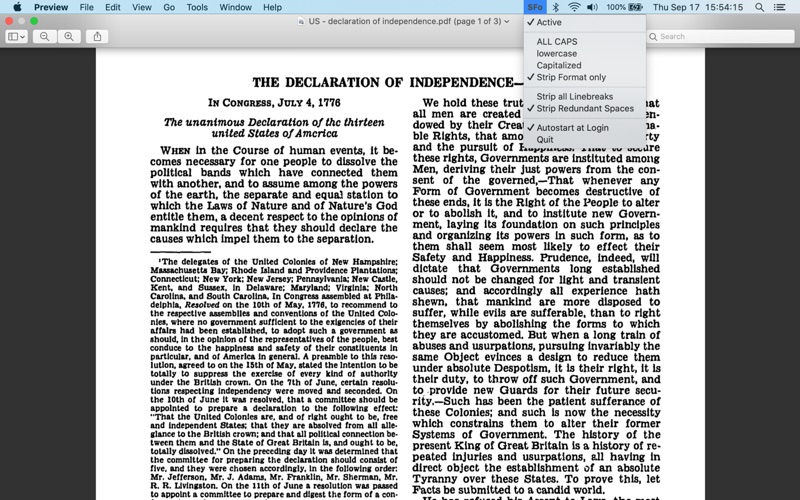
FormatStripper allows you to automatically adjust the format of copied text from one environment to match the format of text in another. Simultaneously it can also remove line breaks, redundant spaces, or change the capitalization while you're at it. All you do is copy and paste, FormatStripper does the rest. Are you sick of untangling wacky text formatting from websites, PDFs and PowerPoint slides? Or how about reading THOSE ANNOYING ALL CAPS MESSAGES from people who don't understand netiquette? FormatStripper is the app for you! That pesky bold-underlined-size-82-hot-purple-heading-you-can’t-seem-to-get-rid-of-in-less-than-five-steps is no match for FormatStripper! FormatStripper is simple to use. After installing and launching the app you will find the FormatStripper icon in your top status bar. After you activate the app it will automatically remove all formatting from whatever text you copy. Once you paste the text it will automatically adjust to the format of the document you are pasting into. You have the options to keep the capitalization as-is by selecting "Strip Format only" from the menu or change your copied text to "ALL CAPS", all "lowercase", or capitalize the first letter of each word using the "Capitalization" mode. As extra options you can choose to strip all line breaks and/or redundant spaces. This app is guaranteed to save you time and headaches. IMPORTANT: There is no application window. After you launch the app the only thing that is supposed to happen is that you see a "SFo" icon on your Mac status bar. Using that icon you can check active in order to activate the app and have it strip the formatting info. Feel free to contact us through our website if you have additional questions or think something isn't working properly!
Installs
Apple does not publish download counts. Estimates are in testing.
We publish iOS estimates only after they pass a back-test against real numbers. Chart history below is measured.
Estimated store revenue Estimated Beta
App Store, worldwide, monthly rate from the last 12 chart days to 19 Nov 2026
Below the top 100 grossing apps in the markets we calibrate. In the United States that usually means under about $6.4M a month. App Store purchases and subscriptions only, before Apple's 15 to 30% fee. Ads and web payments are not included.
Ratings
No rating breakdown published for this app.
Recent reviews
Latest public reviews from the store
No reviews in our sample for this app yet.
Top chart positions
Latest App Store chart ranks by country, last 10 days
Not in any tracked top chart in the last 10 days.
FormatStripper history
Release, install milestones, listing and store changes
- First released on the store 28 Apr 2011
Update frequency
How often FormatStripper ships a new version, month by month
0 updates in the last 12 months. Less often than most similar apps: they shipped a median of 1 updates in the same year.
Recent versions
Current version 1.3
- Version 1.326 Sep 2021
- Added native support for Apple Silicon. - Enhanced icon text color for status menu, especially for inactive state.
Listing keywords
Words and phrases FormatStripper repeats most in its store listing
Top phrases: automatically adjust (2), copied text (2), line breaks (2), redundant spaces (2), status bar (2).
Highlighted words also appear in the title. Counts cover the title, short description and description.
Compliance
What the listing and the app package show
- Store status
- Live
- Upkeep
- No update since 26 Sep 2021
- Age rating
- 4+
Apps like FormatStripper
 Library of AviationNazmi Yavuz★ 4.82
 MyNOVECNorthern Virginia Electric Cooperative★ 2.28
 打工人小组件光翔 卓★ 4.96
 TruckbaysTruckbays LLC★ 4.3
 Tornado PRO PlayerMohammed Altam★ 4.44
 VDX - Video ManagerARISEPEAK LP★ 1.74
 TV CastingZeasn Info Technology Co., Ltd.★ 1.86
 Mil-Dot BallisticsTom Holsten★ 3.82
 MySontiqSontiq, Inc.★ 2.4
FormatStripper: questions and answers
Who makes FormatStripper?
FormatStripper is published by DansApps LLC.
When was FormatStripper last updated?
The latest version (1.3) was released on 26 Sep 2021.
Is FormatStripper free?
No. FormatStripper is a paid app priced at $3.99.
Is FormatStripper still available?
Yes. FormatStripper is live on App Store as of 10 May 2026.
Track FormatStripper and its competitors
Watch any app for new versions, rating drops, chart moves and removals. Free plan, no card.