- Installs
- —
- Apple does not publish download counts
- Rating
- 3.69
- Ratings
- 513
- 513 reviews
- Version
- 5.5.8
- Updated 17 Oct 2018
- Released
- 2 Sep 2016
- Tracked since 11 May 2026
- Size
- 141 MB
- Needs 9.0
Also on Google Play: FreeFlight Mini (7.9K ratings)
Screenshots
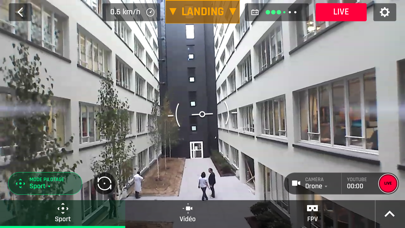
About FreeFlight Mini
The description on the store listing
FREEFLIGHT MINI
The official dedicated app for Parrot Minidrones*.
PILOT YOUR DRONE VIA YOUR SMARTPHONE OR TABLET
Download FreeFlight Mini free of charge in order to pilot Parrot Minidrones.
INTUITIVE PILOTING
FreeFlight Mini’s easy-to-use interface makes piloting simple, even for beginner pilots. The app connects to your Minidrone via Bluetooth Low Energy or Wi-Fi.
EASY CONNECTIVITY
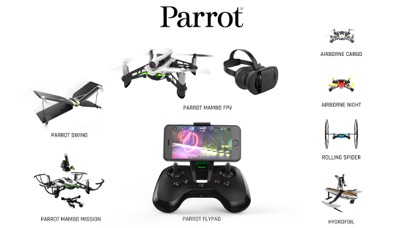
The FreeFlight Mini App automatically detects which Parrot Minidrone you are using.
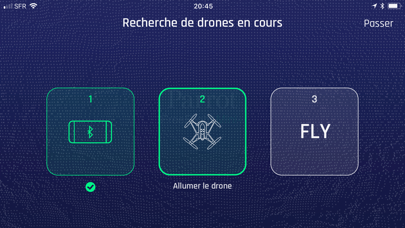
Simply turn on your drone, activate Bluetooth on your smartphone/tablet and open the application. Select your drone from the list that appears on the screen. Your drone will then connect and you are ready for take-off! If …
Read the full description
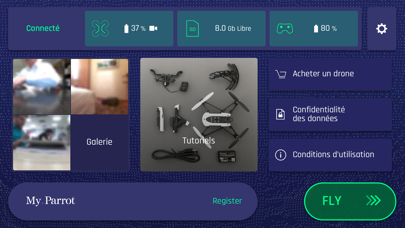
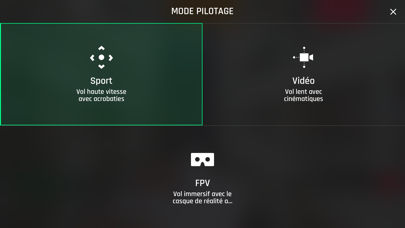
FREEFLIGHT MINI The official dedicated app for Parrot Minidrones*. PILOT YOUR DRONE VIA YOUR SMARTPHONE OR TABLET Download FreeFlight Mini free of charge in order to pilot Parrot Minidrones. INTUITIVE PILOTING FreeFlight Mini’s easy-to-use interface makes piloting simple, even for beginner pilots. The app connects to your Minidrone via Bluetooth Low Energy or Wi-Fi. EASY CONNECTIVITY The FreeFlight Mini App automatically detects which Parrot Minidrone you are using. Simply turn on your drone, activate Bluetooth on your smartphone/tablet and open the application. Select your drone from the list that appears on the screen. Your drone will then connect and you are ready for take-off! If you’re using Mambo FPV, activate wifi on your iDevice and connect to your drone in the app. List of drones compatible with this application: Parrot Mambo, Parrot Swing, Parrot Minidrones Airborne Night and Cargo, Hydrofoil*, and Rolling Spider. *For Hydrofoil: place the Airborne Minidrone into the Hydrofoil structure, select Hydrofoil mode in settings, and start sailing across the water. Parrot MAMBO FPV NEW FEATURES The application will instantly recognize the FPV camera that you have connected to your Parrot Mambo. You can now save and transmit HD video content in real time! To completely immerse yourself in the FPV experience, simply place your iDevice in your Parrot Cockpit Glasses 2. You’ll see exactly what your drone sees and discover new, thrilling sensations thanks to this innovative function. Become a FPV racing pilot using the three new pilot modes. Start with the Easy mode, which will keep your drone’s position in the air even after the controls have been released. Then, move on to Drift mode. This mode deactivates the horizontal stabilization, thus allowing for sharps turns and more complex maneuvers. Last but not least, push your piloting skills to the limit and try the new Racing mode. You’ll have complete control of the drone with no stabilization assistance. The possibilities are endless! ACROBATICS, FLIPS & TURNS From the home screen of the FreeFlight Mini app, you can easily access your settings for piloting, photos, and the "Parrot Cloud.” You can also customize flight parameters, including: altitude, speed and piloting mode (accelerometer, joypad). FreeFlight Mini app also includes fun features like one-touch flip: - Experience loops, barrel rolls, and high speed 180-degree turns with Parrot Swing - Front/back/side flips with Parrot Mambo, Airborne Minidrones, Rolling Spider and Hydrofoil* *Only when it’s removed from the Hydrofoil structure and in flight mode Parrot Minidrones are ultra-compact drones with impressive agility. They can fly both indoors and outdoors with great speed and stability. PHOTOS All Parrot Minidrones can take dronies of you and your friends. You can also store images from your drone races taken by Parrot Swing in plane mode. CUSTOMIZE YOUR FLYPAD SETTINGS The new Parrot Flypad allows you to pilot your Minidrone with extra-precision and control. There are two ways to connect the controller to the Minidrone: - Automatically and directly, without the use of a smartphone. This mode offers an increased flight range of up to 200 feet - Through your smartphone or tablet. This connection mode allows you to monitor your flight status on your device’s screen, and simultaneously pilot the Minidrone using the controller You can customize your Flypad controls to suit your piloting preferences through the use of the FreeFlight Mini app. Turn on your Parrot Flypad and select it in the “controller” section of the app. From there, you can modify the button mapping and check battery life. When you start piloting, enjoy the optimized display of flight information (flight time and drone battery percentage) on your smartphone. *To pilot Parrot Minidrone Jumping Night, Race, or Sumo, you need to download the FreeFlight Jumping app.
Installs since 29 Aug 2026
Apple does not publish download counts. Estimates are in testing.
Estimated store revenue Estimated Beta
App Store, worldwide, monthly rate from the last 12 chart days to 19 Nov 2026
Below the top 100 grossing apps in the markets we calibrate. In the United States that usually means under about $6.4M a month. App Store purchases and subscriptions only, before Apple's 15 to 30% fee. Ads and web payments are not included.
Ratings
513 ratings, 513 reviews
No rating breakdown published for this app.
Recent reviews
Latest public reviews from the store
- 20 Feb 2025
More reliable then a McLaren
Left it under 3 boxes protected by 1 piece of flattened cardboard (the box it I got it in) took it out years later and it still works like new
- 3 May 2024
Best app ever if you know how to control it
It is so fun that I wanted to play with it everyday but the problem is the battery keeps on dying every like 10 or 15 minutes
- 9 Feb 2022
Update issues
I connect my Parrot Mambo just fine but when I try to fly it says I need to update. I try to update and there’s always an error. The parrot support page also wasn’t helpful at all.
- 11 Apr 2020
Why remove gyro controls?
This app used to let my fly the drone with my phone’s gyro, which was super fun and intuitive. Without those controls, the drone is a lot harder to fly. Why remove a feature that worked so well?
What reviewers bring up
Topics mentioned in the latest 50 reviews, by how many reviews mention them
Liked in good reviews (10 reviews)
- control 2
- left 2
- let 2
Raised in bad reviews (32 reviews)
- drone 16
- connect 8
- mambo 8
- fly 8
- parrot 7
- bluetooth 6
- crashes 6
- firmware 5
Top chart positions
Latest App Store chart ranks by country, last 10 days
Not in any tracked top chart in the last 10 days.
FreeFlight Mini history
Release, install milestones, listing and store changes
- First released on the store 2 Sep 2016
Update frequency
How often FreeFlight Mini ships a new version, month by month
0 updates in the last 12 months. Less often than most similar apps: they shipped a median of 1 updates in the same year.
Recent versions
Current version 5.5.8
- Version 5.5.817 Oct 2018
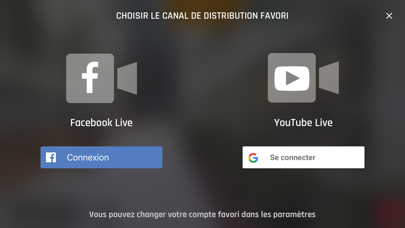
Full access to Facebook live feature. Correction of a bug in the drone firmware that blocked the wifi updgrade process. Remember to activate the live feature to your youtube account in order to use Youtube live feature (takes 24h to activate)
Listing keywords
Words and phrases FreeFlight Mini repeats most in its store listing
Top phrases: freeflight mini (7), parrot minidrones (5), parrot mambo (4), parrot swing (3), customize your flypad (2).
Highlighted words also appear in the title. Counts cover the title, short description and description.
Compliance
What the listing and the app package show
- Store status
- Live
- Upkeep
- No update since 17 Oct 2018
- Age rating
- 4+
Apps like FreeFlight Mini
 SpicyGF: My AI Girlfriend ChatOnyx Tech Inc★ 4.59
 BolitaCubaYoangel Rivaflecha★ 4.77
 TV5MONDETV5MONDE★ 4.63
 Makeup DIY: Spa Makeover GamesVery Pink Company Ltd★ 4.51
 CMC California Music ChannelCMC Broadcasting Company, Incorporated★ 4.83
 LEGO® Powered UpLEGO★ 3.58
 FaceAi - Reface & Dream FaceVisualCraftsman★ 4.33
 Brainrot Makeover:DIY ItalianOuafae Abriji★ 4.59
 DeepLove AI:Dream AI Love ChatDuSichuan★ 4.64
FreeFlight Mini: questions and answers
Who makes FreeFlight Mini?
FreeFlight Mini is published by Parrot SA.
When was FreeFlight Mini last updated?
The latest version (5.5.8) was released on 17 Oct 2018.
Is FreeFlight Mini free?
Yes. FreeFlight Mini is free to download.
Is FreeFlight Mini still available?
Yes. FreeFlight Mini is live on App Store as of 14 Nov 2026.
Track FreeFlight Mini and its competitors
Watch any app for new versions, rating drops, chart moves and removals. Free plan, no card.