
- Installs
- —
- Apple does not publish download counts
- Rating
- 5.0
- Ratings
- 2
- 2 reviews
- Version
- 1.7.1
- Updated 12 Nov 2021
- Released
- 19 Apr 2020
- Tracked since 10 May 2026
- Size
- 24 MB
- Needs 11.0
Screenshots


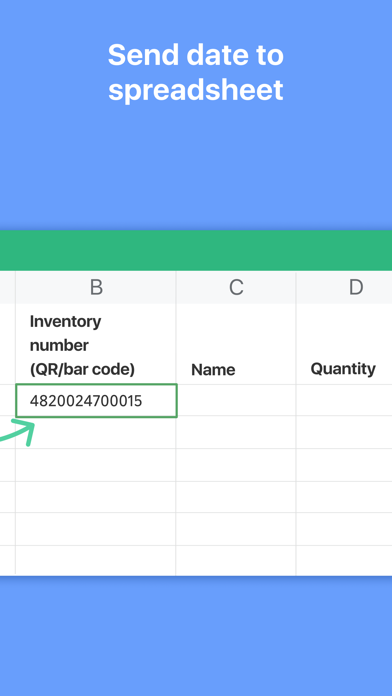
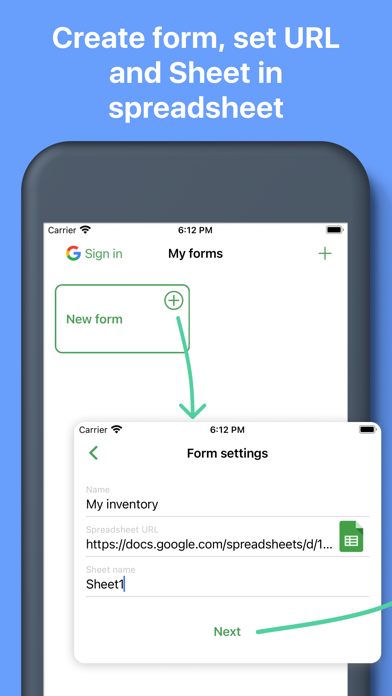
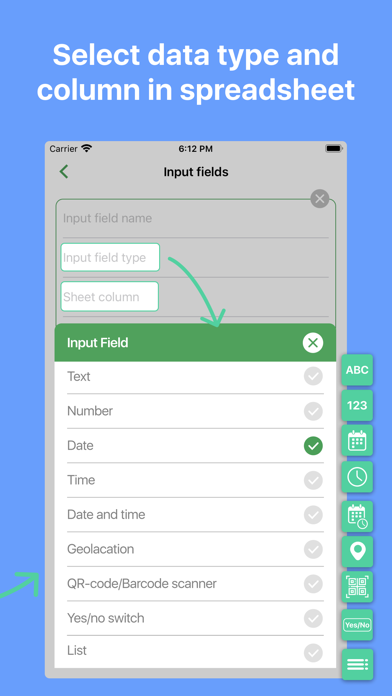
About Functions - save to sheets
The description on the store listing
Send data from your phone to your Google sheet quickly.
After that you can make any future manipulation with data on your Google sheet.
Perfectly fit for inventory, track attendance, finance and tax purpose, collecting QR codes to spreadsheet and beyond.
Save next data types:
- QR and Bar codes (scans code and save data to the spreadsheet);
- Geolocation (allow to save your current location or select it on map);
- Text;
- Number;
- Date / Time / Date and time;
- Select value from predefined list;
- Yes / No selector.
How it works
1. Select function;
2. Put data (scan codes, entering text etc);
3. Tap send;
4. Data appear in spreadsheet on your Google Drive.
You can …
Read the full description
Send data from your phone to your Google sheet quickly. After that you can make any future manipulation with data on your Google sheet. Perfectly fit for inventory, track attendance, finance and tax purpose, collecting QR codes to spreadsheet and beyond. Save next data types: - QR and Bar codes (scans code and save data to the spreadsheet); - Geolocation (allow to save your current location or select it on map); - Text; - Number; - Date / Time / Date and time; - Select value from predefined list; - Yes / No selector. How it works 1. Select function; 2. Put data (scan codes, entering text etc); 3. Tap send; 4. Data appear in spreadsheet on your Google Drive. You can repeat it as much as you want. How to connect your Google sheet to the app 1. Connect your Google account to the app; 2. Set spreadsheet URL in function settings. What is Function Function has target spreadsheet URL and list of input fields. Function can be created manually or from predefined functions library. Create function manually 1. Create spreadsheet with required columns in your Google Drive; 2. Create function in the app: - Copy spreadsheet URL and name of sheet; - Set input fields: - name; - data type; - column. - Save. Create function from library 1. Select function from the library; 2. Tap “Add to my functions” - Function will be added on My Functions screen; - Spreadsheet will be copied to your Google Drive. Terms or Service and Privacy Policy: http://bytepace.com/functionsapp/tos-and-privacy-policy
Installs
Apple does not publish download counts. Estimates are in testing.
We publish iOS estimates only after they pass a back-test against real numbers. Chart history below is measured.
Estimated store revenue Estimated Beta
App Store, worldwide, monthly rate from the last 15 chart days to 22 Nov 2026
Below the top 100 grossing apps in the markets we calibrate. In the United States that usually means under about $6.4M a month. App Store purchases and subscriptions only, before Apple's 15 to 30% fee. Ads and web payments are not included.
Ratings
2 ratings, 2 reviews
No rating breakdown published for this app.
Recent reviews
Latest public reviews from the store
No reviews in our sample for this app yet.
Top chart positions
Latest App Store chart ranks by country, last 10 days
Not in any tracked top chart in the last 10 days.
Functions - save to sheets history
Release, install milestones, listing and store changes
- First released on the store 19 Apr 2020
Update frequency
How often Functions - save to sheets ships a new version, month by month
0 updates in the last 12 months. Less often than most similar apps: they shipped a median of 1 updates in the same year.
Recent versions
Current version 1.7.1
- Version 1.7.112 Nov 2021
Handled error received when app were trying to write into .xlsx spreadsheet. In one or two day we will bring to you big update. Dark mode, input fields reorder, auto fill. Stay tuned.
Listing keywords
Words and phrases Functions - save to sheets repeats most in its store listing
Top phrases: create function (3), google drive (3), google sheet (3), spreadsheet url (3), connect your google (2).
Highlighted words also appear in the title. Counts cover the title, short description and description.
Compliance
What the listing and the app package show
- Store status
- Live
- Upkeep
- No update since 12 Nov 2021
- Age rating
- 4+
Apps like Functions - save to sheets
 Library of AviationNazmi Yavuz★ 4.82
 MyNOVECNorthern Virginia Electric Cooperative★ 2.28
 打工人小组件光翔 卓★ 4.96
 TruckbaysTruckbays LLC★ 4.3
 Tornado PRO PlayerMohammed Altam★ 4.44
 VDX - Video ManagerARISEPEAK LP★ 1.74
 TV CastingZeasn Info Technology Co., Ltd.★ 1.86
 MySontiqSontiq, Inc.★ 2.4
 Laboratory TimerShazino★ 4.66
Functions - save to sheets: questions and answers
Who makes Functions - save to sheets?
Functions - save to sheets is published by Ruslan Musagitov.
When was Functions - save to sheets last updated?
The latest version (1.7.1) was released on 12 Nov 2021.
Is Functions - save to sheets free?
Yes. Functions - save to sheets is free to download.
Is Functions - save to sheets still available?
Yes. Functions - save to sheets is live on App Store as of 1 Jul 2026.
Track Functions - save to sheets and its competitors
Watch any app for new versions, rating drops, chart moves and removals. Free plan, no card.