- Installs
- —
- Apple does not publish download counts
- Rating
- 5.0
- Ratings
- 4
- 4 reviews
- Version
- 5.0.14
- Updated 26 Feb 2018
- Released
- 22 Apr 2013
- Tracked since 10 May 2026
- Size
- 29 MB
- Needs 8.2
Screenshots




About Geometry Ace: Math Tutor
The description on the store listing
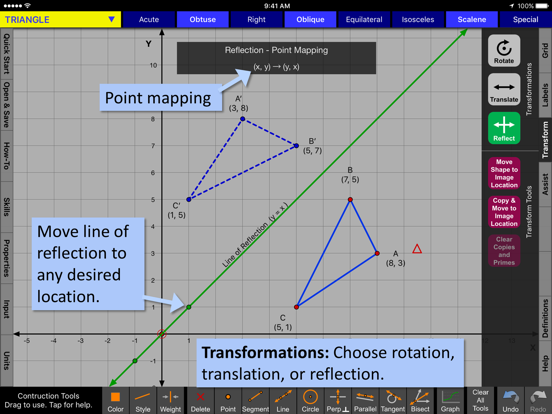
Geometry Ace is a fusion between a graphics based calculator and a geometry textbook. Detailed step-by-step solutions update as you create new math problems by changing the graphics. Learn vocabulary with unlimited examples. Points, Lines, Segments, Rays, Angles, Triangles, Quadrilaterals, Polygons, and Circles. Transformations and Constructions. Full functionality with no ads or in-app purchases. Great classroom or home resource for elementary, middle, and high school students and teachers.
*** Easy Start-up ***
• Simply choose shape to study.
• Shape will already be on the screen and all you have to do is start manipulating it.
• Learn vocabulary, choose from list of tutorials, perform …
Read the full description
Geometry Ace is a fusion between a graphics based calculator and a geometry textbook. Detailed step-by-step solutions update as you create new math problems by changing the graphics. Learn vocabulary with unlimited examples. Points, Lines, Segments, Rays, Angles, Triangles, Quadrilaterals, Polygons, and Circles. Transformations and Constructions. Full functionality with no ads or in-app purchases. Great classroom or home resource for elementary, middle, and high school students and teachers. *** Easy Start-up *** • Simply choose shape to study. • Shape will already be on the screen and all you have to do is start manipulating it. • Learn vocabulary, choose from list of tutorials, perform transformations, or create a construction. *** Detailed problem solutions update as you change the graphics. *** • You are not limited to a set of pre-written or randomly generated problems. • Tutorial examples: finding the length of a line segment, finding the area of any type of quadrilateral, calculating the length of an arc, and many more. • Geometry Ace does not simply calculate lengths and areas for you. It shows you step-by-step how to do it! *** Includes introductory material and makes connections with algebra. *** • Introductory material appropriate for upper elementary students is included. • Helps with differentiation. Middle and high school students who need a refresher can review introductory topics. • Algebra topics needed for coordinate geometry are included. • Introductory topics include coordinates of a point, slope, and the equation of a line. • Answers to problems are given in fraction form when possible. • Solutions address common student misconceptions and give attention to detail. *** Interactive definitions *** • Relevant definitions highlight interactively as you drag points and lines to change the shape on the screen to meet various attributes. • Example: A triangle can be obtuse, oblique, and scalene. • Example: A polygon can be concave and irregular. • Definitions are inclusive. Example: A quadrilateral that is a rectangle is also a parallelogram and a trapezoid. *** Transformations: Rotations, Reflections, and Translations *** • Easily change degrees of rotation, center of rotation, line of reflection, and translation vector. • Point mapping is shown! • Perform successive transformations on the same object. *** Constructions *** • Includes points, lines, segments, circles, perpendicular lines, parallel lines, tangents, and angle bisectors. • Easily make attachments to points, lines, circles, intersections, and midpoints. *** Monitor Students *** • Teachers can view student’s iPad screens who are on the same local wifi network and running this app. TOPICS AVAILABLE IN GEOMETRY ACE POINT: Coordinates Quadrants Distance between points LINE/RAY/SEMGENT: Slope Vertical, Horizontal Y-intercept Equation of line/ray/segment Distance between point and line Construct or write equation of parallel or perpendicular line Segment midpoint and length Construct or write equation of perpendicular bisector Intersection point of 2 lines Transversals Alternate interior angles Alternate exterior angles Corresponding angles Same side interior angles Vertical angles ANGLE: Vertex, Legs, Interior, Measure Acute, Right, Obtuse, Straight, Reflex Convert between degrees/radians Construct or write equation for angle bisector Congruent, Adjacent, Complimentary, Supplementary, Linear Pair, Vertical TRIANGLE: Acute, Obtuse, Right, Oblique, Equilateral, Isosceles, Scalene Perimeter Area – basic elementary Area – coordinate plane - algebra Area – box method Centroid, Circumcenter, Incenter QUADRILATERAL: Square, Rectangle, Rhombus, Parallelogram, Trapezoid, Kite Perimeter Area POLYGON: Triangle, Quadrilateral, Pentagon, Hexagon, Heptagon, Octagon, Nonagon, Decagon Convex, Concave Regular, Irregular Sum of interior angles CIRCLE: Radius, Diameter, Tangent, Secant, Chord Circumference Area Measure and length of an arc Area of a sector
Installs
Apple does not publish download counts. Estimates are in testing.
We publish iOS estimates only after they pass a back-test against real numbers. Chart history below is measured.
Estimated store revenue Estimated Beta
App Store, worldwide, monthly rate from the last 14 chart days to 21 Nov 2026
Below the top 100 grossing apps in the markets we calibrate. In the United States that usually means under about $6.4M a month. App Store purchases and subscriptions only, before Apple's 15 to 30% fee. Ads and web payments are not included.
Ratings
4 ratings, 4 reviews
No rating breakdown published for this app.
Recent reviews
Latest public reviews from the store
No reviews in our sample for this app yet.
Top chart positions
Latest App Store chart ranks by country, last 10 days
Not in any tracked top chart in the last 10 days.
Geometry Ace: Math Tutor history
Release, install milestones, listing and store changes
- First released on the store 22 Apr 2013
Recent versions
Current version 5.0.14
- Version 5.0.1426 Feb 2018
This update from Apple will improve the functionality of this app. No new features are included. Minor updates.
Listing keywords
Words and phrases Geometry Ace: Math Tutor repeats most in its store listing
Top phrases: geometry ace (4), construct or write (3), interior angles (3), points lines (3), write equation (3).
Highlighted words also appear in the title. Counts cover the title, short description and description.
Compliance
What the listing and the app package show
- Store status
- Live
- Upkeep
- No update since 26 Feb 2018
- Age rating
- 4+
Apps like Geometry Ace: Math Tutor
 Populations and Resources SimAmplify Education, Inc.★ 2.38
 Rune WriterPaul Burlov★ 4.34
 Being Moroccan ( Darija )Yasir TIRAK★ 4.56
 方格单词²上海译动智能科技有限公司★ 4.68
 Handwriting Tracing PracticeVladimir Zavada★ 4.02
 Oklahoma Learners Permit TestNilu Rathod★ 4.72
 SU CampusCharles Robinson★ 4.76
 NC CDL Permit Test PracticeNilu Rathod★ 4.82
 Mjølnir NorwegianMjølnir Learning Apps★ 4.92
Geometry Ace: Math Tutor: questions and answers
Who makes Geometry Ace: Math Tutor?
Geometry Ace: Math Tutor is published by Interactive Mindware LLC.
When was Geometry Ace: Math Tutor last updated?
The latest version (5.0.14) was released on 26 Feb 2018.
Is Geometry Ace: Math Tutor free?
No. Geometry Ace: Math Tutor is a paid app priced at $0.99.
Is Geometry Ace: Math Tutor still available?
Yes. Geometry Ace: Math Tutor is live on App Store as of 1 Jul 2026.
Track Geometry Ace: Math Tutor and its competitors
Watch any app for new versions, rating drops, chart moves and removals. Free plan, no card.