
- Installs
- —
- Apple does not publish download counts
- Rating
- 2.0
- Ratings
- 3
- 3 reviews
- Version
- 0.8.6
- Updated 10 Jun 2026
- Released
- 9 Aug 2020
- Tracked since 10 May 2026
- Size
- 159 MB
- Needs 12.0
Also on Google Play: GlobeViewer Moon (250 ratings)
Screenshots


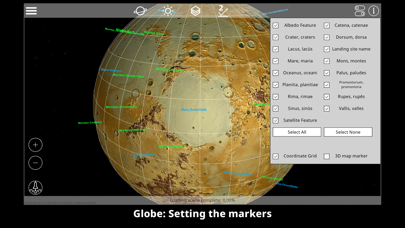


About GlobeViewer Moon
The description on the store listing
GlobeViewer Moon is an interactive and three-dimensional representation of the entire moon surface. The globe rotation view provides an overview of all the existing designations for various surface features. If you are interested in a specific region, an even higher resolution 3D map view can be loaded in order to take a close look at the craters, grooves and other features.
There are four map modes available (elevation display, photo illustration, a combination of both and a grey texture for the telescope mode). These views were created from data from NASA's Lunar Reconnaissance Orbiter. In addition, surface details (normal maps) have been obtained from the elevation data for the display, …
Read the full description
GlobeViewer Moon is an interactive and three-dimensional representation of the entire moon surface. The globe rotation view provides an overview of all the existing designations for various surface features. If you are interested in a specific region, an even higher resolution 3D map view can be loaded in order to take a close look at the craters, grooves and other features. There are four map modes available (elevation display, photo illustration, a combination of both and a grey texture for the telescope mode). These views were created from data from NASA's Lunar Reconnaissance Orbiter. In addition, surface details (normal maps) have been obtained from the elevation data for the display, which can be combined with all map modes. Even the smallest craters, elevations, grooves and gorges are visible on the map. The lighting in the 3D map view is designed in such a way that the light can be directed into the crater from all directions. This is used to improve the visibility of height structures in the craters and is not intended to represent the real lighting situation. Realistic lighting that includes the ecliptic was also dispensed with in the globe view in favour of the visibility of the polar regions. In telescope mode the lighting is a realistic simulation including Moon phase and libration movement. So the app becomes a useful tool for telescope users. The app will recieve lot of updates in the future - this way, user feedback should flow into the further development. If you have any suggestions or ideas for further functions in the app, please contact us using the contact form on our website. We are looking forward to your feedback.
Installs
Apple does not publish download counts. Estimates are in testing.
We publish iOS estimates only after they pass a back-test against real numbers. Chart history below is measured.
Estimated store revenue Estimated Beta
App Store, worldwide, monthly rate from the last 12 chart days to 19 Nov 2026
Below the top 100 grossing apps in the markets we calibrate. In the United States that usually means under about $6.4M a month. App Store purchases and subscriptions only, before Apple's 15 to 30% fee. Ads and web payments are not included.
Ratings
3 ratings, 3 reviews
No rating breakdown published for this app.
Recent reviews
Latest public reviews from the store
No reviews in our sample for this app yet.
Top chart positions
Latest App Store chart ranks by country, last 10 days
Not in any tracked top chart in the last 10 days.
GlobeViewer Moon history
Release, install milestones, listing and store changes
- First released on the store 9 Aug 2020
Update frequency
How often GlobeViewer Moon ships a new version, month by month
1 updates in the last 12 months. More often than most similar apps: they shipped a median of 0 updates in the same year.
Recent versions
Current version 0.8.6
- Version 0.8.610 Jun 2026
- Technical Update: Unity 2022.3.62 - New lunar missions have been added to the mission log.
- Version 0.8.413 Dec 2024
- Technical Update to Unity 2022.3.41 - Bugfix Telescope Mode - fixed too fast libration moon rotation in Topocentric Mode - Bugfix Telescope Mode - View Center will stay on position when changing the time slider
Listing keywords
Words and phrases GlobeViewer Moon repeats most in its store listing
Top phrases: 3d map view (2), 3d map (2), globeviewer moon (2), map modes (2), map view (2).
Highlighted words also appear in the title. Counts cover the title, short description and description.
Compliance
What the listing and the app package show
- Store status
- Live
- Upkeep
- Updated 10 Jun 2026
- Age rating
- 4+
Apps like GlobeViewer Moon
 Populations and Resources SimAmplify Education, Inc.★ 2.38
 Rune WriterPaul Burlov★ 4.34
 Being Moroccan ( Darija )Yasir TIRAK★ 4.56
 方格单词²上海译动智能科技有限公司★ 4.68
 Handwriting Tracing PracticeVladimir Zavada★ 4.02
 Oklahoma Learners Permit TestNilu Rathod★ 4.72
 SU CampusCharles Robinson★ 4.76
 NC CDL Permit Test PracticeNilu Rathod★ 4.82
 Mjølnir NorwegianMjølnir Learning Apps★ 4.92
GlobeViewer Moon: questions and answers
Who makes GlobeViewer Moon?
GlobeViewer Moon is published by RAB-Software.
When was GlobeViewer Moon last updated?
The latest version (0.8.6) was released on 10 Jun 2026.
Is GlobeViewer Moon free?
Yes. GlobeViewer Moon is free to download.
Is GlobeViewer Moon still available?
Yes. GlobeViewer Moon is live on App Store as of 1 Jul 2026.
Track GlobeViewer Moon and its competitors
Watch any app for new versions, rating drops, chart moves and removals. Free plan, no card.