
- Installs
- —
- Apple does not publish download counts
- Rating
- 4.16
- Ratings
- 323
- 323 reviews
- Version
- 6.2.3099
- Updated 6 Aug 2024
- Released
- 9 Jun 2017
- Tracked since 10 May 2026
- Size
- 34 MB
- Needs 12.0
Screenshots


About GoToMyPC - Remote Access
The description on the store listing
GoToMyPC gives you the freedom to go anywhere you choose and connect right to your Mac or PC. To use this free app, you must first have a GoToMyPC subscription.
********
“If you want to access your computer remotely, this app is your best bet.” – LAPTOP Magazine
“GoToMyPC is definitely a hit in the business world. It's simple, clean, and gets to the point.” – HotHardware
********
GETTING STARTED IS EASY
1) Download the GoToMyPC app from the App Store.
2) Make sure you have GoToMyPC installed on the Mac or PC you want to access.
3) Tap the GoToMyPC app from your iPad or iPhone to access your computer.
Your computer is always just a few taps away. GoToMyPC is…
Convenient
• Use your …
Read the full description
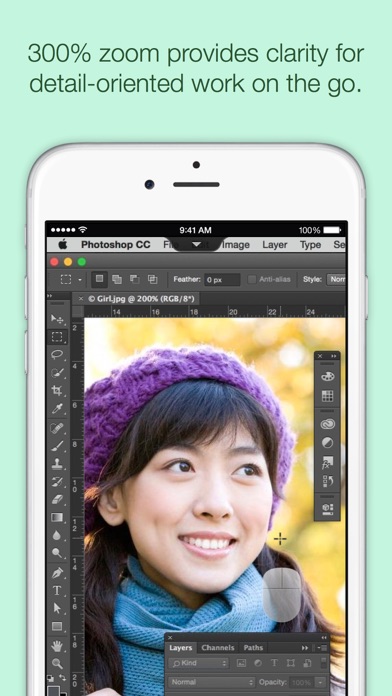
GoToMyPC gives you the freedom to go anywhere you choose and connect right to your Mac or PC. To use this free app, you must first have a GoToMyPC subscription. ******** “If you want to access your computer remotely, this app is your best bet.” – LAPTOP Magazine “GoToMyPC is definitely a hit in the business world. It's simple, clean, and gets to the point.” – HotHardware ******** GETTING STARTED IS EASY 1) Download the GoToMyPC app from the App Store. 2) Make sure you have GoToMyPC installed on the Mac or PC you want to access. 3) Tap the GoToMyPC app from your iPad or iPhone to access your computer. Your computer is always just a few taps away. GoToMyPC is… Convenient • Use your computer wherever you take your iPad or iPhone – meaning everywhere. Simple • Instantly access any application or file on your Mac or PC. Reliable • GoToMyPC is famous for its reliability and free 24/7 Global Customer Support. FEATURES • Instant access to all your files, programs and network • Works seamlessly with your existing firewalls – no need for special configuration • Precision mouse control so it’s easy to tap the details • 300% zoom to see details and work without straining your eyes • Full keyboard functionality, including special keys like Alt, Ctrl and Tab • Fast, auto-corrected typing with the Preview Text feature • Copy and paste between your computer and apps on your phone • Hear sound coming from the computer you are accessing (PC only) • Multitasking capability • Keyboard Locking and Screen Blanking on the computer you access (PC only) • Multi-monitor support • 128-bit AES encryption, dual passwords and end-to-end user authentication • Connects over 3G, 4G and Wi-Fi networks • Bluetooth keyboard support NOTE: To use this free application, you must first have a GoToMyPC subscription on the computer(s) you want to access. ********
Installs since 29 Aug 2026
Apple does not publish download counts. Estimates are in testing.
Estimated store revenue Estimated Beta
App Store, worldwide, monthly rate from the last 12 chart days to 19 Nov 2026
Below the top 100 grossing apps in the markets we calibrate. In the United States that usually means under about $6.4M a month. App Store purchases and subscriptions only, before Apple's 15 to 30% fee. Ads and web payments are not included.
Ratings
323 ratings, 323 reviews
No rating breakdown published for this app.
Recent reviews
Latest public reviews from the store
- 25 Oct 2025
Imagination Becoming Reality
Confidence in this app has only gotten stronger through years of use. It really does place you visually and operationally at the keyboard of a computer at a remote location. Real time teleportation in our Present time. WOW!
- 17 Jan 2025
Have been using it for years, Love it!
Allows me to control my office even when I’m not there; make, reschedule, and cancel appointments whenever I need to. Have rarely had a problem in the past 5 -8 years that I’ve had my account…. Thanks
- 27 Jun 2024
User since 2011
I have been using this since the day I found it. The cost has gone up significantly for the amount of use and the one computer I need access to but being a business owner I have many times had to work from home, the car, vacation……always felt safe logging into this site and getting work done. I have literally been across the globe and done payroll, helped employees or answered time sensitive questions. Also love that it will work with a printer anywhere you are. When something works I have a hard time wanting to try something else.
- 20 Jan 2024
iPhone is best
I have been using go to my PC since the day it started. I believe the iPhone interface is more intuitive and easier to navigate compared to the iPad. The iPad has a larger screen, of course, but the iPhone makes better use of its space. I recommend it heartily … I have been using it constantly for over 10 years.
What reviewers bring up
Topics mentioned in the latest 50 reviews, by how many reviews mention them
Liked in good reviews (32 reviews)
- computer 8
- office 6
- gotomypc 5
- without 5
- remote 5
- better 5
- home 5
- access 4
Raised in bad reviews (15 reviews)
- experience 3
- windows 3
- mouse 3
- try 3
- mac 3
- remote connection 2
- magic keyboard 2
- disappointed 2
Top chart positions
Latest App Store chart ranks by country, last 10 days
Not in any tracked top chart in the last 10 days.
GoToMyPC - Remote Access history
Release, install milestones, listing and store changes
- First released on the store 9 Jun 2017
Update frequency
How often GoToMyPC - Remote Access ships a new version, month by month
0 updates in the last 12 months. Less often than most similar apps: they shipped a median of 2 updates in the same year.
Recent versions
Current version 6.2.3099
- Version 6.2.30996 Aug 2024
Bug fixes and UI improvements.
Listing keywords
Words and phrases GoToMyPC - Remote Access repeats most in its store listing
Top phrases: mac or pc (3), want to access (3), access your computer (2), ipad or iphone (2), gotomypc subscription (2).
Highlighted words also appear in the title. Counts cover the title, short description and description.
Compliance
What the listing and the app package show
- Store status
- Live
- Upkeep
- No update since 6 Aug 2024
- Age rating
- 4+
Apps like GoToMyPC - Remote Access
 EasyBooks Expenses, AccountingMarla International Limited★ 4.41
 NDTA EventsNational Defense Transportation Association★ 4.89
 WBR EventsWorldwide Business Research USA, LLC★ 4.85
 Orders.co Manager MobileOrders Grid, Inc★ 4.88
 climbto350: aviation job boardClimbto350, LLC★ 4.84
 Workzillawork-zilla.com★ 4.38
 Record Phone Calls: EZTapeTrivia Tribe LLP★ 4.31
 CapptionsCapptions B.V.★ 4.44
 NetClient CSThomson Reuters★ 1.89
GoToMyPC - Remote Access: questions and answers
Who makes GoToMyPC - Remote Access?
GoToMyPC - Remote Access is published by GoTo Group, Inc..
When was GoToMyPC - Remote Access last updated?
The latest version (6.2.3099) was released on 6 Aug 2024.
Is GoToMyPC - Remote Access free?
Yes. GoToMyPC - Remote Access is free to download.
Is GoToMyPC - Remote Access still available?
Yes. GoToMyPC - Remote Access is live on App Store as of 14 Nov 2026.
Track GoToMyPC - Remote Access and its competitors
Watch any app for new versions, rating drops, chart moves and removals. Free plan, no card.