
- Installs
- —
- Apple does not publish download counts
- Rating
- 4.67
- Ratings
- 14.2K
- 14.2K reviews
- Version
- 9.1.3
- Updated 23 Jul 2026
- Released
- 12 Aug 2014
- Tracked since 10 May 2026
- Size
- 68 MB
- Needs 16.0
Screenshots

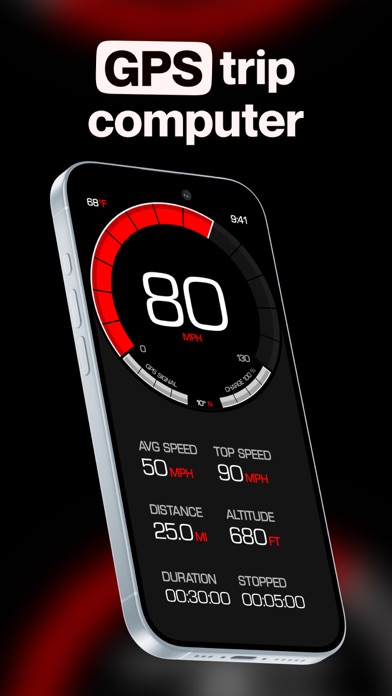


About GPS Speedometer MPH Tracker
The description on the store listing
Transform every journey into valuable data with GPS Speedometer - the most comprehensive speed tracking app for driving, cycling, boating, and beyond. Experience professional-grade features that keep you informed and in control.
CORE FEATURES:
- Real-time GPS speed tracking with precision accuracy
- Comprehensive trip computer: speed, distance, altitude, heading, duration
- Trip recording with route tracking
- Live map view with real-time position tracking
- Save and export your journeys
ADVANCED CAPABILITIES:
Picture in Picture Mode (PRO):
- Keep your speed visible while using other apps
- Resizable floating speedometer overlay
- Perfect for navigation or music apps
Heads-Up Display …
Read the full description
Transform every journey into valuable data with GPS Speedometer - the most comprehensive speed tracking app for driving, cycling, boating, and beyond. Experience professional-grade features that keep you informed and in control. CORE FEATURES: - Real-time GPS speed tracking with precision accuracy - Comprehensive trip computer: speed, distance, altitude, heading, duration - Trip recording with route tracking - Live map view with real-time position tracking - Save and export your journeys ADVANCED CAPABILITIES: Picture in Picture Mode (PRO): - Keep your speed visible while using other apps - Resizable floating speedometer overlay - Perfect for navigation or music apps Heads-Up Display (HUD): - Project speed onto your windshield for safer driving - Mirrored display mode for reflection viewing - Keep eyes on the road while monitoring speed Road-Based Speed Limits (PRO): - Automatic speed limit detection for your current road - Real-time alerts when exceeding limits - Works worldwide with smart inference technology - Customizable warning offsets and sounds Performance Metrics: - G-Force meter tracks acceleration and braking forces - Enhanced altitude tracking with barometric sensors - Moving vs. stopped time analysis - Maximum and average speed calculations SEAMLESS INTEGRATION: - Apple Music display and playback controls - View current song without switching apps - Control your music while tracking your journey COMPLETE CUSTOMIZATION: - Choose units: KM/H, MPH, or Knots - Multiple display modes and layouts - Extensive theme selection with custom colors - Dark/Light mode support - Adjustable speedometer scale - Portrait/Landscape with orientation lock - Left or right-handed speedometer placement PRO SUBSCRIPTION UNLOCKS: - Unlimited trip saving and recording - Export routes in GPX format - Road-based speed limit detection & alerts - Picture in Picture mode - Weather information with forecasts - Custom app icons - All themes and colors SUBSCRIPTION INFORMATION: - Free to download with core features always free - Optional PRO subscription for advanced features - Cancel anytime via App Store settings - Payment charged to Apple ID at confirmation - Auto-renews unless canceled 24 hours before period ends - Manage subscriptions in your App Store account settings IMPORTANT NOTES: - Requires GPS/Location Services for speed tracking - Not compatible with WiFi-only iPad models - GPS accuracy varies with signal strength and environment - Best accuracy in open areas with clear sky view - Continuous GPS use impacts battery life - Never interact with device while driving - safety first! Love the app? Rate us on the App Store! Your feedback helps us improve and add new features. Terms of Use: https://speedometer.app/terms
Installs, last 30 days
Apple does not publish download counts. Estimates are in testing.
Estimated store revenue Estimated Beta
App Store, worldwide, monthly rate from the last 12 chart days to 19 Nov 2026
Below the top 100 grossing apps in the markets we calibrate. In the United States that usually means under about $6.4M a month. App Store purchases and subscriptions only, before Apple's 15 to 30% fee. Ads and web payments are not included.
Ratings
14,159 ratings, 14,159 reviews
- 5 ★82%
- 4 ★10%
- 3 ★3.9%
- 2 ★1.4%
- 1 ★2.5%
Recent reviews
Latest public reviews from the store
- 11 Nov 2025
FORD TRUCKS FOREVER
So I got bigger tires on my truck and they make my truck go five over the speed limit the speedometer app works very well to help me not speed 😅… my only complaint (it’s very small) I wish some of the extras you wouldn’t have to pay like the speed limits I was a little bummed out by that I was looking forward to that…but overall love this app!!👍🏼👍🏼
- 27 Jul 2025
Really helped out
My truck has some crazy electrical issues, down loaded your app. And instantly paid off. Needed to go thru section of a town known for police presence to monitor sped traps, one pulled behind me but I was able to maintain consistent speed thanks to this app. The cop followed for two blocks before turning around. I know I wouldn’t have been able to keep my speed the same without a speedometer and thanks to this app I was
- 12 Oct 2023
Great app.
If anyone saw my previous review, the issue was resolved, and my rating and review have been updated. i’ve been using this app since 2015 and must say it does its job very well. I’ve even found a few uses for the app that I’m sure we’re not intended when it was developed such as getting the speed and altitude when I am on a flight. if the plane I’m on is flying at 600 mph this app will show the full speed instead of stopping at 99 which is what some other apps I tried did. Earlier this week, version 5.0 was released, and I must say that I like the look of the app. There was originally an issue where for those who paid to remove ads they were not going away, but the developer has since fixed this. There are some nice looking features that have been added as a subscription. I personally don’t believe I will need those for how I use the app but I could see others benefiting from them and I’m glad to see the developer is still thinking of ways to make the app even better.
- 29 Nov 2020
Absolutely Accurate
I had to buy a used 2008 Ford Taurus, as I needed a car for the amount of driving needed for my job as a Caregiver. Since the car gets better gas mileage than my truck, it was the right decision to get the car. The car is perfect inside and out for being 12 yrs old. After 2 months of driving the car the speedometer quit working completely, leaving only the Tach as a method of determining my speed while driving and since I didn't want to rely solely on that for maintaining proper speed on the freeway and city streets, I had the need for this speedometer app. It's simple to use, and is quite pleasing and easy to read without a bunch of unnecessary stuff to clutter the screen not to mention the great colors to choose from to personalize it just enough! I may never get my speedometer repaired due the insane cost to do so, but hey no worries there because I'll use your app until the end of tim, the end of this car, or I actually win the lottery in which case I'll still keep using this app!! LOVE THIS APP!!
What reviewers bring up
Topics mentioned in the latest 8 reviews, by how many reviews mention them
Liked in good reviews (6 reviews)
- speed 5
- accurate 3
- truck 3
- other 3
- looking 2
- without 2
- believe 2
- needed 2
Raised in bad reviews (1 reviews)
No topic comes up twice.
Top chart positions
Latest App Store chart ranks by country, last 10 days
- Countries ranked
- 44 of 50
- Best rank
- #15
- Top 10 placements
- 0
- of 63 chart placements
- Average rank
- #64.5
Best countries on App Store
- 🇿🇦 South Africa · Top grossing, Navigation#15
- 🇸🇬 Singapore · Top grossing, Navigation#16
- 🇦🇺 Australia · Top grossing, Navigation#16
- 🇨🇭 Switzerland · Top grossing, Navigation#21
- 🇨🇳 China · Top grossing, Navigation#21
- 🇮🇹 Italy · Top grossing, Navigation#22
| Country | Chart | Category | Rank | Best (10 days) | Date |
|---|---|---|---|---|---|
| 🇿🇦 South Africa | Top grossing | Navigation | #15 | #8 | 19 Nov 2026 |
| 🇸🇬 Singapore | Top grossing | Navigation | #16 | #7 | 19 Nov 2026 |
| 🇦🇺 Australia | Top grossing | Navigation | #16 | #14 | 19 Nov 2026 |
| 🇨🇭 Switzerland | Top grossing | Navigation | #21 | #18 | 19 Nov 2026 |
| 🇨🇳 China | Top grossing | Navigation | #21 | #16 | 19 Nov 2026 |
| 🇮🇹 Italy | Top grossing | Navigation | #22 | #22 | 19 Nov 2026 |
| 🇵🇹 Portugal | Top grossing | Navigation | #22 | #22 | 19 Nov 2026 |
| 🇦🇹 Austria | Top grossing | Navigation | #23 | #14 | 19 Nov 2026 |
| 🇩🇪 Germany | Top grossing | Navigation | #24 | #22 | 19 Nov 2026 |
| 🇭🇰 Hong Kong SAR China | Top grossing | Navigation | #27 | #14 | 19 Nov 2026 |
GPS Speedometer MPH Tracker history
Release, install milestones, listing and store changes
- First released on the store 12 Aug 2014
Update frequency
How often GPS Speedometer MPH Tracker ships a new version, month by month
11 updates in the last 12 months. More often than most similar apps: they shipped a median of 6 updates in the same year.
Recent versions
Current version 9.1.3
- Version 9.1.323 Jul 2026
- Fixed: speed camera alerts could go silent when the approach passed through a roundabout or a curved motorway entrance — the alert now stays live all the way to the camera - Fixed: resuming an interrupted trip no longer draws a straight line across the missing part of the route - Fixed trips recorded in mainland China appearing shifted sideways from the road you actually drove — new recordings now line up correctly - Fixed rare cases where trip statistics or the speed limit display could show invalid values Enjoying the App? We appreciate your support, please consider leaving a rating and review. If you encounter any challenges while using the app, feel free to reach out, and we'll be glad to assist you!
- Version 9.1.218 Jul 2026
- More reliable hands-free trip recording with Siri, Shortcuts, and Control Center — works with the app closed and your phone locked - Live Activity appears immediately when a trip starts, now also on iOS 17 - Trip detail and iPad layout fixes; rare crash fixes - Now requires iOS 17 Enjoying the App? We appreciate your support, please consider leaving a rating and review. If you encounter any challenges while using the app, feel free to reach out, and we'll be glad to assist you!
- Version 9.1.113 Jul 2026
A big update for everyone who records their drives: - Redesigned trip screens — a cleaner trip list with sorting, collapsible sections, and swipe-to-rename, plus a rebuilt trip detail view - New animated map playback that replays your route with a smooth follow camera and speed & elevation charts - New Statistics screen with distance totals, personal records, and streaks - Start and stop recording hands-free from Control Center (iOS 18), Shortcuts automations, and Siri — even when your phone is locked - Trip start and stop notifications so you always know when recording begins or ends - Live Activity now shows your current speed, plus a new layout settings screen - Refreshed speed camera database, faster launch, smoother charts, and several crash fixes Enjoying the App? We appreciate your support, please consider leaving a rating and review. If you encounter any challenges while using the app, feel free to reach out, and we'll be glad to assist you!
- Version 9.111 Jul 2026
A big update for everyone who records their drives: - Redesigned trip screens — a cleaner trip list with sorting, collapsible sections, and swipe-to-rename, plus a rebuilt trip detail view - New animated map playback that replays your route with a smooth follow camera and speed & elevation charts - New Statistics screen with distance totals, personal records, and streaks - Start and stop recording hands-free from Control Center (iOS 18), Shortcuts automations, and Siri — even when your phone is locked - Trip start and stop notifications so you always know when recording begins or ends - Live Activity now shows your current speed, plus a new layout settings screen - Refreshed speed camera database, faster launch, smoother charts, and several crash fixes Enjoying the App? We appreciate your support, please consider leaving a rating and review. If you encounter any challenges while using the app, feel free to reach out, and we'll be glad to assist you!
Listing keywords
Words and phrases GPS Speedometer MPH Tracker repeats most in its store listing
Top phrases: speed tracking (3), picture in picture (2), road based speed (2), speed limit detection (2), based speed (2).
Highlighted words also appear in the title. Counts cover the title, short description and description.
Compliance
What the listing and the app package show
- Store status
- Live
- Upkeep
- Updated 23 Jul 2026
- Age rating
- 4+
Apps like GPS Speedometer MPH Tracker
 Blue Beacon Truck WashBlue Beacon, Inc.★ 4.82
 Aqua Map BoatingGEC s.r.l.★ 4.72
 Garmin Messenger™Garmin★ 4.6
 Easy CoinsStuzo, LLC★ 4.85
 RandonauticaRandonauts, LLC★ 3.56
 Subway Time NYCRohan Mehta★ 4.73
 i-Boating: Marine Charts & GpsBist LLC★ 4.51
 SunocoSunoco LP★ 4.77
 Kuwait FinderPublic Authority For Civil Information (PACI - Kuwait)★ 4.59
GPS Speedometer MPH Tracker: questions and answers
Who makes GPS Speedometer MPH Tracker?
GPS Speedometer MPH Tracker is published by BITHAUS.TECH, UNIPESSOAL LDA.
When was GPS Speedometer MPH Tracker last updated?
The latest version (9.1.3) was released on 23 Jul 2026.
Is GPS Speedometer MPH Tracker free?
Yes. GPS Speedometer MPH Tracker is free to download.
Is GPS Speedometer MPH Tracker still available?
Yes. GPS Speedometer MPH Tracker is live on App Store as of 19 Nov 2026.
Track GPS Speedometer MPH Tracker and its competitors
Watch any app for new versions, rating drops, chart moves and removals. Free plan, no card.