
- Installs
- —
- Apple does not publish download counts
- Rating
- 4.58
- Ratings
- 171
- 171 reviews
- Version
- 2.0.38
- Updated 29 Oct 2025
- Released
- 19 May 2022
- Tracked since 10 May 2026
- Size
- 705 MB
- Needs 15.0
Screenshots




About GUGA-Hyperboard
The description on the store listing
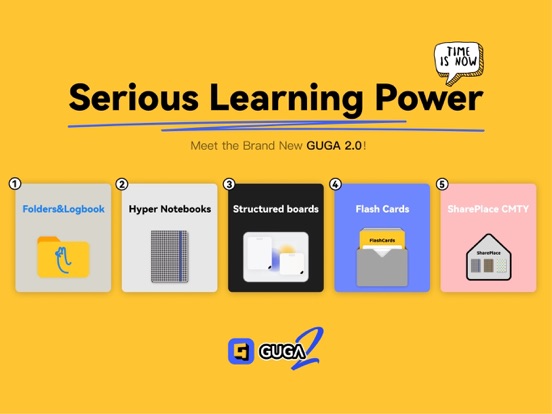
GUGA is a hyper learning tool that can meet your learning needs in different scenarios.
“Notebook”, “Whiteboard” and “Cards” are the three most important functions of GUGA.
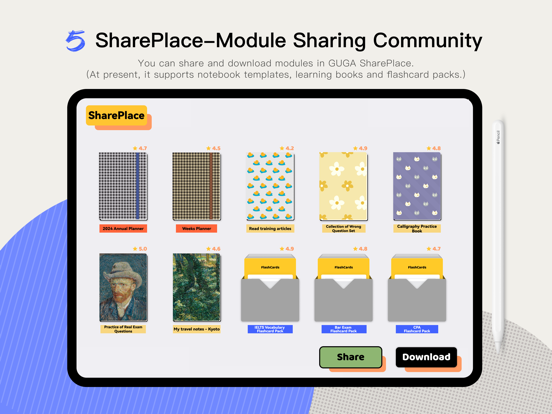
In addition, GUGA also provides users with a community-SharePlace to share learning data; and provides a "Inspiration Shorthand" function to send data and record information across devices; and GUGA also provides a large number of shortcuts for you to use after connecting to the keyboard mouse.
The “Notebook” is the most common learning material and the most basic learning scenario. GUGA's notebook:
1. Not only other notebook software, but also support a variety of formats to be imported into notebooks, create new …
Read the full description
GUGA is a hyper learning tool that can meet your learning needs in different scenarios. “Notebook”, “Whiteboard” and “Cards” are the three most important functions of GUGA. In addition, GUGA also provides users with a community-SharePlace to share learning data; and provides a "Inspiration Shorthand" function to send data and record information across devices; and GUGA also provides a large number of shortcuts for you to use after connecting to the keyboard mouse. The “Notebook” is the most common learning material and the most basic learning scenario. GUGA's notebook: 1. Not only other notebook software, but also support a variety of formats to be imported into notebooks, create new notebooks, add/reduce pages, provide more than 100 inner pages and cover templates, DIY outline catalogues, edit page jumps, import pictures/text, etc. 2. It also supports adding an unlimited number of handwriting layers to each page of the notebook, hiding/displaying/merging handwriting layers, which is convenient for brushing questions and other uses when learning. And, 3. You can also long press to select the content on the notebook to mark/excerpt while writing and taking notes, and make cards for other uses based on the excerpt content. The “Whiteboard” is a multi-data learning console and a richer learning scenario. GUGA's whiteboard: 1. Support the import of multiple notebooks and use them in one whiteboard at the same time. You can also add/import data in other formats to learn and use them together. 2. Provide a notebook floating window system, which makes it more convenient for you to use multiple notebooks and whiteboards at the same time. The notebook in the whiteboard can be presented in the form of a floating window. The floating window has a variety of states (maximizing/mini window/up and down left and right side windows), which can hide/close/display all floating windows with one click; support floating window memory, type again Open the whiteboard, and all floating windows that are not closed can continue to be used. 3 Provide the "multi-level" whiteboard function. The whiteboard can create a lower-layer whiteboard, or it can be connected with other whiteboards to form a link relationship, thus creating a relationship between learning scenes. 4 You can copy the selected content in the floating notebook to the whiteboard to form a card. The cards on the whiteboard can be freely combined and split, and the cards can also be connected to form a brain map; the jump relationship can be set between the cards. 5 The whiteboard can be divided by frame, and it can also be positioned with pins to make it easier to use and manage the whiteboard content. In addition, 6 The entire whiteboard can be emitted as pdf, and the frame can also be emitted as a multi-page PDF, and the jump relationship between the frames will also be retained. The card is the achievement of atomization learning, and the card package is the collection of your achievements. GUGA's card: 1. Excerpt cards in the notebook and cards on the whiteboard can be collected in the card package. 2. You can use the "Inspiration Catcher" function of the GUGA WeChat official account/browser's GUGA plug-in to transfer the information you want to save to any of your card package at any time. 3. Each card is a "blocked" rich text editor, which can be combined and split on the whiteboard, or any block can be set as an answer block in flash card mode. 4. Card packs can be converted between ordinary packs and flash card packs; the function of flash card packs is consistent with other flash card software (Anki). 5. Each flash card pack can choose different learning modes and different memory algorithms to help you better learn and review cards. In addition, 6. The daily learning plan of flash cards will automatically appear in the GUGA log (My Logbook) on the right to learn flash card packages at any time. Have Fun with GUGA 2.0, and Enjoy Your Serious Learning Power.
Installs since 29 Aug 2026
Apple does not publish download counts. Estimates are in testing.
Estimated store revenue Estimated Beta
App Store, worldwide, monthly rate from the last 12 chart days to 19 Nov 2026
Below the top 100 grossing apps in the markets we calibrate. In the United States that usually means under about $6.4M a month. App Store purchases and subscriptions only, before Apple's 15 to 30% fee. Ads and web payments are not included.
Ratings
171 ratings, 171 reviews
No rating breakdown published for this app.
Recent reviews
Latest public reviews from the store
- 18 Oct 2025
One Suggestion
I love everything about this app so far. I am a heavy users of GoodNotes and MarginNotes. I use both of the apps for note taking and study. What I like about this note taking app is it’s user-friendly, it has a white board for mind mapping, and flashcard for studying. I did not get to test white board and flashcard to study yet but this app is very promising. One suggestion I have for the developer is if you could allow Apple Pencil to be able to transition from one tool to the previous tool used. The current default setting is it switch between pen and eraser. But for me I rarely use the eraser because you can undo with two taps. I switch my pen a lot more from black and red so it would be huge if you can do that here. Thank you for the amazing work! and thank you for taking the time to hear my feedback!
- 29 Jan 2025
iCloud Sync glitchy
I really enjoyed this app but the cloud sync function seems to be glitchy often. Some of my files are not synced between my two iPads even though both are showing synced to the cloud and some of my notes would get erased if I switch my device. Other than this, great app.
- 19 Dec 2024
👍👍👍
比官方好用
- 16 Dec 2024
Love it!
I initially faced some issues using it, but the developers quickly responded to my request, and now it works perfectly. This app makes studying more efficient and enjoyable. Thank you, GUGA team, for creating such a brilliant app and special thanks to KAN ER YE for recommending it to me!
What reviewers bring up
Topics mentioned in the latest 35 reviews, by how many reviews mention them
Liked in good reviews (24 reviews)
- pdf 4
- feature 3
- guga 3
- developers 2
- whiteboard 2
- brilliant 2
- studying 2
- function 2
Raised in bad reviews (8 reviews)
- accept 2
- terms 2
Top chart positions
Latest App Store chart ranks by country, last 10 days
Not in any tracked top chart in the last 10 days.
GUGA-Hyperboard history
Release, install milestones, listing and store changes
- First released on the store 19 May 2022
Update frequency
How often GUGA-Hyperboard ships a new version, month by month
0 updates in the last 12 months. Less often than most similar apps: they shipped a median of 2 updates in the same year.
Recent versions
Current version 2.0.38
- Version 2.0.3829 Oct 2025
Version 2.0.38 is compatible with the new iPadOS 26 system and optimizes several bugs. The next major version will be the iPhone version.
Listing keywords
Words and phrases GUGA-Hyperboard repeats most in its store listing
Top phrases: flash card (6), floating window (4), card package (3), card packs (3), combined and split (2).
Highlighted words also appear in the title. Counts cover the title, short description and description.
Compliance
What the listing and the app package show
- Store status
- Live
- Upkeep
- Updated 29 Oct 2025
- Age rating
- 4+
Apps like GUGA-Hyperboard
 CV+ Resume MakerMajed Hariri★ 4.66
 2 factor - Authenticator App25 Degrees Apps LLC★ 4.44
 Chore Chart: Family Rewards舜 吕★ 4.69
 HouwiyetiAGENCE NATIONALE DU REGISTRE DES POPULATIONS ET DES TITRES SECURISES★ 4.15
 TheBrain: Smart Notes & LinksTheBrain Technologies LP★ 4.82
 CalamariHubert Lisek★ 4.53
 Coin Pic IdentifierTech Consolidated Inc★ 4.07
 Clippit: AI Text To SpeechSpencer Yen★ 4.59
 Ai humanizer humanize ai textABDELHAFID BASAFOU★ 4.61
GUGA-Hyperboard: questions and answers
Who makes GUGA-Hyperboard?
GUGA-Hyperboard is published by GutenbergGalaxy Technology Co..
When was GUGA-Hyperboard last updated?
The latest version (2.0.38) was released on 29 Oct 2025.
Is GUGA-Hyperboard free?
Yes. GUGA-Hyperboard is free to download.
Is GUGA-Hyperboard still available?
Yes. GUGA-Hyperboard is live on App Store as of 14 Nov 2026.
Track GUGA-Hyperboard and its competitors
Watch any app for new versions, rating drops, chart moves and removals. Free plan, no card.