
- Installs
- —
- Apple does not publish download counts
- Rating
- —
- Ratings
- —
- Version
- 2.4.2
- Updated 23 Nov 2020
- Released
- 10 Jun 2011
- Tracked since 10 May 2026
- Size
- 3 MB
- Needs 10.9
Screenshots

About HanzConvert
The description on the store listing
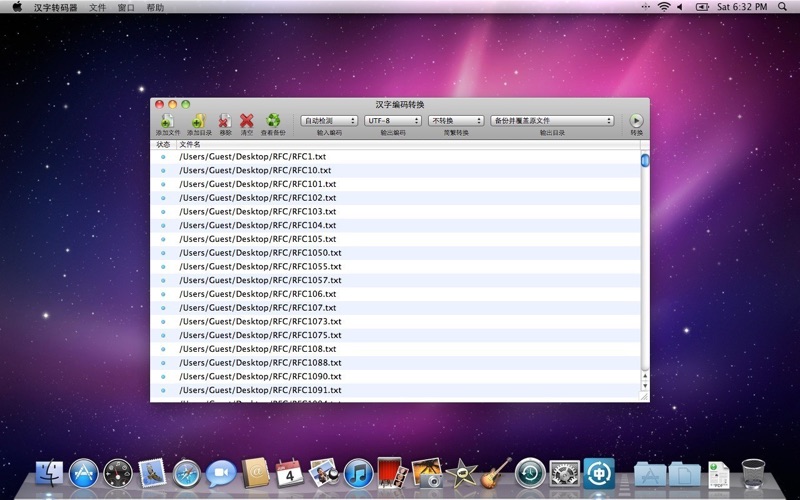
HanzConvert is a utility to convert Chinese text files between UTF-8, GB18030 and BIG-5 encodings. It can detect encoding of input files automatically, and it's also support simplified or traditional output characters with output encodings of UTF-8 and GB18030. The simplified and traditional characters converting algorithm is based on words rather than characters, so it's more accurate.
----------------- Usage ------------------
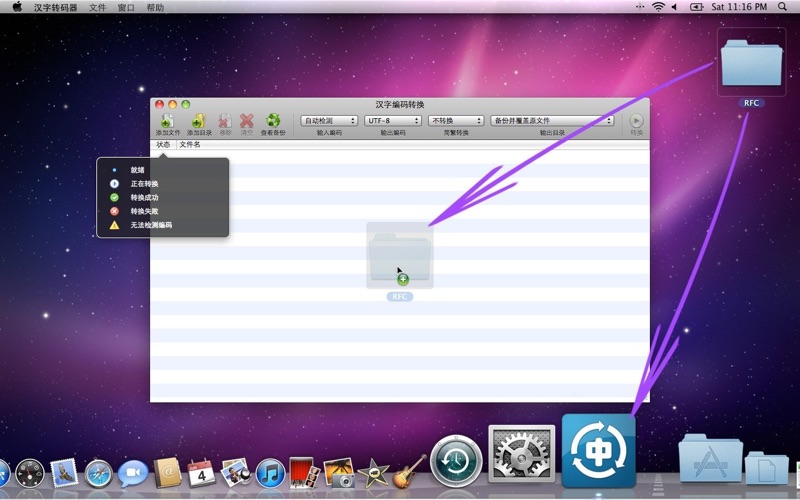
1. Add file by click "Add Files" or "Add Folder" button, drag files to main window or dock icon.
2. Set encodings, character set and output folder.
3. Click "Convert" button to start.
---------------- Problems ----------------
Q: Can't detect encoding of input …
Read the full description
HanzConvert is a utility to convert Chinese text files between UTF-8, GB18030 and BIG-5 encodings. It can detect encoding of input files automatically, and it's also support simplified or traditional output characters with output encodings of UTF-8 and GB18030. The simplified and traditional characters converting algorithm is based on words rather than characters, so it's more accurate. ----------------- Usage ------------------ 1. Add file by click "Add Files" or "Add Folder" button, drag files to main window or dock icon. 2. Set encodings, character set and output folder. 3. Click "Convert" button to start. ---------------- Problems ---------------- Q: Can't detect encoding of input files. A: Set input encoding manually, or decrease confidence in Preferences window (not recommended). Q: The output files are messed up. A: Check whether you've selected input encoding correctly. Q: Some characters in output files are missing. A: You'd better not use BIG-5 as output encoding because it contains less characters than UTF-8 and GB18030. Q: Convert failed. A: Check whether you've selected input encoding correctly and you have permission to write to output folder. Q: I want to convert text file with other extensions. A: Set file extensions in Preferences window. Q: How to add files recursively? A: Check this option in Preferences window.
Installs
Apple does not publish download counts. Estimates are in testing.
We publish iOS estimates only after they pass a back-test against real numbers. Chart history below is measured.
Estimated store revenue Estimated Beta
App Store, worldwide, monthly rate from the last 13 chart days to 20 Nov 2026
Below the top 100 grossing apps in the markets we calibrate. In the United States that usually means under about $6.4M a month. App Store purchases and subscriptions only, before Apple's 15 to 30% fee. Ads and web payments are not included.
Ratings
No rating breakdown published for this app.
Recent reviews
Latest public reviews from the store
No reviews in our sample for this app yet.
Top chart positions
Latest App Store chart ranks by country, last 10 days
Not in any tracked top chart in the last 10 days.
HanzConvert history
Release, install milestones, listing and store changes
- First released on the store 10 Jun 2011
Recent versions
Current version 2.4.2
- Version 2.4.223 Nov 2020
• Big Sur style application icon.
Listing keywords
Words and phrases HanzConvert repeats most in its store listing
Top phrases: input encoding (3), preferences window (3), check whether you've (2), encoding of input (2), input encoding correctly (2).
Highlighted words also appear in the title. Counts cover the title, short description and description.
Compliance
What the listing and the app package show
- Store status
- Live
- Upkeep
- No update since 23 Nov 2020
- Age rating
- 4+
Apps like HanzConvert
 Super VPN: Fast Private ProxyGeek Incorporated★ 4.4
 Hubtel RetailerHubtel Limited★ 4.32
 Monthly Calendar 2022 - CalistOmoboto LLC★ 4.38
 Firstly: To-Do List & PlannerfocusCove LLC★ 4.7
 CBUS 311City of Columbus, Ohio★ 1.8
 Themes for Powerpoint - DesiGNGraphic Node★ 4.22
 iSiloDC & Co.★ 3.82
 Flashlight Pro [Multipurpose LED light]KAVAPOINT★ 3.88
 WiPryOscium LLC★ 2.68
HanzConvert: questions and answers
Who makes HanzConvert?
HanzConvert is published by 繁 林.
When was HanzConvert last updated?
The latest version (2.4.2) was released on 23 Nov 2020.
Is HanzConvert free?
Yes. HanzConvert is free to download.
Is HanzConvert still available?
Yes. HanzConvert is live on App Store as of 10 May 2026.
Track HanzConvert and its competitors
Watch any app for new versions, rating drops, chart moves and removals. Free plan, no card.